
This guide describes how to unregister Hyper-V servers from a Recovery Services vault and disable protection for machines protected by Azure Site Recovery.
Table of Contents
Hyper-V Prevented Starting Virtual Machine
I was recently cleaning my Azure Site Recovery failover demo at the Azure ITCamp, and I hit the following error:
“An error occurred while attempting to start the selected virtual machine. Hyper-V prevented starting virtual machine because it is prepared for planned failover. Virtual machine can be started after canceling failover preparation”.

Now, before I start with the root cause and the solution of this error, here is what my demo looks like:
- Single Hyper-V host registered with Azure Site Recovery Vault.
- Single Hyper-V site to group one or more Hyper-V servers located in a physical location.
- Single Protection group to group together virtual machines that have common protection requirements.
- Two tier application (VMs) protected with ASR (Back-end SQL database and front-end web server).
- Single Recovery Plan to shutdown and startup virtual machines in sequence as the following: (Shutdown: 1- Web Server / 2-SQL DB – Startup: 1-SQL DB / 2- Web Server).
During my demo, I initiated a planned failover, which took around 34 minutes…
If you want to know what Azure Site Recovery does behind the scenes, here are the job details:
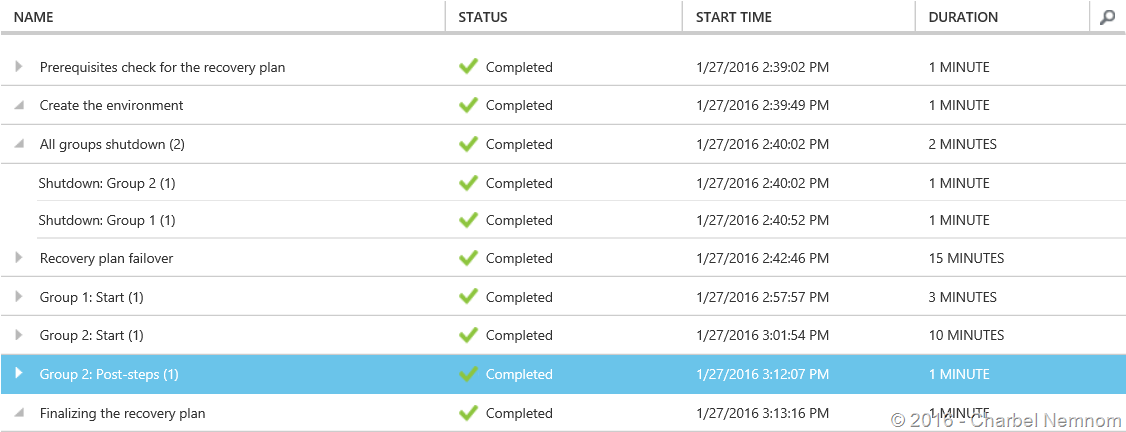
As you can see, the planned failover was completed successfully!
During the planned failover process, I lost network connectivity between my Hyper-V site and Azure, and I ended up with a Virtual Machine on-premises with “Prepared for planned failover”.
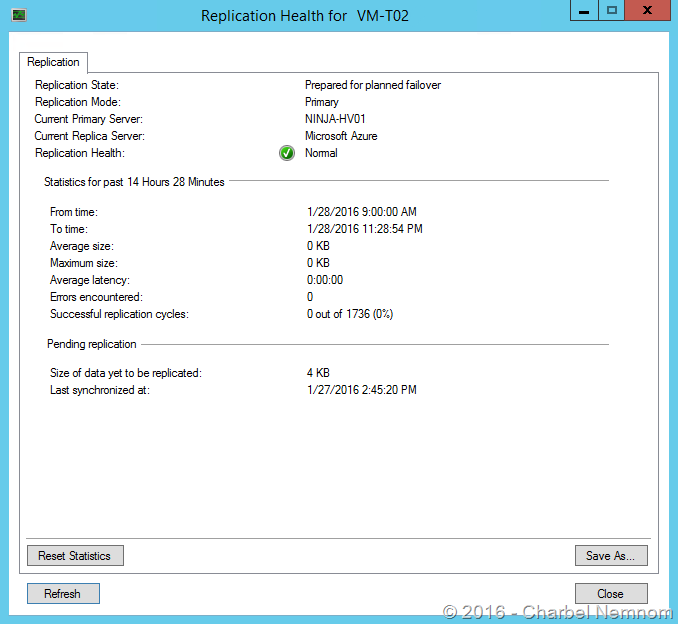

The virtual machines are in an off state because Azure Site Recovery will initiate a final sync during the planned failover operation before shutting down the VMs on-premises.
If you are familiar with Hyper-V Replica technology, Azure Site Recovery uses the same technology.
During the cleaning process, I started deleting the virtual machines and Hyper-V server from the Azure Site Recovery portal without paying attention on the status on-premises, this causes the VM not to start because it’s still in prepared for failover state, however the failover to Azure was completed.

There is no option to remove this VM’s replication from Hyper-V Manager because when a VM is protected using ASR, all operations must be done from the Azure portal, not from Hyper-V Manager.
What about PowerShell?
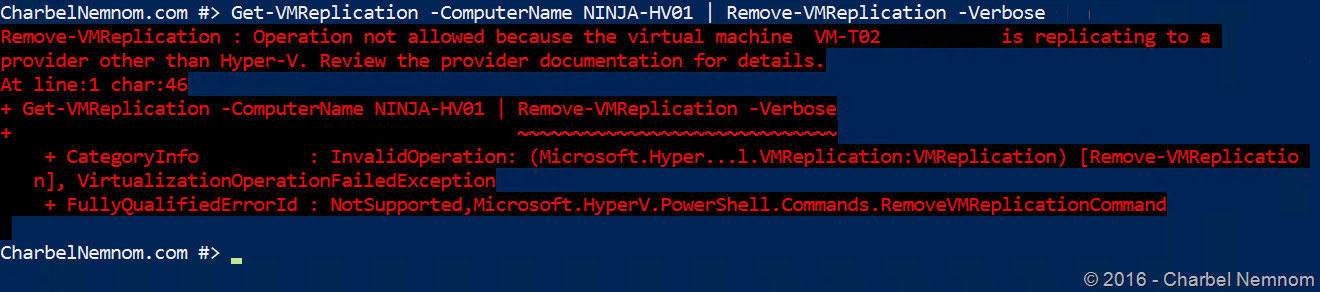
The error is a little bit different here… The operation not allowed because the virtual machine is replicating to a provider other Hyper-V.
Who is the other provider? … ASR, of course… The UI error was more precise in this case.
Remove Hyper-V Server and Disable Protection
To manually unregister the Hyper-V server and disable the protection, you want to run the following script on the server where the VM resides.
try
{
     $windowsIdentity=[System.Security.Principal.WindowsIdentity]::GetCurrent()
     $principal=new-object System.Security.Principal.WindowsPrincipal($windowsIdentity)
     $administrators=[System.Security.Principal.WindowsBuiltInRole]::Administrator
     $isAdmin=$principal.IsInRole($administrators)
     if (!$isAdmin)
     {
        "Please run the script as an administrator in elevated mode."
        $choice = Read-Host
        return;
     }

    $error.Clear()
    "This script will remove the old Azure Site Recovery Provider related properties. Do you want to continue (Y/N) ?"
    $choice =  Read-Host

    if (!($choice -eq 'Y' -or $choice -eq 'y'))
    {
    "Stopping cleanup."
    return;
    }

    $serviceName = "dra"
    $service = Get-Service -Name $serviceName
    if ($service.Status -eq "Running")
    {
        "Stopping the Azure Site Recovery service..."
        net stop $serviceName
    }

    $asrHivePath = "HKLM:\SOFTWARE\Microsoft\Azure Site Recovery"
    $registrationPath = $asrHivePath + '\Registration'
    $proxySettingsPath = $asrHivePath + '\ProxySettings'
    $draIdvalue = 'DraID'

    if (Test-Path $asrHivePath)
    {
        if (Test-Path $registrationPath)
        {
            "Removing registration related registry keys."
            Remove-Item -Recurse -Path $registrationPath
        }

        if (Test-Path $proxySettingsPath)
    {
            "Removing proxy settings"
            Remove-Item -Recurse -Path $proxySettingsPath
        }

        $regNode = Get-ItemProperty -Path $asrHivePath
        if($regNode.DraID -ne $null)
        {
            "Removing DraId"
            Remove-ItemProperty -Path $asrHivePath -Name $draIdValue
        }
        "Registry keys removed."
    }

    # First retrive all the certificates to be deleted
    $ASRcerts = Get-ChildItem -Path cert:\localmachine\my | where-object {$_.friendlyname.startswith('ASR_SRSAUTH_CERT_KEY_CONTAINER') -or $_.friendlyname.startswith('ASR_HYPER_V_HOST_CERT_KEY_CONTAINER')}
    # Open a cert store object
    $store = New-Object System.Security.Cryptography.X509Certificates.X509Store("My","LocalMachine")
    $store.Open('ReadWrite')
    # Delete the certs
    "Removing all related certificates"
    foreach ($cert in $ASRcerts)
    {
        $store.Remove($cert)
    }
}catch
{
    [system.exception]
    Write-Host "Error occured" -ForegroundColor "Red"
    $error[0]
    Write-Host "FAILED" -ForegroundColor "Red"
}
This script will remove the old Azure Site Recovery Provider and all related settings on the server.
After removing Azure Site Recovery Provider from the server, we need to clean up the protection settings for the VM manually.
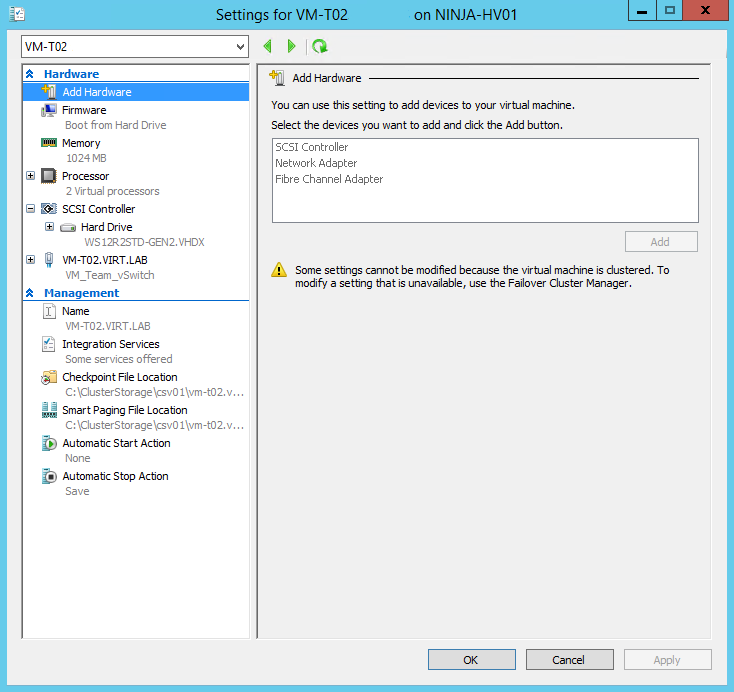
On the source affected Hyper-V host server, to remove replication for the virtual machine use this script. Replace $vmName with the name of your virtual machine.
$vmName = "VM-T02"
$vm = Get-WmiObject -Namespace "root\virtualization\v2" -Query "Select * From Msvm_ComputerSystem Where ElementName = '$vmName'"
$replicationService = Get-WmiObject -Namespace "root\virtualization\v2"  -Query "Select * From Msvm_ReplicationService"
$replicationService.RemoveReplicationRelationship($vm.__PATH)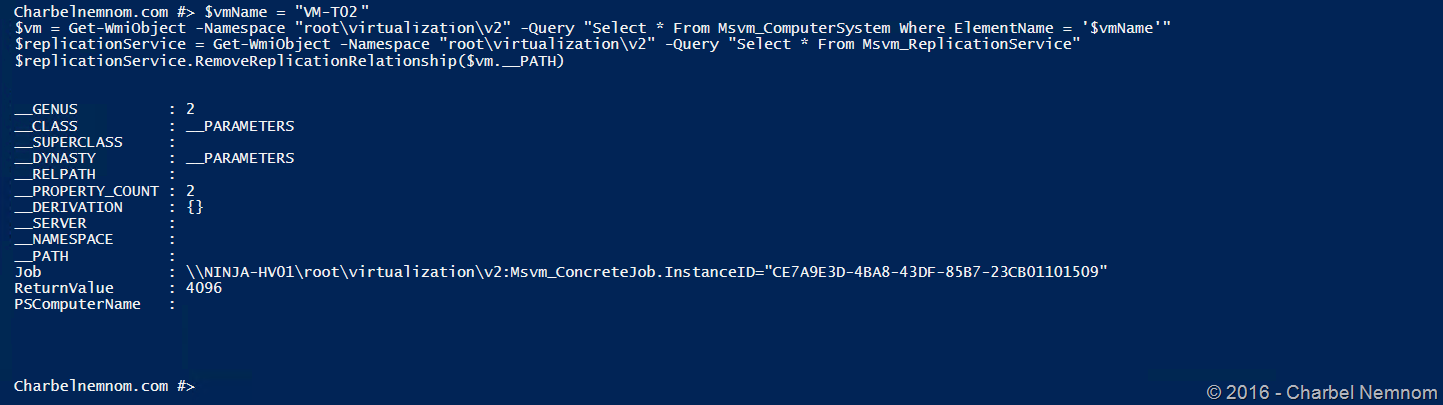
This script will remove the replication settings for the affected VM by querying the WMI Namespace “root\virtualization\v2“, then query the “Msvm_ReplicationService” class and remove the replication relationship.
The VM will start now and the replication is manually removed 
Reference: Azure Site Recovery Documentation.
Hope this helps!
__
Thank you for reading our blog.
Please let us know in the comments section below if you have any questions or feedback.
-Charbel Nemnom-
