
Table of Contents
Introduction
I am currently working on several Microsoft RDS/VDI projects, and what is better than Hyper-V, RDS and Unidesk integration. Awesome stuff!
While importing a virtual machine in Hyper-V Manager, I received the following Unhandled exception error:
[Unhandled exception has occurred in your application. If you click Continue, the application will ignore and attempt to continue. If you click Quit, the application will close immediately.]

Well Hyper-V Manager console will crash and close if you click either option.
As you can see in the error message thrown in the UI is not clear enough, if we dig deeper and expand the details, we can see the following message:
See the end of this message for details on invoking
just-in-time (JIT) debugging instead of this dialog box.

************** Exception Text **************
System.InvalidOperationException: Sequence contains no matching element
   at System.Linq.Enumerable.First[TSource](IEnumerable`1 source, Func`2 predicate)
   at Microsoft.Virtualization.Client.Wizards.VMFixup.FixRemoteFxPage.LoadDataComplete(Object loadedData)
   at Microsoft.Virtualization.Client.Wizards.VMWizardPage.LoadDataCompleteInternal()
   at Microsoft.Virtualization.Client.Wizards.VMWizardPage.OnActivate()
   at Microsoft.Virtualization.Client.Wizards.Framework.WizardPage.Activate()
   at Microsoft.Virtualization.Client.Wizards.Framework.WizardForm.GoToPage(WizardPage page)
   at Microsoft.Virtualization.Client.Wizards.VMFixup.FixupWizard.NavigateToFirstFixupPage()
   at Microsoft.Virtualization.Client.Wizards.VMImport.ImportWizard.<OnValidatePvmComplete>b__d(Object param0, EventArgs param1)
   at Microsoft.Virtualization.Client.DelayedUIInvoker.HandleTimerTick(Object sender, EventArgs ea)
   at System.Windows.Forms.Timer.OnTick(EventArgs e)
   at System.Windows.Forms.Timer.TimerNativeWindow.WndProc(Message& m)
   at System.Windows.Forms.NativeWindow.Callback(IntPtr hWnd, Int32 msg, IntPtr wparam, IntPtr lparam)


************** Loaded Assemblies **************
mscorlib
    Assembly Version: 4.0.0.0
    Win32 Version: 4.6.1055.0 built by: NETFXREL2
    CodeBase: file:///C:/Windows/Microsoft.NET/Framework64/v4.0.30319/mscorlib.dll
----------------------------------------
Microsoft.ManagementConsole
    Assembly Version: 3.0.0.0
    Win32 Version: 6.3.9600.16384
    CodeBase: file:///C:/windows/assembly/GAC_MSIL/Microsoft.ManagementConsole/3.0.0.0__31bf3856ad364e35/Microsoft.ManagementConsole.dll
----------------------------------------
System
    Assembly Version: 4.0.0.0
    Win32 Version: 4.6.1055.0 built by: NETFXREL2
    CodeBase: file:///C:/windows/Microsoft.Net/assembly/GAC_MSIL/System/v4.0_4.0.0.0__b77a5c561934e089/System.dll
----------------------------------------
MMCFxCommon
    Assembly Version: 3.0.0.0
    Win32 Version: 6.3.9600.16384
    CodeBase: file:///C:/windows/assembly/GAC_MSIL/MMCFxCommon/3.0.0.0__31bf3856ad364e35/MMCFxCommon.dll
----------------------------------------
System.Configuration
    Assembly Version: 4.0.0.0
    Win32 Version: 4.6.1055.0 built by: NETFXREL2
    CodeBase: file:///C:/windows/Microsoft.Net/assembly/GAC_MSIL/System.Configuration/v4.0_4.0.0.0__b03f5f7f11d50a3a/System.Configuration.dll
----------------------------------------
System.Core
    Assembly Version: 4.0.0.0
    Win32 Version: 4.6.1055.0 built by: NETFXREL2
    CodeBase: file:///C:/windows/Microsoft.Net/assembly/GAC_MSIL/System.Core/v4.0_4.0.0.0__b77a5c561934e089/System.Core.dll
----------------------------------------
System.Xml
    Assembly Version: 4.0.0.0
    Win32 Version: 4.6.1055.0 built by: NETFXREL2
    CodeBase: file:///C:/windows/Microsoft.Net/assembly/GAC_MSIL/System.Xml/v4.0_4.0.0.0__b77a5c561934e089/System.Xml.dll
----------------------------------------
System.Windows.Forms
    Assembly Version: 4.0.0.0
    Win32 Version: 4.6.1055.0 built by: NETFXREL2
    CodeBase: file:///C:/windows/Microsoft.Net/assembly/GAC_MSIL/System.Windows.Forms/v4.0_4.0.0.0__b77a5c561934e089/System.Windows.Forms.dll
----------------------------------------
System.Drawing
    Assembly Version: 4.0.0.0
    Win32 Version: 4.6.1055.0 built by: NETFXREL2
    CodeBase: file:///C:/windows/Microsoft.Net/assembly/GAC_MSIL/System.Drawing/v4.0_4.0.0.0__b03f5f7f11d50a3a/System.Drawing.dll
----------------------------------------
Microsoft.Virtualization.Client.VMBrowser
    Assembly Version: 6.3.0.0
    Win32 Version: 6.3.9600.16384
    CodeBase: file:///C:/windows/Microsoft.Net/assembly/GAC_MSIL/Microsoft.Virtualization.Client.VMBrowser/v4.0_6.3.0.0__31bf3856ad364e35/Microsoft.Virtualization.Client.VMBrowser.dll
----------------------------------------
Microsoft.Virtualization.Client.Common
    Assembly Version: 6.3.0.0
    Win32 Version: 6.3.9600.16384
    CodeBase: file:///C:/windows/Microsoft.Net/assembly/GAC_MSIL/Microsoft.Virtualization.Client.Common/v4.0_6.3.0.0__31bf3856ad364e35/Microsoft.Virtualization.Client.Common.dll
----------------------------------------
Microsoft.Virtualization.Client
    Assembly Version: 6.3.0.0
    Win32 Version: 6.3.9600.16384 (winblue_rtm.130821-1623)
    CodeBase: file:///C:/windows/Microsoft.Net/assembly/GAC_MSIL/Microsoft.Virtualization.Client/v4.0_6.3.0.0__31bf3856ad364e35/Microsoft.Virtualization.Client.dll
----------------------------------------
Microsoft.Virtualization.Client.Management
    Assembly Version: 6.3.0.0
    Win32 Version: 6.3.9600.16384
    CodeBase: file:///C:/windows/Microsoft.Net/assembly/GAC_MSIL/Microsoft.Virtualization.Client.Management/v4.0_6.3.0.0__31bf3856ad364e35/Microsoft.Virtualization.Client.Management.dll
----------------------------------------
System.Management
    Assembly Version: 4.0.0.0
    Win32 Version: 4.6.1055.0 built by: NETFXREL2
    CodeBase: file:///C:/windows/Microsoft.Net/assembly/GAC_MSIL/System.Management/v4.0_4.0.0.0__b03f5f7f11d50a3a/System.Management.dll
----------------------------------------
Microsoft.Virtualization.Client.Wizards
    Assembly Version: 6.3.0.0
    Win32 Version: 6.3.9600.16384
    CodeBase: file:///C:/windows/Microsoft.Net/assembly/GAC_MSIL/Microsoft.Virtualization.Client.Wizards/v4.0_6.3.0.0__31bf3856ad364e35/Microsoft.Virtualization.Client.Wizards.dll
----------------------------------------
Microsoft.Virtualization.Client.Settings
    Assembly Version: 6.3.0.0
    Win32 Version: 6.3.9600.16384
    CodeBase: file:///C:/windows/Microsoft.Net/assembly/GAC_MSIL/Microsoft.Virtualization.Client.Settings/v4.0_6.3.0.0__31bf3856ad364e35/Microsoft.Virtualization.Client.Settings.dll
----------------------------------------
Microsoft.Virtualization.Client.Settings.resources
    Assembly Version: 6.3.0.0
    Win32 Version: 6.3.9600.16384
    CodeBase: file:///C:/windows/Microsoft.Net/assembly/GAC_MSIL/Microsoft.Virtualization.Client.Settings.resources/v4.0_6.3.0.0_en_31bf3856ad364e35/Microsoft.Virtualization.Client.Settings.resources.dll
----------------------------------------
Accessibility
    Assembly Version: 4.0.0.0
    Win32 Version: 4.0.30319.33440 built by: FX45W81RTMREL
    CodeBase: file:///C:/windows/Microsoft.Net/assembly/GAC_MSIL/Accessibility/v4.0_4.0.0.0__b03f5f7f11d50a3a/Accessibility.dll
----------------------------------------
System.Data
    Assembly Version: 4.0.0.0
    Win32 Version: 4.6.1055.0 built by: NETFXREL2
    CodeBase: file:///C:/windows/Microsoft.Net/assembly/GAC_64/System.Data/v4.0_4.0.0.0__b77a5c561934e089/System.Data.dll
----------------------------------------
System.Numerics
    Assembly Version: 4.0.0.0
    Win32 Version: 4.6.1055.0 built by: NETFXREL2
    CodeBase: file:///C:/windows/Microsoft.Net/assembly/GAC_MSIL/System.Numerics/v4.0_4.0.0.0__b77a5c561934e089/System.Numerics.dll
----------------------------------------

************** JIT Debugging **************
To enable just-in-time (JIT) debugging, the .config file for this
application or computer (machine.config) must have the
jitDebugging value set in the system.windows.forms section.
The application must also be compiled with debugging
enabled.

For example:

<configuration>
    <system.windows.forms jitDebugging="true" />
</configuration>

When JIT debugging is enabled, any unhandled exception
will be sent to the JIT debugger registered on the computer
rather than be handled by this dialog box.
At first I did not realize from where this error came from.
If you noticed at the beginning of this message, we can see the following:
[Microsoft.Virtualization.Client.Wizards.VMFixup.FixRemoteFxPage.LoadDataComplete].
If you recall, every time you have ever tried to import or register a virtual machine in Hyper-V Manager, and the virtual machine was not compatible with your current computer (i.e. memory, processor, virtual switch, etc…), you will receive a warning message to take corrective action before you continue. This is a GUI experience that allows you to make changes to the incoming virtual machine in order to make it work on the physical computer. Microsoft internally refers to it as “the fix-up wizard”, as it allows you to fix a virtual machine and make it compatible with your computer.
However, this is not the case when you import or register a virtual machine with missing RemoteFX Adapter, the GUI do not give you the option to fix it, the import wizard GUI will crash. Is it a bug in the UI? Probably Yes!
If we try to import the same VM using PowerShell, you will get a different error message, but you are guided to use Compare-VM to repair the virtual machine.

Cause
The root cause of this error is that Windows Server 2012 R2 Remote Desktop Virtualization Host did not have the physical GPU selected under Hyper-V Settings:

Resolution
There are two options actually to fix this error, the first one is very obvious, selected the right GPU under Hyper-V Settings if your host capable and you are good to go, and the second one is using PowerShell to remove the RemoteFx Adapter and import the VM into a Hyper-V host where you don’t have a GPU installed. I will show you the latter option which you will need if you want to start this VM without RemoteFx Adapter.
So how do you make this VM to work? Well the answer is in the error message as shown above: use Compare-VM. “Compare-VM” is the PowerShell equivalent of “the fix-up wizard” in the UI.
In this case you need to use Compare-VM and provide it with exactly the same parameters that I was using for Import-VM. This returns a virtual machine compatibility report – which I will store in the variable called $vmReport

As you can see, the virtual machine compatibility report has a property called “Incompatibilities”. This property is a collection of everything that is wrong with the virtual machine. Here I have a RemoteFX Adapter that is failed to find any RemoteFX capable host.
If we go deeper and look at the “RemoteFxAdapter” VM property, we can see all the settings for this adapter.

There is only one way that you can fix up this particular problem. This way is to remove the virtual machine object (RemoteFxAdapter) that is attached to the virtual machine compatibility report itself. Below I show you how to do it:
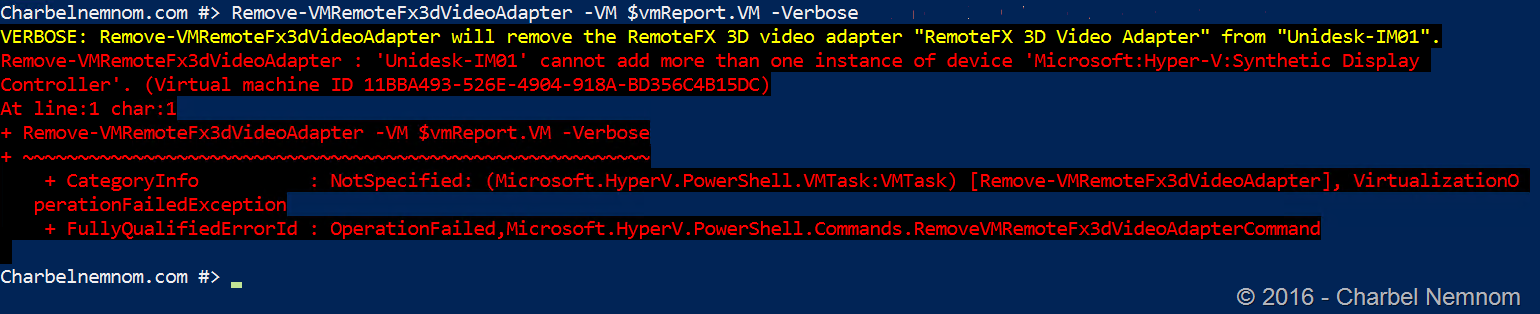
As you can see when removing the adapter from the compatibility report, we received another error as well [cannot add more than one instance of device ‘Microsoft:Hyper-V:Synthetic Display Controller’.] However, the RemoteFxAdapter was removed successfully:

Once you have removed the RemoteFxAdapter from the incompatibilities you can successfully import the virtual machine by using Import-VM and passing it the corrected compatibility report.

Here is the settings for the same VM on a host with GPU and RemoteFxAdapter attached to it.
The same VM imported and running without RemoteFxAdapter on a Hyper-V host without GPU.

Hope this helps!
Enjoy your weekend…
Cheers,
-Charbel
