
Azure Files is a core component of Microsoft Azure’s storage offerings, providing fully managed file shares in the cloud that are accessible via industry-standard Server Message Block (SMB) and (in some cases) Network File System (NFS) protocols. Whether your organization is looking to rehost legacy applications, support modern workloads, or create a hybrid cloud scenario with on-premises integration, Azure Files offers a variety of performance tiers and billing models designed to meet diverse requirements.
This guide will delve into the details of Azure Files Storage, compare the different access tiers, and explain the latest billing models—including the recently introduced Provisioned V2 option, generally available for HDD (standard)—to help you choose your storage strategy.
Table of Contents
Overview of Azure Files
Azure Files offers cloud-based file shares that are easily accessible through SMB and, for premium storage options, NFS protocols. This service gives you the flexibility to lift-and-shift applications to the cloud with minimal changes, provides support for cross-platform access, and makes it simple to integrate with on-premises environments. Azure Files is part of a suite of services that includes blob storage, queues, tables, and more—each tailored to different aspects of application and infrastructure needs.
Azure Files is particularly useful for scenarios where centralized file storage is required. It allows multiple virtual machines or compute instances to share data, supports complex collaboration applications, and integrates with hybrid file sync solutions like Azure File Sync, which caches data on-premises while using Azure as one centralized location for your files with multi-site access powered by fast local caches and cloud tiering.
Understanding the Storage Tiers
When deploying Azure Files, one of the first decisions you must make is selecting the appropriate media tier for your data: SSD (solid-state drives) or HDD (hard disk drives). Each storage medium offers distinct performance, cost, and durability characteristics.
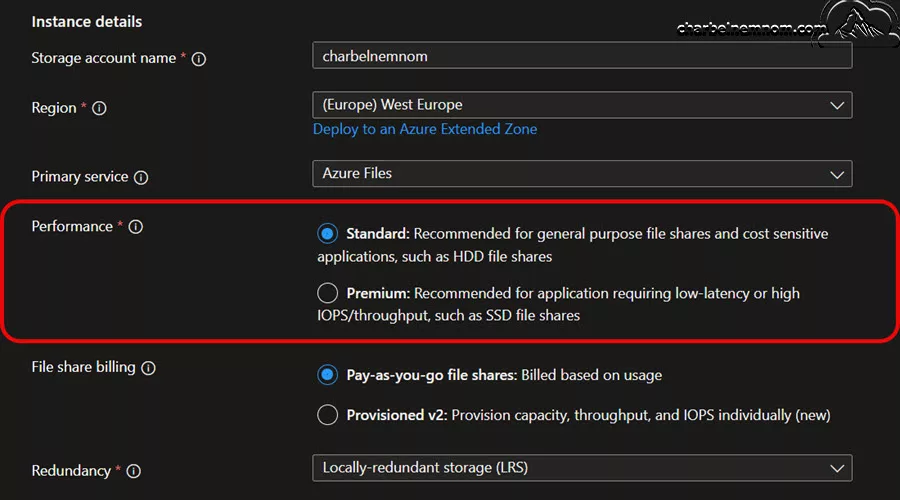
SSD Versus HDD Storage
SSD File Shares
* Performance: SSD-based file shares deliver high performance with consistent, low-latency I/O operations—often in single-digit milliseconds. This makes them particularly well-suited for IO-intensive workloads and scenarios where rapid access to data is critical.
* Billing Model: SSD file shares typically use a provisioned billing model (Provisioned v1) where you commit to a specific capacity regardless of actual usage. This ties performance (IOPS and throughput) directly to the provisioned size of your file share.
* Protocol Support: Premium SSD storage supports both SMB and NFS protocols, thereby expanding your usage scenarios, particularly for applications that require native NFS support.
HDD File Shares
* Performance: HDD-based file shares offer lower performance compared to SSDs. However, they are cost-effective and provide sufficient performance for general-purpose workloads.
* Billing Model: For standard HDD storage, Azure Files provide flexible billing options, including the pay-as-you-go model, in which you are charged for the capacity consumed and the number and type of transactions performed.
* Use Cases: HDD file shares are ideal for workloads that do not require ultra-low latency, such as team shares, collaboration spaces, and scenarios where data is cached on-premises using services like Azure File Sync.
The choice between SSD and HDD tiers ultimately depends on your workload’s performance requirements and budget constraints. If low latency and high IOPS are indispensable for your business process, SSD is the better choice. Conversely, if cost efficiency is paramount and your workload is less performance-sensitive, HDD provides a robust solution.
Access Tiers and Their Benefits
For Azure Files, particularly in the pay-as-you-go billing model, Microsoft provides several access tiers that allow you to balance the cost of storage against the cost of transactions. The main access tiers for Azure Files are:
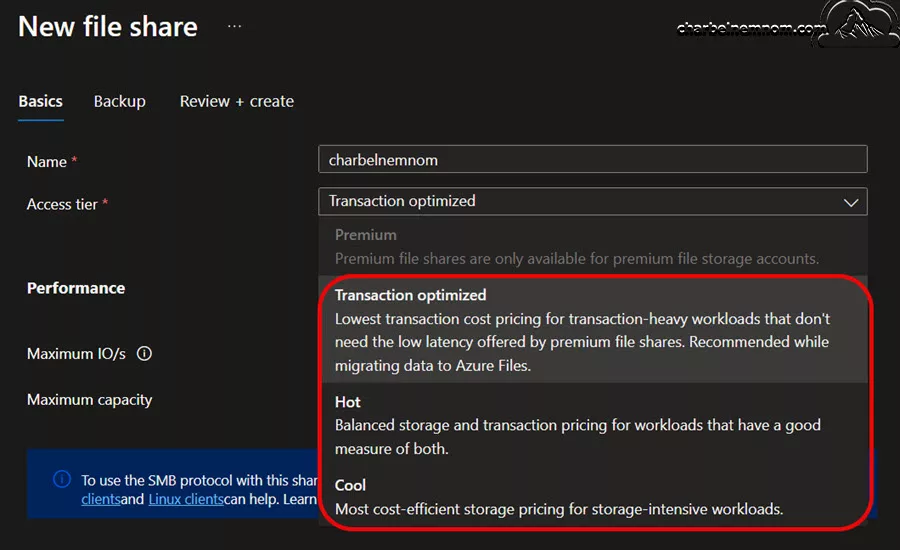
Transaction Optimized Tier
Designed for workloads with frequent, high-volume read/write activity. Characteristics:
- Storage Cost: The highest among the tiers, reflecting its premium performance.
- Transaction Cost: The lowest transaction cost to facilitate rapid, high IOPS activity.
The transaction-optimized tier is ideal when your workload requires high performance and low latency—for example, mission-critical applications or frequent file access patterns where data is constantly modified and accessed. The recommendation is to start with the transaction-optimized tier during initial migrations to gain insight into transaction patterns and performance requirements.
Hot Tier
Designed for active data that is regularly accessed, balanced against cost. Characteristics:
- Storage Cost: Lower than the Transaction Optimized tier, but higher than the Cool tier.
- Transaction Cost: Moderately higher than the Transaction Optimized tier.
The hot tier is best suited for workloads that require a balance—active data usage where neither extreme performance nor extreme cost savings are necessary. It provides an effective middle ground for a variety of production scenarios. The recommendation is to consider the Hot tier if you want to balance the cost of storage with the frequency of transactions while achieving acceptable performance.
Cool Tier
Designed for data that is infrequently accessed, serving as an archival or long-term storage option. Characteristics:
- Storage Cost: The lowest among the three, making it attractive for long-term storage.
- Transaction Cost: The highest fee per transaction since this tier is optimized for storage cost rather than speed.
The cool tier is ideal for archival workloads or datasets that are rarely queried but still need to be retained. Utilizing the Cool tier can lead to significant storage savings for rarely accessed data. The recommendation is to use the Cool tier when the transaction volume is low and the cost of accessing data infrequently does not offset the storage savings.
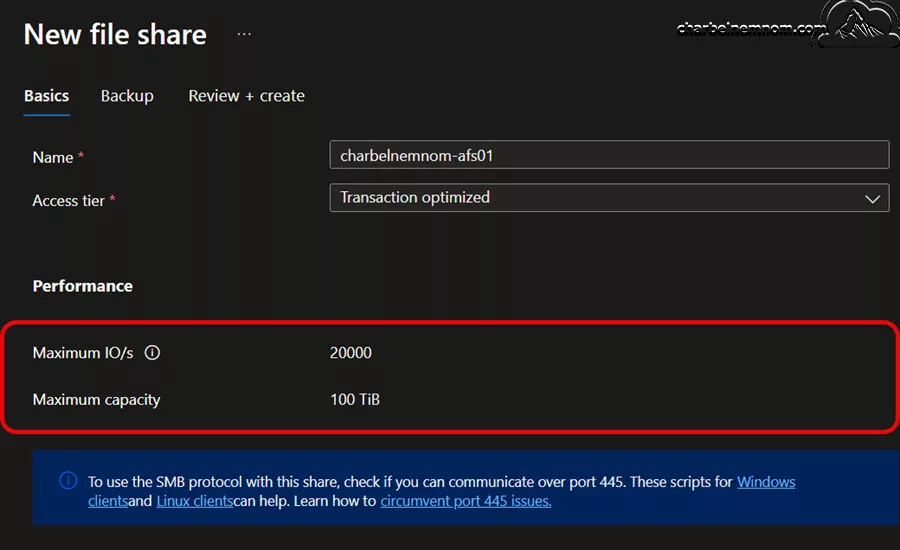
For Azure Files, in the pay-as-you-go billing model, the maximum number of IO requests per second for the file share can be 20,000 IO/s, and the maximum capacity is 100 Tebibytes. Your observed IOPS depend on how you use the file share and may vary based on IO request size, throughput utilization, network performance, and other factors. This IO limit is shared with the other storage resources (file shares, blob containers, etc.) in a storage account.
Evaluating your workload patterns carefully is essential because selecting the wrong access tier could lead to unexpected cost increases. For instance, using the Cool tier for a high-frequency transactional workload might save on storage but result in high transaction costs that ultimately inflate your monthly bill.
Choosing the Right Tier for Your Workload
Selecting an appropriate media tier and access tier requires an understanding of both your performance requirements and your usage patterns. Consider these key factors when making your decision:
1. Performance Needs:
If your applications require consistent low latency and high IOPS, an SSD-based solution with the Premium option (Provisioned v1 model) is typically preferred. For workloads with acceptable latency and higher cost sensitivity, HDD-based file shares with either Transaction Optimized, Hot or Cool access tiers could be a better fit.
2. Workload Pattern:
- Frequent Reads/Writes: Opt for the Transaction Optimized tier.
- Moderate Access: The Hot tier is an excellent middle-ground solution.
- Archival or Infrequent Use: The Cool tier minimizes storage costs for data that is not accessed often.
3. Cost Predictability:
In scenarios where predictable billing is critical, such as for budgeting in production environments, the Premium SSD (with Provisioned v1) or the newly introduced Provisioned v2 model for standard HDD may be preferable. These models allow you to pre-define capacity and performance metrics.
4. Scalability and Flexibility:
For growing workloads, the ability to independently adjust capacity, IOPS, and throughput becomes essential. The Provisioned v2 model allows these values to be scaled independently, giving you granular control over performance without overprovisioning unnecessary resources.
Billing Models for Azure Files
Azure Files provides multiple billing models to suit a variety of operational scenarios. The primary models are the pay-as-you-go consumption model, Provisioned v1, and Provisioned v2 models.
Pay-As-You-Go Model
The pay-as-you-go model for Azure Files is predominantly used with standard HDD storage and is ideal for customers with fluctuating workload demands or development and testing environments. In this model:
- Charging Method: You pay for the storage capacity actually consumed and for the number of transactions (differentiated by operation types such as read, write, and list).
- Cost Dynamics: Because transactions are billed based on their type—with operations like writes and lists costing significantly more than reads—the overall cost can be variable and sometimes hard to predict.
- Ideal Use Cases: This model is well-suited to scenarios where usage can be monitored and adjusted over time, such as in early migration phases or in environments where load cannot be accurately predicted in advance.
A common strategy is to start with the transaction-optimized tier under the pay-as-you-go model to gather data on transaction patterns. Then, after validating the workload’s performance and usage patterns, you can decide whether to continue with variable billing or switch to a provisioned model for more predictable cost control.
Provisioned v1 Model
The Provisioned v1 model is typically associated with the premium SSD tier and is designed for environments where predictability and guaranteed performance are critical. Under this model:
- Billing Structure: You are charged based on the total provisioned capacity rather than actual storage usage. For example, if you provision a 500 GiB share, you pay for the entire 500 GiB, regardless of how much data is actually written.
- Performance Linkage: IOPS (Input/Output Operations Per Second) and throughput scale linearly with the provisioned capacity. In other words, to achieve higher performance levels, you need to provision more capacity.
- Benefits: This approach ensures predictable monthly billing and guaranteed performance parameters, which makes it very appealing for production workloads that cannot tolerate performance variations.
- Trade-offs: The downside is that you might end up overprovisioning (and overpaying) just to achieve the necessary performance levels if your actual storage needs are lower than the performance requirements.
The minimum file share size for the Provisioned v1 model can be between 100 Gibibytes (GiB) and a maximum of 100 Tebibytes (TiB). The minimum is 100 GiB.
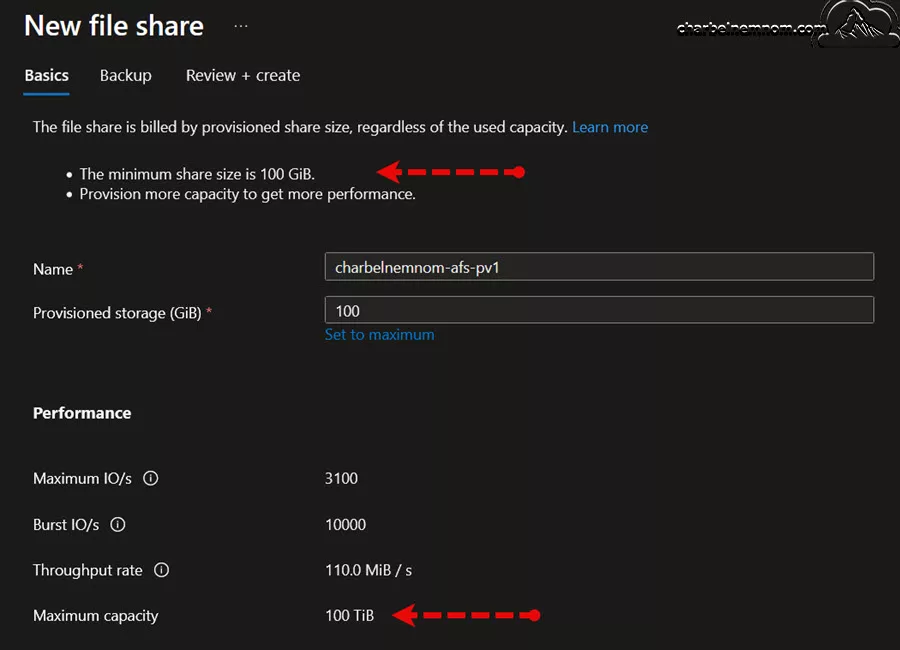
Provisioned v1 on premium SSD file shares remains a compelling option for organizations where budgeting and strict performance guarantees are the main drivers.
Provisioned v2 Model
The Provisioned v2 model represents a significant improvement in flexibility and control, especially for standard HDD-based file shares. It addresses some of the limitations of the Provisioned v1 model by decoupling the relationship between storage capacity and performance metrics. The key features include:
- Independent Dials: You can independently provision capacity, IOPS, and throughput. This decoupling allows you to tailor each parameter to your specific workload needs without being forced to overprovision one to achieve enhancements in another.
- Dynamic Adjustability: With dynamic settings, you can adjust these values anytime to reflect changing workload demands. However, if you increase any parameter, you must wait for a 24-hour period before scaling it back down.
- IOPS Bursting: A particularly innovative feature of the Provisioned v2 model is the IOPS burst bucket. If your workload consistently operates below the provisioned IOPS threshold, unused credits accumulate. When an unexpected spike occurs, your file share can automatically burst above the provisioned IOPS limit by consuming these accumulated credits.
- Capacity and Performance Limits: Provisioned v2 supports file shares ranging from 32 Gibibytes up to a massive 256 Tebibytes. IOPS can scale between 500 and 50,000, and throughput from 60 Mebibytes per second up to 5 Gibibytes per second.
- Ideal for Production Workloads: Most production environments benefit from the Provisioned v2 model because of its granular control. It allows for predictable performance under varying loads while minimizing the risk of unexpected cost surges.
The Provisioned v2 model is designed to give you better control over your service level agreements (SLAs) and to reduce the guesswork that often comes with the consumption-based billing of the pay-as-you-go model.
Deep Dive: Provisioned v2
One of the standout features in Azure Files’ latest billing evolution is the Provisioned v2 model, which is available for standard HDD-based file shares (with plans to expand to SSD-based storage later). This section explains how the independent dials work and how IOPS bursting can help accommodate unpredictable workloads.
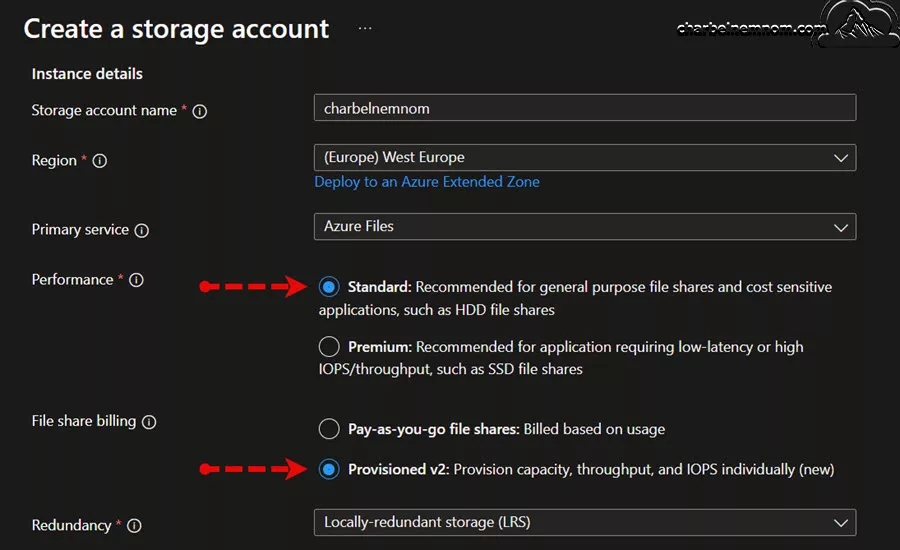
Independent Provisioning of Capacity, IOPS, and Throughput
In previous models, there was a direct correlation between the provisioned storage capacity and the performance metrics (IOPS and throughput). With Provisioned v2, this coupling is broken, meaning that you can:
- Provision Storage Capacity Independently: Specify exactly how much data you expect to store without being forced to increase IOPS or throughput simply to receive more capacity. The capacity size for a Provisioned v2 file share can be between 32 Gibibytes and 256 Tebibytes.
- Set IOPS Independently: Decide how many IOPS you require based on your application’s read/write frequency, independent of storage size. For instance, if you need high performance for a specific process, you can allocate more IOPS without overprovisioning storage capacity. The IOPS can be between 500 and a maximum of 50,000.
- Define Throughput Separately: Adjust your throughput settings to match the average data transfer rate needed for your operations without correlating it directly to the size of your file share. The throughput is between 60 Mebibytes and 5 Gibibytes per second.
These independent dials allow you to optimize cost versus performance more precisely. For example, you might have a workload that processes a large volume of data stored over a long period, but it does not necessarily require a high IOPS count constantly.
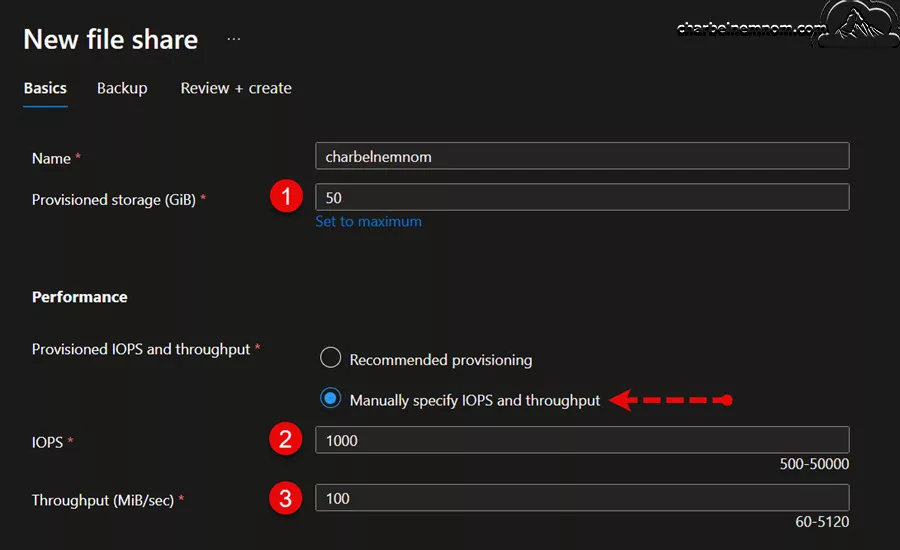
With Provisioned v2, you can provision a higher capacity for the large data volume while keeping IOPS and throughput at moderate levels. Another option is to use the recommended provisioning capability, as shown in the figure below, which will automatically recommend a certain amount of IOPS and Throughput based on the Provisioned storage capacity that you choose.
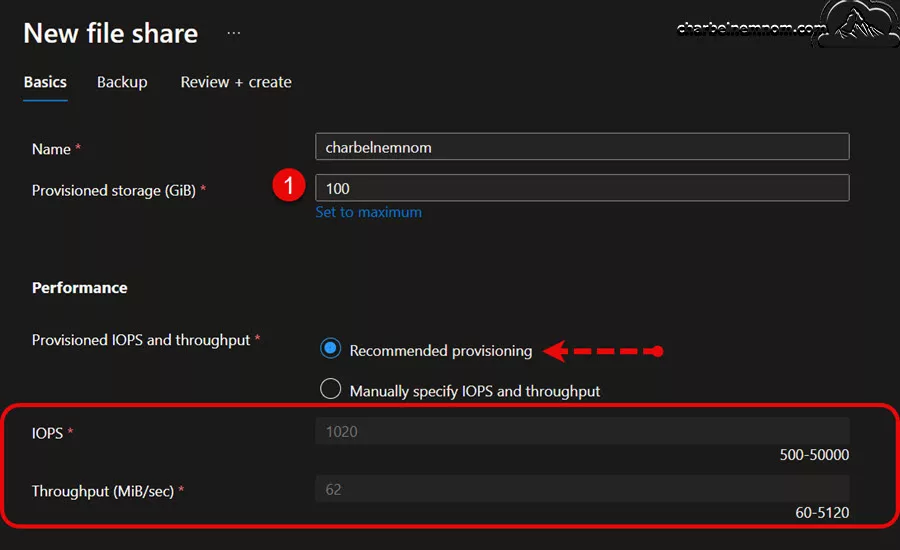
How IOPS Bursting Works?
Another innovation in the Provisioned v2 billing model is the introduction of the IOPS burst bucket mechanism. Here’s how it benefits your workload:
1. Accumulate Burst Credits: When your file share is operating below the provisioned IOPS allocation, the unused IOPS credits accumulate over time in a burst bucket.
2. Automatic Burst During Peaks: When your workload experiences an unexpected spike in IOPS demand, the file share can automatically draw on the stored burst credits. This ensures that performance remains stable even during temporary surges in workload activity.
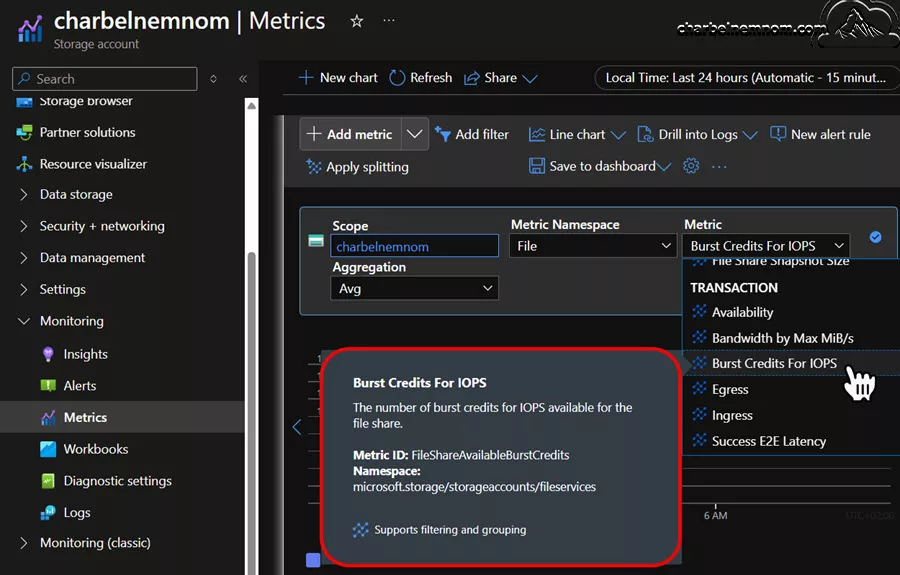
3. Monitoring Burst Credits: Azure provides a metric called Burst Credits for IOPS on a per file-share basis. This metric lets you monitor how many credits have accumulated and gives insight into how often your file share is using burst capacity.
4. Cost Efficiency: Instead of overprovisioning IOPS continuously to cater to occasional spikes, the burst bucket approach allows you to provision closer to your normal operating levels while still having the capability to handle peak loads efficiently.
The IOPS bursting feature is particularly beneficial for workloads with sporadic spikes where constantly high IOPS allocation would be cost-prohibitive if maintained continuously.
Flexibility With Dynamic Adjustments
The Provisioned v2 model supports dynamic adjustments for all three key performance indicators—capacity, IOPS, and throughput. This dynamic nature offers several advantages:
* Real-Time Tuning: As your workload patterns shift, you can modify your resource allocation to ensure you only pay for what you need.
* 24-Hour Scale-Down Restriction: Although you can increase these values at any time, note that any scaling down (reducing capacity, IOPS, or throughput) requires a waiting period of 24 hours. This limitation encourages careful planning, but the ability to scale up instantly is critical when your workload demands a sudden boost in performance.
* Granular Control: With independent dials, you can experiment with different configurations, record the impact on performance, and iterate to find the most cost-effective setup.
Provisioned V2 Account Limits
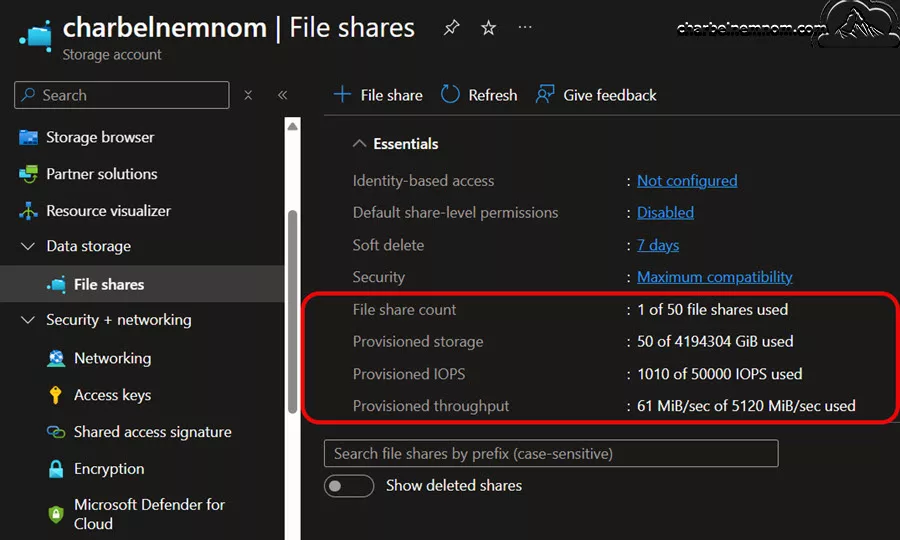
One of the things to bear in mind is that there are still account level limits. As shown in the figure below, you’ll notice there’s a 50 file share maximum that shows on the main page, so you can see how I’m tracking towards those limits.
In the example below, I’ve got one of 50 file shares created already; I’m using 50 Gibibytes of the massive number of 256 Tebibytes that a storage account can support. How many IOPS am I using of what the storage accounts can support and the provision throughput of what the storage account can support, and when I create one of those file shares it will not let me exceed what the storage account that underlies this can support so that that’s an excellent capability.
Monitoring, Metrics, and Best Practices
Effective management of Azure Files requires robust monitoring and a clear understanding of performance metrics. Microsoft provides several tools and dashboards to help track your file share’s performance, understand cost drivers, and optimize your configuration.
Key Metrics to Monitor
1. IOPS and Throughput:
- Real-Time Metrics: Monitor current performance levels, including IOPS and throughput, against your provisioned allocations.
- Peak Usage: Review historical metrics to understand peak load conditions. This can help determine whether the current provisioning is adequate or if adjustments are needed.
2. Burst Credits for IOPS:
- Tracking Credits: Use the dedicated metric to monitor how many burst credits have accumulated and how often they are being utilized.
- Performance Analysis: High utilization of burst credits may indicate that your baseline IOPS provision should be revisited.
3. Transaction Logs:
- Differentiating Operations: Azure Files provide logs that show the types of operations (reads, writes, lists) being performed. This detailed breakdown can help you determine which operations incur higher costs.
- Cost Predictability: With granular data, you can estimate your monthly costs more accurately, especially for pay-as-you-go usage.
4. Share-Level Monitoring:
- Account-Level vs. Share-Level: While storage account-level metrics are provided, you also need share-level monitoring to understand how each individual share is performing, which is critical if you have a large number of file shares within a single account.
- Throttling Indicators: Logs will also show if and when your file share is being throttled—an important indicator if your workload occasionally exceeds the provisioned limits.
Best Practices for Optimizing Azure Files
Let’s look at the different best practices for optimizing Azure Files:
1. Start with Data Collection: Begin by utilizing the Transaction Optimized tier if you are unsure about your transaction patterns. This approach allows you to gather meaningful performance and cost data that will inform your future decisions.
2. Monitor and Iterate: Regularly review performance metrics and transaction logs. If you notice that you are consistently over or under your provisioned performance, make adjustments accordingly. Schedule periodic reviews to ensure that your configuration remains aligned with the evolving demands of your workload.
3. Test Different Configurations: With the independent settings of Provisioned v2, experiment with various configurations to discover the ideal balance between cost and performance. Use the dynamic adjustability to your advantage; for example, increase IOPS during known busy periods and allow the burst bucket to handle unexpected peaks.
4. Plan for Scaling: Be aware of the 24-hour waiting period for scaling down. Plan your provisioning in advance for periods of anticipated lower performance needs to avoid overpaying. Use historical data to predict future scaling requirements, ensuring you maintain performance without needing constant manual adjustments.
5. Understand Transaction Costs: Recognize that some operations, such as writes and listings, incur higher costs than others. Tailor your application’s design to minimize expensive operations where possible. Optimize workflows by consolidating operations and implementing caching strategies to reduce unnecessary transaction costs.
6. Integration with Azure File Sync: For on-premises scenarios, integrating with Azure File Sync can help cache frequently accessed data locally while leveraging cloud storage for backup and redundancy. Be cautious, as certain operations—such as listing—may incur higher costs if not managed carefully. In this case, the Provisioned v2 model might be a better fit for Azure File Sync. Make sure to monitor and adjust your usage to maximize efficiency.
Real-World Use Cases and Decision Factors
Choosing the right Azure Files Storage tier and billing model often depends on your specific business needs. Here, we outline several real-world scenarios and factors that can help guide your decision-making process:
Enterprise Applications and Mission-Critical Workloads
Requirements:
- High performance with consistent, low-latency I/O.
- Predictable and guaranteed performance metrics.
- Tight integration with business-critical applications.
Recommended Tier:
- Premium SSD File Shares: With the Provisioned v1 model, you can scale performance linearly with the provisioned capacity. NFS support may also be relevant, depending on the application’s requirements.
Considerations:
- The cost of overprovisioning may be justified by the predictability and guaranteed performance SLAs.
- Constant monitoring and periodic adjustments based on usage are key to maintaining the cost-to-performance ratio.
Hybrid Cloud Scenarios and On-Premises Integration
Requirements:
- Support for Azure File Sync to cache frequently used data locally.
- Cost-effective storage where ultra-low latency is not critical.
Recommended Tier:
- Standard HDD File Shares: Leverage the pay-as-you-go model or select the Hot tier for actively used data.
Considerations:
- Use Azure File Sync to ensure that local performance is acceptable while keeping the less frequently accessed data stored in the cloud.
- Monitor transaction costs carefully since operations like list and write may be more expensive, mainly if your on-premises sync configuration triggers frequent metadata updates. In this case, the Provisioned v2 model might be an alternative recommendation.
Development, Testing, and Experimental Environments
Requirements:
- Flexibility to adjust performance as needed.
- Variable usage patterns that may not justify high up-front costs.
Recommended Tier:
- Pay-As-You-Go Model on Standard HDD Shares: In such environments, the variable cost of transactions is typically acceptable, given the irregular workload.
Considerations:
- Avoid overprovisioning since the workload is not expected to generate consistently high IOPS.
- Use the pay-as-you-go cost structure to experiment with different access tiers (Transaction Optimized, Hot, or Cool) until the workload pattern stabilizes.
Production Workloads with Unpredictable Demand Patterns
Requirements:
- Consistent performance with the ability to handle sudden spikes.
- Optimized balance between cost and performance through independent provisioning.
Recommended Tier:
- Provisioned v2 Model: The capacity to independently scale IOPS, throughput, and storage ensures that unexpected workload peaks are accommodated through IOPS bursting while keeping costs predictable.
Considerations:
- Ensure that you monitor the
Burst Credits for IOPSmetric, which will help signal if the current baseline provisioning should be adjusted to meet recurring spikes better. - Regularly review metrics to plan for potential scaling events and adjust thresholds as necessary.
In Summary
Azure Files continues to evolve as a robust, flexible solution for cloud-based file storage that can be tailored to meet diverse workloads. Whether you choose the high-performance SSD option for mission-critical applications or a more cost-effective HDD solution for general file sharing, the tiered pricing structure is designed to balance performance against cost.
In summary, Azure Files represent a highly adaptable file storage solution that allows you to fine-tune performance characteristics while managing costs effectively. By starting with a data-driven approach—collecting metrics under the Transaction Optimized (pay-as-you-go model)—and then transitioning to a more predictable provisioning model if needed, you can achieve a cost-effective, performance-assured storage strategy. As your requirements evolve, the independent dials offered by Provisioned v2 provide the necessary flexibility to adjust to changing workloads without the risk of overprovisioning.
For most production environments, the recommendation is to take advantage of the new Provisioned v2 model for its predictability and granular control. Meanwhile, smaller or less critical workloads might still benefit from the pay-as-you-go approach due to the lower baseline cost, especially where ultra-high performance is not needed.
Ultimately, your decision will depend on balancing performance requirements with budgetary constraints and operational predictability. By understanding the differences between SSD and HDD media tiers, the distinct access tiers, and the evolution in billing models, you are better equipped to design an Azure Files strategy that meets your organizational needs.
Remember, you can always support us in developing tools and creating content via Why Donate? – Charbelnemnom.com Cloud & Cybersecurity
__
Thank you for reading our blog.
Please let us know in the comments section below if you have any questions or feedback.
-Charbel Nemnom-
