
Cybersecurity is an ever-evolving field, and staying ahead of potential threats requires constant innovation. Microsoft Sentinel continues to lead the way with its advanced threat intelligence capabilities.
Recently, Microsoft announced a significant update that organizations using Microsoft Sentinel must prepare for: a critical change in how Threat Intelligence data is modeled. If your organization uses Microsoft Sentinel to ingest threat intelligence data, it is essential to act quickly. This blog post will explain why transitioning to the new model is vital and how to upgrade your Security Information and Event Management (SIEM) and Extended Detection and Response (XDR) systems seamlessly before the deadlines.
We will cover everything you need to know about the upcoming migration, including new data schemas, improved threat intelligence handling, detailed timelines, best practices for a smooth transition, and how to check which Microsoft Sentinel analytic rules are using the ThreatIntelligenceIndicator table.
Table of Contents
Introduction
In today’s dynamic threat landscape, security operations centers (SOCs) and incident response teams must rely on advanced tools to detect, investigate, and respond to cyber threats. Microsoft Sentinel has long been a trusted SIEM and SOAR platform, offering robust threat intelligence capabilities. However, as cyber threats evolve, so must our defense mechanisms.
Microsoft has announced a significant update to its threat intelligence data ingestion system in Microsoft Sentinel. This change introduces an enhanced data schema that provides more efficient handling, better functionality, and a richer context for threat intelligence data. As a result, organizations must transition from the legacy data ingestion method to the new schema by 31 July 2025, which is a tight schedule.
This migration is not merely a technical update but a significant step forward in threat intelligence management. This post will explain what this change entails, why it is necessary, and how to prepare your environment for a seamless upgrade.
Understanding the Enhanced Threat Intelligence Modeling
For organizations leveraging threat intelligence in Microsoft Sentinel, a major update is on the horizon. Microsoft is rolling out an improved data schema that enhances how threat intelligence data is modeled and managed. This update aims to provide more efficient data handling, improved support for advanced threat hunting, and better integration of various threat intelligence components.
The changes are designed to support advanced threat-hunting techniques using STIX objects. By incorporating not only Indicators of Compromise (IoCs) but also broader threat intelligence elements such as Threat Actors, Attack Patterns, Relationships, Identities, and Indicators, the new model offers a comprehensive approach to understanding and mitigating cyber threats.
New Tables: ThreatIntelIndicators and ThreatIntelObjects
This transition involves introducing two new tables:
-
ThreatIntelIndicators: This table will continue to capture Indicators of Compromise (IoCs) like the current table
ThreatIntelligenceIndicator, but in a more structured and efficient format. - ThreatIntelObjects: This table will house additional threat intelligence objects beyond IoCs, including STIX-based objects such as Threat Actor, Attack Pattern, Relationship, and Identity.
These tables enable a more detailed and granular ingestion of threat intelligence data. The improved schema not only simplifies data correlation but also enhances the capability of your analytics and hunting rules, ensuring that your security operations are always one step ahead.
Transition Timeline and Critical Deadlines
Understanding the timeline is crucial for planning your migration. Microsoft has laid a clear path for the transition but with a tight schedule, with several key dates that organizations must adhere to, as follows:
Public Preview: 3 April 2025
Starting on 3 April 2025, Microsoft will launch the public preview of the new tables. During this phase, both existing and new customers will see a dual ingestion of data:
- The legacy
ThreatIntelligenceIndicatortable will continue to receive Indicators of Compromise. - Simultaneously, the new
ThreatIntelIndicatorsandThreatIntelObjectstables will begin to receive threat intelligence data.
This dual ingestion period is critical as it allows organizations to test and adjust their custom content, such as workbooks, KQL queries, and analytic rules, to ensure they are compatible with the new schema (See how to check which analytic rules use the ThreatIntelligenceIndicator table).
General Availability: 31 May 2025
By 31 May 2025, the enhanced threat intelligence tables will reach General Availability (GA). During this period, the dual ingestion approach will continue, providing ample time for users to adjust their custom configurations. Your team must begin evaluating and updating your existing threat intelligence integrations at this stage to avoid any disruptions later.
Mandatory Transition: 31 July 2025
The most critical deadline is 31 July 2025. Data ingestion will transition exclusively to the new ThreatIntelIndicators and ThreatIntelObjects tables on this date. While the legacy table will remain accessible for historical data, no new data will be ingested there. This means that if you do not update your custom content to point to the new tables, your analytics rules, workbooks, and queries will fail to process new data, potentially leaving your organization vulnerable to emerging threats.
For those needing more time, Microsoft offers an option to opt into dual ingestion for an extended period—up to 12 months by submitting a new support request (See how to opt into dual ingestion). However, the proactive recommendation is to complete your transition by 31 July 2025 to ensure continuous protection and data integrity.
Note: Microsoft is working to update all out-of-the-box threat intelligence solutions in the Content hub to leverage the new tables. Make sure to update your content hub solutions to reflect these new changes.

Legacy Table Retirement: 31 May 2026
Finally, on 31 May 2026, support for the legacy ThreatIntelligenceIndicator table will officially end. This marks the final step in the transition process. Post-retirement, organizations must have fully migrated their threat intelligence ingestion and associated custom content to the new tables.
Why Transitioning is Essential
The move to an enhanced threat intelligence modeling system in Microsoft Sentinel and Microsoft Defender XDR is not just a routine update—it is a critical upgrade designed to improve your overall cybersecurity posture. Here’s why transitioning is essential:
Enhanced Data Handling and Performance
The new schema is engineered for superior performance. By distributing threat intelligence data between two dedicated tables, organizations can expect:
- Faster Query Performance: Optimized table structures reduce query latency and improve the responsiveness of your threat-hunting activities.
- Scalability: The new design is better suited to handle large volumes of data, ensuring that even as your threat intelligence feeds grow, your system remains efficient.
- Streamlined Data Correlation: With a clear separation between indicators and other threat intelligence objects, security teams can quickly correlate data, making investigations more efficient.
Improved Functionality for Threat Hunting
Advanced threat hunting requires more than just basic indicators. The new model supports a broader array of threat intelligence objects, which means:
- Richer Context: By integrating STIX objects such as Threat Actors, Attack Patterns, and Identities, analysts receive a fuller picture of the threat landscape.
- Enhanced Analytical Capabilities: The detailed metadata and structured relationships in the new schema empower you to build more sophisticated detection and analytic rules.
- Interoperability: The updated model enhances sharing and interoperability of threat intelligence across different systems and organizations, aligning with modern cybersecurity standards.
Optimizing Your Security Operations
Security operations centers (SOCs) rely on real-time data and accurate threat intelligence to prevent attacks. Transitioning to the enhanced model offers several operational advantages:
- Proactive Threat Detection: With better data ingestion and improved schema design, your SOC can detect and respond to threats faster.
- Customizability: The new tables allow you to tailor your threat intelligence management to your organization’s unique needs, enabling more precise control over incident response workflows.
- Future-Ready: As cyber threats evolve, a modernized threat intelligence framework ensures your defenses remain robust and adaptive to new attack vectors.
Preparing for the Migration
Preparation is key to a smooth transition. The following steps will guide you through the necessary actions to update your threat intelligence infrastructure before the mandatory deadline.
Evaluating Your Current Setup
Begin by assessing your existing threat intelligence configuration as follows:
-
Inventory Custom Content: Identify all custom workbooks, KQL queries, and analytic rules that reference the legacy
ThreatIntelligenceIndicatortable. - Map Data Dependencies: Understand how your current ingestion pipelines and integrations depend on the legacy schema.
- Impact Analysis: Determine the potential impact on your SOC if certain elements are not updated in time.
Having a clear inventory and understanding of dependencies allows you to prioritize updates and allocate resources more effectively.
Custom Content: Workbooks, Queries, and Analytic Rules
One of the most critical aspects of the migration is ensuring that all custom content is updated to reference the new tables. This includes:
- Workbooks: Review and update any workbooks that display threat intelligence data.
-
KQL Queries: Modify your queries to pull data from
ThreatIntelIndicatorsandThreatIntelObjects. This change is essential to maintain accurate threat detection. - Analytic Rules: Ensure any rules built around the legacy table are updated. Failure to do so could result in missed detections and potential security gaps. (See how to check which analytic rules use the ThreatIntelligenceIndicator table).
Opting into Dual Ingestion
If your organization needs additional time to transition fully, Microsoft offers an opt-in option for dual ingestion. This feature allows your systems to continue receiving data in both the legacy and new tables for up to 12 months beyond the initial 31 July 2025 deadline. Here’s how to request an extension:
* For Azure Portal Users: Navigate to your Sentinel workspace, click the question mark icon at the top of the Azure portal, select “Contact Support,” and create a new support request. Choose “Extend ingestion timeframe for ThreatIntelligenceIndicator table” as the problem type.

* For Defender Portal Users: In the chatbot text, include the phrase “Extend ingestion timeframe for ThreatIntelligenceIndicator table” in your support request.

This option ensures that your environment continues to receive both legacy and new data, giving you additional time to complete the migration.
Note: While opting into dual ingestion provides a safety net, it is best to aim for a complete migration to avoid any long-term disruptions, but this will introduce additional ingestion costs into the legacy and the new tables.
Deep Dive into STIX Objects and New Threat Intelligence Capabilities
The transition to the enhanced threat intelligence model is more than a backend change—it also brings powerful new capabilities to Microsoft Sentinel. One of the standout features is the expanded support for STIX objects, which significantly enriches your threat intelligence data.
The Power of STIX in Microsoft Sentinel
Structured Threat Information eXpression (STIX) is a standardized language describing cyber threat information. By supporting STIX objects, Microsoft Sentinel allows you to:
- Represent Threat Actors and Attack Patterns: Move beyond simple IoCs to include complex threat intelligence elements.
- Establish Relationships: Create and manage relationships between different threat entities, such as linking a threat actor to a specific attack pattern.
- Enhance Contextual Analysis: By having detailed information on threat actors, identities, and attack methods, your SOC can perform deeper, context-rich investigations.
This modern approach to threat intelligence makes it easier for your team to understand the complete context of an attack, connecting the dots between various indicators and activities.
Key Scenarios for Using STIX Objects
With the new threat intelligence model, there are several key scenarios where STIX objects can transform your security operations:
1. Ingesting Comprehensive Threat Data:
Modern threat intelligence feeds are not limited to basic indicators. You can ingest various data from commercial feeds, including threat actors, attack patterns, and relationships. This enriched data empowers your team to build a more comprehensive threat landscape.
2. Curating and Managing Threat Intelligence:
With the ability to manage different types of threat intelligence objects, your organization can curate a centralized repository of critical threat data. This repository facilitates better sharing, analysis, and collaborative investigation among your security teams.
3. Establishing Relationships Between Threat Entities:
You can construct a detailed map of adversarial behavior by creating connections between threat actors, attack patterns, and indicators. For instance, you might link a known threat actor to a specific phishing campaign or associate an indicator with a previously identified threat pattern.
4. Advanced Hunting and Investigations:
Leveraging these relationships, your SOC analysts can write more sophisticated queries to hunt for threats across your organization. This capability improves detection rates and faster remediation by providing clear insights into the attack lifecycle.
Please check the official documentation by Microsoft for a detailed overview to better illustrate the enhanced capabilities.
How to Get Started: Step-by-Step Guide
Transitioning to the enhanced threat intelligence model in Microsoft Sentinel involves several practical steps. Below is a detailed guide to help you navigate the process and ensure your environment is fully updated before the deadlines.
To check which Microsoft Sentinel Analytic Rules are using the legacy ThreatIntelligenceIndicator table, you can query the SecurityAlert table in Log Analytics using KQL, Microsoft Sentinel REST API, or PowerShell. Let’s look into each method in more detail:
Method 1: KQL Query in Log Analytics
Run the following query in the Log Analytics workspace to find analytic rules that reference the ThreatIntelligenceIndicator table:
let LookBack = 90d;
SecurityAlert
| where TimeGenerated > ago(LookBack)
| extend RuleName = tostring(parse_json(ExtendedProperties).["Analytic Rule Name"])
| extend Query = tostring(parse_json(ExtendedProperties).["Query"])
| where Query contains "ThreatIntelligenceIndicator"
//| project RuleName, Query, TimeGenerated // Uncomment to see the query details
| summarize by RuleName
This will return a list of all analytic rules that contain the legacy ThreatIntelligenceIndicator in their query, as shown in the figure below.
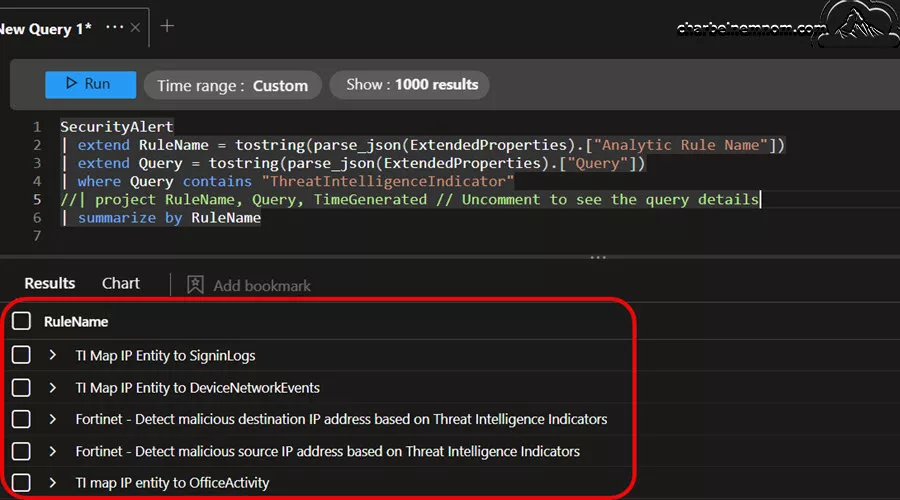
This is the quickest method if you have alerts triggered by relevant analytic rules; however, this does NOT provide a complete list if you do not have alerts triggered in the last 90 days (lookback time).
Method 2: Using Sentinel REST API
If you prefer using Microsoft Sentinel’s REST API, you can list all scheduled analytic rules and search for those with the legacy ThreatIntelligenceIndicator in their query.
$SubscriptionId = "YourSubscriptionID"
$ResourceGroup = "YourResourceGroup"
$WorkspaceName = "YourWorkspaceName"

#! Install Az Module If Needed
function Install-Module-If-Needed {
    param([string]$ModuleName)

    if (Get-Module -ListAvailable -Name $ModuleName) {
        Write-Host "Module '$($ModuleName)' already exists, continue..." -ForegroundColor Green
    }
    else {
        Write-Host "Module '$($ModuleName)' does not exist, installing..." -ForegroundColor Yellow
        Install-Module $ModuleName -Force  -AllowClobber -ErrorAction Stop
        Write-Host "Module '$($ModuleName)' installed." -ForegroundColor Green
    }
}

#! Install Az Accounts Module If Needed
Install-Module-If-Needed Az.Accounts

#! Check Azure Connection
Try {
    Write-Verbose "Connecting to Azure Cloud..."
    Connect-AzAccount -ErrorAction Stop | Out-Null
}
Catch {
    Write-Warning "Cannot connect to Azure Cloud. Please check your credentials. Exiting!"
    Break
}

# Set Azure Subscription context
Set-AzContext -Subscription $subscriptionId

# Define the latest and stable API version to use for Sentinel
$apiVersion = "?api-version=2025-03-01"

$rulesUri = "https://management.azure.com/subscriptions/$SubscriptionId/resourceGroups/$ResourceGroup/providers/Microsoft.OperationalInsights/workspaces/$WorkspaceName/providers/Microsoft.SecurityInsights/alertRules$($apiVersion)"

#! Get Az Access Token
#! This will default to Azure Resource Manager endpoint
$token = (ConvertFrom-SecureString (Get-AzAccessToken -AsSecureString -WarningAction SilentlyContinue).Token -AsPlainText)
$authHeader = @{
    'Content-Type'  = 'application/json'
    'Authorization' = 'Bearer ' + $token
}

$rules = (Invoke-RestMethod -Uri $rulesUri -Headers $authHeader -Method Get).value

$filteredRules = $rules | Where-Object { $_.properties.query -match "ThreatIntelligenceIndicator" }

$filteredRules | Select-Object @{Name = "RuleName"; Expression = { $_.properties.displayName } }, @{Name = "Query"; Expression = { $_.properties.query } }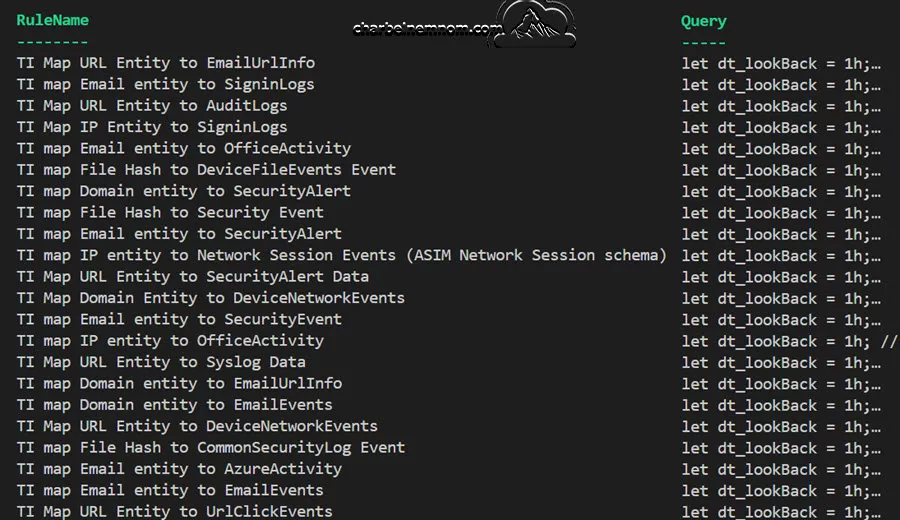
This is the best method for a complete search across all rules, especially if you have many rules.
Method 3: PowerShell using Az.SecurityInsights Module
If you prefer to use PowerShell with the Az.SecurityInsights module, you can run the following:
Install-Module -Name Az.SecurityInsights -Force -Scope CurrentUser

Connect-AzAccount

Import-Module -Name Az.SecurityInsights

$rules = Get-AzSentinelAlertRule -ResourceGroupName "ResourceGroupName" -WorkspaceName "WorkspaceName"

$rules | Where-Object { $_.Query -match "ThreatIntelligenceIndicator" } | Select-Object DisplayName, Query
This lists all the analytic rules using the ThreatIntelligenceIndicator table, as shown in the figure below.

This method is suitable for automation and scripting.
Navigating the Azure and Defender Portals
For Azure Portal Users:
1. Access Your Sentinel Workspace: Log in to the Azure portal and select your Sentinel workspace.
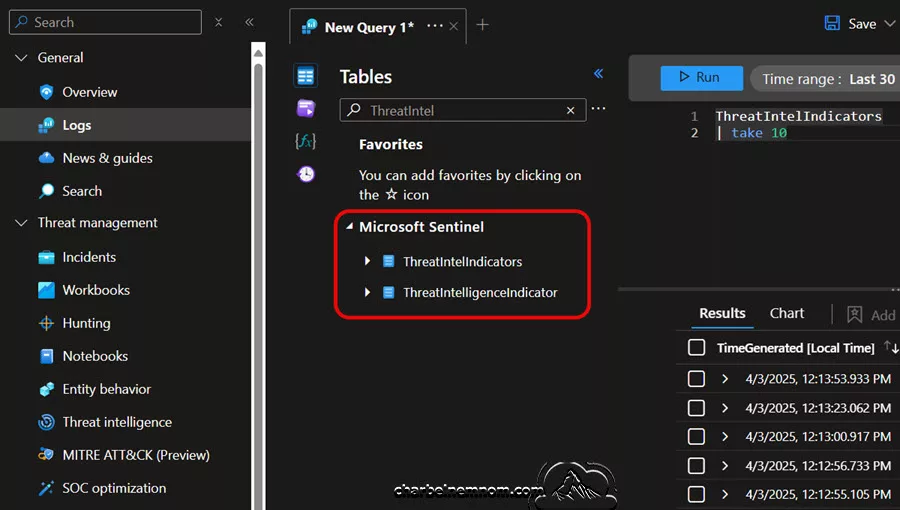
2. Locate the Logs Section: Go to the General section in the navigation pane and click on Logs.
3. Identify the Affected Tables: Use the table list to search for the legacy ThreatIntelligenceIndicator table. Verify that your queries and workbooks reference this table.
4. Update Custom Content: Modify your KQL queries, analytic rules, and workbooks to target the new ThreatIntelIndicators and ThreatIntelObjects tables.
For Defender Portal Users:
1. Access Advanced Hunting: Log in to the Defender portal at security.microsoft.com and navigate to Advanced Hunting.
2. Check the Schema View: Search for the legacy ThreatIntelligenceIndicator table in the schema view.
3. Make the Necessary Changes: Update any hunting queries to ensure they pull data from the new ThreatIntelIndicators and ThreatIntelObjects tables.

Wrapping Up
This comprehensive guide has covered every aspect of the transition—from understanding the new schema and the importance of STIX objects to actionable steps for updating your security operations. Remember, the clock is ticking, and preparing now is the key to maintaining uninterrupted protection against cyber threats.
The transition to an enhanced threat intelligence data model in Microsoft Sentinel represents a significant milestone in the evolution of cybersecurity operations. With the introduction of dedicated tables—ThreatIntelIndicators and ThreatIntelObjects—Microsoft Sentinel is set to deliver faster query performance, richer threat context, and improved capabilities for advanced threat hunting.
Now is the time to act for organizations committed to maintaining a proactive and efficient security operations center. Evaluate your current threat intelligence ingestion process as discussed above, update your custom configurations, and leverage the enhanced capabilities of Microsoft Sentinel. By transitioning to the new enhanced threat intelligence modeling, you will be better equipped to detect, investigate, and respond to cyber threats confidently.
Remember, you can always support us in developing tools and creating content via Why Donate? – Charbelnemnom.com Cloud & Cybersecurity
__
Thank you for reading our blog.
Please let us know in the comments section below if you have any questions or feedback.
-Charbel Nemnom-
