
Updated — 01/04/2025 — Microsoft announced the new Case Management service’s general availability (GA). This represents the first step in providing a unified, security-focused case management system for Security Operations (SecOps) teams.
The rapid evolution of cybersecurity threats has placed increasing demands on Security Operations (SecOps) teams to streamline their workflows, enhance collaboration, and respond quickly to incidents. In response, Microsoft has introduced an advanced case management service within its unified security operations platform, offering a groundbreaking approach to handling SecOps workloads.
Integrated directly into the unified security operations platform (SecOps) Microsoft Defender portal, the new case management (Generally Available) capability eliminates the inefficiencies of disjointed workflows and third-party tools by providing a centralized, security-centric solution. With features like customizable workflows, task assignments, role-based access control (RBAC), and integration with Microsoft Sentinel, it revolutionizes the way SecOps teams manage and respond to security incidents.
This article dives into the features, benefits, and future developments of Microsoft’s case management system, highlighting its role in transforming security operations into a unified and efficient process.
Table of Contents
Understanding Case Management
Case management within the Microsoft Defender portal is designed to empower SecOps teams by providing a single, integrated platform for managing their security workflows. This eliminates the need to rely on external tools or platforms, ensuring that all operations remain secure and contextually connected.
The core functionality of case management includes:
- Customizable Workflows: Define case workflows that align with your organization’s processes by configuring custom status values, such as “Under Review” or “Escalated.” These statuses help track the progress of cases across their lifecycle.
- Task Assignments: Assign specific tasks to team members, complete with due dates, priority levels, and detailed descriptions. This ensures accountability and clarity of responsibilities.
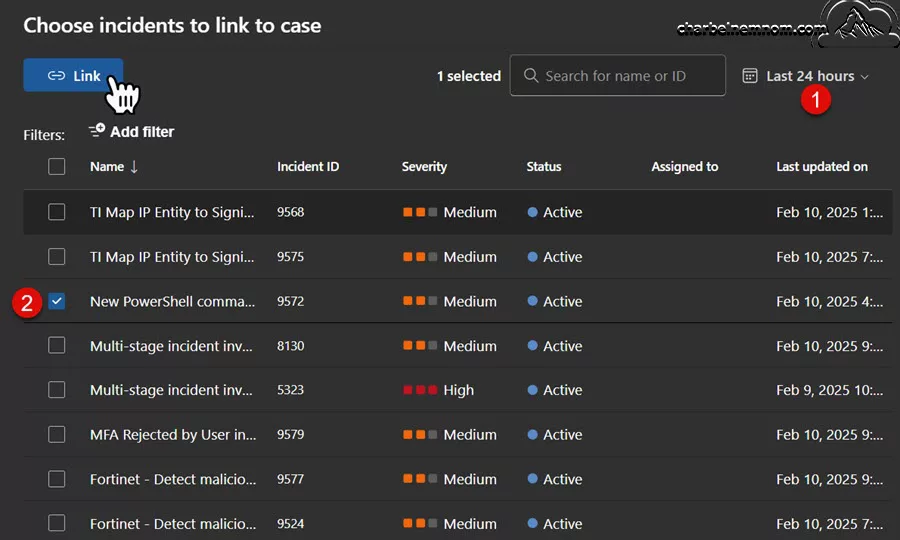
- Incident Linking: Handle complex or escalated cases by linking multiple incidents to a single case. This provides a broader context for investigations and helps teams identify patterns across related events.
- Role-Based Access Control (RBAC): Manage access to cases with fine-grained RBAC settings, ensuring that team members can only view or edit cases based on their roles and permissions.
Key Features and Capabilities
The initial release of Microsoft’s case management service lays the foundation for a robust SecOps platform with features that cater to both large enterprises and small teams. Here’s a detailed look at the capabilities:
1. Customizable Status Workflows
Every security team has its unique processes and terminology. Microsoft’s case management allows administrators to customize status options to fit their operational needs. For example, a Security Operations Center (SOC) can define and customize statuses such as “Research Phase,” “Generating Hypothesis,” or “Awaiting Approval.”

This flexibility ensures that the platform adapts to your workflows rather than forcing your team to conform to a rigid system.
2. Streamlined Task Management
Managing cases often involves breaking them into smaller, actionable tasks.

Each task you add to the case comes with:
- A unique name for clear identification.
- Statuses such as “New,” “In Progress,” “Failed,” “Partially completed,” “Skipped,” or “Completed.”
- Priority levels such as “Critical,” “High,” “Medium,” “Low,” or “Very low” to ensure high-impact tasks are addressed promptly.
- Detailed descriptions and closing notes to provide context and record outcomes.

This granularity enables efficient progress tracking and ensures that no critical steps are overlooked.
3. Incident Linking for Contextual Insights
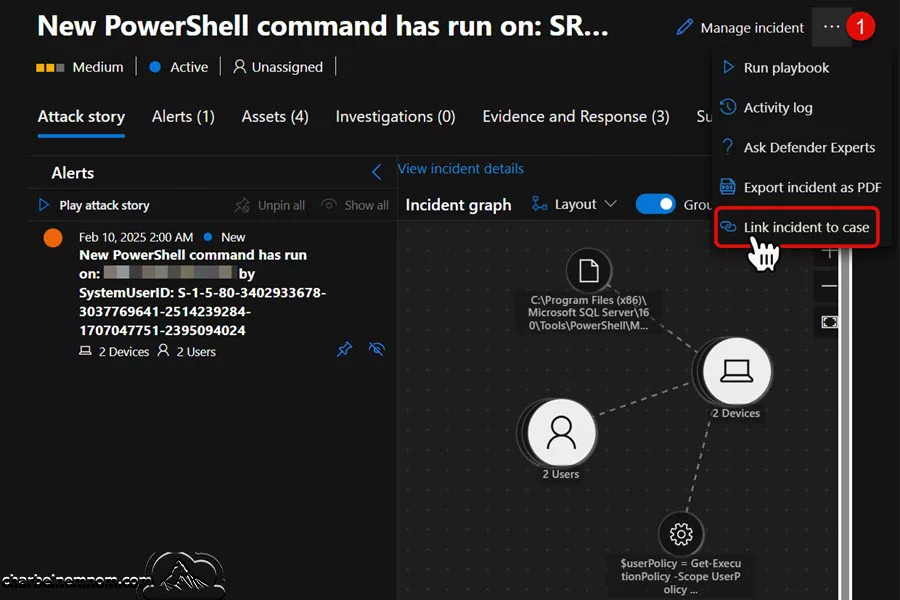
One of the standout features of case management is the ability to link incidents to cases. For example, a threat hunter investigating suspicious activity can link related incidents to a single case, providing a cohesive view of the attack.
Similarly, incidents can be escalated to create new cases from the Investigation & Response Incident Details page, ensuring all stakeholders have the necessary context to act effectively.
4. RBAC for Secure Access Control
With sensitive information at stake, the unified role-based access control (RBAC) ensures that only authorized personnel have access to specific cases. For instance, the minimum permissions required in the Microsoft Defender XDR:
- Viewing cases and their details requires “Security Data Basics (read)” permissions.
- Creating or managing cases requires “Alerts (manage)” permissions.

- Customizing case statuses is restricted to users with “Core Security Settings (manage)” permissions under Authorization and Settings, as shown in the figure below.

This hierarchical control prevents unauthorized access while enabling collaboration across teams.
Case Management Practical Applications
To illustrate the impact of Microsoft’s case management, let’s consider a real-world scenario:
A SOC analyst is investigating a hypothetical “Burrowing” attack involving multiple MITRE ATT&CK techniques and Indicators of Compromise (IoCs). The concept of “burrowing” has been recognized in cybersecurity for several years. For instance, in 2017, the “Bad Rabbit” ransomware attack was noted for its ability to burrow into networks, following earlier attacks like “WannaCry” and “NotPetya” that year. In 2023, the Cybersecurity and Infrastructure Security Agency (CISA) and industry experts warned about threat actors exploiting vulnerabilities like Log4j to burrow into systems, aiming for future attacks.
Then, the threat hunter creates a case in the Microsoft Defender portal, linking all related incidents to provide context. Custom statuses like “Research Phase” and “Evidence Gathering” guide the investigation, while tasks are assigned to specific SOC analysts with clear deadlines. As the investigation progresses, comments and audit logs capture the important findings, ensuring transparency and accountability.

This streamlined process enables the SOC to respond faster, reduce errors, and maintain a detailed record of actions taken.
Integration with Microsoft Sentinel
The integration of Microsoft Sentinel with the unified security operations platform (SecOps) Microsoft Defender portal marks a significant milestone in unifying SecOps workflows. By connecting a Sentinel workspace to the Defender portal, organizations can manage cases seamlessly within a single interface.

Benefits of Sentinel Integration
- Streamlined Case Management: Cases and incidents are now managed together in the Defender portal, reducing administrative overhead and improving efficiency.
- Clear Distinction Between Cases and Incidents: Incidents represent specific security events, while cases provide a broader framework for addressing related incidents and tasks. This separation ensures clarity in roles and responsibilities.
- Improved Contextual Awareness: Linking incidents to cases ensures that all related activities and evidence are tracked cohesively, enabling better decision-making and faster resolution.
Note: These advanced case management features are exclusive to the Defender portal and are not available in the Azure portal for Microsoft Sentinel. Organizations must fully transition to the Defender portal to take advantage of this unified platform.

Future Developments
Microsoft is continuously working and enhancing the case management platform, with several exciting features planned for future releases, such as:
Automation
Automating repetitive tasks such as case creation, status updates, or incident linking will save time and reduce human error. Automation can enforce consistent workflows across teams, ensuring all cases are handled efficiently.
Multi-Tenant Support
Multi-tenant capabilities will make the platform ideal for Managed Security Service Providers (MSSPs) and large organizations with complex environments, allowing them to manage cases across multiple tenants from a single interface.
Enhanced Collaboration Features
Microsoft plans to introduce more robust collaboration tools, such as real-time commenting and shared task boards, to improve communication within teams.
Expanded Integrations
Future updates will include deeper integrations with other Defender portal features, such as threat intelligence, vulnerability management, and automated threat response.
Advantages over Traditional Solutions
Microsoft’s unified approach to case management offers several advantages over traditional methods:
- Centralized Operations: All case-related activities are managed within the Defender portal, eliminating the need for third-party tools.
- Improved Efficiency: Customizable workflows, task assignments, and incident linking streamline processes, reducing time to resolution.
- Enhanced Security: RBAC ensures that sensitive information is accessible only to authorized users.
- Future-Proof: With planned enhancements like automation and multi-tenant support, the platform is designed to meet evolving security needs.
In Conclusion
Microsoft’s case management system represents a significant leap forward for SecOps teams. By centralizing workflows, improving collaboration, and integrating with Microsoft Sentinel, it simplifies security operations and prepares organizations for future challenges in cybersecurity.
As the platform continues to evolve, its focus on user feedback and real-world applicability ensures that it will remain a valuable tool for security professionals worldwide. For organizations looking to enhance their security operations, Microsoft’s case management service offers a modern, efficient, and scalable solution.
By adopting this unified platform, SecOps teams can focus on what matters most: protecting their organizations from evolving cyber threats.
__
Thank you for reading our blog.
If you have any questions or feedback, please leave a comment.
-Charbel Nemnom-
