
Once you have enabled Microsoft Sentinel UEBA (User and Entity Behavior Analytics) in your environment, you can customize the entity page and change the activities UEBA tracks. In addition to the activities tracked and presented in the timeline by Microsoft Sentinel UEBA, you can create any other activities you want to keep track of and present them on the timeline.
Microsoft security researchers have developed a collection of over 50+ out-of-the-box query activities, which will run and display for an entity, providing you with up-to-the-minute information in the entity timeline. However, once you create or customize an activity, your entity pages will display only those activities, not out-of-the-box ones. To continue seeing the out-of-the-box activities in your entity pages, you must create an activity for each template you want to be tracked and displayed, as documented officially by Microsoft.
In this article, we will show you how to customize and enable Sentinel UEBA activity templates at scale so that you can continue seeing the out-of-the-box activities on your entity pages.
Table of Contents
Introduction
User and Entity Behavior Analytics (UEBA) identify threats in your organization and their potential impact, whether a compromised entity or a malicious insider, which has always been a time-consuming and labor-intensive process. Shifting through alerts, connecting the dots, and active hunting all add up to massive amounts of time and effort expended with minimal return.
There is a possibility of a sophisticated threat simply evading discovery. Efficient threats, such as zero-day targeted and advanced persistent threats, can be the most dangerous to your organization, making their detection all the more critical. Now, by implementing User and Entity Behavior Analytics in Microsoft Sentinel, you can use the data generated by machine learning to analyze the different types of activities that a user or an entity can perform.
Once you have enabled Microsoft Sentinel UEBA (User and Entity Behavior Analytics) in your environment, you can customize the entity page and change the activities UEBA tracks.

For example, we can go to the Activity Templates tab to customize the entity page, whether it’s an account, host, IP, IoT, or Azure resource. If we are interested in monitoring whether or not an account was created on a host, whether an account has been added to a domain admins group, or, for example, when we see new credential log-ins to a host, we can create this activity. It’s a security event-based activity. Behind the activity we are creating, we can run a Kusto query language here. From that point, we can then create the activity.

Once you click on Create activity, you will be taken to the Activity wizard. The idea is to start customizing that entity page. For example, if we leave the default and click Review, we can create the activity, as shown in the figure below. The nice thing is that we have created the activity here, and we can choose this activity to be shown on the timelines in your entity pages.
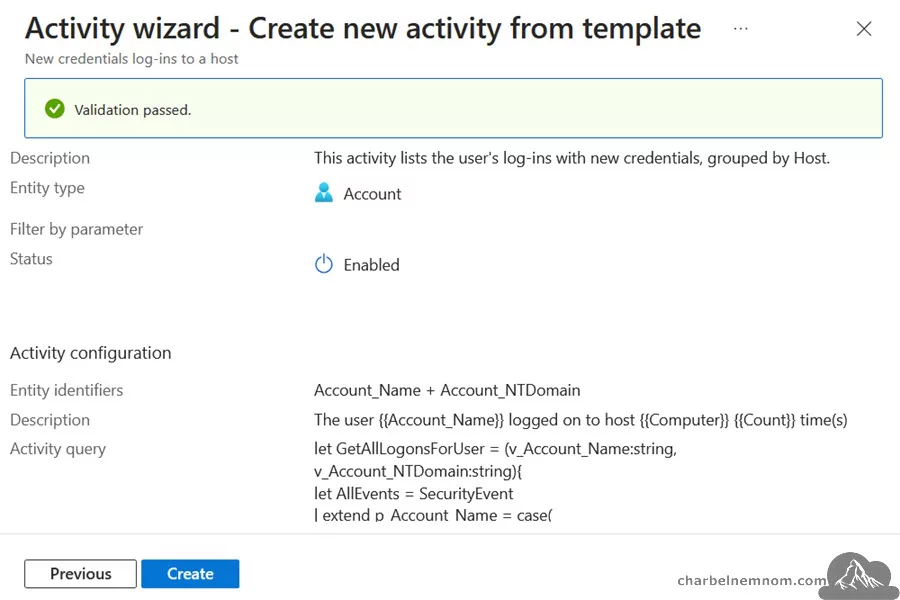
We can also add activities completely from scratch, which will appear in the “My Activities” tab, or edit the “Activity templates” page based on templates. With that, we can extend the functionality of what we track and display on the timelines in your entity pages.

However, once you create or customize an activity, your entity pages will display only those activities under the My Activities tab, not out-of-the-box ones available in the Activity Templates tab. So, to continue seeing all the out-of-the-box activities in your entity pages, you must create an activity for each template you want to be tracked and displayed.
See Also: Deep Dive into Microsoft Sentinel User and Entity Behavior Analytics.
Prerequisites
To follow this guide, you need to have the following:
1) Azure subscription – If you don’t have an Azure subscription, you can create one here for free.
2) Log Analytics workspace – To create a new workspace, follow the instructions to create a Log Analytics workspace.
3) Enable Microsoft Sentinel at no additional cost on an Azure Monitor Log Analytics workspace for the first 31 days; follow the quick onboarding process. Once Microsoft Sentinel is enabled on your Azure Monitor Log Analytics workspace, every GB of data ingested into the workspace can be retained at no charge for 90 days.
4) Enable Microsoft Sentinel User and Entity Behavior Analytics; follow the quick onboarding process.
5) Ensure you have the following roles assigned on the following resources:
- Microsoft Sentinel Contributor on the Log Analytics workspace where Microsoft Sentinel is deployed.
6) Install Azure PowerShell locally on your machine or use Cloud Shell.
To install Azure Accounts PowerShell modules on your machine, you can run the following command:
# Install and update to the latest Az PowerShell module
Install-Module -Name Az.Accounts -AllowClobber -Force

# Check the installed Az PowerShell modules version
Get-Module -Name Az.Accounts -ListAvailable | Select Name, Version
Assuming you have all the prerequisites in place, take the following steps:
Enable Sentinel UEBA Activity Templates
This section will describe how to enable and automatically create a Microsoft Sentinel UEBA activity template at scale.
You have several options for running the script: Azure Cloud Shell, Visual Studio Code, or Windows Terminal. The Script works with PowerShell 7 (core) with the Az module installed.
.EXAMPLE-1
.\Customize-SentinelActivities.ps1 -SubscriptionId <SUB-ID> `
  -ResourceGroup <RG-Name> -WorkspaceName <Log-Analytics-Name> `
  -enablePreview No -enableRules No -Verbose
This example will connect to your Azure account using the subscription ID specified and then create all activity templates for Microsoft Sentinel User and Entity Behavior Analytics in Disabled mode, as shown in the figure below. The tool will also check and filter out all custom rules you created under the “My Activities” tab from the default “Activity templates” tab, and then only the remaining Sentinel activity templates will be created.

By default, all activity templates, excluding the Preview templates, will be created in a Disabled state. As shown in the figure below, we have five Preview templates at this time. Microsoft security researchers will first release entity templates in Preview mode before they move them to GA.

However, you have the option to enable all these rules, including the preview templates, at creation time by setting the following parameters “-enableRules” And “-enablePreview“. See example 2 below.
.EXAMPLE-2
.\Customize-SentinelActivities.ps1 -SubscriptionId <SUB-ID> `
  -ResourceGroup <RG-Name> -WorkspaceName <Log-Analytics-Name> `
  -enablePreview Yes -enableRules Yes -Verbose
This example will connect to your Azure account using the subscription ID specified and then create all activity templates for Microsoft Sentinel User and Entity Behavior Analytics in Enabled mode. The tool will also check and filter out all custom rules you created under the “My Activities” tab from the default “Activity templates” tab, and then only the remaining Sentinel activity templates will be created.

Note: At the time of this writing, the Preview templates will fail to create because the Entity type is classified as “AzureResource“, and the currently supported Entity types are “Account” and “Host” only. Hopefully, the Microsoft Sentinel team will address this issue soon.
Run the PowerShell Tool
Before we run the tool, we can see that only two custom activities are enabled in this environment under the “My Activities” tab.

Once you run this tool, you’ll get an output similar to the one below.

PowerShell Code
Below is the tool for automatically enabling and creating Microsoft Sentinel UEBA Activity Templates at Scale.
<#
.SYNOPSIS
Enable Microsoft Sentinel UEBA Activity Templates at Scale.

.DESCRIPTION
How to create and enable Microsoft Sentinel Entity Behavior Activity Templates at Scale using PowerShell and REST API.

.NOTES
File Name : Customize-SentinelActivities.ps1
Author    : Microsoft MVP/MCT - Charbel Nemnom
Version   : 1.0
Date      : 18-September-2024
Updated   : 19-September-2024
Requires  : PowerShell 7.4.x (Core)
Module    : Az Module

.LINK
To provide feedback or for further assistance please visit:
 https://charbelnemnom.com

.EXAMPLE
.\Customize-SentinelActivities.ps1 -SubscriptionId <SUB-ID> -ResourceGroup <RG-Name> -WorkspaceName <Log-Analytics-Name> -enablePreview [No] -enableRules [Yes] -Verbose
This example will connect to your Azure account using the subscription ID specified and then create all activity templates for Microsoft Sentinel User and Entity Behavior Analytics.
By default, all activity templates, excluding the Preview templates, will be created in a Disabled state.
However, you have the option to enable all these rules, including the preview templates, at creation time by setting the following parameters "-enableRules" and "-enablePreview".
#>

param (
    [Parameter(Position = 0, Mandatory = $true, HelpMessage = 'Enter Azure Subscription ID')]
    [string]$subscriptionId,
    [Parameter(Position = 1, Mandatory = $true, HelpMessage = 'Enter Resource Group Name where Microsoft Sentinel is deployed')]
    [string]$resourceGroupName,
    [Parameter(Position = 2, Mandatory = $true, HelpMessage = 'Enter Log Analytics Workspace Name')]
    [string]$workspaceName,
    [ValidateSet("Yes", "No")]
    [String]$enablePreview = 'No',
    [ValidateSet("Yes", "No")]
    [String]$enableRules = 'No'
)

#! Install Az Module If Needed
function Install-Module-If-Needed {
    param([string]$ModuleName)

    if (Get-Module -ListAvailable -Name $ModuleName) {
        Write-Host "Module '$($ModuleName)' already exists, continue..." -ForegroundColor Green
    }
    else {
        Write-Host "Module '$($ModuleName)' does not exist, installing..." -ForegroundColor Yellow
        Install-Module $ModuleName -Force  -AllowClobber -ErrorAction Stop
        Write-Host "Module '$($ModuleName)' installed." -ForegroundColor Green
    }
}

#! Install Az Accounts Module If Needed
Install-Module-If-Needed Az.Accounts

#! Check Azure Connection
Try {
    Write-Verbose "Connecting to Azure Cloud..."
    Connect-AzAccount -ErrorAction Stop | Out-Null
}
Catch {
    Write-Warning "Cannot connect to Azure Cloud. Please check your credentials. Exiting!"
    Break
}

# Define the Preview API Version to use for Microsoft Sentinel Entity Activity templates
$apiVersion = "api-version=2024-04-01-preview"

#! Get Az Access Token
# This will default to Azure Resource Manager endpoint
# Note: Add the [-AsSecureString] parameter, the change is expected to take effect in Az module version: '13.0.0' and later
$token = Get-AzAccessToken
$authHeader = @{
    'Content-Type'  = 'application/json'
    'Authorization' = 'Bearer ' + $token.Token
}

# Get all default Microsoft Sentinel Activity Templates
Write-Verbose "Getting all default Microsoft Sentinel Activity Templates..." -Verbose
$ruleTemplateURI = "https://management.azure.com/subscriptions/$subscriptionid/resourceGroups/$resourceGroupName/providers/Microsoft.OperationalInsights/workspaces/$workspaceName/providers/Microsoft.SecurityInsights/entityQueryTemplates?$($apiVersion)"
$ruleResponse = (Invoke-RestMethod $ruleTemplateURI -Method 'GET' -Headers $authHeader).value
Write-Verbose "$($ruleResponse.count) Microsoft Sentinel UEBA Entity activity templates were found..." -Verbose

# Filter out the Preview activity rules if not needed
if ($enablePreview -eq "No") {
    Write-Verbose "Filter out the Preview activity rules if not needed..." -Verbose
    $previewTemplates = ($ruleResponse | Where-Object { $_.properties.title -match "(Preview)" }).count
    Write-Verbose "$($previewTemplates) Preview activity rules were found and excluded..." -Verbose
    $ruleResponse = $ruleResponse | Where-Object { $_.properties.title -notmatch "(Preview)" }
}

# Get all custom Microsoft Sentinel Entity Rules
Write-Verbose "Getting all custom Microsoft Sentinel Entity Rules..." -Verbose
$customRuleURI = "https://management.azure.com/subscriptions/$subscriptionId/resourceGroups/$resourceGroupName/providers/Microsoft.OperationalInsights/workspaces/$workspaceName/providers/Microsoft.SecurityInsights/entityQueries?kind=Activity&$($apiVersion)"
$customRuleResponse = (Invoke-RestMethod $customRuleURI  -Method 'GET' -Headers $authHeader).value
Write-Verbose "$($customRuleResponse.count) custom Microsoft Sentinel UEBA Entity activity were found..." -Verbose

# Filter out the custom rules from the default Activity templates
Write-Verbose "Filter out the custom rules from the default Sentinel activity templates..." -Verbose
$ruleTemplates = $ruleResponse | Where-Object { $customRuleResponse.properties.templateName -notcontains $_.name }

if ($ruleResponse.count -eq $ruleTemplates.count) {
    Write-Verbose "No custom activity rules were found that match the default Sentinel activity templates..." -Verbose
}
else {
    Write-Verbose "$($ruleTemplates.count) remaining Microsoft Sentinel activity templates were found to activate..." -Verbose
}

$entityActiveRules = @()
foreach ($entityRuleTemplate in $ruleTemplates) {

    $ruleName = $entityRuleTemplate.name

    $activityRule = $entityRuleTemplate | Select-Object * -ExcludeProperty id, name, type
    $activityRule.properties | Add-Member -NotePropertyName templateName -NotePropertyValue $rulename

    If ($enableRules -eq "Yes") {
        $activityRule.properties | Add-Member -NotePropertyName enabled -NotePropertyValue $true
    }
    else {
        $activityRule.properties | Add-Member -NotePropertyName enabled -NotePropertyValue $false
    }

    $rulePayload = $activityRule | ConvertTo-Json -EnumsAsStrings -Depth 50

    $activityRuleURI = "/subscriptions/$subscriptionId/resourceGroups/$resourceGroupName/providers/Microsoft.OperationalInsights/workspaces/$workspaceName/providers/Microsoft.SecurityInsights/entityQueries/$($ruleName)?$($apiVersion)"

    try {
        $ruleResult = Invoke-AzRestMethod -Method PUT -path $activityRuleURI -Payload $rulePayload -Verbose:$false

        If (!($ruleResult.StatusCode -in 200, 201)) {
            Write-Warning $ruleResult.StatusCode
            Write-Warning $ruleResult.Content
            throw "Error when creating Entity Activity template rule: [$($activityRule.properties.title)]"
        }
        elseIf ($enableRules -eq "Yes") {
            Write-Verbose "Creating and Enabling Entity Activity template rule: [$($activityRule.properties.title)]" -Verbose
            $entityActiveRules += $rule
        }
        Else {
            Write-Verbose "Creating Entity Activity template rule in disabled mode: [$($activityRule.properties.title)]" -Verbose
            $entityActiveRules += $rule
        }

    }
    catch {
        Write-Error $_ -ErrorAction Continue
    }
}

Write-Verbose "$($entityActiveRules.count) Microsoft Sentinel Entity Activity templates were created!" -Verbose
Here is the verification that 45 activity templates have been successfully created in this environment.

This is version 1.0. If you have any feedback or changes that everyone should receive, please feel free to leave a comment below.
Verify Microsoft Sentinel Custom Activities
Once you run the tool, you can verify the custom activities created under the “My Activities” tab on the Microsoft Sentinel portal | Entity Behavior.

You can also verify the same using the Unified Security Operations platform (Microsoft Defender portal) by taking the following steps:
1) In the Microsoft Defender portal, find any entity page.
- Select Assets > Devices or Identities.
- Select a device or a user from the list. If you selected a user, select the View user page on the following popup, as shown in the figure below.

2) On the entity page, select the Sentinel events tab.
3) On the Sentinel events tab, select Customize Sentinel activities, as shown in the figure below.

4) On the Customize Sentinel activities page, you’ll see all the out-of-the-box activities created automatically by the tool in the “My activities” tab. In the “Activity templates” tab, you’ll see the entire collection of activities offered out-of-the-box by Microsoft security researchers.

That’s it, there you have it. Happy Automating and Customizing Microsoft Sentinel UEBA Activities at Scale!
In Summary
Customizing and enabling Microsoft Sentinel UEBA activities at scale allows you to tailor the security insights presented on your entity pages, ensuring you keep track of both out-of-the-box and custom activities. By following the steps outlined in this guide, you can effectively enhance your monitoring capabilities and maintain visibility over key security events.
Automating this process saves time and helps ensure that critical activities are tracked across your environment. The flexibility offered by the UEBA activity templates allows you to adapt your security strategies to better detect and respond to potential threats.
__
Thank you for reading our blog.
Please let us know in the comments section below if you have any questions or feedback.
-Charbel Nemnom-
