
Updated – 12/03/2024 – Microsoft announced the new Exam User Interface (UI) major update. Please check the following section.
Updated – 08/11/2023 – Microsoft announced the new Applied Skills Credentials for Free. Please check the following section.
Updated – 23/08/2023 – Microsoft announced adding an open-book option for Role-Based certification exams. Please check the following section.
Updated – 30/05/2023 – At the end of June 2023, Microsoft announced that they would retire from their partnership with Credly. Please check the following section.
Updated – 11/05/2022 – Microsoft announced adding unscheduled breaks to all Microsoft Exams. Please check the following section.
In this article, we want to share with you the recent announcement by Microsoft about the new certification changes.
Table of Contents
Introduction
In the past, when we wanted to get a new Microsoft specialty or Role-based certification such as (AZ-104, AZ-700, AZ-305, AZ-500, etc.), there was a long upfront study process that we wanted to go through to prepare and register for the exam, and pay the fees based on which country you live, and then go and take the exam. Once you pass the exam, you celebrate, and then you are good to go for two years duration.
At the end of those two years, well, you have to do everything again. You do a whole bunch of studying to get prepared. You register, pay the fees again, sit for the exam, pass it, and it’s good for another two years. Then, we continue repeating that process again and again.
Please note that the fundamentals certifications such as (AZ-900, MS-900, SC-900, MB-910, MB-920, PL-900, DP-900, and AI-900) don’t get expire.
Microsoft Certification Changes
All the renewing certification process is changing now. So what has been announced is that starting in June 2021, when you do the initial study and pass the exam, it will now be good for one year instead of two years for newly earned certifications. However, for renewing existing certifications, please check the next section.
As you know technology is changing so fast, the idea of having these certifications last for two years doesn’t apply so much with this rapid cloud cadence development. So instead of now, you pass the exam and it’s good for two years. It’s good for one year ONLY.
So before you start thinking that I have to go and redo this huge amount of studying, and the stress of taking the exam and paying money. That’s not the case. When you pass the exam after June 2021 it’s good for a year, but six months after you pass that certification, you will get an email. This email will let you know that your certification is going to expire. You should renew it.
So now what we can do to renew the certifications, we can go to Microsoft Learn. Well, there are going to be free online learning modules that we can just go through to learn the updates. And then there is an online assessment that we just take in the Microsoft Learn again, so this is FREE. The learning modules and the assessment are free as well (more on this in a bit).
So when you pass that assessment it will extend your certification for another year to your current expiry time, not from the time you take the assessment, it is adding one year to your current expiry time.
And this continues forever, so once again, six months into that, you’ll go for the learning module, you retake the assessment, and it will be good for another year. So essentially, the point is now that it’s a one-year cycle, but you only have to take that kind of big exam once. And you just go through these learning modules that they’re going to remind you.
You’ll get 4 emails before your certification expires, so it’s around six months, and you’ll get a reminder that your cert is going to expire.

You can now go and do this assessment to extend it out again, but you’ll get four of these emails before you get your certification expires, so plenty of opportunities to go through the learning modules, take the assessment and it’s just going to be this continual one year cycle. Again a kind of six months through each one. You’ll start to get these emails saying, hey, you should go and do these assessments to renew it another year.

Once you click on Get Started with renewing your certification, you get redirected to the renewal of this certification. You need to verify that you are eligible to renew your certification as shown in the screenshot below. This page will provide a summary of the skills being measured with training material and a link to take the renewal assessment for free.

What you can do is look at your Microsoft training dashboard as shown in the figure below. You can see a list of kinds of your portfolio. All of your assessments, and will show you the achievement date of your certification, and the time it’s going to expire, so you’re going to get approximately six months before it expires.
 If you let it expire, then you want to go back to the start! You have to go and take the full exam and pay the money again, so the key point here is don’t let it expire.
This one year is not retroactive. If you have taken the exam before June 2021, and it’s currently a two-year validity, so if you took it in April 2021, it has a two-year validity, they’re not going to shorten it to one year. If you take the exam after June 2021 and beyond, then it’s one year. So they are NOT shortening your existing certification times, it is for ones taken after June 2021.
This is part one of the upcoming changes, and there’s an official announcement from Microsoft about it here.
Please note that you can take the assessment as many times as you want. You can take it back to back the first and second time, subsequent tries, so if you fail it twice on that first attempt, you can take the assessment once every 24 hours until you pass. They will be freely available online, you don’t go anywhere to take these assessments. You can just keep taking them.
Renew Existing Microsoft Certification
The second change is that starting in early February 2021, you’ll be able to start renewing your role-based and specialty certifications below by passing a free renewal assessment on Microsoft Learn:
- Microsoft Certified: Azure Administrator Associate
- Microsoft Certified: Azure Developer Associate
- Microsoft Certified: Azure Security Engineer Associate
- Microsoft Certified: DevOps Engineer Expert
- Microsoft Certified: Azure Solutions Architect Expert
- Microsoft Certified: Azure for SAP Workloads Specialty
- Microsoft Certified: Azure IoT Developer Specialty
- Microsoft Certified: Azure Data Scientist Associate
- Microsoft 365 Certified: Modern Desktop Administrator Associate
- Microsoft 365 Certified: Messaging Administrator Associate
- Microsoft 365 Certified: Security Administrator Associate
- Microsoft 365 Certified: Developer Associate
- Microsoft 365 Certified: Teams Administrator Associate
- Microsoft 365 Certified: Enterprise Administrator Expert
- Microsoft Certified: Dynamics 365 Sales Functional Consultant Associate
- Microsoft Certified: Dynamics 365 Customer Service Functional Consultant Associate
- Microsoft Certified: Dynamics 365 Field Service Functional Consultant Associate
- Microsoft Certified: Dynamics 365 Finance Functional Consultant Associate
- Microsoft Certified: Dynamics 365 Supply Chain Management Functional Consultant Associate
Starting in early March 2021, you’ll be able to start renewing your role-based and specialty certifications below by passing a free renewal assessment on Microsoft Learn as well:
- Microsoft Certified: Azure AI Engineer Associate
- Microsoft Certified: Azure Data Engineer Associate
- Microsoft Certified: Azure Database Administrator Associate
- Microsoft Certified: Data Analyst Associate
- Microsoft Certified: Dynamics 365 Marketing Functional Consultant Associate
- Microsoft Certified: Dynamics 365 Supply Chain Management, Manufacturing Functional Consultant Associate
- Microsoft Certified: Dynamics 365 Finance and Operations Apps Developer Associate
- Microsoft Certified: Dynamics 365 Finance and Operations Apps Solution Architect Expert
For more information about renewing your Microsoft certifications, please check the official Microsoft frequently asked questions.
Taking Breaks on Microsoft Exams
You have the option now to take unscheduled breaks during all exams, except for Microsoft Office Specialist (MOS) exams, and you don’t need to make advance requests through the accommodation process. Now, you will see a “Take a Break” button added at the bottom of the exam as shown in the screenshot below.
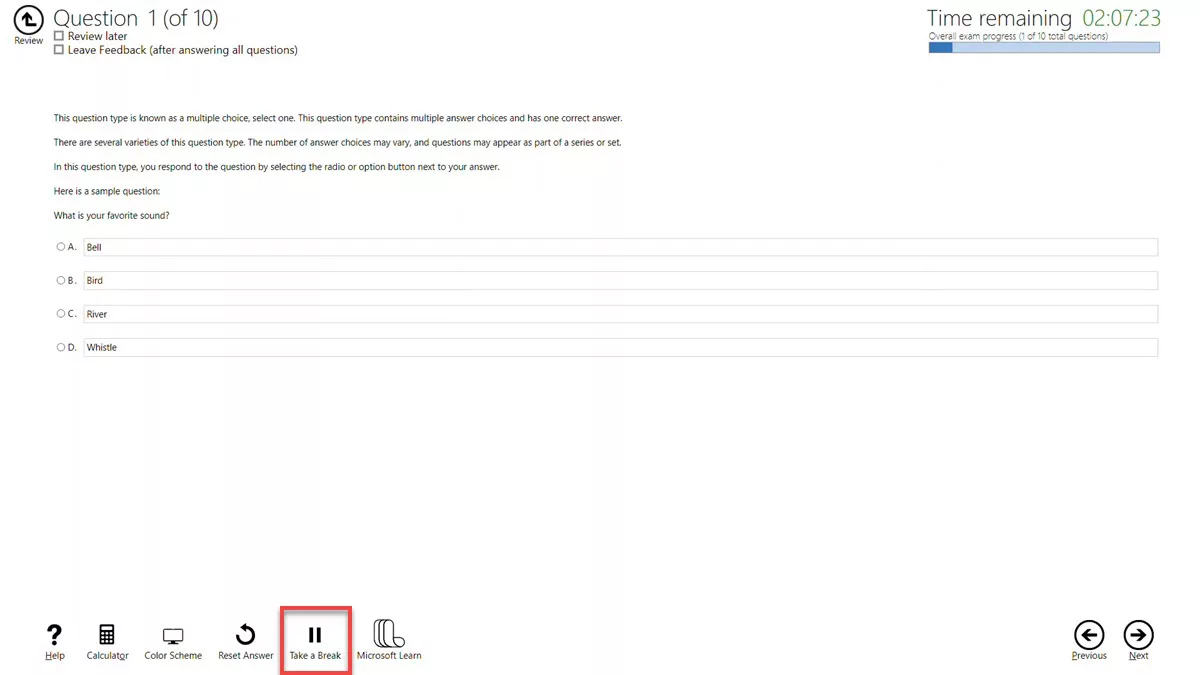
Here are some key details about taking breaks during your Microsoft exams:
There are designated five (5) minutes included in the exam time specifically for breaks. To facilitate this, Microsoft has removed questions from the exam.
While the break time is set at 5 minutes, you are allowed to take as much time as you need during the break, and you’re even free to take multiple breaks. However, it’s important to note that the exam clock will continue running while you’re on a break. If the exam duration expires while you’re on a break, your score will be based on the work you completed before the break. If you’re unable to finish the exam due to being on break, no accommodations will be provided, and you’re responsible for managing your own time effectively.
Once you initiate a break, you won’t be able to revisit any questions you had seen before the break, whether they were unanswered or marked for review. While you can take breaks at any point during the exam except in the middle of a lab or during problem-solution question sets, you’re allowed to take breaks before or after these specific question types, but not during them.
For case studies, you can take breaks, but please note that you won’t be able to return to any questions seen before the break.
IMPORTANT: During your break, it’s crucial to avoid accessing any unauthorized materials, including your cell phone. If the proctor observes you doing so, your exam will be revoked.
Microsoft Role-Based Exams Now Open-Book
The big news is that Microsoft is making a small but important change to its exam policy by introducing a new resource for all role-based Microsoft Certification exams. Now, you will be able to browse the Microsoft Learn website while taking any of the role-based certification exams ONLY.
This means that if you encounter a difficult question, you can click a button on the exam interface to view the Microsoft Learn website content, which includes Microsoft Documentation. You can browse the topic you are interested in and look up the details you need to know. Then return to the question, hopefully with the answer you need.
This move is kind of like an “open-book exam”, you will see a “Microsoft Learn” button added at the bottom of the exam as shown in the screenshot below.
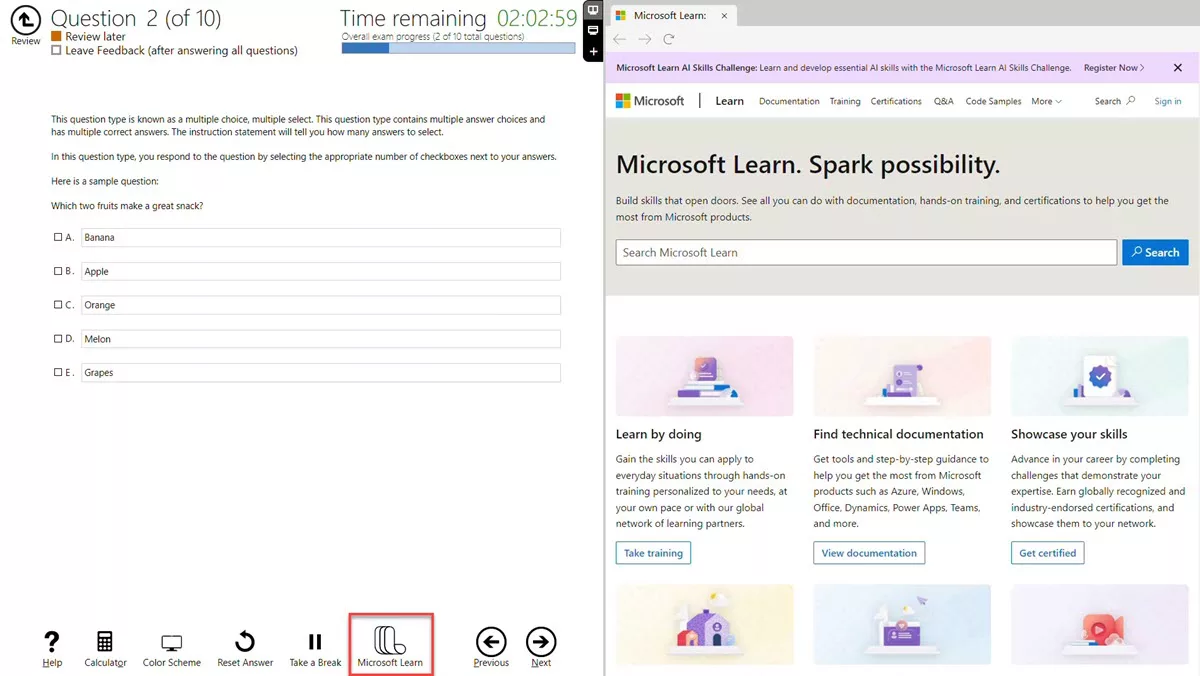
There’s an important thing to realize with this move. You’re not getting any extra time on your exam, so you can’t exactly spend all the time you need looking up any question. But for those questions where you “kind of” know the answer and just need to quickly look it up to verify, this could be a lifesaver.
This is a bold move by Microsoft. You might think that this makes the tests easier, and perhaps it does. But in the real world, if we don’t know something, we can quickly look it up. So having to memorize the amount of RAM a memory-optimized virtual machine instance had in the real world is unrealistic.
They are not changing the questions because of this move. Partly, that is because the questions on Associate and Expert exams are generally not trivial. Also, it may not be possible to do deep research on every question to pass the exam, so you will probably want to use this resource sparingly.
// See Also: How Microsoft Open Book works in action.
Microsoft Credentials Applied Skills
Microsoft announced brand new free, Applied Skills that are now available for various Microsoft Technologies.
When we think about the credentials that are available for Microsoft Technologies, we’re very used to the idea of Certifications, we pay for those Certifications, and then we get them renewed for free by the online assessments as shared above. Those Certifications are very broad tech a breadth of knowledge about the technology, and it’s taken in a very curated environment, we have a lockdown experience, it’s for a set amount of time, and we can’t view or do other things during the exam, then we get this Certification that attests that we have this particular set of knowledge, typically focused around a certain Role.

Don’t think of this as an either/or option. The Applied Skills complement the normal Certifications nicely. I can think about when my Certification shows I have a certain set of broad breadth of knowledge around a certain role I may want to do, Applied Skills show I can perform some very specific targeted sets of actions around a very specific scenario, and that’s what the Applied Skills are all about, but again it’s free with a fantastic 2 hour in the real Azure experience, it’s not a simulated environment, I’m creating the resources in Azure.
If we take a look at the Microsoft Learn portal, we can see there are eight of these Applied Skills: Microsoft Sentinel, Azure Networking, Power Automate, ASP.NET, Kubernetes, Azure Monitor, Microsoft Defender for Cloud, Azure Files and Azure Blob Storage.
- Configure SIEM security operations using Microsoft Sentinel
- Configure secure access to your workloads using Azure networking
- Create and manage automated processes by using Power Automate
- Deploy and configure Azure Monitor
- Deploy containers by using Azure Kubernetes Service
- Develop an ASP.NET Core web app that consumes an API
- Secure Azure services and workloads with Microsoft Defender for Cloud regulatory compliance controls
- Secure storage for Azure Files and Azure Blob Storage

I can just go in and take one of these Applied Skills, now for each of these Applied Skills, if we look at “Deploy and configure Azure Monitor” for example, the first thing it has is, it tells you the tasks you’re going to perform, it gives you a learning path to help you prepare for this assessment, it shows that you’re going to have 2 hours to complete this assessment, and then once you’ve prepared, then I just click Start and it will launch me into the experience.

The way this is structured is that 2 hours is plenty, I took two of them, I did the Azure Networking and the Azure Storage one just to get an idea, each one took me 40 minutes, and that was while I was doing other things, so you have a lot amount of time, obviously they have to limit the amount of time because it’s using real Azure, it’s doing real consumption, and it wants to make sure you stay focused to some extent on the task, you are going to get a set of guidance via Open Emails.

Certain Emails include a set of guidelines, we need this done, then we need this done, and then in the Azure portal, you go through and perform these various actions. Of course, I’m referring to the Azure portal, it will vary the interface based on the specific technology it is asking you to perform, again it’s not a simulation, I’m in the real tools.
Now in those emails, make sure you read the guidelines very carefully, they might tell you to do it in a very specific Resource Group and you must follow this exactly because what’s going to happen is at the end of the 2 hours lab, it’s going to take a dump of the resources that exist and compare them to what it’s expecting if I followed the instructions correctly, so if I went and created things in different places, or if I don’t follow the instructions, it’s not going to match what they’re going to go and look for.

But again this is not locked down, it’s a window in your browser, I can be doing other things, and while taking the assessment if you’re not sure about something, you may go and reread that particular bit of learning, so then I can understand it, that’s the key point.
Now make sure you don’t click the “Submit Assessment” button before you’ve read all of the emails, and if you are doing provisioning and creating a new resource, make sure it’s finished, you always have that little icon that shows the progress… check everything is finished deploying, everything is finished configuring, and then I can go ahead and click the “Submit Assessment” because again it’s comparing what exists the time you click submit, to what it’s expecting to be there if you followed all of the instructions correctly.
Then within 60 seconds, you’re going to go ahead and get your score. In this case, I did the Azure Networking and the Azure Storage, and if you click on one of them, you can view your credentials and share it, I can go and add it very easily to LinkedIn for example, but I can share it on Facebook, X (Twitter), or send it via email.
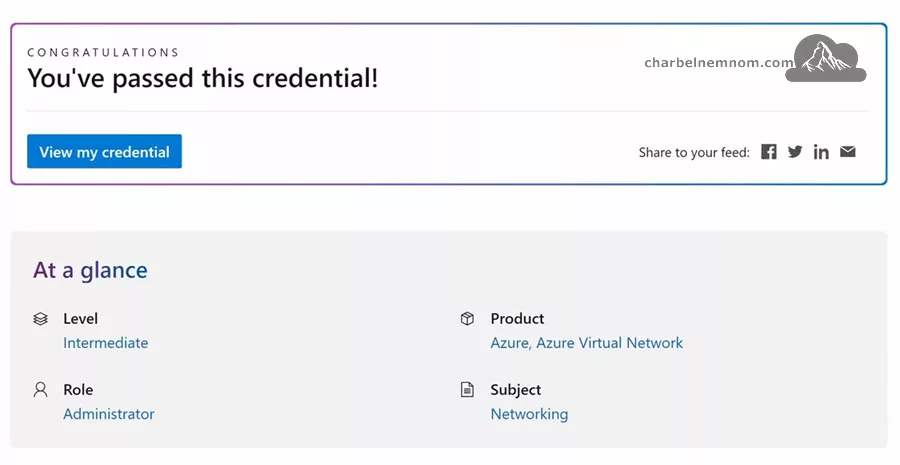
Then you see the total score and what you’d see after within about 60 seconds when you take this skill, you’ll see your results and your results will tell you if you got a certain task wrong, if you did, well then you know you can go and refocus on that task, spend a bit more time and reread those materials that’ll help with that task.

If you fail an assessment, you’ll receive an email with preparation resources to help you earn a Microsoft Applied Skills credential. When you’re ready, you can retake the assessment. The content of the email looks similar to the one below. Currently, you cannot see what exactly you did wrong in the end or get a hint, hopefully, they’ll improve this part too.

Then 3 days later, I can take it again, you can’t retake it immediately, there is a wait because you’re using Azure resources, so there’s a little bit of a delay before I can retake it, but every 3 days (72 Hours) I could retake it and I get 2 hours window, I can’t pause it, it’s a continuous 2 hours period, but again that’s a lot of time, you’ll be able to go and read materials and check things as you’re taking it.
I think the Applied Skills is fantastic, it’s a great way to go and show that I can do this particular skill, but for someone trying to learn Azure, well it enables me to understand what the common tasks are associated with that skill, and it gives me a way to validate my knowledge of that skill, it’s an environment to perform that skill in, so maybe I don’t have an Azure environment, maybe I’m restricted on things I can create.
Applied Skills gives you an Azure environment or whatever particular technology is for that period, so even if I don’t even care that much about the applied skill, it gives me a chance to go and practice and use those skills to fine-tune and just keep getting better, and then, of course, it does help validate to employers that I can perform those skills.
The key point of this is all for free, I think this is a huge improvement for Microsoft learning to help practicing and diving into a particular skill. I do recommend them. There are eight Applied Skills already today and I think these are going to grow over time, they just complement very nicely the normal Certifications that show a broader breadth of knowledge, to have a very specific set of skills, they’re very low-stress, there is no curation about it, you’re just logging in, there’s a set of emails to guide you do this in the portal, and you got a very generous amount of time to do that.
Have a lot of fun! Go and get your hands on Applied Skills.
Microsoft Exam User Interface Update
In this section, we want to review a significant update that Microsoft announced on March 7th, 2024, about reimagining the Microsoft Certification exam user interface (UI) experience.
To be precise, they are not changing the type of questions you get; they are merely updating the user interfaces to make them more accessible and intuitive. The nice thing is that we can try out the new user interface update by visiting the exam sandbox URL.
When we go into the exam sandbox, you’ll see a color scheme option down the bottom, as shown in the figure below. You can change it to dark or high contrast, and that will be available throughout the exam as well. You’ll also notice at the top that you can now toggle the clock on or off. Maybe it makes you panic a bit anxious. As long as you still track your timing, you can now disable the clock if you want.

Next, you’ll go through the regular things. It gives you details about the session time, surveys, instructions, the actual exam time, the questions, the number of case studies, and the minimum score required to pass.

Then, after showing the basic exam information, we can start our exam. Again, you can turn the clock on or off in the top right corner, and we can change the color scheme.

Through the leftmost window, we can get help whenever we want to. If we kick off the exam, well, now we have that option to take a break, which has been there for a while now. This is well, hey, look, you won’t be able to go back to any of your previous questions; the clock will keep running. Still, if you need it, you can take a break.
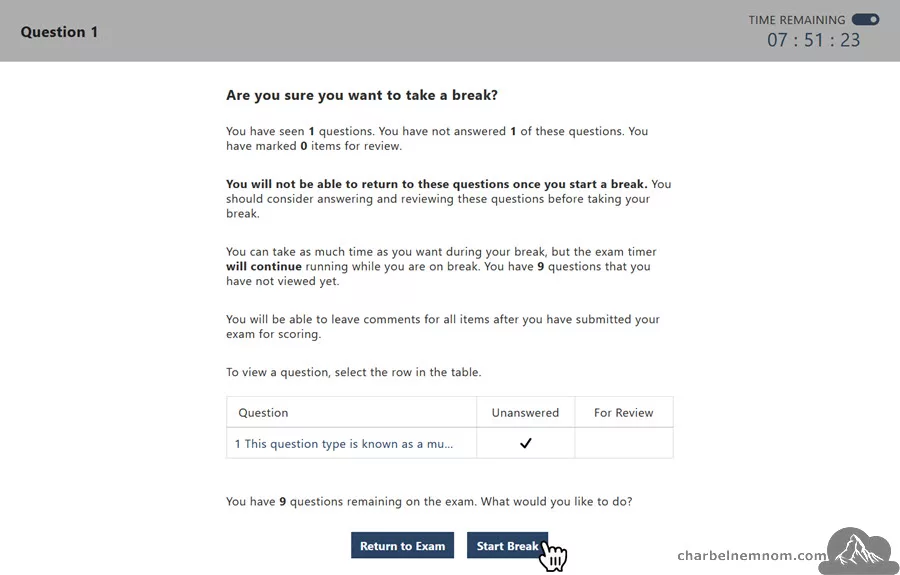
The calculator is there; you’ll also see the Microsoft Learn documentation icon on the left side, but now, as you start answering, you have the option to review later and leave feedback as usual. Still, you can go through it, and now, on the top left, there are three things to pay attention to; you can make this menu pop out so I can give myself more screen for actually taking the exam. Still, I can see the details of where I am, how many I’ve answered, how many are unanswered, whether I have marked any for review or comment, and I can also see a little subway map of where I am in my overall progress.
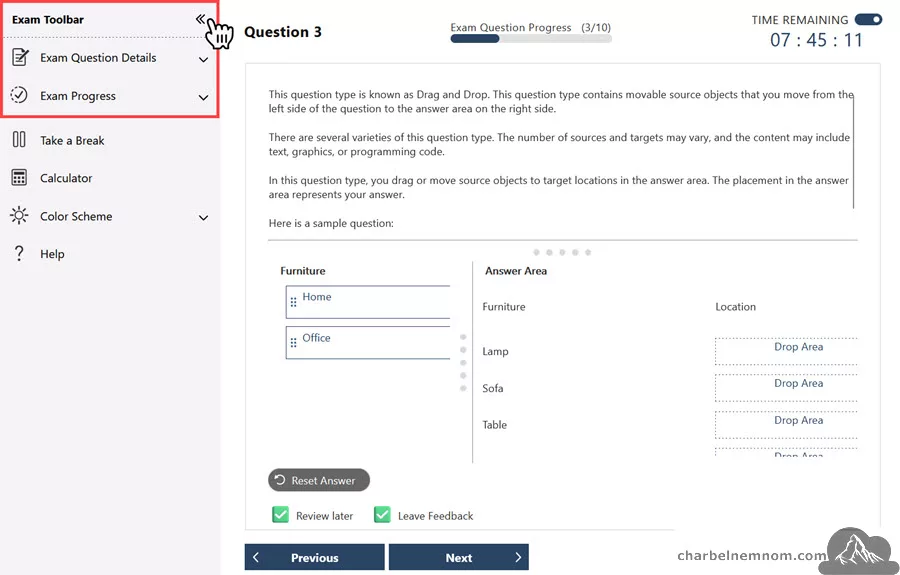
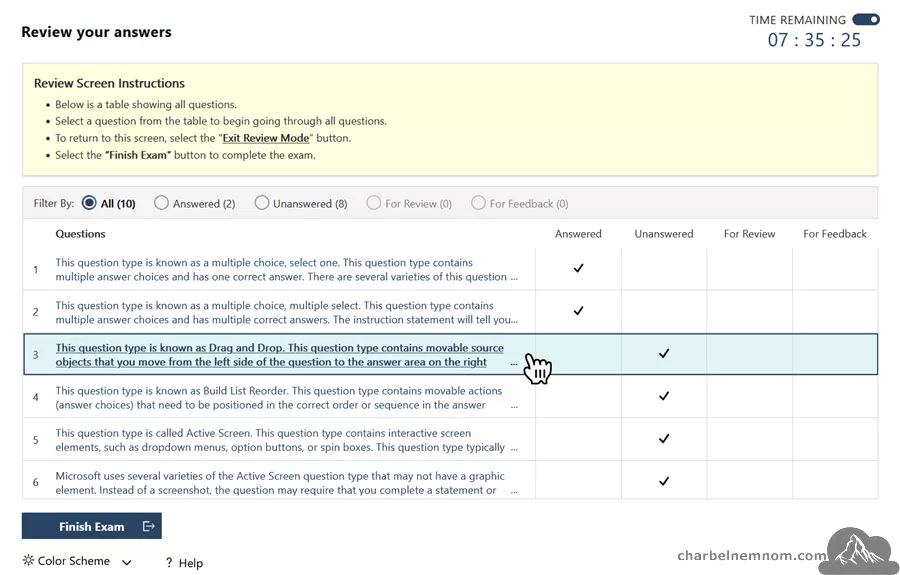
So you can carry on going through the drag-and-drop questions over, and it’s just a much nicer experience to leverage. At the end, it gives you the following summary, as shown in the figure below. It shows all the Answered/Unanswered questions you may have said; hey, I want to review it for feedback. You can jump back to any of them; if you want to look at any unanswered question while taking it, you can jump back and forth and get to the various pieces of information.
As Microsoft mentioned in their announcement, the calculator should also have a calculation history, but really, it’s just a nice experience.
Regarding the rollout, Microsoft started launching the new exam user interface (UI) on March 9, 2014. So, for the first set of exams, it’s launched a lot of the fundamentals exam it says over the next few months, but it’s just something to be aware of so you don’t panic if you see it, but overall, it’s just a cleaner, more intuitive exam experience.

Good luck with all of your Microsoft exams!
Become Microsoft Certified
To become Microsoft certified and grow your options for a career in IT by increasing credibility with a Microsoft Certification, validating your skills and ability to perform in a role using Microsoft technologies. As digital transformation evolves in how we do business, getting trained and certified can help you accelerate your ability to land a technical role that is in demand.
If you are a job seeker who has completed training for one of the Microsoft-specific technical roles mentioned here, and you can attest that you have been unemployed or furloughed due to COVID-19, you can secure an industry-recognized Microsoft Certification at a discounted fee of USD15. You will have the ability to schedule an exam before December 30, 2021, and will have until December 31, 2021, to appear for and complete the exam. For more details, please check the terms and conditions published by Microsoft.
Advance your career, earn recognition, and validate your technical knowledge and ability in current and future industry job roles with Microsoft Azure certifications.
Growing your skills with Azure can help you turn ideas into solutions with more than 200 services to build, deploy, and manage applications—in the cloud, on-premises, and at the edge— using the tools and frameworks of your choice. Check your preferred Azure certification path here and start learning.
Microsoft Learn Community
Microsoft recently announced a new opportunity for learning Azure and Microsoft 365 with Learn Rooms, a part of the Microsoft Learn community designed to allow you to connect with other learners and technical experts with similar interests in Azure.
The NEW Microsoft Learning Rooms will assist in your certification journey. You can find connections with peers and engage with experts to dive into topic-specific questions via discussions and virtual sessions.

You can choose your learning experience through the Tech Community Hub, Microsoft Q&A, and all-new Learning Rooms. Together they offer a comprehensive approach to your and present unique benefits depending on your learning style and skilling goals.
> Tech Community: You get Microsoft Learn updates and connect with experts at the Tech Community hub. It’s the perfect place to start a conversation or get advice on which path to take or certification to explore.
> Microsoft Q&A: For technical answers, you can try Microsoft Q&A, where you can get answers from Microsoft experts.
> Learning rooms: Learning rooms are a NEW space for connecting with experts and peers. They provide a safe environment for asynchronous discussions and virtual sessions facilitated by Microsoft Learn experts.
Learning rooms are available for anyone who is looking for a supportive and interactive community experience to enhance their learning. These rooms are designed for group learning and are facilitated by an expert. Learners can participate in conversations asynchronously and attend office hours. The primary focus of many learning rooms is on Microsoft Azure.
Updated – 09/10/2023 – Microsoft announced that there are four Microsoft Security Learning Rooms to choose from for your SC-100, SC-200, SC-300, and SC-400 exams that span end-to-end. Whether you choose one path or all of them, the Microsoft Learning Rooms are ready to support your learning journey. You can access these learning rooms during your exam:
- Cloud Security Study Group
- Compliance Learning Room
- Cybersecurity from Beginner to Expert
- Microsoft Entra
The purpose of these rooms is to bring together individuals who share a common interest in learning about Azure and connect them with experts in the field who can provide guidance and support. This creates an environment that is supportive and engaging for learners. These learning rooms are a part of the Microsoft Learn Azure community, which provides a broader platform for learners worldwide to interact with technology experts and like-minded individuals who share an interest in Azure.
Learn More: Discover the Azure learning community with Microsoft Learn rooms.
Credly Microsoft Partnership to Retire
At the end of June 2023, Microsoft announced that they would retire from their partnership with Credly. Here’s what this means to you:
* From that date, Credly will no longer issue badges for Microsoft Certifications.
* All your certifications will be on your Microsoft Learn profile, ready for sharing and verification, and will be updated with pertinent information, such as expiration and renewal dates.
* If you don’t have a Credly profile, you can verify and share your certifications on your Microsoft Learn profile.
* If you do have a Credly profile, Microsoft Certifications that you earned and claimed before June 2023 will be there through June 2024, but will no longer be updated with changes to expiration or renewal dates.
* If you’ve shared your certifications through Credly on other platforms, such as LinkedIn, we encourage you to share them again from your Microsoft Learn profile to help ensure continued verification services, since Credly will no longer verify or receive any information on Microsoft Certifications after the end of June 2023.
Summary
As clarified in this article, this is a kind of big change for Microsoft certifications going forward, especially now we don’t have every two years to take these big exams anymore. We’re going to go through it once, and now they’re always going to last for a year. Six months in, we are going to start to get notifications. We go through an online learning module. We take an online assessment, all of it free, and it just extends it out here so it helps keep our knowledge current. And it makes the certification a bit more meaningful.
I think this is a good thing overall since we only have to pay once now. And just that helps us to keep our knowledge up-to-date.
Do you want to become Microsoft Certified? Check the official Microsoft certifications portfolio here and choose your preferred learning path.
Hope this was useful… Stay Safe!
__
Thank you for reading my blog.
If you have any questions or feedback, please leave a comment.
-Charbel Nemnom-
