
Microsoft Sentinel comes with Content Hub, which you can use out-of-the-box to get content value and start on Microsoft Sentinel quickly. Solutions in Microsoft Sentinel Content Hub provide a consolidated way to acquire Microsoft Sentinel content, like data connectors, playbooks, workbooks, analytics rules, hunting, and automation in your workspace with a single deployment step.
Updating workbooks in Microsoft Sentinel can be tedious, especially if many Content Hub solutions are installed, including workbooks. This can be particularly challenging for managed security service providers (MSSPs) who serve multiple tenants from different customers and have many workbooks to maintain and update. Updating these workbooks every week or month can be time-consuming and boring, right?
In this article, we will show you how to update Microsoft Sentinel Workbooks at scale automatically using PowerShell and REST API.
Table of Contents
Introduction
Microsoft Sentinel is a cloud-native Security Information Event Management (SIEM) and Security Orchestration Automated Response (SOAR) solution. Microsoft Sentinel delivers intelligent security analytics and threat intelligence across the enterprise, providing a single solution for alert detection, threat visibility, proactive hunting, and threat response.
Once you have connected your data sources to Microsoft Sentinel, you can visualize and monitor the data by using workbooks in Microsoft Sentinel. These workbooks are built on Azure Monitor workbooks and include tables and charts with analytics for your logs and queries, in addition to the tools already available in Azure.
Content Hub is designed to provide a consistent and scenario-driven approach for onboarding out-of-the-box (OOTB) content as needed. This is accomplished by organizing solutions into packages that comprise data connectors, analytics rules, hunting queries, parsers, playbooks, workbooks, and watchlists. These solutions assist enterprise security operations (SecOps) teams in managing their business, from data ingestion to security monitoring, issue detection, threat hunting, and breach response, all in a scenario-driven mode.
When you update Content Hub solutions, you may notice that Microsoft also updates its built-in workbook templates, so if you have saved workbooks based on those built-in templates, you will see a new version available with the [Update available] text appended to the workbook name, as shown in the figure below. Then, you can click “Update” on the right-hand side to update the workbook as needed.

Related: Check how to automate Microsoft Sentinel Content Hub Updates.
Microsoft, technology partners, and the community regularly update those workbook templates. The question that often comes up is: Is there a way to automatically update active workbooks so I don’t have to set a reminder every week/month to go through and check to see which one has a new updated template version?

This tedious manual operation can be performed in the Azure portal or the Microsoft Defender portal (Unified Security Operations platform). At the time of this writing, there is no out-of-the-box native component that alleviates this manual process.

Related: Check how to update Microsoft Sentinel Analytics Rules at Scale.
Let’s see how to automate this process and update Microsoft Sentinel workbooks at scale.
Prerequisites
To follow this guide, you need to have the following:
1) Azure subscription – If you don’t have an Azure subscription, you can create one here for free.
2) Log Analytics workspace – To create a new workspace, follow the instructions to create a Log Analytics workspace.
3) Enable Microsoft Sentinel at no additional cost on an Azure Monitor Log Analytics workspace for the first 31 days; follow the quick onboarding process. Once Microsoft Sentinel is enabled on your Azure Monitor Log Analytics workspace, every GB of data ingested into the workspace can be retained at no charge for 90 days.
4) Before running the script described below, you must install one or more solutions from Content Hub that include Workbook as a content type. You could also install Workbook(s) as standalone content. Once you install the Workbook(s) template, then you can save these templates under the “My Workbooks” tab.

5) To create, update, and delete a Microsoft Sentinel workbook, you need to either have the Microsoft Sentinel Contributor role or a lesser Microsoft Sentinel role (like Microsoft Sentinel Reader or Microsoft Sentinel Responder), together with the Workbook Contributor Azure Monitor role. The Workbook Contributor role isn’t necessary for using workbooks; it is only for creating (updating) and deleting.
6) Install Azure PowerShell locally on your machine or use Cloud Shell.
To install Azure Accounts PowerShell modules on your machine, you can run the following command:
# Install and update to the latest Az PowerShell module
Install-Module -Name Az.Accounts -AllowClobber -Force

# Check the installed Az PowerShell modules version
Get-Module -Name Az.Accounts -ListAvailable | Select Name, Version
Assuming you have all the prerequisites in place, take the following steps:
Update Microsoft Sentinel Workbooks
This section will describe how to update Microsoft Sentinel saved Workbooks templates at scale.
You have several options for running the script: Azure Cloud Shell, Visual Studio Code, or Windows Terminal. The Script works with the Az module installed with PowerShell 7.4.x (core).
.EXAMPLE-1
.\Update-SentinelWorkbooks.ps1 -SubscriptionId <SUB-ID> `
  -ResourceGroup <RG-Name> -WorkspaceName <Log-Analytics-Name> -Verbose
This example will connect to your Azure account using the subscription ID, resource group, and the workspace specified. Then, check all the installed and saved Workbooks in Microsoft Sentinel. Then, it will check if the saved Workbook(s) under the “My workbooks” tab are outdated compared to the installed template(s) from Content Hub. If the saved Workbook(s) is outdated, it will automatically update the saved Workbook(s) to the latest template version available.
Run the PowerShell Tool
Before we run the tool, under the “My workbooks” tab, we can see only one workbook, Investigation Insights, that requires an update in this environment. This could be one or more Workbooks.

Once you run this tool, you’ll get an output similar to the one below.

PowerShell Code
Below is the tool for automatically updating Microsoft Sentinel Workbooks at scale. Please note that you must run this script on demand; check the next section to learn how to automate the update process based on a weekly or monthly schedule.
<#
.SYNOPSIS
Update Microsoft Sentinel "My Workbooks" Templates at Scale.

.DESCRIPTION
How to automatically update Microsoft Sentinel "My Workbooks" Templates at Scale using PowerShell and REST API.

.NOTES
File Name : Update-SentinelWorkbooks.ps1
Author    : Microsoft MVP/MCT - Charbel Nemnom
Version   : 1.0
Date      : 04-October-2024
Updated   : 07-October-2024
Requires  : PowerShell 7.4.x (Core)
Module    : Az Module

.LINK
To provide feedback or for further assistance please visit:
 https://charbelnemnom.com

.EXAMPLE
.\Update-SentinelWorkbooks.ps1 -SubscriptionId <SUB-ID> -ResourceGroup <RG-Name> -WorkspaceName <Log-Analytics-Name> -Verbose
This example will connect to your Azure account using the subscription ID specified. Then, check all the installed and saved Workbooks in Microsoft Sentinel.
Then, it will check if the saved Workbook(s) are outdated compared to the installed template(s) from Content Hub.
If the saved Workbook(s) is outdated, it will update the saved Workbook(s) to the latest template version available.
#>

param (
    [Parameter(Position = 0, Mandatory = $true, HelpMessage = 'Enter Azure Subscription ID')]
    [string]$subscriptionId,
    [Parameter(Position = 1, Mandatory = $true, HelpMessage = 'Enter Resource Group Name where Microsoft Sentinel is deployed')]
    [string]$resourceGroupName,
    [Parameter(Position = 2, Mandatory = $true, HelpMessage = 'Enter Log Analytics Workspace Name')]
    [string]$workspaceName
)

#! Install Az Module If Needed
function Install-Module-If-Needed {
    param([string]$ModuleName)

    if (Get-Module -ListAvailable -Name $ModuleName) {
        Write-Host "Module '$($ModuleName)' already exists, continue..." -ForegroundColor Green
    }
    else {
        Write-Host "Module '$($ModuleName)' does not exist, installing..." -ForegroundColor Yellow
        Install-Module $ModuleName -Force  -AllowClobber -ErrorAction Stop
        Write-Host "Module '$($ModuleName)' installed." -ForegroundColor Green
    }
}

#! Install Az Accounts Module If Needed
Install-Module-If-Needed Az.Accounts

#! Check Azure Connection
Try {
    Write-Verbose "Connecting to Azure Cloud..."
    $azAccount = (Connect-AzAccount -ErrorAction Stop).Context
}
Catch {
    Write-Warning "Cannot connect to Azure Cloud. Please check your credentials. Exiting!"
    Break
}

# Set Azure Context
Write-Verbose "Setting Azure Context..." -Verbose
Set-AzContext -Tenant $azAccount.Tenant.id -Subscription $azAccount.Subscription.Id | Out-Null

# Define the API Version to use for Microsoft Sentinel and Application Insights
$sentinelApiVersion = "api-version=2024-04-01-preview"
$appInsightsApiVersion = "api-version=2023-06-01"

#! Get Az Access Token
# This will default to Azure Resource Manager endpoint
# Note: Add the [-AsSecureString] parameter, the change is expected to take effect in Az module version: '13.0.0' and later
Write-Verbose "Getting Azure Access Token..." -Verbose
$token = Get-AzAccessToken -TenantId $azAccount.Tenant.id
$authHeader = @{
    'Content-Type'  = 'application/json'
    'Authorization' = 'Bearer ' + $token.Token
}

# Get all installed Microsoft Sentinel Workbook Templates
Write-Verbose "Getting all installed Microsoft Sentinel Workbook Templates..." -Verbose
$workbookTemplateURI = "https://management.azure.com/subscriptions/$subscriptionid/resourceGroups/$resourceGroupName/providers/Microsoft.OperationalInsights/workspaces/$workspaceName/providers/Microsoft.SecurityInsights/contenttemplates?$($sentinelApiVersion)&%24filter=(properties%2FcontentKind%20eq%20'Workbook')"
$workbookContentTemplates = (Invoke-RestMethod $workbookTemplateURI -Method 'GET' -Headers $authHeader).value
try {
    if ($workbookContentTemplates.Count -eq 0) {
        throw "No Workbook templates can be found in Microsoft Sentinel. Please install Workbooks from the Content Hub blade!"
    }
}
catch { Write-Error $_ -ErrorAction Stop }
Write-Verbose "$($workbookContentTemplates.count) Microsoft Sentinel installed Workbook templates were found..." -Verbose

# Get all saved Microsoft Sentinel Workbooks
Write-Verbose "Getting all saved Microsoft Sentinel Workbooks..." -Verbose
$installedWorkbookURI = "https://management.azure.com/subscriptions/$subscriptionid/resourceGroups/$resourceGroupName/providers/Microsoft.Insights/workbooks?$($appInsightsApiVersion)&canFetchContent=false&%24filter=sourceId%20eq%20'%2Fsubscriptions%2F$($subscriptionid)%2Fresourcegroups%2F$($resourceGroupName)%2Fproviders%2Fmicrosoft.operationalinsights%2Fworkspaces%2F$($workspaceName)'&category=sentinel"
$installedWorkbookResponse = (Invoke-RestMethod $installedWorkbookURI -Method 'GET' -Headers $authHeader).value
try {
    if ($installedWorkbookResponse.Count -eq 0) {
        throw "No saved Workbook can be found in the resource group: $($resourceGroupName). Please save Microsoft Sentinel Workbooks from the Templates tab!"
    }
}
catch { Write-Error $_ -ErrorAction Stop }
Write-Verbose "$($installedWorkbookResponse.Count) Microsoft Sentinel saved Workbooks were found..." -Verbose

# Filter out the saved workbooks from the installed Workbook templates
Write-Verbose "Filter out Microsoft Sentinel saved Workbooks from the installed Workbook templates from Content Hub..." -Verbose
$installedWorkbookMetadataURI = "https://management.azure.com/subscriptions/$subscriptionid/resourceGroups/$resourceGroupName/providers/Microsoft.OperationalInsights/workspaces/$workspaceName/providers/Microsoft.SecurityInsights/metadata?$($sentinelApiVersion)&%24filter=(properties%2FKind%20eq%20'Workbook')"
$installedWorkbookMetadataResponse = (Invoke-RestMethod $installedWorkbookMetadataURI -Method 'GET' -Headers $authHeader).value
$installedWorkbookTemplates = $workbookContentTemplates | Where-Object { $installedWorkbookMetadataResponse.properties.contentId -eq $_.properties.contentId }
try {
    if ($installedWorkbookTemplates.count -eq 0) {
        throw  "No saved Workbooks were found that match the installed Microsoft Sentinel Workbook templates from Content Hub..."
    }
}
catch { Write-Error $_ -ErrorAction Stop }
Write-Verbose "$($installedWorkbookTemplates.count) Microsoft Sentinel saved Workbooks remained..." -Verbose

$workbookUpdates = @()

# Checking if the remaining saved Workbooks are outdated and need to be updated
Write-Verbose "Checking if the remaining saved Workbooks version are outdated and need to be updated..." -Verbose
foreach ($installedWorkbookTemplate in $installedWorkbookTemplates) {

    $oldMetadataName = ($installedWorkbookMetadataResponse | Where-Object { $installedWorkbookTemplate.properties.contentId -eq $_.properties.contentId }).name
    $oldWorkbookName = $oldMetadataName -replace 'workbook-', ''

    $workbookURI = "https://management.azure.com/subscriptions/$subscriptionid/resourceGroups/$resourceGroupName/providers/Microsoft.OperationalInsights/workspaces/$workspaceName/providers/Microsoft.SecurityInsights/metadata/$($oldMetadataName)?$($sentinelApiVersion)"
    $workbookResponse = Invoke-RestMethod $workbookURI -Method 'GET' -Headers $authHeader -Verbose:$false

    if ($workbookResponse.properties.version -ne $installedWorkbookTemplate.properties.version) {
        Write-Verbose "Microsoft Sentinel Workbook [$($installedWorkbookTemplate.properties.displayName)] is outdated `
         and running version [$($workbookResponse.properties.version)] and needs to be updated to version [$($installedWorkbookTemplate.properties.version)]" -Verbose
        Write-Verbose "Updating Microsoft Sentinel Workbook [$($installedWorkbookTemplate.properties.displayName)]..." -Verbose

        # Deleting outdated workbook
        Write-Verbose "Deleting the outdated Microsoft Sentinel Workbook [$($installedWorkbookTemplate.properties.displayName)] version [$($workbookResponse.properties.version)]..." -Verbose
        $deleteOldWorkbookURI = "https://management.azure.com/subscriptions/$subscriptionid/resourceGroups/$resourceGroupName/providers/Microsoft.Insights/workbooks/$($oldWorkbookName)?$($appInsightsApiVersion)"
        $deleteOldWorkbookResponse = Invoke-RestMethod $deleteOldWorkbookURI -Method 'DELETE' -Headers $authHeader -Verbose:$false

        # Deleting the metadata of the outdated workbook
        Write-Verbose "Deleting the metadata of the outdated Microsoft Sentinel Workbook [$($installedWorkbookTemplate.properties.displayName)] version [$($workbookResponse.properties.version)]..." -Verbose
        $deleteMetadataWorkbookURI = "https://management.azure.com/subscriptions/$subscriptionid/resourceGroups/$resourceGroupName/providers/Microsoft.OperationalInsights/workspaces/$workspaceName/providers/Microsoft.SecurityInsights/metadata/$($oldMetadataName)?$($sentinelApiVersion)"
        $deleteMetadataWorkbookResponse = Invoke-RestMethod $deleteMetadataWorkbookURI -Method 'DELETE' -Headers $authHeader -Verbose:$false

        # Generate a new GUID for the new workbook
        Write-Verbose "Generating a new GUID for the new Microsoft Sentinel Workbook [$($installedWorkbookTemplate.properties.displayName)]" -Verbose
        $guid = (New-Guid).Guid
        $newWorkbookName = ($workbookContentTemplates | Where-Object { $installedWorkbookTemplate.properties.contentId -eq $_.properties.contentId }).Name
        $newWorkbookURI = "https://management.azure.com/subscriptions/$subscriptionid/resourceGroups/$resourceGroupName/providers/Microsoft.OperationalInsights/workspaces/$workspaceName/providers/Microsoft.SecurityInsights/contenttemplates/$($newWorkbookName)?$($sentinelApiVersion)"
        $newWorkbookResponse = (Invoke-RestMethod $newWorkbookURI -Method 'GET' -Headers $authHeader).properties.mainTemplate.resources
        $newWorkbook = $newWorkbookResponse | Where-Object type -eq 'Microsoft.Insights/workbooks'
        $newWorkbook = $newWorkbook | Select-Object * -ExcludeProperty apiVersion, metadata, name
        $newWorkbook | Add-Member -NotePropertyName name -NotePropertyValue $guid
        $newWorkbookPayload = $newWorkbook | ConvertTo-Json -EnumsAsStrings -Depth 50
        # Updating to the latest Microsoft Sentinel workbook version
        Write-Verbose "Updating to the latest Microsoft Sentinel Workbook [$($installedWorkbookTemplate.properties.displayName)] to version [$($installedWorkbookTemplate.properties.version)]..." -Verbose
        $createNewWorkbookURI = "https://management.azure.com/subscriptions/$subscriptionid/resourceGroups/$resourceGroupName/providers/Microsoft.Insights/workbooks/$($guid)?$($appInsightsApiVersion)"
        try {
            $createNewWorkbookResponse = Invoke-AzRestMethod $createNewWorkbookURI -Payload $newWorkbookPayload -Method 'PUT' -Verbose:$false
            If (!($createNewWorkbookResponse.StatusCode -in 200, 201)) {
                Write-Warning $workbookResult.StatusCode
                Write-Warning $workbookResult.Content
                throw "Error when updating the latest Microsoft Sentinel Workbook [$($installedWorkbookTemplate.properties.displayName)] to version [$($installedWorkbookTemplate.properties.version)]"
            }
            else {
                Write-Verbose "Microsoft Sentinel Workbook [$($installedWorkbookTemplate.properties.displayName)] is updated to version [$($installedWorkbookTemplate.properties.version)]!" -Verbose
            }
        }
        catch {
            Write-Error $_ -ErrorAction Continue
        }

        # Updating the metadata of the new workbook
        Write-Verbose "Updating the metadata of the new Microsoft Sentinel Workbook [$($installedWorkbookTemplate.properties.displayName)] to version [$($installedWorkbookTemplate.properties.version)]..." -Verbose
        $newWorkbookMetadata = $newWorkbookResponse | Where-Object type -eq 'Microsoft.OperationalInsights/workspaces/providers/metadata'
        $newWorkbookMetadata = $newWorkbookMetadata | Select-Object * -ExcludeProperty apiVersion, name
        $newWorkbookMetadata | Add-Member -NotePropertyName name -NotePropertyValue "workbook-$($guid)"
        $workbookParentId = $newWorkbookMetadata.properties.parentId -replace '/[^/]+$', "/$guid"
        $newWorkbookMetadata.properties | Add-Member -NotePropertyName parentId -NotePropertyValue $workbookParentId -Force
        $newWorkbookMetadataPayload = $newWorkbookMetadata | ConvertTo-Json -EnumsAsStrings -Depth 50
        $updateMetadataWorkbookURI = "https://management.azure.com/subscriptions/$subscriptionid/resourceGroups/$resourceGroupName/providers/Microsoft.OperationalInsights/workspaces/$workspaceName/providers/Microsoft.SecurityInsights/metadata/workbook-$($guid)?$($sentinelApiVersion)"
        try {
            $updateMetadataWorkbookResponse = Invoke-AzRestMethod $updateMetadataWorkbookURI -Payload $newWorkbookMetadataPayload -Method 'PUT' -Verbose:$false
            If (!($updateMetadataWorkbookResponse.StatusCode -in 200, 201)) {
                Write-Warning $workbookResult.StatusCode
                Write-Warning $workbookResult.Content
                throw "Error when updating the metadata of the Microsoft Sentinel Workbook [$($installedWorkbookTemplate.properties.displayName)] to version [$($installedWorkbookTemplate.properties.version)]"
            }
            else {
                Write-Verbose "Microsoft Sentinel Workbook metada [$($installedWorkbookTemplate.properties.displayName)] is updated to version [$($installedWorkbookTemplate.properties.version)]!" -Verbose
                $workbookUpdates += $installedWorkbookTemplate
            }
        }
        catch {
            Write-Error $_ -ErrorAction Continue
        }
    }
    else {
        Write-Verbose "Microsoft Sentinel Workbook: [$($installedWorkbookTemplate.properties.displayName)] is already up-to-date!" -Verbose
    }
}
Write-Verbose "$($workbookUpdates.count) Microsoft Sentinel saved workbooks were updated!" -Verbose
Here is the verification that 1 Microsoft Sentinel saved Workbook has been successfully updated to the latest version, 1.4.1.

Verify Microsoft Sentinel Workbooks Update
Once you run the tool, you can verify the Workbook(s) “Investigation Insights” is updated in this environment under the “My workbooks” tab in the Azure portal, as shown in the figure below.

You can also verify this using the Unified Security Operations platform (Microsoft Defender portal) > Microsoft Sentinel > Threat management > Workbooks, and click Refresh, as shown in the figure below.

This is version 1.0. If you have any feedback or changes that everyone should receive, please feel free to leave a comment below.
Automate Microsoft Sentinel Workbooks Update
The next step is automating the updates of Microsoft Sentinel Workbooks using Azure Automation Accounts, Azure Logic Apps, or Azure Functions. In this example, we will look at automating this update process using Automation Accounts.
You might ask why Automation Accounts instead of Azure Logic Apps or Azure Functions? Creating Runbooks as part of process automation is easier to configure, and Automation Accounts is cheaper than Logic App or Function App.
First, we must create an Azure automation resource with a Managed Identity (or use an existing one). A managed identity is more secure and offers ease of use since it doesn’t require any credentials to be stored. Azure Automation support for Managed Identities is now generally available.
Create Automation Account
Creating an Automation Account creates a new service principal in Microsoft Entra ID (formerly Azure AD) by default. Next, you must assign the appropriate (Azure RBAC) role to allow access to Microsoft Sentinel for the service principal at the resource group level where Sentinel is deployed.
In this example, we have assigned the Microsoft Sentinel Contributor role to the managed identity at the resource group level. You must also give the managed identity the Workbook Contributor Azure Monitor role. When assigning permissions, always remember to use the principle of least privilege (PoLP).

If you have an existing Automation Account with system-assigned managed identity enabled, skip this step and jump to the “Create PowerShell Runbook” section.
Open the Azure portal and click All Services in the upper left-hand corner. In the list of resources, type Automation. As you begin typing, the list filters based on your input. Select Automation Accounts.
Click +Add. Enter the automation account name, and choose the right subscription, resource group, and location. A system-assigned managed identity is selected by default, as shown in the figure below.

Then select Review + Create and click Create.
Create PowerShell Runbook
In this step, you create a PowerShell Runbook to update Microsoft Sentinel Workbooks automatically. You can directly edit the runbook’s code using the text editor in the Azure portal. Alternatively, you can use any offline text editor, such as Visual Studio Code, and import the Runbook into Azure Automation.
From your automation account, select Runbooks under Process Automation. Click the ‘+ Create a runbook‘ button to open the Create a runbook blade, as shown in the figure below. Please make sure to select the right runtime PowerShell version. This example will use the PowerShell Az modules targeting the 7.2 runtime version.
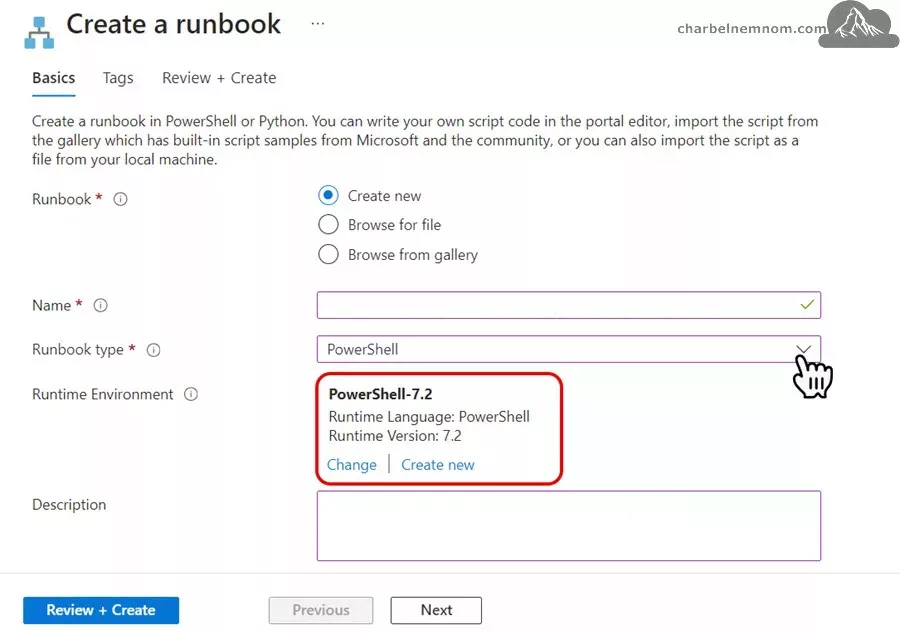
Next, select Review + Create and click Create.
Edit the Runbook
Once you have created the runbook, you must edit it and add the PowerShell script below. As mentioned, we will create a Runbook to connect to your Azure account using the subscription ID, resource group name, and log analytics workspace name. Then, it will check if the saved Workbook(s) are outdated compared to the installed template(s) from Content Hub. If the saved Workbook(s) is outdated, it will update the saved Workbook(s) in Microsoft Sentinel to the latest template version you imported from Content Hub.
The automation runbook is as follows. It is a modified version of the above script fine-tuned for Automation Accounts:
<#
.SYNOPSIS
Update Microsoft Sentinel "My Workbooks" Templates at Scale.

.DESCRIPTION
How to automatically update Microsoft Sentinel "My Workbooks" Templates at Scale using PowerShell and REST API.

.NOTES
File Name : Update-SentinelWorkbooks.ps1
Author    : Microsoft MVP/MCT - Charbel Nemnom
Version   : 1.0
Date      : 04-October-2024
Updated   : 07-October-2024
Requires  : PowerShell 7.4.x (Core)
Module    : Az Module
Service   : Automation Accounts

.LINK
To provide feedback or for further assistance please visit:
 https://charbelnemnom.com

.EXAMPLE
.\Update-SentinelWorkbooks.ps1 -SubscriptionId <SUB-ID> -ResourceGroup <RG-Name> -WorkspaceName <Log-Analytics-Name> -Verbose
This example will connect to your Azure account using the subscription ID specified. Then, check all the installed and saved Workbooks in Microsoft Sentinel.
Then, it will check if the saved Workbook(s) are outdated compared to the installed template(s) from Content Hub.
If the saved Workbook(s) is outdated, it will update the saved Workbook(s) to the latest template version available.
#>

param (
    [Parameter(Position = 0, Mandatory = $true, HelpMessage = 'Enter Azure Subscription ID')]
    [string]$subscriptionId,
    [Parameter(Position = 1, Mandatory = $true, HelpMessage = 'Enter Resource Group Name where Microsoft Sentinel is deployed')]
    [string]$resourceGroupName,
    [Parameter(Position = 2, Mandatory = $true, HelpMessage = 'Enter Log Analytics Workspace Name')]
    [string]$workspaceName
)

# Ensures you do not inherit an AzContext in your runbook
Disable-AzContextAutosave -Scope Process

#! Check Azure Connection
Try {
    Write-Output "Connecting to Azure Cloud..."
    # Connect to Azure with system-assigned managed identity (automation account)
    Connect-AzAccount -Identity -ErrorAction Stop | Out-Null
}
Catch {
    Write-Warning "Cannot connect to Azure Cloud. Please check your managed identity Azure RBAC access. Exiting!"
    Break
}

# Set Azure Subscription context
Set-AzContext -Subscription $subscriptionId

# Define the API Version to use for Microsoft Sentinel and Application Insights
$sentinelApiVersion = "api-version=2024-04-01-preview"
$appInsightsApiVersion = "api-version=2023-06-01"

#! Get Az Access Token
# This will default to Azure Resource Manager endpoint
# Note: Add the [-AsSecureString] parameter, the change is expected to take effect in Az module version: '13.0.0' and later
Write-Verbose "Getting Azure Access Token..." -Verbose
$token = Get-AzAccessToken -TenantId $azAccount.Tenant.id
$authHeader = @{
    'Content-Type'  = 'application/json'
    'Authorization' = 'Bearer ' + $token.Token
}

# Get all installed Microsoft Sentinel Workbook Templates
Write-Verbose "Getting all installed Microsoft Sentinel Workbook Templates..." -Verbose
$workbookTemplateURI = "https://management.azure.com/subscriptions/$subscriptionid/resourceGroups/$resourceGroupName/providers/Microsoft.OperationalInsights/workspaces/$workspaceName/providers/Microsoft.SecurityInsights/contenttemplates?$($sentinelApiVersion)&%24filter=(properties%2FcontentKind%20eq%20'Workbook')"
$workbookContentTemplates = (Invoke-RestMethod $workbookTemplateURI -Method 'GET' -Headers $authHeader).value
try {
    if ($workbookContentTemplates.Count -eq 0) {
        throw "No Workbook templates can be found in Microsoft Sentinel. Please install Workbooks from the Content Hub blade!"
    }
}
catch { Write-Error $_ -ErrorAction Stop }
Write-Verbose "$($workbookContentTemplates.count) Microsoft Sentinel installed Workbook templates were found..." -Verbose

# Get all saved Microsoft Sentinel Workbooks
Write-Verbose "Getting all saved Microsoft Sentinel Workbooks..." -Verbose
$installedWorkbookURI = "https://management.azure.com/subscriptions/$subscriptionid/resourceGroups/$resourceGroupName/providers/Microsoft.Insights/workbooks?$($appInsightsApiVersion)&canFetchContent=false&%24filter=sourceId%20eq%20'%2Fsubscriptions%2F$($subscriptionid)%2Fresourcegroups%2F$($resourceGroupName)%2Fproviders%2Fmicrosoft.operationalinsights%2Fworkspaces%2F$($workspaceName)'&category=sentinel"
$installedWorkbookResponse = (Invoke-RestMethod $installedWorkbookURI -Method 'GET' -Headers $authHeader).value
try {
    if ($installedWorkbookResponse.Count -eq 0) {
        throw "No saved Workbook can be found in the resource group: $($resourceGroupName). Please save Microsoft Sentinel Workbooks from the Templates tab!"
    }
}
catch { Write-Error $_ -ErrorAction Stop }
Write-Verbose "$($installedWorkbookResponse.Count) Microsoft Sentinel saved Workbooks were found..." -Verbose

# Filter out the saved workbooks from the installed Workbook templates
Write-Verbose "Filter out Microsoft Sentinel saved Workbooks from the installed Workbook templates from Content Hub..." -Verbose
$installedWorkbookMetadataURI = "https://management.azure.com/subscriptions/$subscriptionid/resourceGroups/$resourceGroupName/providers/Microsoft.OperationalInsights/workspaces/$workspaceName/providers/Microsoft.SecurityInsights/metadata?$($sentinelApiVersion)&%24filter=(properties%2FKind%20eq%20'Workbook')"
$installedWorkbookMetadataResponse = (Invoke-RestMethod $installedWorkbookMetadataURI -Method 'GET' -Headers $authHeader).value
$installedWorkbookTemplates = $workbookContentTemplates | Where-Object { $installedWorkbookMetadataResponse.properties.contentId -eq $_.properties.contentId }
try {
    if ($installedWorkbookTemplates.count -eq 0) {
        throw  "No saved Workbooks were found that match the installed Microsoft Sentinel Workbook templates from Content Hub..."
    }
}
catch { Write-Error $_ -ErrorAction Stop }
Write-Verbose "$($installedWorkbookTemplates.count) Microsoft Sentinel saved Workbooks remained..." -Verbose

$workbookUpdates = @()

# Checking if the remaining saved Workbooks are outdated and need to be updated
Write-Verbose "Checking if the remaining saved Workbooks version are outdated and need to be updated..." -Verbose
foreach ($installedWorkbookTemplate in $installedWorkbookTemplates) {

    $oldMetadataName = ($installedWorkbookMetadataResponse | Where-Object { $installedWorkbookTemplate.properties.contentId -eq $_.properties.contentId }).name
    $oldWorkbookName = $oldMetadataName -replace 'workbook-', ''

    $workbookURI = "https://management.azure.com/subscriptions/$subscriptionid/resourceGroups/$resourceGroupName/providers/Microsoft.OperationalInsights/workspaces/$workspaceName/providers/Microsoft.SecurityInsights/metadata/$($oldMetadataName)?$($sentinelApiVersion)"
    $workbookResponse = Invoke-RestMethod $workbookURI -Method 'GET' -Headers $authHeader -Verbose:$false

    if ($workbookResponse.properties.version -ne $installedWorkbookTemplate.properties.version) {
        Write-Verbose "Microsoft Sentinel Workbook [$($installedWorkbookTemplate.properties.displayName)] is outdated `
         and running version [$($workbookResponse.properties.version)] and needs to be updated to version [$($installedWorkbookTemplate.properties.version)]" -Verbose
        Write-Verbose "Updating Microsoft Sentinel Workbook [$($installedWorkbookTemplate.properties.displayName)]..." -Verbose

        # Deleting outdated workbook
        Write-Verbose "Deleting the outdated Microsoft Sentinel Workbook [$($installedWorkbookTemplate.properties.displayName)] version [$($workbookResponse.properties.version)]..." -Verbose
        $deleteOldWorkbookURI = "https://management.azure.com/subscriptions/$subscriptionid/resourceGroups/$resourceGroupName/providers/Microsoft.Insights/workbooks/$($oldWorkbookName)?$($appInsightsApiVersion)"
        $deleteOldWorkbookResponse = Invoke-RestMethod $deleteOldWorkbookURI -Method 'DELETE' -Headers $authHeader -Verbose:$false

        # Deleting the metadata of the outdated workbook
        Write-Verbose "Deleting the metadata of the outdated Microsoft Sentinel Workbook [$($installedWorkbookTemplate.properties.displayName)] version [$($workbookResponse.properties.version)]..." -Verbose
        $deleteMetadataWorkbookURI = "https://management.azure.com/subscriptions/$subscriptionid/resourceGroups/$resourceGroupName/providers/Microsoft.OperationalInsights/workspaces/$workspaceName/providers/Microsoft.SecurityInsights/metadata/$($oldMetadataName)?$($sentinelApiVersion)"
        $deleteMetadataWorkbookResponse = Invoke-RestMethod $deleteMetadataWorkbookURI -Method 'DELETE' -Headers $authHeader -Verbose:$false

        # Generate a new GUID for the new workbook
        Write-Verbose "Generating a new GUID for the new Microsoft Sentinel Workbook [$($installedWorkbookTemplate.properties.displayName)]" -Verbose
        $guid = (New-Guid).Guid
        $newWorkbookName = ($workbookContentTemplates | Where-Object { $installedWorkbookTemplate.properties.contentId -eq $_.properties.contentId }).Name
        $newWorkbookURI = "https://management.azure.com/subscriptions/$subscriptionid/resourceGroups/$resourceGroupName/providers/Microsoft.OperationalInsights/workspaces/$workspaceName/providers/Microsoft.SecurityInsights/contenttemplates/$($newWorkbookName)?$($sentinelApiVersion)"
        $newWorkbookResponse = (Invoke-RestMethod $newWorkbookURI -Method 'GET' -Headers $authHeader).properties.mainTemplate.resources
        $newWorkbook = $newWorkbookResponse | Where-Object type -eq 'Microsoft.Insights/workbooks'
        $newWorkbook = $newWorkbook | Select-Object * -ExcludeProperty apiVersion, metadata, name
        $newWorkbook | Add-Member -NotePropertyName name -NotePropertyValue $guid
        $newWorkbookPayload = $newWorkbook | ConvertTo-Json -EnumsAsStrings -Depth 50
        # Updating to the latest Microsoft Sentinel workbook version
        Write-Verbose "Updating to the latest Microsoft Sentinel Workbook [$($installedWorkbookTemplate.properties.displayName)] to version [$($installedWorkbookTemplate.properties.version)]..." -Verbose
        $createNewWorkbookURI = "https://management.azure.com/subscriptions/$subscriptionid/resourceGroups/$resourceGroupName/providers/Microsoft.Insights/workbooks/$($guid)?$($appInsightsApiVersion)"
        try {
            $createNewWorkbookResponse = Invoke-AzRestMethod $createNewWorkbookURI -Payload $newWorkbookPayload -Method 'PUT' -Verbose:$false
            If (!($createNewWorkbookResponse.StatusCode -in 200, 201)) {
                Write-Warning $workbookResult.StatusCode
                Write-Warning $workbookResult.Content
                throw "Error when updating the latest Microsoft Sentinel Workbook [$($installedWorkbookTemplate.properties.displayName)] to version [$($installedWorkbookTemplate.properties.version)]"
            }
            else {
                Write-Verbose "Microsoft Sentinel Workbook [$($installedWorkbookTemplate.properties.displayName)] is updated to version [$($installedWorkbookTemplate.properties.version)]!" -Verbose
            }
        }
        catch {
            Write-Error $_ -ErrorAction Continue
        }

        # Updating the metadata of the new workbook
        Write-Verbose "Updating the metadata of the new Microsoft Sentinel Workbook [$($installedWorkbookTemplate.properties.displayName)] to version [$($installedWorkbookTemplate.properties.version)]..." -Verbose
        $newWorkbookMetadata = $newWorkbookResponse | Where-Object type -eq 'Microsoft.OperationalInsights/workspaces/providers/metadata'
        $newWorkbookMetadata = $newWorkbookMetadata | Select-Object * -ExcludeProperty apiVersion, name
        $newWorkbookMetadata | Add-Member -NotePropertyName name -NotePropertyValue "workbook-$($guid)"
        $workbookParentId = $newWorkbookMetadata.properties.parentId -replace '/[^/]+$', "/$guid"
        $newWorkbookMetadata.properties | Add-Member -NotePropertyName parentId -NotePropertyValue $workbookParentId -Force
        $newWorkbookMetadataPayload = $newWorkbookMetadata | ConvertTo-Json -EnumsAsStrings -Depth 50
        $updateMetadataWorkbookURI = "https://management.azure.com/subscriptions/$subscriptionid/resourceGroups/$resourceGroupName/providers/Microsoft.OperationalInsights/workspaces/$workspaceName/providers/Microsoft.SecurityInsights/metadata/workbook-$($guid)?$($sentinelApiVersion)"
        try {
            $updateMetadataWorkbookResponse = Invoke-AzRestMethod $updateMetadataWorkbookURI -Payload $newWorkbookMetadataPayload -Method 'PUT' -Verbose:$false
            If (!($updateMetadataWorkbookResponse.StatusCode -in 200, 201)) {
                Write-Warning $workbookResult.StatusCode
                Write-Warning $workbookResult.Content
                throw "Error when updating the metadata of the Microsoft Sentinel Workbook [$($installedWorkbookTemplate.properties.displayName)] to version [$($installedWorkbookTemplate.properties.version)]"
            }
            else {
                Write-Verbose "Microsoft Sentinel Workbook metada [$($installedWorkbookTemplate.properties.displayName)] is updated to version [$($installedWorkbookTemplate.properties.version)]!" -Verbose
                $workbookUpdates += $installedWorkbookTemplate
            }
        }
        catch {
            Write-Error $_ -ErrorAction Continue
        }
    }
    else {
        Write-Verbose "Microsoft Sentinel Workbook: [$($installedWorkbookTemplate.properties.displayName)] is already up-to-date!" -Verbose
    }
}
Write-Verbose "$($workbookUpdates.count) Microsoft Sentinel saved workbooks were updated!" -Verbose
Please refer to the following guide, which describes all the steps for automating Microsoft Sentinel Analytics Rules updates using Automation Accounts. The exact process and workflow will apply to automating the Microsoft Sentinel Workbooks update.
That’s it, there you have it. Happy Automating and Updating Microsoft Sentinel Workbooks at Scale!
In Summary
Automating the update of Microsoft Sentinel workbooks at scale using PowerShell and REST API can significantly improve operational efficiency, especially for teams managing multiple tenants and workbooks. By streamlining this process, you can save valuable time, ensure your workbooks stay current, and reduce manual efforts.
This method, along with further automation using Azure Automation Accounts, offers a powerful way to keep Microsoft Sentinel optimized. Whether you’re a managed security service provider (MSSP) or an enterprise team, this solution provides a scalable and cost-effective way to manage your security operations more effectively.
__
Thank you for reading our blog.
Please let us know in the comments section below if you have any questions or feedback.
-Charbel Nemnom-
