
Microsoft Sentinel has become a leading cloud SIEM/XDR/SOAR platform, but organizations often struggle to get full value from it. High-volume security telemetry can drive up ingestion and storage costs, while raw log noise leads to alert fatigue and wasted analyst time. Building custom data pipelines for collection, transformation, and routing can be manual and error-prone, and Sentinel’s native data model may not accommodate all formats or compliance requirements out of the box.
In this multi-part blog series, we’ll introduce VirtualMetric DataStream, a unified telemetry pipeline that addresses these challenges. DataStream intelligently filters, enriches, normalizes, and routes security data so that only meaningful logs reach Sentinel, while less-critical logs are offloaded to cost-effective storage, including Sentinel data lake.
In Part 1 (this article), we outline common Sentinel pain points and show how DataStream’s architecture and features address them, setting the stage for subsequent deep dives (including using Syslog and Windows Event Collector as input sources). Our focus is on the expert perspective we apply, combined with real-world lessons that we learned along the way, to help security architects and SOC teams make Sentinel deployments more efficient and cost-effective.
Table of Contents
Common Challenges with Microsoft Sentinel
Microsoft Sentinel delivers powerful SIEM and SOAR capabilities, which have again been recognized as a Leader in the 2025 Gartner® Magic Quadrant™ for Security Information and Event Management (SIEM). But its consumption-based pricing and broad scope introduce issues. However, we often see in customers’ environments and report that Sentinel deployments face:
* High ingestion costs. Every log ingested into Sentinel’s Log Analytics workspace incurs charges. High-volume sources (firewalls, infrastructure logs, cloud services) can quickly increase cloud bills. Sentinel’s “High cost (ingest-based)” pricing is a top technical challenge. Yes, you may have heard that you can run Sentinel for free, but in the real world, this does not apply to organizations with hybrid services and a wide range of data sources. Sentinel offers only a limited set of free data sources for ingestion.
* Alert fatigue and noise. With raw logs ingested into Sentinel’s analytics, alert rules can generate overwhelming noise. Poorly filtered data and redundant events obscure actual threats. We see “alert fatigue (a lot of noise)” as a key pain point, meaning critical alerts may be drowned out by irrelevant ones.
* Manual pipeline configuration. Native Sentinel connectors and Data Collection Rules (DCRs) cover many sources, but complex environments often need custom ingestion pipelines. Building and maintaining these data pipelines (filtering, parsing, routing) can require scripting, maintenance, and ongoing manual work. Any schema changes or new devices force reconfiguration.
* Poor data quality and normalization. Logs may arrive in different formats (CEF, LEEF, JSON, Windows events, etc.), making correlation hard. Without schema normalization (e.g., to Microsoft’s CommonSecurityLog or ASIM model), many logs sit idle or generate duplicate alerts. “Poor data quality” is explicitly listed as a Sentinel shortcoming, reflecting challenges in structuring and contextualizing data for effective detection.
* Compliance and retention limits. Sentinels’ built-in retention is free for 90 days (unless you pay more). Long-term archival of logs for compliance (e.g., GDPR, PCI, SOX) becomes expensive. Organizations may need external storage (e.g., ADX or blob storage) for audit logs, which complicates visibility and access controls. With the introduction of the Sentinel data lake, Microsoft claimed that data is compressed at a 6:1 ratio across all data sources. This means 6 times lower storage costs, but we can still do better.
These issues collectively diminish Sentinel’s return on investment. High ingestion costs limit the budget, and “log sprawl” reduces the security team’s capacity to identify real threats. In summary, many teams require more innovative security data processing and telemetry pipelines to extract greater value from their SIEM.
Gartner predicts that by 2026, “40% of logs will go through a telemetry pipeline, up from less than 10% in 2022”, reflecting the move toward pre-processing data. Forrester similarly urges that any modern security program should adopt managed data pipelines. In our own experience advising SOCs, we’ve seen organizations struggling with ad-hoc collection scripts and rising ingestion bills until they adopted a pipeline solution.
Introducing VirtualMetric DataStream
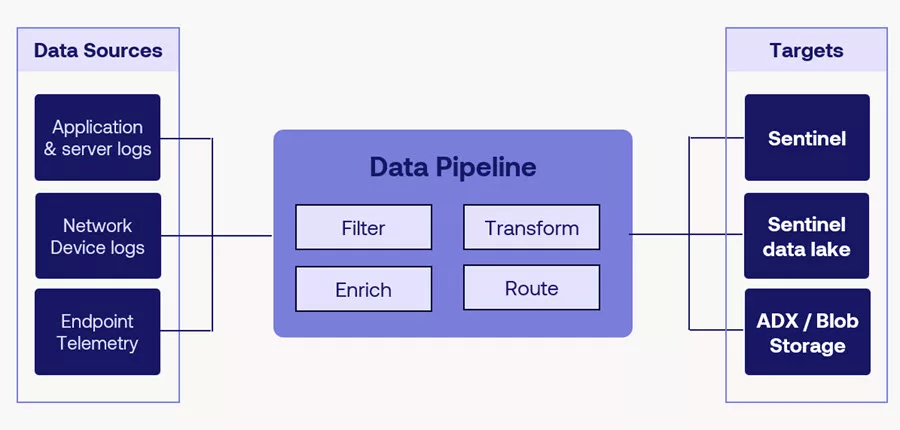
VirtualMetric DataStream is designed as a comprehensive telemetry pipeline specifically to optimize Microsoft Sentinel (and other security platforms). It acts as a “central nervous system” for your logs, ingesting from on-premises and cloud sources, processing them in-flight, and intelligently routing outputs. Unlike manual scripts or basic log forwarders, DataStream automates filtering, transformation, enrichment, and compression at scale. Critically, it reduces Sentinel ingestion volume by 50–90% while handling the full workload. This means organizations can dramatically reduce Microsoft Sentinel costs without sacrificing visibility.
Key features of DataStream include:
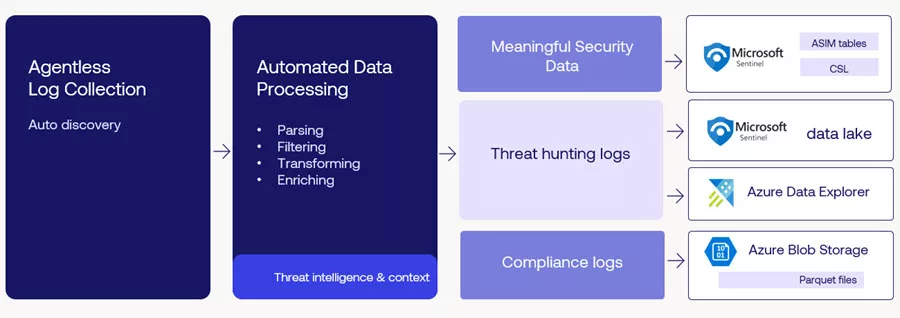
* Smart Data Filtering & Enrichment: DataStream’s pipelines apply rules and schemas (including Microsoft’s ASIM) to drop non-actionable fields and logs. Irrelevant or duplicate events are filtered out on the fly. Enrichment (Geo-IP, threat intel lookups, asset tagging, etc.) adds context to make high-value logs more useful. This auto-filtering ensures analysts see “meaningful security data” instead of noise.
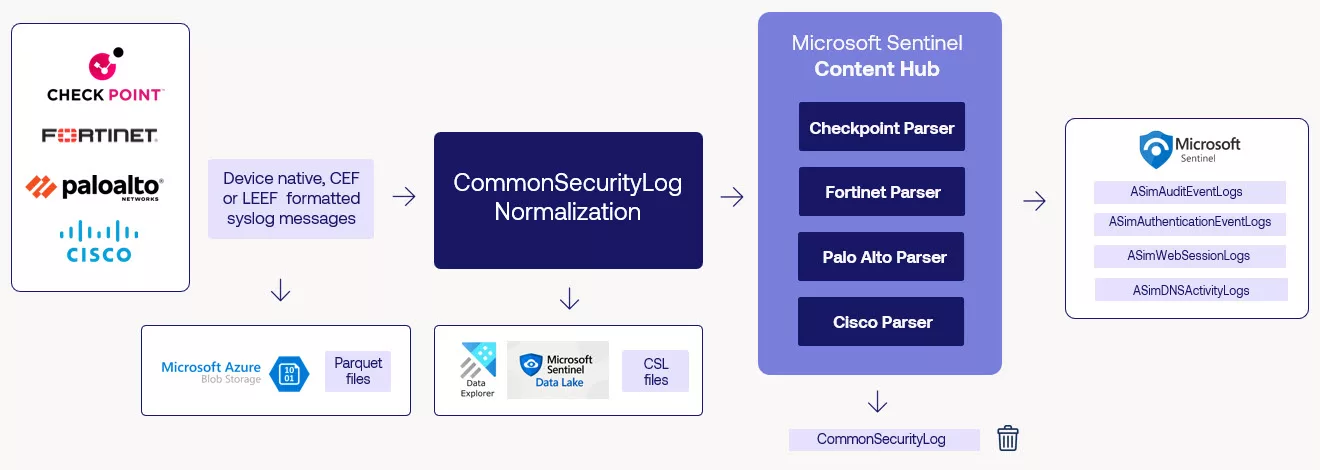
* Automated Normalization (ASIM/CSL): Logs are normalized to standard schemas (CEF/LEEF to CommonSecurityLog or the Advanced Security Information Model) automatically. For example, VirtualMetric “converts CEF-formatted logs into Microsoft’s CommonSecurityLog (CSL) and ASIM-compliant formats”. By doing this at ingest time, Sentinel’s rule engine and XDR tools can correlate events across sources. Contextual mapping (e.g., recognizing that a log entry is an authentication event vs. a config change) further reduces noise.

* Cost-Efficient Storage & Routing: Rather than sending everything to Sentinel, DataStream routes logs to the most appropriate destination. High-priority security events go to Sentinel log analytics; large-volume or compliance logs are archived to Sentinel data lake, Azure Data Explorer, or Blob Storage. DataStream’s intelligent data routing ensures “security-relevant data is routed efficiently”: critical logs to Sentinel, hunting data to data lake or ADX, and long-term archives to Blob. Unused logs can stay compressed offline until needed, thus reducing cloud costs.
* Seamless Integration: DataStream includes built-in connectors and templates for Microsoft Sentinel and Azure services. It can inject logs via Sentinel’s normal APIs or via new Log Analytics “Data Lake” tables. Importantly, it can operate agentless for many sources (e.g., SSH-based Linux log collection or WinRM-based Windows events), while still supporting a lightweight agent if needed. This makes it easy to onboard sources like firewalls (CEF/LEEF over Syslog) or servers without reconfiguring existing endpoints.
* Operational Analytics & Management: VirtualMetric’s cloud portal provides centralized pipeline visibility, performance metrics, and RBAC. Teams can see real-time flow stats and adjust filters on the fly. There is no blind spot – the control plane handles config and monitoring, while all data plane processing stays on-premises/cloud within your environment, addressing data sovereignty concerns.
The combined capabilities of this solution lead to significant returns on investment (ROI). We have observed a typical reduction of 50% to 90% in the volume of data ingested into Sentinel, along with a 25% to 75% decrease in manual processing effort. By compressing data by up to 99% and offloading it, storage costs significantly decrease. As a result, Sentinel operates more efficiently and can focus on generating high-fidelity alerts.
In practice, we have seen these benefits realized. In a recent proof-of-value, a customer routing firewall and network logs through DataStream saw total log volume to Sentinel drop by ~80%, dramatically lowering their monthly ingestion bill. Another common example: a Managed Security Service Provider (MSSP) used DataStream to normalize logs for many tenants simultaneously, avoiding hundreds of custom pipelines. These results echo industry sentiment.
VirtualMetric is a next-gen Security Data Pipeline Platform (SDPP) vendor, with a technically sophisticated design built to solve ingestion, routing, and cost challenges for Sentinel users. This means that DataStream could emerge as a credible option for Microsoft-centric security environments. These reflect the reality that DataStream delivers the clean, contextual data and flexibility that enterprise Sentinel deployments need.
VirtualMetric DataStream Architecture
At the core of DataStream’s power is its modular, security-first architecture. It enforces a strict separation between the data plane/control plane: all log processing occurs on your infrastructure, while management is via a centralized VirtualMetric cloud console. This means sensitive logs never leave your network (only encrypted metadata and heartbeats go out over HTTPS). A simple outbound SSL (443) connection suffices for updates and monitoring.

Let’s now dive into architecture and learn about all the components:
VirtualMetric Director
The Director is the heart of DataStream’s data plane. It is a scalable containerized service you deploy on a server or VM (on-premises or in your Azure/AWS/GCP cloud). In short, a Director is the engine that processes your data flows. It receives data from your data sources, processes it through pipelines, and sends it to your destinations. In effect, it is the central orchestrator of all collection, transformation, and routing. The director supports multiple concurrent pipelines and schemas (ASIM, OCSF, ECS, etc.), so it can normalize logs to the desired model on the fly.
Key characteristics of the Director include:
* Multi-Protocol Collection: It can listen on TCP/UDP (e.g., Syslog 514/UDP, TCP/1514), HTTP sources (webhooks, REST API pulls), watch files, or use APIs and DB streams. It also accepts data pushed from VirtualMetric Agents.
* Vectorized Pipeline Processing: The Director’s core uses all CPU cores for parallel processing. Performance benchmarks show it can ingest and process logs up to 10× faster than legacy JSON-based pipelines. An internal write-ahead log (WAL) ensures that no data is lost even if processes restart.
* Normalization and Enrichment: Built-in processors perform parsing (CEF/LEEF/JSON/XML), field extraction, and normalization. VirtualMetric includes many parsers (Checkpoint, Palo Alto, Cisco, Fortinet, etc.) to map raw fields into CSL/ASIM tables. The Director can also add enrichment tags (WHOIS, DNS lookup, geo-location, TI indicators) during pipeline execution.
* Intelligent Routing: Once processed, the Director routes data to one or more targets based on content or policy. It supports conditional routes (e.g., send all authentication events to Sentinel, send web logs to Azure Data Explorer). Load balancing, failover, and priority routing are built in. The intelligent routing enables dynamic destination selection among Sentinel, AWS Security Lake, Splunk, etc. Our focus here is on Microsoft destinations.
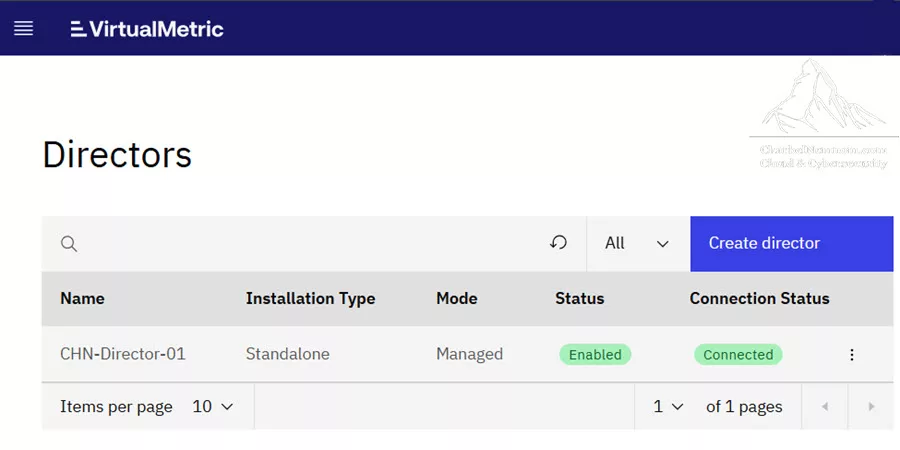
You configure and create Directors centrally via the VirtualMetric cloud portal. Multiple Directors (even clustered for HA) can be managed in one account. The Director’s software is lightweight and runs on Windows or Linux hosts; on Windows, it leverages Windows Remote Management (WinRM) for agentless collection, and on Linux, it can directly monitor Syslog or pull logs via SSH.
VirtualMetric Agent
The next component is the VirtualMetric Agent. While the Director can work agentlessly for many sources, VirtualMetric provides a lightweight Agent for high-performance data collection on machines. The agent handles local log collection (Windows event logs, Linux logs, performance counters, etc.) and streams data to the Director in real-time.
VirtualMetric Agent is a lightweight, high-performance data-collection component that gathers telemetry from various sources while maintaining minimal system impact. It buffers locally, handles reconnections, and supports plugins for custom sources. In practice, you’d install an agent on key servers or as a forwarder where standard protocols aren’t available. The agent ensures reliable delivery with crash recovery and persistent queues, so transient network issues won’t lose logs.
Even in so-called agentless configurations, the Director uses a dynamic deployment mechanism via WinRM to trigger the Agent, which handles collection and buffering. This approach ensures stability and efficiency in environments where persistent WinRM sessions would be costly or unreliable.
VirtualMetric Director Proxy and MSSP Deployment
For multi-tenant or highly segmented environments, DataStream offers a Director Proxy. This is essentially a secure bridge component that lives in each customer’s environment (or branch network) to receive data from the central Director, without giving the Director direct access to customer credentials or networks. The Director Proxy enables secure data delivery to customer-owned destinations while maintaining complete isolation of customer credentials. It listens for encrypted, token-authenticated streams from the central Director and then forwards processed logs to local endpoints (such as the customer’s own Sentinel workspace, data lake, or ADX).

This architecture is ideal for MSSPs or large enterprises with siloed units. In the MSSP deployment model, each client installs a Director Proxy (e.g., as an Azure Function or on-premises container). The MSSP runs one or more Directors centrally. Each customer shares only the Proxy’s endpoint and an auth token. The Director pushes data to the Proxy, and the Proxy – using that customer’s own Azure Managed Identity – pushes to the client’s Sentinel and storage. This way, no customer credentials are exposed to the MSSP. It also ensures compliance: customers retain complete control over where their logs land, even as an MSSP scales collection.
Architecture Summary
In summary, the DataStream architecture cleanly separates control vs data planes. Your security team defines pipelines and policies via the cloud portal (multi-tenant SaaS control plane), but all log ingestion and processing happens inside your network. The Director(s) and Agents handle “data in motion” locally, and only final results (or encrypted streams) go out. This design provides zero third-party data exposure, full data sovereignty, and minimal external networking (just outbound HTTPS and specified inbound ports for Syslog or agent communication).
Additional architectural benefits include role-based access controls on pipelines, high availability options (clustered Directors), containerized or VM deployments, and zero inbound connections required from the cloud. The bottom line is an enterprise-grade, scalable pipeline with sub-second data propagation and enterprise-scale throughput. In our tests, it easily handled bursts of 100k EPS with minimal latency.
Value Proposition: ROI and Insights
The VirtualMetric DataStream value proposition for Sentinel is clear: do more with less. By filtering out noise and compressing intelligently, it turns an unwieldy log torrent into a lean, enriched feed. This reduces Azure expenditures and frees SOC teams to hunt real threats. The built-in compliance storage features ensure you meet audit requirements without inflating Sentinel costs.
Here are the key ROI points that we see:
* Reduce Azure Costs: DataStream implementations see “50% to 90% reduction in data volume ingested into Microsoft Sentinel. This directly lowers Sentinel ingestion and retention charges. For example, routing bulk DNS or proxy logs to a cheap data lake table rather than sending them all to Log Analytics can reduce costs by orders of magnitude.
* Reduce Manual Effort: Automated pipelines mean fewer scripts and spreadsheets to update. We reduced 25–75% reduction in manual log collection and processing efforts. Teams no longer need to hand-write parsers or re-work Data Collection Rules (DCRs) for every new device – that is all handled in DataStream’s GUI-driven pipelines. If you are already working with DCRs, you know how painful it is.
* Improve Detection Efficiency: With context-enriched, normalized data, security tools (Sentinel and XDR) can detect threats more accurately. We often see lower false-positive rates and faster triage when data is pre-processed. In one case, a customer found a user account anomaly in cloud logs within hours of deployment – something that had gone unnoticed before due to log clutter. VirtualMetric summarizes this as improved “Security & Threat detection” and “Hunting logs” availability.
* Enable Compliance and Forensics: By archiving filtered logs in Sentinel data lake, Azure Data Explorer (ADX), or Blob Storage, organizations can retain audit trails for years. DataStream can also push logs back into Sentinel’s new data lake tables as needed. This meets compliance needs (retaining logs for HIPAA, PCI, etc.) without blowing up the hot Log Analytics workspace. The ability to pull archived logs into Sentinel on demand is a game-changer for investigations.
From our perspective as security advisors, we find that virtualMetric DataStream effectively delivers on its promises. In the deployments we’ve observed over the past year, Sentinel workspaces have become more streamlined and faster after integrating DataStream. Teams can set data routing rules and then focus on refining detection content instead of managing logs. However, it’s important to note that no single product can solve every issue. DataStream requires proper configuration, and the initial setup involves careful planning (which we’ll cover in future posts). For many organizations, this pipeline has been crucial in maximizing their return on investment in Sentinel.
Building Out the Pipeline: Prerequisites and Next Steps
In the first part of this series, we’ve outlined the why and what of DataStream. To prepare for implementation, security teams should gather and configure the underlying data sources. In upcoming posts, we will dive into hands-on steps (connecting to Syslog, Windows Event Collector, and sink targets).
For now, the critical prerequisites include:
* Syslog Sources (Linux/Network Devices): Ensure that your network devices, firewalls, and Linux/Unix hosts can forward Syslog events to the DataStream Director. This typically means opening UDP/TCP port 514 (and/or 1514 for secure Syslog) on the host where the Director will run. Configure devices (firewalls, switches, IDS, etc.) to send their logs in CEF/LEEF or plain Syslog to DataStream. VirtualMetric explicitly supports “native Syslog messages” as inputs. In practice, point your first tier of log forwarders at the DataStream collector instead of directly at Sentinel.
It’s worth noting that VirtualMetric DataStream helps avoid data duplication across normalization tiers without complex conditional logic. What does this mean to you?
Suppose you have data that supports multiple source schemas, such as LEEF, CEF, and native Syslog messages via Syslog autodiscovery, and multiple destination tables in Sentinel, such as Syslog, CommonSecurityLog, and 10 ASIM tables. In that case, it must go through several normalization layers, vendor autodiscovery, and other steps. This turns it into condition-based routing, which is not as simple as CEF detection. This is easy if you only support a single-source schema, like CEF, but not with multiple-source schemas.
Technically, you could configure one DCR rule for each vendor’s native Syslog format. But in that scenario, configuration would become very difficult: you would need to create multiple listeners for each vendor, and configure AMA to send each port to a different DCR, and so on. VirtualMetric DataStream has recently embedded a clean, predictable, and cost-efficient pattern for multi-tier normalization without duplication. Read on how to simplify multi-tier data pipelines with staged routes and commit processors.
* Windows Event Forwarding (WEC): For Windows servers and domain controllers, configure a Windows Event Collector (WEC) or direct access to collect security, application, and system events. In the case of DataStream, the Director does not pull logs directly via WinRM. Instead, it uses WinRM to initiate a secure connection to the target host, injects a lightweight agent, and then disconnects. The agent performs all log collection using the Windows API and forwards events to the Director via HTTPS (port 443) in VMF format.
This model ensures better efficiency, resilience, and avoids the performance and stability issues commonly associated with persistent WinRM connections. Even if connectivity is lost temporarily, the local agent buffers logs to prevent data loss from event log rotation.
* DataStream Director Deployment: Provision one or more servers for the DataStream Director (Windows or Linux) according to your scale. Ensure these machines have outbound HTTPS (port 443) access to virtualmetric-cloud for management, and inbound ports open for receiving the chosen data (e.g., 514/1514 for Syslog, 5985 for WinRM, etc.). If using an agent, install it on your WEC or on-premises servers; otherwise, verify you have credentials or keys to allow Director to SSH/WinRM to sources.
* Azure and Sentinel Preparation: In the Azure tenant where Sentinel runs, ensure you have a Log Analytics workspace or the newer Sentinel data lake enabled. DataStream will publish into these via a Sentinel connector. Provide DataStream with service principal or Managed Identity credentials that can send data to your Sentinel workspace (and to ADX/Blob if using those for archives). For MSSPs, each customer’s proxy should be set up with its own Managed Identity to push into that tenant’s Sentinel data lake.
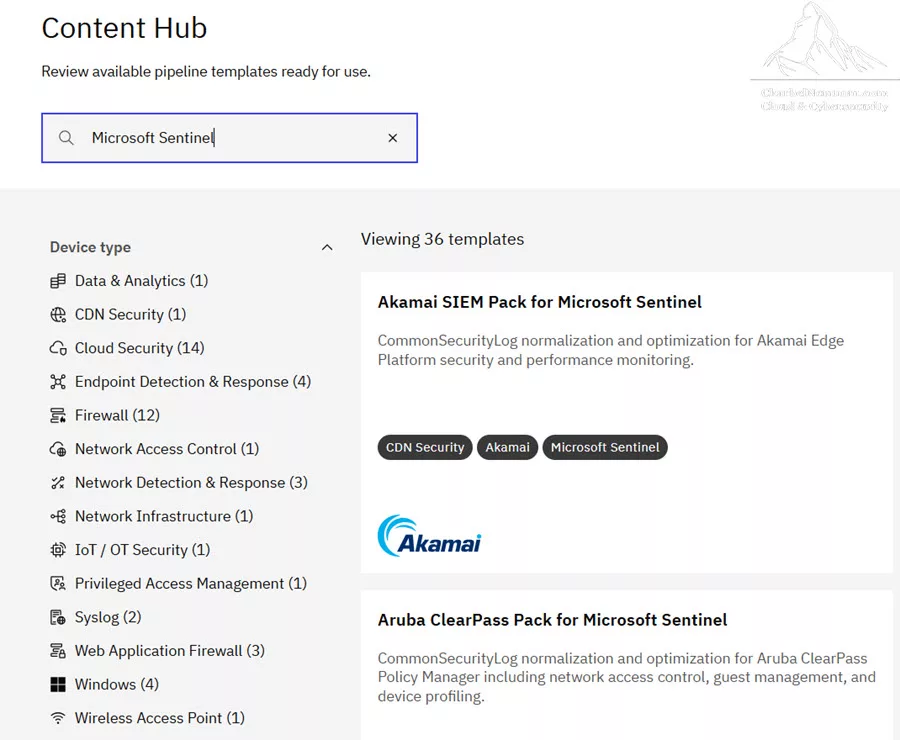
* General Pipeline Planning: Define which logs should flow where. For example, you might route all Windows login events to Sentinel (for IAM monitoring) and send verbose system logs to Sentinel data lake or blob storage for audit. Identify any parsing or enrichment needs (e.g., mapping IPs to geolocation). VirtualMetric’s Content Hub and examples can help bootstrap this.
As a best practice, you generally start with a proof-of-value by selecting a few sources and targets. One roadmap is: (1) set up basic Syslog and WEC ingestion into DataStream; (2) build simple pipelines that filter and send events to Sentinel workspace and to Sentinel data lake or to Azure Data Explorer cluster; (3) verify volume reduction and validate alerts; (4) iterate to cover all critical log sources. We will detail these steps in later articles.
In Conclusion
As a final note, remember that DataStream is highly configurable but requires proper scoping. Each environment’s needs differ (which logs need filtering, retention policies, etc.), so plan your pipeline logic carefully. The architecture is there to support any scale: whether a single Director capturing 10K EPS or a clustered setup handling multi-tenancy, the components (Director, Agent, Proxy) work together.
In Part 2 of this series, we will walk through deploying DataStream and connecting it to Sentinel. We’ll cover creating a DataStream Director, configuring Syslog and WEC devices, and setting up routes into a Sentinel workspace and data lake. Stay tuned for a detailed, step-by-step implementation guide that puts the above concepts into action, using best practices and real-world examples.
Remember, you can always support us in developing tools and creating content via Why Contribute? – Charbelnemnom.com Cloud & Cybersecurity
__
Thank you for reading our blog.
Please let us know in the comments section below if you have any questions or feedback.
-Charbel Nemnom-
