
Updated – 17/06/2026 – Microsoft has released native Split and Filter Transformations in Microsoft Sentinel, enabling fine-grained data routing between the Analytics and data lake tiers directly from the Defender portal—without manually authoring DCR configurations. See the expanded “The Hybrid Approach: Splitting Ingestion” section and the updated “Filter Early, Filter Aggressively” section for details.
Updated – 02/05/2026 – As of April 15, 2026, Microsoft has announced a new threshold enforcement for KQL queries and notebooks in the Microsoft Sentinel data lake. So, you can now go beyond notifications and automatically block new queries and jobs when your configured usage limits are exceeded. You and your SOC analysts keep working confidently, and your budgets stay protected, avoiding surprise bills from runaway queries or heavy workloads. Please check the following section for more details.
Updated – 11/04/2026 – As of April 10, 2026, Microsoft has released the official Sentinel Cost Estimator for authenticated customers and partners through the Sentinel pricing page. Please check the following section for more details.
Managing SIEM costs is critical to the sustainability of security operations. This article provides a deep dive into Microsoft Sentinel’s pricing model, including ingestion tiers, data lake, analytics optimization, Sentinel cost estimation, and retention strategies.
By the end of this comprehensive guide, you’ll learn proven techniques from working with a large number of customers after putting so many hours into this to accurately forecast costs, implement data filtering, and leverage automation to reduce overhead while maintaining full security visibility and compliance. This guide is ideal for security architects and financial decision-makers (CFOs) seeking to achieve predictable security budgets using Microsoft Sentinel as the platform, enabling deeper planning.
Table of Contents
Understanding the Microsoft Sentinel Pricing Architecture
Before you can estimate or optimize costs, you need a clear picture of how Microsoft Sentinel organizes and charges for data. At the core of the pricing model are two distinct storage tiers, each designed for different operational requirements. Choosing the right tier for each data source is the single most impactful decision you will make when it comes to controlling your Sentinel spend.
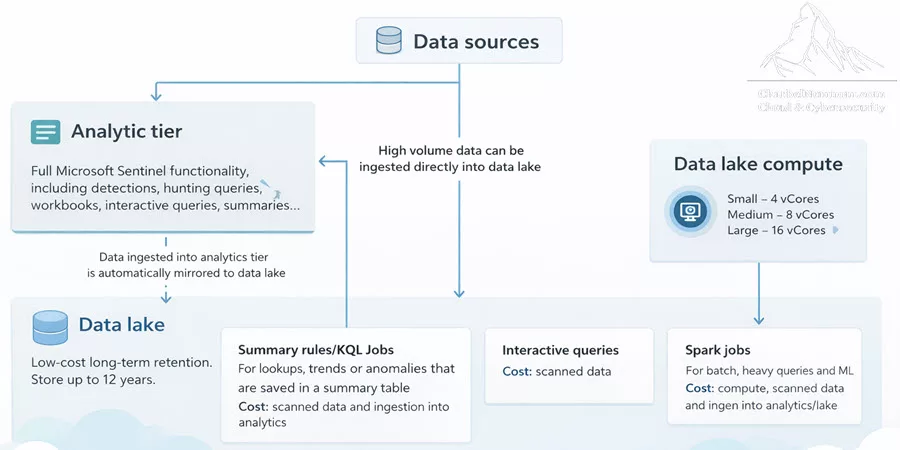
The Analytics Tier
The analytics tier is the primary, high-performance storage layer in Microsoft Sentinel. Think of it as your “hotter-SSD” storage. This is where your most valuable security data lives—the data that drives real-time detection rules, powers investigations during active incidents, and supports the day-to-day work of your SOC analysts.
When you ingest data into the analytics tier, you get several things included at no extra charge: 90 days of interactive retention, unlimited KQL queries within your retention period, full detection rule execution, and automatic mirroring to the data lake (for supported, non-legacy tables). The analytics tier is optimized for speed, delivering fast query performance across all your interactive workloads.
The retention window for the analytics tier is configurable from 30 days up to 2 years. The first 90 days of interactive retention are included at no additional cost—this is a retention benefit, not an ingestion benefit. You pay for ingestion once (per GB), and that entitles you to 90 days of retention. Any retention configured beyond those 90 days incurs additional per-GB monthly charges.
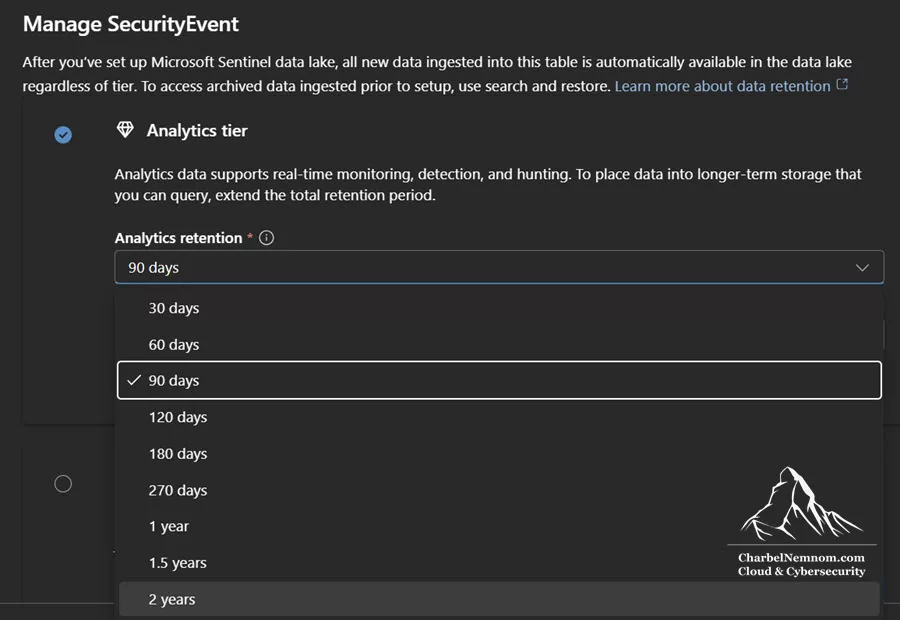
The data lake Tier
The data lake tier represents a fundamentally different approach to security data storage. Think of it as your “hot-HDD” storage. Built on Fabric technology and using the open Delta Parquet format, the data lake is designed for high-volume, long-term storage at a fraction of the cost of the analytics tier.
The data lake is where you store verbose logs that generate massive volumes but don’t require real-time detection—network flow records, detailed firewall traffic, DNS query logs, proxy logs, and compliance data that must be retained for regulatory reasons. The retention period for the data lake ranges from 30 days up to 12 years, giving you the flexibility to meet virtually any compliance requirement without breaking the budget.
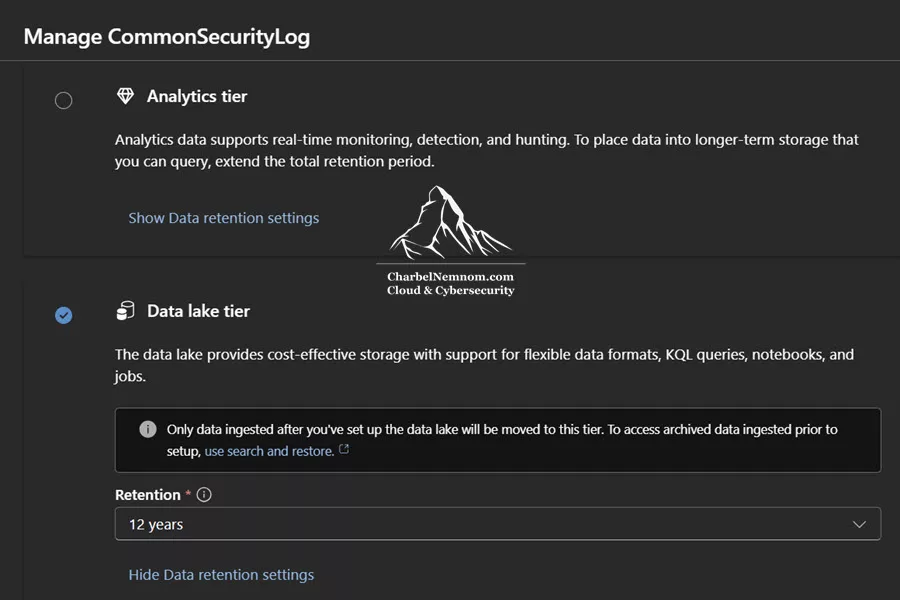
An important distinction: you cannot run detection rules (analytics rules) directly against data lake tables. Queries against the data lake are interactive and support full KQL syntax (a significant improvement over the old archive tier limitations), but each query incurs a per-GB scan charge. For computationally intensive analytics, you can also leverage Spark notebooks that run on the data lake’s open Delta Parquet format, billed by CPU hours rather than data scanned.
If you’d like a deeper understanding of how log tiering works in Sentinel and the operational considerations behind each tier, I covered this topic extensively in my previous article, Master Log Tiering with Microsoft Sentinel data lake.
Data Mirroring Between Tiers
One of the most powerful aspects of the data lake architecture is automatic data mirroring. Once the data lake is enabled, every gigabyte of data ingested into the analytics tier for supported tables is automatically replicated to the data lake at no additional ingestion or processing cost. This means the data lake always contains a complete copy of your analytics data, alongside any data you choose to ingest directly into the data lake tier.
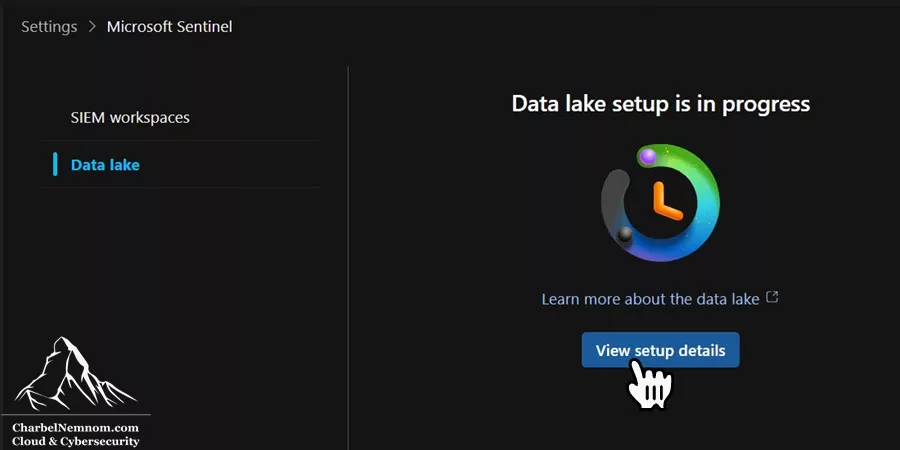
There are several critical details about mirroring that you should understand:
- Only newly ingested data is mirrored. Existing historical data that was in your analytics tables before data lake enablement will not be retroactively copied.
- Mirrored data exists simultaneously in both tiers under the same table name, accessible through both the SIEM analytics interface and the data lake exploration interface.
- Mirroring occurs after Data Collection Rule (DCR) processing, so any transformations or filtering you apply in your DCRs will be reflected in both tiers.
- Storage in the data lake is free for mirrored data as long as it remains within your analytics retention window. Once data ages past the analytics retention period, data lake storage charges apply.
- Querying mirrored data specifically through the data lake interface (e.g., the data lake exploration tab, KQL queries page, or KQL jobs) still incurs query costs, even if that same data exists in the free-to-query analytics tier.
That last point is particularly important here. When you query data in the Defender portal, pay attention to which interface you use. In the Microsoft Defender portal’s Advanced Hunting experience, tables are organized into collections —logical groupings that determine which storage tier your query actually hits behind the scenes.
The Triage collection contains your analytics tier tables. When you run a KQL query against tables in this collection, you are querying the analytics tier directly—and those queries are free, just as they would be in the Log Analytics workspace.
The Data Exploration collection contains your data lake tables. When you query tables in this collection, you are hitting the data lake—and every query incurs the per-GB scan charge on uncompressed data, regardless of how recent the data is.
Here is the critical implication: because of automatic mirroring, the exact same data can exist in both collections simultaneously during your analytics retention window. An analyst investigating a recent incident could accidentally run a query against the Data Exploration collection and incur per-GB scan charges for data that is also available for free in the Triage collection. The query results would be identical—but one path costs money, and the other does not.
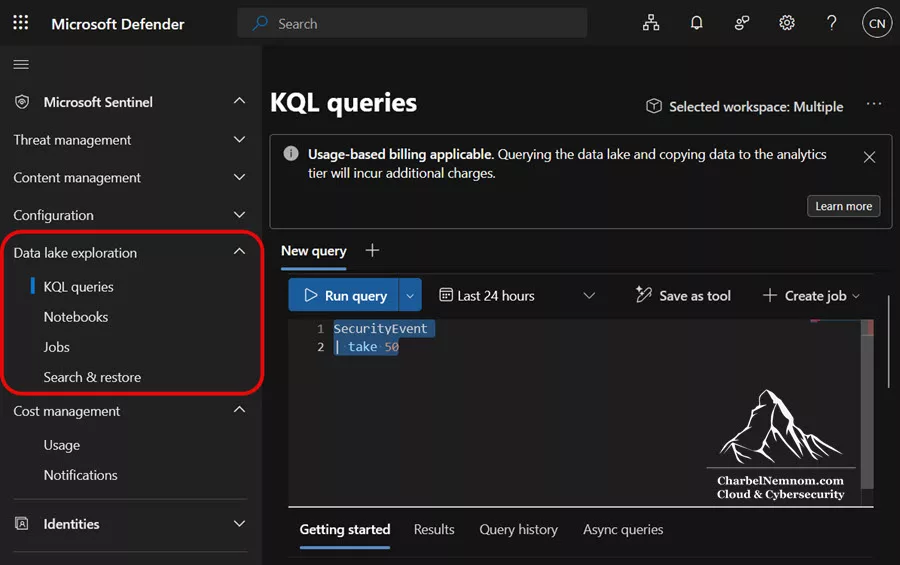
>Best practice: Always use the Triage collection for data within your analytics retention window. Only switch to Data Exploration when you need data that has aged past analytics retention and exists only in the data lake, or when querying data lake-only tables that were never in the analytics tier. Train your SOC analysts to be aware of which collection they are querying—this is one of the easiest ways to avoid unnecessary data lake query charges.
Breaking Down Every Cost Element
Understanding each individual billing component is essential for building accurate sentinel cost estimation. Microsoft Sentinel has seven distinct cost elements, and overlooking any one of them can lead to significant budget surprises. Let me walk you through each one.
Before diving into the details, here is a complete reference of all billing meters as they appear in Azure Cost Management. Each meter maps directly to one of the seven cost elements described below:
| Tier | Meter Name | Unit | Description |
|---|---|---|---|
| Log Analytics | Pay-as-you-go Analysis Or Pay-as-you-go Data Ingestion |
GB | Ingest, and analyze security data for real-time detection, alerting, and analytics |
| Log Analytics | Pay-as-you-go Data Retention Or Analytics Logs Retention |
GB | Store security data for real-time detection, alerting, and analytics |
| Data lake | Data lake ingestion Data Processed | GB | Ingest and store large volumes of security data at a much lower cost than the analytics tier — ideal for long-term retention and compliance |
| Data lake | Data processing Data Processed | GB | Transform and standardize your security data as it enters the data lake ingestion pipeline |
| Data lake | Data lake storage Data Stored | GB | Cost-effective, interactive storage — free if the data is also loaded in the analytics tier (within the analytics retention window) |
| Data lake | Data lake query Data Queried | GB | Run searches and queries over data in the lake using KQL, Async queries, and KQL jobs — explore and analyze data without moving it to the analytics tier |
| Data lake | Advanced data insights | Compute Hour | Analyze large security datasets using interactive or scheduled Spark notebooks — ideal for advanced investigations, ML, and custom insights |
>Note: GB refers to binary Gigabytes, where 1 GB = 2^30 bytes of uncompressed data unless stated otherwise. The analytics tier retention meter (for retention beyond 90 days) is billed under Azure Monitor, not under the Sentinel service name. Specifically, Azure Monitor uses the following retention meters: Pay-as-you-go Data Retention (now called Analytics Logs Retention) is the interactive retention meter for workspaces on modern pricing tiers (Pay-as-you-go and Commitment Tiers).
How to identify these meters in Azure Cost Management. When you open Cost Analysis for the subscription where Sentinel is deployed, you will see two distinct resources generating Sentinel charges:
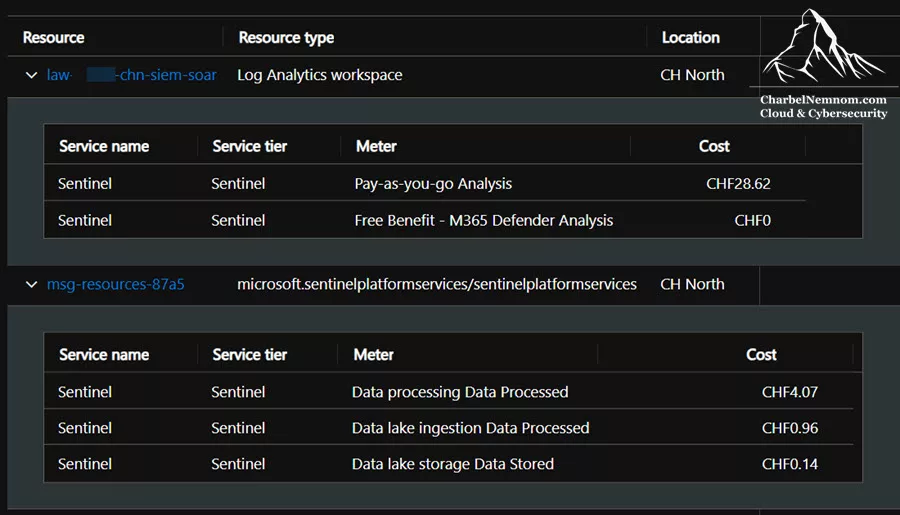
– Your Log Analytics workspace name — this is the resource of type “Log Analytics workspace” where analytics tier meters appear. In the cost breakdown, you will see the “Pay-as-you-go Analysis” meter (or the commitment tier meter if configured), along with any free benefit meters such as “Free Benefit – M365 Defender Analysis” showing CHF 0 for the Microsoft Sentinel benefit for Microsoft 365 E5, A5, F5, and G5 customers.
– A Sentinel platform services resource (e.g., msg-resources-XXXX) — this resource is automatically provisioned in the resource group when you enable the data lake. Its resource type is microsoft.sentinelplatformservices/sentinelplatformservices, and all data lake meters (Data processing Data Processed, Data lake ingestion Data Processed, Data lake storage Data Stored, Data lake query, Advanced data insights) appear under this resource.
Understanding this two-resource structure is important when analyzing your bill: analytics tier costs are tied to the Log Analytics workspace resource, while all data lake costs are tied to the separate Sentinel platform services resource. Both resources will show “Sentinel” as the service name and “Sentinel” as the service tier.
1. Analytics Tier Ingestion
This is the cost of bringing data into your analytics tier tables—the most significant line item for most Sentinel deployments. You are charged per GB of data ingested, regardless of table type, whether legacy or new DCR-based tables.
What you receive with analytics ingestion is substantial: 90 days of free interactive retention, unlimited queries within your retention window, full KQL query capabilities, detection rule execution, and automatic free mirroring to the data lake for non-legacy tables.
Several cost-reduction mechanisms apply specifically to analytics ingestion. Defender for Servers Plan 2 provides a 500 MB per day allowance per protected server that is pooled across all protected servers. Microsoft 365 E5 licenses include a 5 MB per user per day allowance. Commitment tiers offer volume-based discounts. Sentinel pre-purchase plans provide additional savings.
A critical cost advantage of analytics tables: when Microsoft Sentinel is enabled for the Log Analytics workspace, there is no cost for DCR transformations applied to analytics tables, regardless of the amount of data the transformation filters. You can freely use transformKQL in your Data Collection Rules to drop unnecessary fields, remove noisy event types, and eliminate duplicate records before ingestion—and you are only charged for the data that actually lands in the analytics table, not for the data that was filtered out. This makes DCR-level filtering one of the most powerful zero-cost optimization tools available for analytics tier ingestion.
2. Analytics Tier Retention (Beyond 90 Days)
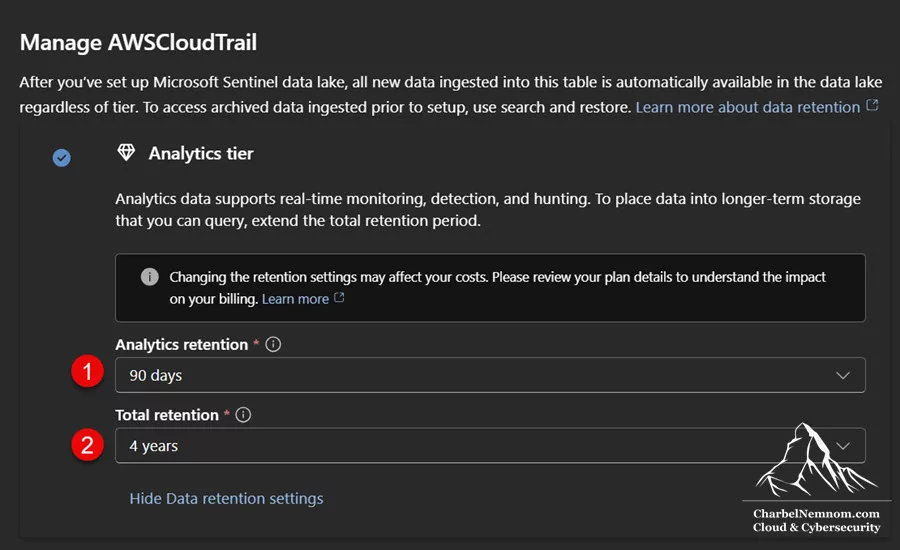
If you need to keep data in the analytics tier beyond the included 90-day window, retention charges apply. These are billed per GB per month for each day of data retention beyond 90 days, and you can configure analytics retention for up to 2 years.
Extended analytics retention preserves the full, fast query performance that makes the analytics tier valuable. There are no additional query costs during the extended retention period. However, extended analytics retention does not benefit from the 6:1 compression discount offered by data lake storage, making it the more expensive option for long-term storage.
Optimization tip: If you don’t need instant-speed queries on data older than 90 days, set your analytics retention to 90 days and let the data age into data lake retention, where storage costs are dramatically lower. You can configure retention settings at the table level to ensure you are only paying for fast access to data that genuinely requires it.
3. Data Lake Processing
This is one of the most commonly misunderstood cost elements—and it represents a fundamental billing difference between analytics and data lake tables. Data processing is a fee charged when data enters the data lake ingestion pipeline, covering the compute resources used to process and store incoming data. It is billed per GB of uncompressed data processed.
Unlike analytics tables—where DCR transformations are completely free—data lake tables always incur the data processing fee on the full volume of uncompressed data that enters the ingestion pipeline, regardless of whether a DCR filters any of it out. The processing fee does not apply to data mirrored from the analytics tier; it only applies to data entering through DCRs directly into data lake tables. For example, if you send 100 GB of raw data to a DCR and your transformation drops 90% of it, you will pay the processing fee on the full 100 GB, but only the data lake ingestion cost on the 10 GB that passes through.
Log splitting further multiplies processing costs. If you send 100 GB of data through a DCR and route it via separate data flows into three different data lake-only tables, you will incur the processing fee three times—once per data flow—totaling 300 GB of data processing charges, even though only 100 GB of raw data entered the pipeline.
Optimization tip: Filter data before it reaches the DCR whenever possible, rather than relying on DCR transformations. If you have a log-splitting scenario, structure your data flows so they can be processed through different streams without requiring a transformKQL, which prevents the multiplication of processing costs.
4. Data Lake Ingestion
Data lake ingestion is the cost of bringing data directly into the data lake tier tables. This is optimized for high-volume, lower-query-frequency data. The per-GB cost is significantly lower than the analytics tier ingestion cost, but there are important differences to understand.
No commitment tier discounts apply to data lake ingestion. The Sentinel pre-purchase plan does not apply either, and neither do the Defender for Servers Plan 2 or Microsoft 365 E5 allowances. You cannot run detection rules against data lake tables, and every query incurs an additional scan cost. Additionally, data lake ingestion always accompanies the data processing fee described above—the two costs are inseparable when ingesting directly into the data lake.
The best use cases for direct data lake ingestion include verbose logs that don’t require real-time detection (such as raw network flow data), compliance data requiring long-term retention at the lowest possible cost, maintaining an unmodified, unfiltered source-of-truth copy of your data, and—critically—Microsoft Defender XDR Advanced Hunting tables that generate large volumes of endpoint, email, and cloud app telemetry (more on this in the Cost Optimization Strategies section below).
5. Data Lake Storage
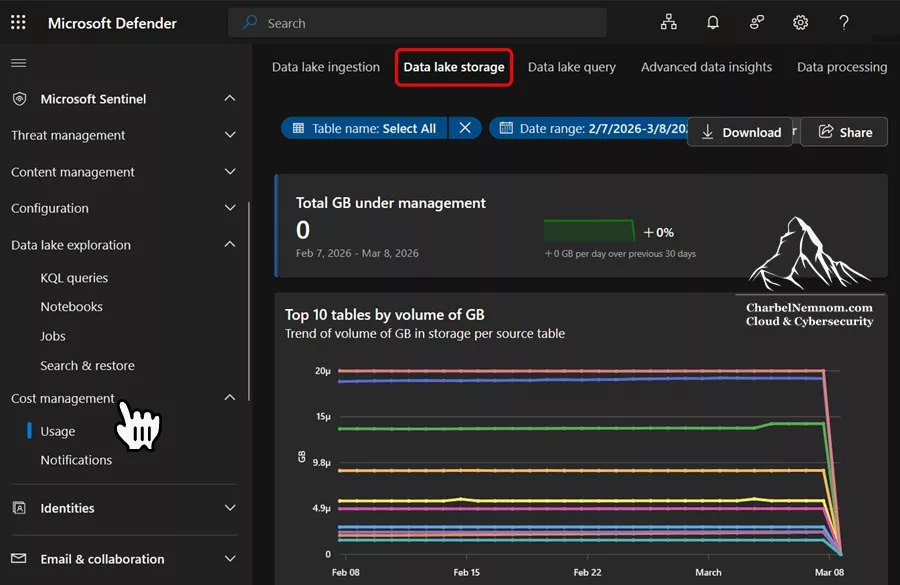
Data lake storage is the ongoing cost of keeping data in the data lake tier over time. Microsoft applies a fixed 6:1 compression factor to all data lake storage, meaning you are billed for approximately one-sixth of the raw data size, regardless of how well your specific data actually compresses.
The billing timeline for data lake storage depends on how the data arrived. For mirrored data from the analytics tier, storage is free during the analytics retention window. Once data ages past your configured analytics retention, data lake storage charges begin. For data ingested directly into data lake-only tables, storage charges apply from day one.
It’s worth noting that your data’s actual compression ratio may differ from the assumed 6:1 factor. If your data compresses better than 6:1, you may pay slightly more than the true compressed cost; if it compresses less effectively, you may pay less. Microsoft uses this fixed factor as a standardized assumption across all data. Also, be aware that the Cost Management page in the Defender portal displays raw (uncompressed) storage in GB and does not reflect the 6:1 discount, so the reported storage volumes will appear larger than what you are actually billed for.
6. Data Lake Query Costs
Unlike the analytics tier, where queries are free, every query you run against data lake storage incurs a charge based on the volume of data scanned (uncompressed). This applies to all KQL execution modes—interactive queries, Async queries, KQL jobs—as well as API-based queries (including through the Sentinel MCP server) and any other workload that reads data from the data lake.
Microsoft Sentinel provides three distinct KQL execution modes for the data lake, and understanding when to use each one has direct cost implications:
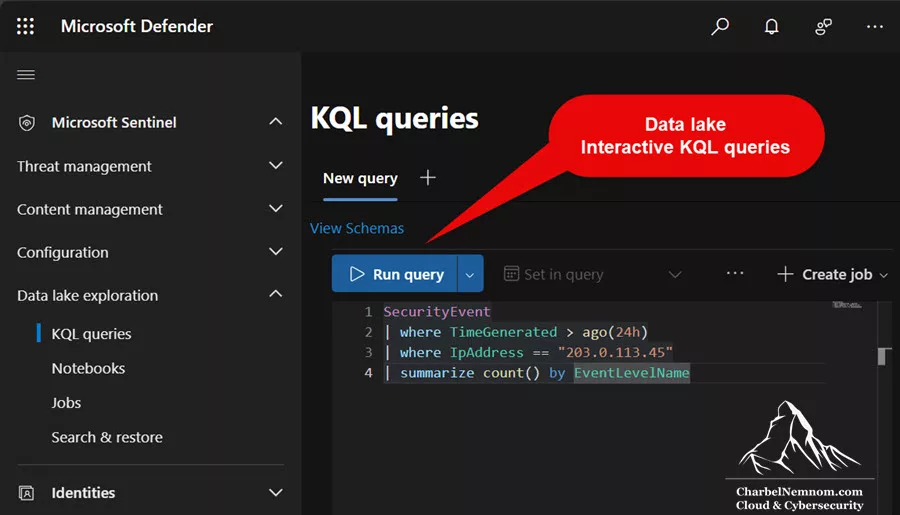
**Interactive KQL queries** are designed for quick, ad-hoc exploration. They execute in real time and return results immediately, but they time out after approximately 7–8 minutes. If a query times out, you have already paid for the data scanned up to that point—and rerunning the query means paying again. For this reason, always test interactive queries on short time ranges first.
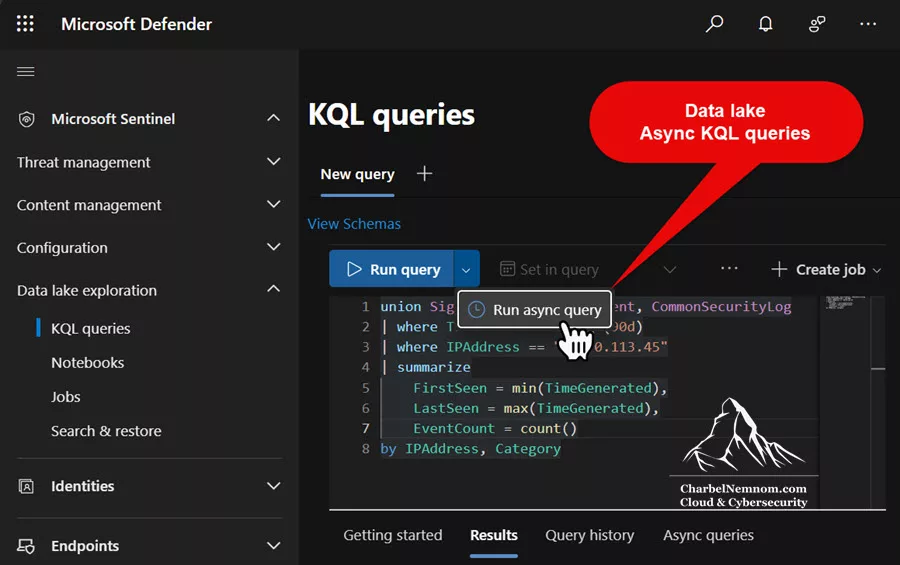
**Async KQL queries** run in the background for up to one hour, eliminating the timeout risk that plagues interactive queries on larger datasets. Crucially, Async query results are cached in the data lake hot cache for up to 24 hours, and multiple SOC analysts can retrieve those cached results without triggering additional data scans. During an active incident where several SOC analysts need access to the same historical data, a single Async query replaces what would otherwise be multiple redundant interactive queries—each of which would incur its own per-GB scan charge.
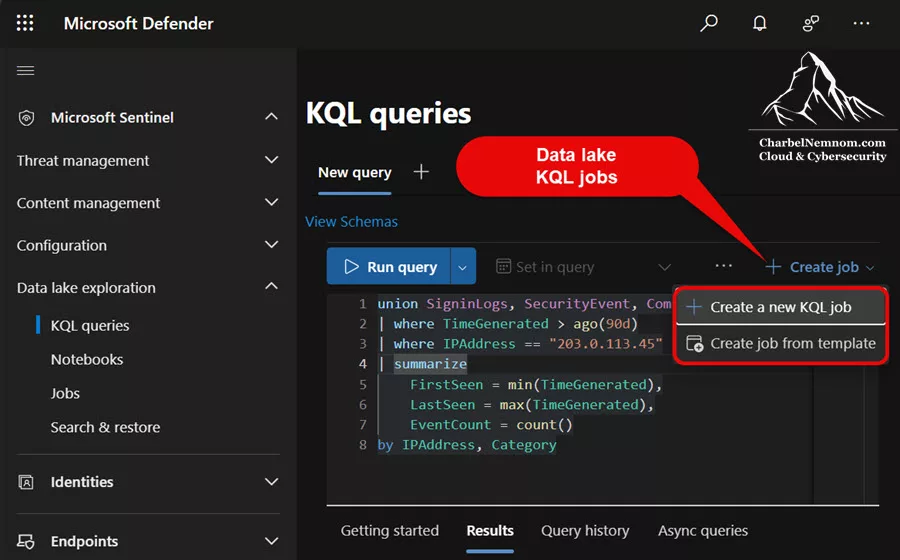
**KQL jobs** hydrate results from the data lake into the analytics tier, either as a one-time operation or on a recurring schedule. Once the results land in an analytics tier table, they can power detection rules, dashboards, and workbooks—and all subsequent queries against that table are free. KQL jobs are the right choice when investigation findings need to become permanent, reusable security assets.
However, KQL jobs carry a dual cost: you pay data lake query charges on the full uncompressed volume scanned during the job, plus analytics tier ingestion charges on the data that lands in the destination table. Always factor both cost components into your KQL job planning—especially for recurring scheduled jobs that run daily or weekly.
There is one additional exception: queries executed through Spark notebooks do not incur per-GB query charges. Instead, notebooks are billed under the Advanced Data Insights model (described below) based on the CPU hours they consume.
Optimization tips for query costs
Here is a list of optimization tips that you can follow for query costs:
– Always include TimeGenerated filters to limit the scope of your scans. This is the most effective way to reduce query costs because data lake partitions data by time.
– Test queries on small time ranges first, then expand. SOC analysts often set a broad time window and then troubleshoot their query logic—with data lake tables, this KQL habit quickly becomes expensive.
– Use Async queries instead of interactive queries when investigating longer time windows or joining multiple large tables. A single Async query that caches results for the team is far cheaper than five analysts each running their own interactive query against the same data.
– Create smaller, purpose-specific tables rather than querying massive monolithic tables. This naturally limits the amount of data scanned per query.
– Be especially careful with the Sentinel MCP server, which tends to query all data by default. Always specify explicit time and table filters when using any of the following MCP tools (Microsoft Security Copilot, Microsoft Copilot Studio, Microsoft Foundry, or Visual Studio Code).
– Track your team’s query patterns. If a particular data lake table is being queried more than approximately 830 times per GB (across its full lifecycle), it may be more cost-effective to promote that data to the analytics tier.
7. Advanced Data Insights (Notebooks)
Advanced Data Insights charges apply when you use Spark notebooks to analyze data in the data lake. This billing model is fundamentally different from standard query costs: instead of paying per GB of data scanned, you pay per CPU hour consumed during notebook execution.
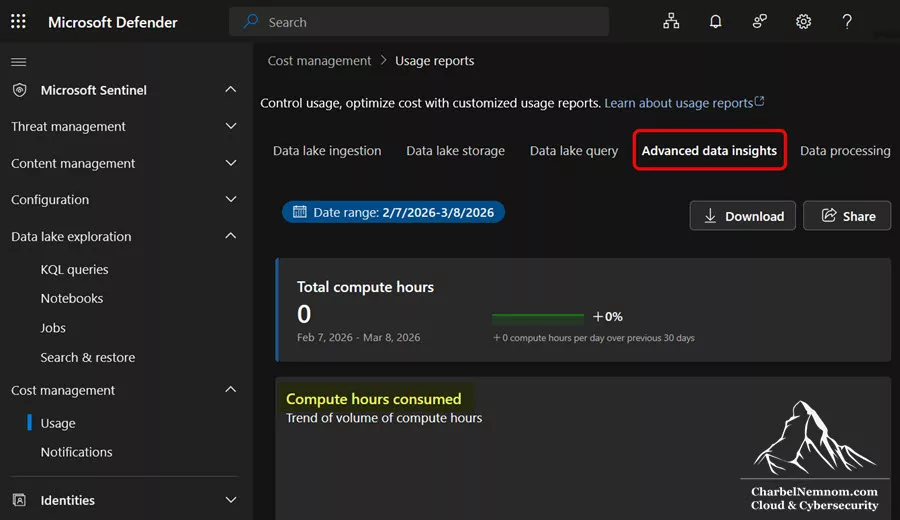
This can be advantageous for heavy analytical workloads. If you need to process large volumes of data lake data with complex transformations, unions, joins, or machine learning operations, the CPU-hour billing model of notebooks may be substantially cheaper than the per-GB scan charges of standard KQL queries. Notebooks support both interactive execution and scheduled jobs, and both are billed the same way.
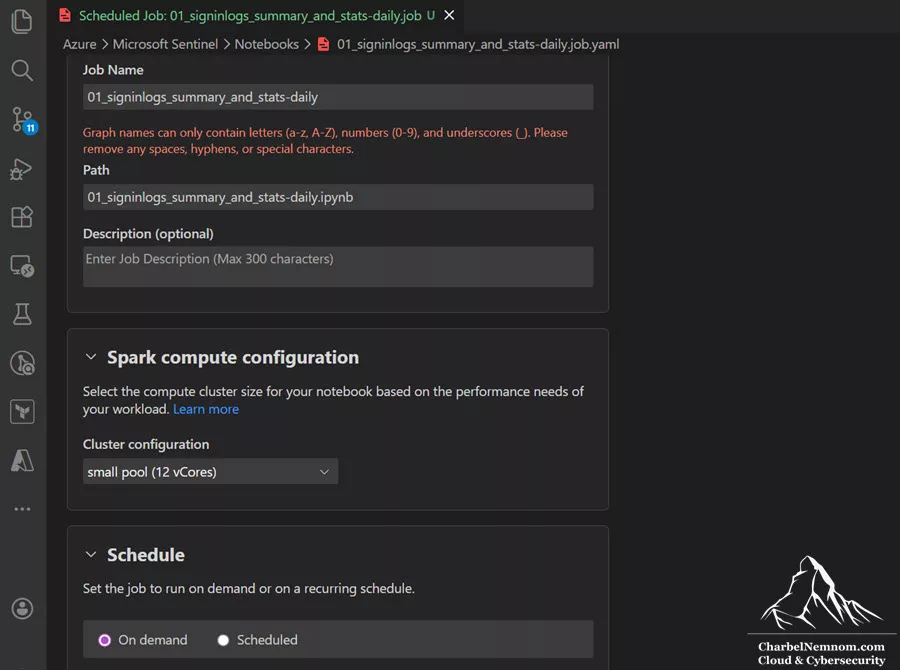
Spark notebook pools are available in three sizes: 4 cores, 8 cores, and 16 cores. Compute hours are calculated as cores × session duration (in hours), so a 30-minute session on a 16-core pool consumes 8 compute hours. Choose the smallest pool size that meets your workload requirements to avoid unnecessary compute charges.
To minimize notebook costs, write efficient code, use TimeGenerated filters for partition pruning, select only the columns you need (field pruning), and cache intermediate results when iterating on analysis.
Data Lake Federation (Federated Queries)
Data lake federation is a new capability (currently in public preview) that allows you to query data sitting in external systems—Azure Databricks, Azure Data Lake Storage Gen2, and Microsoft Fabric—directly from the Sentinel data lake without ingesting or copying that data. Through Microsoft Fabric, you can also reach additional external data sources transitively.
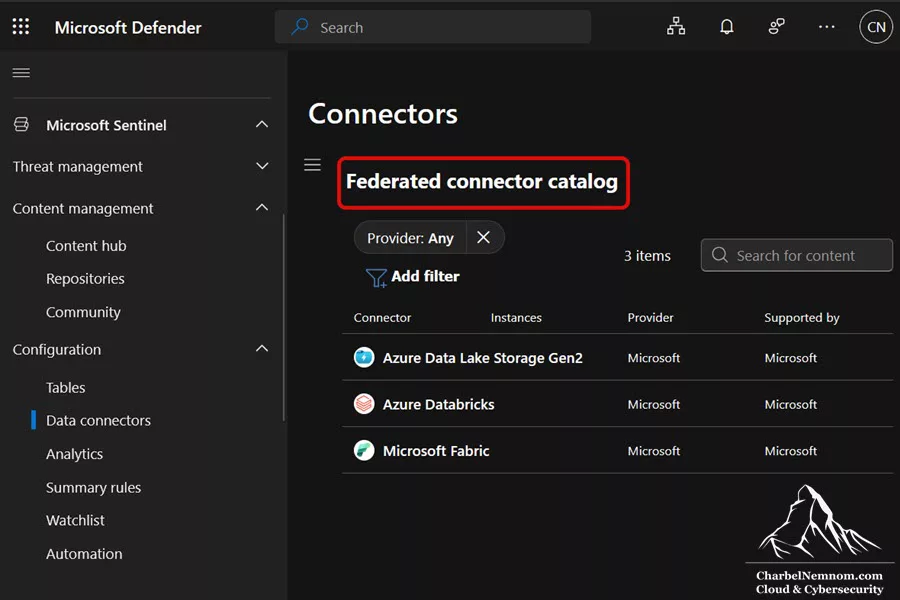
From a billing perspective, federated queries do not introduce any new meters. They are charged using the same meters that already apply to data lake workloads:
- KQL queries against federated tables are billed under the standard data lake query meter (per GB of data scanned), exactly like querying a native data lake table.
- Spark notebooks accessing federated tables are billed under the Advanced Data Insights meter (per compute hour), just like notebooks querying native data lake tables.
Because the data is never ingested into the data lake, there are no ingestion, processing, or storage costs for federated tables. You only pay for the compute when you actually query the data. Federated tables are read-only—Sentinel can query them in place, but cannot write back to the source.
Keep in mind that query performance on federated tables is comparable to data lake performance, but external factors such as network connectivity and the source platform’s responsiveness can affect query execution time. If your federated tables include a TimeGenerated column (or an equivalent datetime field), use it in your KQL filters to limit the scope of data scanned and reduce query costs—just as you would with native data lake tables. And if your federated tables do not include a TimeGenerated field, you can add it to your data.
Commitment Tiers, Discounts, and Allowances
Microsoft offers several mechanisms to reduce your effective cost per GB of analytics tier ingestion. Understanding and stacking these discounts correctly can save organizations tens of thousands of dollars annually.
Commitment Tiers
Commitment tiers are volume-based discounts that apply when you commit to ingesting a minimum daily volume into the analytics tier. Under simplified pricing, commitment tiers start at 100 GB/day and scale up to 200 GB/day, 300 GB/day, 400 GB/day, 500 GB/day, and beyond.
A 50 GB/day commitment tier is available with promotional pricing for customers who sign up during the public preview window (October 1, 2025, through June 30, 2026); those customers lock in promotional pricing until March 31, 2027. Customers who sign up earlier in the promotional window benefit from a longer lock-in period—up to 18 months for those who joined on October 1, 2025, versus 9 months for those who join on June 30, 2026. After the promotional window closes, new customers may no longer be able to sign up for the 50 GB tier.
The 50 GB promotional tier is available across EA, CSP, and Direct channels, in all regions where Sentinel is sold (including Public Sector and GCC), and it can decrement MACC—meaning the charges you pay for this tier count toward fulfilling your Microsoft Azure Consumption Commitment (MACC), a contractual agreement where a customer commits to spending a minimum dollar amount on Azure services over a defined period, typically in exchange for favorable commercial terms.
Most importantly, the 50 GB promotional tier cannot be combined with any other Microsoft Sentinel discounts—including deal desk or field empowerment overlays, which are custom discounts that Microsoft’s internal sales teams (the “deal desk”) or field sales representatives can negotiate and apply to Azure services during contract discussions—and it is not available via the Sentinel Pre-Purchase Plan (SCUs). The higher your committed volume, the greater the per-GB discount.
The way commitment tiers work is straightforward: you select a tier in your Sentinel settings, and you pay a fixed daily rate for the committed volume. If you exceed the committed volume on any given day, the overage is billed at the same effective per-GB rate of your selected commitment tier—not at the higher Pay-As-You-Go rate. The effective per-GB price is simply the commitment tier price divided by the tier’s daily GB quantity. If you ingest less than the committed volume, you still pay the full tier price.
Understanding the breakeven points is critical for selecting the right tier. For example, the 50 GB/day commitment tier becomes economically favorable at approximately 34–35 GB/day of actual ingestion. Below that point, Pay-As-You-Go pricing is cheaper. The 100 GB/day tier becomes favorable at approximately 78–79 GB/day. This means that if your daily ingestion fluctuates between 79 and 100 GB, you pay the same fixed amount—providing both cost savings and budget predictability.
You can increase your commitment tier at any time to optimize costs as your data volume grows. However, lowering the commitment tier or switching back to Pay-As-You-Go is only allowed once every 31 days, so plan tier changes carefully.
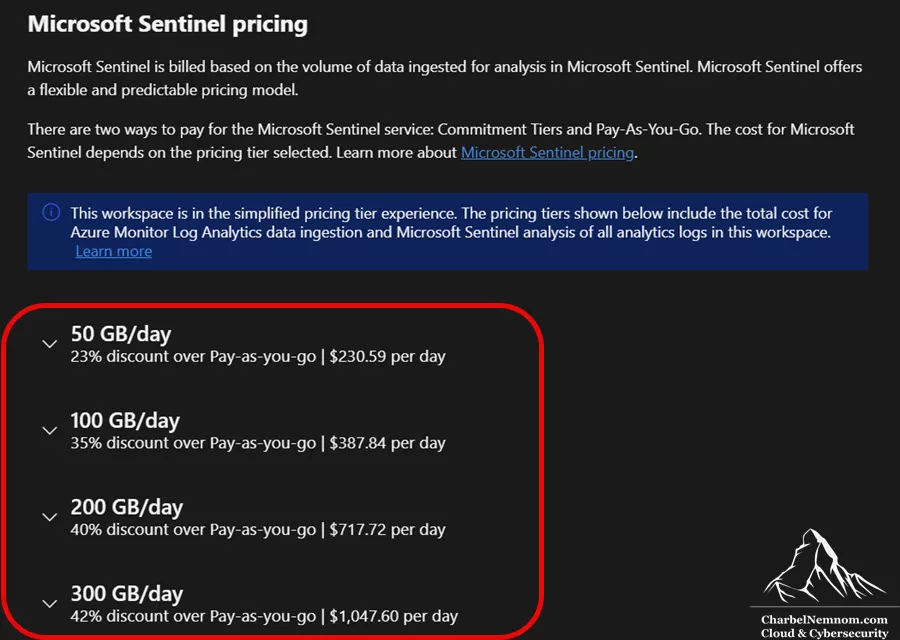
>Critical: always base your commitment tier on billable ingestion, not raw ingestion. Many teams select a commitment tier based on the total raw daily volume they see from their connectors. That is often the wrong baseline. The correct baseline is the expected billable analytics tier ingestion after subtracting free sources, Microsoft 365 E5 allowances, and Defender for Servers P2 allowances. A customer seeing 95 GB/day of raw analytics-tier telemetry might assume the 100 GB commitment tier is obvious—but after accounting for benefits, their actual billable volume might be 50 GB/day or lower, making a smaller tier (or even Pay-As-You-Go) the better choice.
Pre-Purchase Plans
Sentinel pre-purchase plans let you buy Sentinel Commit Units (SCUs) in advance at a discount. Each SCU is equivalent to $1 USD of retail Microsoft Sentinel analytics tier cost. When your Sentinel workspace generates charges, SCUs are consumed automatically—no redeployment or reassignment required. Plans have a one-year term, are non-refundable and non-exchangeable, and renew automatically.
The available SCU tiers and their approximate discounts off retail are:
| SCU Tier | Approximate Discount |
|---|---|
| 5,000 SCUs (New P3 Plan) | ~44% *** |
| 10,000 SCUs | ~11% |
| 25,000 SCUs | ~14% |
| 50,000 SCUs | ~17% |
| 75,000 SCUs | ~20% |
| 100,000 SCUs | ~22% |
| 150,000 SCUs | ~25% |
>Important: Sentinel Commit Units (SCUs) are not the same as Security Copilot Compute Units, even though both abbreviate to “SCU.” They are separate products and cannot be used interchangeably.
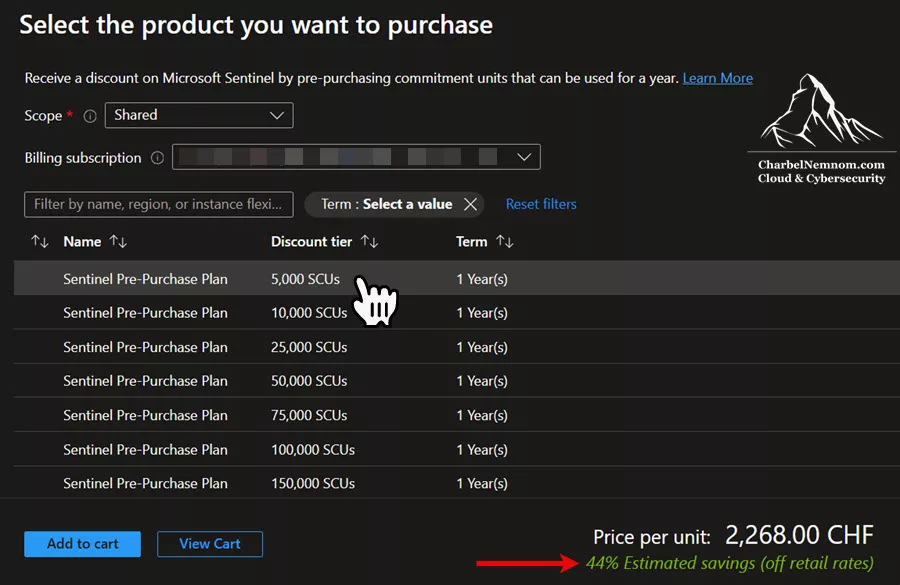
The new P3 5,000 SCU plan. Announced in December 2025, the P3 pre-purchase plan delivers $5,000 of Microsoft Sentinel value for approximately $2,800 USD (region dependent), representing an approximately 44% discount off retail—by far the deepest discount of any SCU tier. When combined with a commitment tier, the effective savings can reach up to approximately 73% off Pay-As-You-Go rates, because the commitment tier discount and the P3 discount compound.
Customers can stack multiple 5,000 SCU plans over time as their ingestion grows, and Sentinel usage is automatically deducted from available CUs first, ensuring you always consume the cheapest pricing layer before any standard billing applies. The P3 plan is purchased directly in the Azure portal (under Reservations, as shown in the figure below) and follows the same one-year term, auto-renewal, and non-refundable/non-exchangeable rules as all other SCU tiers. For CSP subscriptions, partners can buy reservations on behalf of a customer or allow the customer to buy their own.
What SCUs cover—and what they don’t. SCUs pay for eligible Sentinel analytics tier costs only—the entries with the Sentinel service name in your invoice details. They do NOT cover data lake costs (ingestion, processing, storage, or queries), Azure Monitor retention charges, restore costs, or search costs. This means your data lake spend is always billed separately, regardless of how many SCUs you hold.
The right-sizing approach is straightforward: estimate your annual Sentinel analytics tier bill (after commitment-tier pricing and allowances), then select the SCU tier that covers a meaningful portion of that spend without significantly overshooting it. If the plan runs out before the year ends, the remaining months are billed at your standard rate. If SCUs remain unused at the end of the one-year term, they expire.
Critical caveat for EA and CSP customers. The SCU discount is applied against the retail rate, not against your existing Enterprise Agreement (EA) or Cloud Solution Provider (CSP) discounted rate. This distinction is essential. If your EA or CSP contract already provides a discount on Sentinel charges, the effective net saving from a pre-purchase plan is the SCU discount percentage minus your existing contractual discount percentage. In some cases, this net saving can be minimal—or even negative if your contractual discount already exceeds the SCU tier discount.
>Important: Always calculate the net benefit before purchasing: Net saving = SCU discount % − existing contractual discount %. For Pay-As-You-Go customers without an EA or CSP discount, the SCU discount applies in full against the retail rate.
Microsoft 365 E5 Allowance
If your organization holds Microsoft 365 E5 licenses, each licensed user receives 5 MB of free data ingestion per day into Sentinel. This benefit is automatic—there is no contract to sign or configuration to set up. For an organization with 5,000 E5 users, that translates to 25 GB of free ingestion per day, which can represent a substantial portion of your total analytics tier volume.
The E5 data grant applies to a specific set of eligible data sources, as defined in the official offer page:
- Microsoft Entra ID sign-in and audit logs
- Microsoft Defender for Cloud Apps shadow IT discovery logs
- Microsoft Purview Information Protection logs
- Microsoft Defender XDR advanced hunting data
These tables are not free independently—their ingestion volume counts toward the shared 5 MB/user/day pool. If your total eligible ingestion exceeds the grant, you pay for the excess at your standard analytics tier rate.
Defender for Servers Plan 2 Allowance
Organizations using Microsoft Defender for Servers Plan 2 receive 500 MB of free Sentinel ingestion per day for each protected server. This allowance is aggregated into a shared pool across all protected servers. So if you have 10 protected servers, you have a combined 5 GB of free ingestion per day that any of those servers can consume.
Critical: This benefit applies only to a specific subset of security data types. The following tables are ONLY eligible for the 500 MB/day allowance:
SecurityAlertSecurityBaselineSecurityBaselineSummarySecurityDetectionSecurityEventWindowsFirewallProtectionStatus-
UpdateandUpdateSummary(when the Update Management solution is not running in the workspace or solution targeting is enabled) MDCFileIntegrityMonitoringEvents-
WindowsEvent(only security events from theMicrosoft-SecurityEventstream that land in theSecurityEventtable — Application, System, or other event log channels are not covered)
Notably, the Syslog table is NOT included in this list. This means that Linux server logs ingested via the Syslog connector (which land in the Syslog table) do not benefit from the P2 allowance—even though those Linux servers are counted when calculating the pool size. The LinuxAuditLog table was previously listed as eligible, but in early 2026, Microsoft removed it from the supported list, and there is currently no supported method to ingest data into that table after the migration from MMA to AMA.
In practice, this means the P2 allowance is most impactful for organizations with Windows servers generating SecurityEvent data. If your environment is predominantly Linux, the P2 benefit may be significantly smaller than expected because the vast majority of Linux security logs flow into the Syslog table, which is billed as regular ingestion. Always validate which tables your servers are actually populating before factoring the P2 allowance into your cost estimates. For Linux-heavy environments, consider using a security data pipeline such as VirtualMetric DataStream to filter and reduce the volume of Linux logs before they reach Sentinel, compensating for the lack of P2 coverage on the Syslog table.
This is particularly meaningful because a typical Windows Server generates between 300 and 800 MB of security logs per day. For many organizations, the Defender for Servers Plan 2 allowance can significantly reduce or even eliminate the cost of ingesting Windows Server logs into Sentinel. When you are scoping a Sentinel deployment, always determine whether Defender for Servers Plan 2 is already in place or whether it makes economic sense to adopt it.
Free Data Sources
The following data sources are ingested into Microsoft Sentinel at no charge:
- Azure Activity Logs (
AzureActivity) - Microsoft Sentinel Health (
SentinelHealth) — health and audit monitoring for Sentinel itself - Office 365 Audit Logs (
OfficeActivity) — including all SharePoint activity, Exchange admin activity, and Teams - Microsoft Defender XDR —
SecurityIncidentandSecurityAlerttables - Microsoft Defender for Endpoint alerts (
SecurityAlert (MDATP)) - Microsoft Defender for Identity alerts (
SecurityAlert (AATP)) - Microsoft Defender for Cloud Apps alerts (
SecurityAlert (MCAS)) - Microsoft Defender for Office 365 alerts (
SecurityAlert (OATP)) - Microsoft Defender for Cloud alerts (
SecurityAlert (Azure Security Center)) - Microsoft Defender for IoT alerts (
SecurityAlert (Azure Security Center for IoT)) - Microsoft Entra ID Protection alerts (
SecurityAlert (IPC))
Although alerts are free, the raw logs for some Microsoft Defender XDR, Defender for Endpoint/Identity/Office 365/Cloud Apps, Microsoft Entra ID, and Azure Information Protection (AIP) data types are paid. For data connectors that include both free and paid data types, you can select which data types to enable—always enable the free alert tables and evaluate whether the paid raw log tables justify the additional ingestion cost.
You only pay for any extended retention beyond the included 90-day interactive period. When planning your Sentinel budget, start by identifying which of your data sources fall into these free or allowance-covered categories. The remaining volume is what you actually need to budget for.
A Practical Methodology for Sizing Microsoft Sentinel
Before jumping into pricing calculators, the best cost estimates start with workload classification, not pricing lookups. Treat Microsoft Sentinel cost estimation as an architectural exercise: you are designing how security data flows through the platform, where it lives, how long it stays interactive, and which workloads truly need premium analytics performance.
Begin by inventorying all current and planned log sources. If you are migrating from another SIEM (Splunk, QRadar, ArcSight, etc.), export actual daily ingestion numbers by source. If no existing SIEM is in place, estimate by connector and platform: Microsoft 365, Microsoft Entra ID, Defender XDR, Windows Security Events, Sysmon, DNS, firewalls, VPN, proxy, cloud platforms, SaaS audit logs, and custom application telemetry.
Next, classify every log source into one of the following three categories:
Category 1 — Premium operational telemetry. This data must remain in the analytics tier because it fuels real-time detections, entity correlations, active investigations, and frequent threat hunting. Examples: XDR alerts, identity sign-in and audit logs, critical server security events, Defender for Endpoint telemetry.
Category 2 — Secondary but valuable telemetry. These are the classic data lake candidates: high-volume logs that provide investigative context, DFIR evidence, and compliance coverage, but do not justify analytics tier economics every day. Examples: full firewall session logs, VPN traffic, DNS query logs, web proxy access logs, and verbose cloud resource activity.
Category 3 — Disposable or reducible telemetry. This is data you should either not ingest at all, summarize before ingesting, or reduce at the source before it ever reaches a Data Collection Rule. Remember that the cheapest gigabyte in Microsoft Sentinel is the one you never send!
Only after this classification should you calculate daily ingestion volumes per category. From there, define retention windows: how long does the SOC need fast, interactive access for routine work (analytics retention), and how long must the organization retain data for forensic, legal, or compliance purposes (data lake retention)? Finally, model your expected query behavior against the data lake, because a cheap historical store only stays cheap if you query it intentionally.
Start with the Free Trial
If you are evaluating Microsoft Sentinel for a new deployment, start with the free trial. It lasts 31 days and includes up to 10 GB per day of log ingestion into the analytics tier at no additional cost. This lets you onboard a representative subset of data sources—some servers, network devices, virtualization hosts, and endpoints—and observe what the resulting daily ingestion volume actually looks like in practice. Note that the data lake is not included in the free trial.
The free trial is limited to 20 workspaces per Azure tenant, and charges for automation playbooks, BYOML (Bring Your Own Machine Learning), and any data lake usage still apply during the trial period.
Use the Cost Calculator as a Modeling Tool
The Microsoft Sentinel pricing calculator (available on the Azure pricing page) is most valuable when used at the beginning of a project to compare architecture options, not just at the end to validate a decision already made. You can model the same environment in multiple ways: a detection-heavy design where more sources stay in the analytics tier, a balanced design where only high-signal data stays in analytics, or a compliance-heavy design where long-term data lake retention is maximized while analytics retention is kept deliberately short. These designs often produce very different monthly costs even when the total raw telemetry volume is identical.
There are many third-party Sentinel cost calculators out there developed by the community, but I would prefer to use the official Azure pricing calculator. Stay tuned for an official Microsoft Sentinel pricing calculator soon!
As of April 10, 2026, Microsoft has released the official Sentinel Cost Estimator for authenticated customers and partners through the Sentinel pricing page. It provides a guided, Sentinel‑specific estimation experience to support more accurate early‑stage cost conversations with customers. Key capabilities include:
- 1) Provides meter‑level visibility into ingestion, retention, analytics, and data lake costs
- 2) Models multi‑year projections (up to 3 years) with built‑in growth assumptions
- 3) Helps teams explore tradeoffs between the Analytics tier and the Sentinel data lake
- 5) Estimates compute usage for notebooks, advanced queries, and MCP workflows
- 6) Supports scenario planning for onboarding new data sources or shifting retention strategies
- 7) Makes it easy to share estimates with finance, architecture, and leadership teams
For organizations modernizing their SIEM or migrating from legacy platforms, this tool brings clarity to the early‑stage planning process — especially when you don’t yet know all the inputs. If you’re designing your Microsoft Sentinel Platform architecture, optimizing ingestion, or evaluating data lake adoption, this estimator gives you the confidence to model real‑world scenarios and avoid budget surprises.
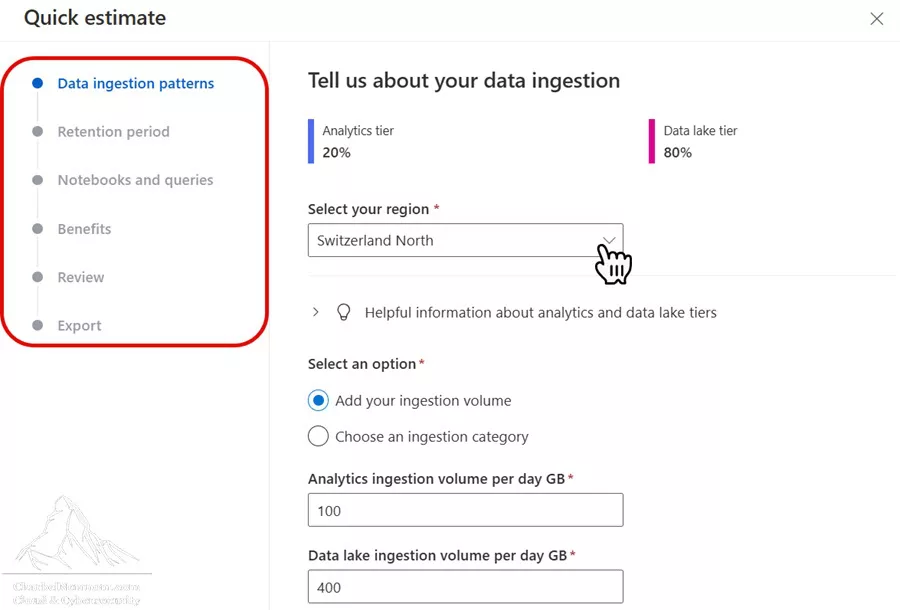
The experience is designed to support customers, partners, and sellers with authentication via Microsoft Entra ID. You can access it through the Sentinel Cost Estimator page.
Cost Estimation: Practical Examples
One of the most frequently asked questions that I receive about Microsoft Sentinel is “How much will it cost?” The answer depends on many variables: which data sources you onboard, how much data each source generates, how you distribute data between tiers, your retention requirements, and how aggressively you query your data lake. Below are three realistic scenarios that demonstrate how to build an accurate estimate.
>Note: The prices used in these examples are based on representative North Europe pricing for illustrative purposes. Always verify current pricing on the Microsoft Sentinel pricing page, as prices vary by region and may change over time.
Scenario 1: Small Organization (50 GB/day Total Ingestion)
A small-to-mid-size company with approximately 500 employees, 50 servers protected by Defender for Servers P2, basic network infrastructure, and Microsoft 365 E5 licensing.
Data distribution (with XDR lake-only optimization):
- Analytics tier: 12 GB/day (Entra ID sign-in and audit logs, critical server security events) + XDR alerts (free ingestion, negligible volume)
- Data lake tier: 38 GB/day (Defender for Endpoint Advanced Hunting tables ~8 GB/day, firewall traffic logs, DNS logs, proxy logs)
By streaming the Defender for Endpoint Advanced Hunting tables (DeviceProcessEvents, DeviceNetworkEvents, DeviceFileEvents, etc.) directly to the data lake — bypassing Sentinel analytics ingestion entirely — approximately 8 GB/day of endpoint telemetry never enters the analytics tier at all. This data remains accessible in Defender Advanced Hunting for 30 days (included in the Defender license) and flows to the Sentinel data lake at ~$0.18/GB for long-term retention. XDR alerts remain in the analytics tier at no ingestion cost.
Cost-reduction allowances:
- Microsoft 365 E5: 500 users × 5 MB/day = 2.5 GB/day free
- Defender for Servers P2: 50 servers × 500 MB/day = 25 GB/day free
- Free sources (Azure Activity, Office 365 audit, XDR alerts): ~3 GB/day
Effective billable analytics ingestion: 12 GB − 2.5 GB (E5) − 25 GB (P2, applied to server logs) − 3 GB (free sources). In practice, the P2 allowance and free sources cover nearly all of the analytics tier volume for organizations of this size. The remaining billable analytics ingestion is effectively 0–3 GB/day after all allowances are applied.
Commitment tier selection:
At this volume, the 50 GB commitment tier is not needed since the allowances cover most of the analytics volume. Pay-As-You-Go is the most economical choice here.
Retention configuration:
- Analytics retention: 90 days (included free)
- Data lake total retention: 365 days (compliance requirement)
Data lake costs (for 38 GB/day direct ingestion):
- Ingestion: 38 GB/day × $0.06/GB = $2.28/day (~$68/month)
- Processing: 38 GB/day × $0.12/GB = $4.56/day (~$137/month)
- Storage (after 6:1 compression): After one year at steady state, approximately 13,870 GB of raw data was stored, compressed to ~2,312 GB billed. At ~$0.02/GB/month = ~$46/month
- Queries: Assuming 200 queries/month scanning 200 GB each = 40,000 GB scanned × $0.006/GB = $240/month
Estimated monthly cost at steady state:
Approximately $490–550/month for the data lake component, plus minimal analytics tier costs after allowances. The data lake total is slightly higher than it would be without the XDR lake-only optimization (due to the additional 8 GB/day of endpoint telemetry now flowing through the data lake), but the analytics tier savings from avoiding ~$5.16/GB on that same 8 GB/day far outweigh the incremental data lake cost. Furthermore, making a Sentinel pre-purchase plan is completely irrelevant for this scenario.
Scenario 2: Medium Organization (200 GB/day Total Ingestion)
A mid-size enterprise with 3,000 employees, 200 servers, multiple network appliances, cloud workloads across Azure, and Microsoft 365 E5 licensing.
Data distribution (with XDR lake-only optimization):
- Analytics tier: 40 GB/day (Entra ID sign-in and audit logs, server security events, cloud workload alerts, critical application logs) + XDR alerts (free ingestion, negligible volume)
- Data lake tier: 160 GB/day (Defender for Endpoint Advanced Hunting tables ~25 GB/day, Defender for Office 365 Advanced Hunting tables ~5 GB/day, full network traffic logs, DNS, DHCP, VPN logs, verbose cloud resource logs)
Streaming the Defender Advanced Hunting tables directly to the data lake — bypassing Sentinel Analytics ingestion — means that approximately 30 GB/day of XDR telemetry never enters the analytics tier or the Log Analytics workspace. This data stays in the Defender Advanced Hunting experience for 30 days (included in the Defender license) and flows to the Sentinel data lake at ~$0.18/GB. Compared to routing this same data through the analytics tier at ~$5.16/GB, this single optimization avoids approximately $155/day or ~$4,644/month in analytics ingestion costs. The XDR alerts and incident tables remain in the analytics tier at no ingestion cost, and the Advanced Hunting data remains fully accessible in the Defender portal for 30 days.
Cost-reduction allowances:
- Microsoft 365 E5: 3,000 users × 5 MB/day = 15 GB/day free
- Defender for Servers P2: 200 servers × 500 MB/day = 100 GB/day free (pooled)
- Free sources: ~8 GB/day
Effective billable analytics ingestion: 40 GB − 15 GB (E5) − ~10 GB (P2, applied to server logs within analytics) − 8 GB (free sources) ≈ 7 GB/day billable.
Commitment tier selection:
At 7 GB/day of billable analytics volume after allowances, the 50 GB commitment tier is unnecessary. Pay-As-You-Go is the most economical choice in this scenario as well. Note how dramatically the XDR lake-only optimization changed this calculation: without it, the XDR Advanced Hunting data would flow through Sentinel analytics ingestion, pushing the analytics tier to 70 GB/day with ~17 GB/day billable, making a commitment tier discussion relevant. With the lake-only approach, this data bypasses analytics entirely, the analytics tier drops to 40 GB/day, and allowances cover nearly everything.
Retention configuration:
- Analytics retention: 180 days (6 months for active investigations)
- Data lake total retention: 730 days (2 years, regulatory requirement)
Monthly cost breakdown at steady state:
- Analytics ingestion: ~7 GB/day × 30 days × ~$5.16/GB = ~$1,084/month (Pay-As-You-Go)
- Analytics extended retention (beyond 90 days): 40 GB/day × 90 additional days of data × $0.10/GB/month ≈ $360/month
- data lake ingestion: 160 GB/day × $0.06/GB × 30 = ~$288/month
- data lake processing: 160 GB/day × $0.12/GB × 30 = ~$576/month
- data lake storage: At steady-state 2-year accumulation, approximately 116,800 GB raw, compressed to ~19,467 GB billed × $0.02/GB/month ≈ $389/month
- data lake queries: 500 queries/month × 500 GB/scan = 250,000 GB × $0.006/GB = $1,500/month
Estimated monthly cost at steady state:
Approximately $4,200–4,500/month. Compared to the ~$5,700–6,100/month this deployment would cost without the XDR lake-only optimization, that is a reduction of approximately $1,500–1,600/month—driven almost entirely by moving ~30 GB/day of Defender Advanced Hunting telemetry from the analytics tier to the data lake.
Pre-purchase plan optimization:
The only SCU-eligible cost in this scenario is the analytics tier ingestion of ~$1,084/month, or approximately $13,008 per year (extended retention and all data lake costs are not covered by SCUs). A 10,000 SCU pre-purchase plan at ~11% off retail costs approximately $8,900 and covers $10,000 of the annual Sentinel analytics bill—roughly 9.2 months of consumption. The remaining ~2.8 months (~$3,008) are billed at the standard Pay-As-You-Go rate. The total annual analytics cost with the pre-purchase plan drops to approximately $11,908, saving ~$1,100 per year (~8.5%) compared to pure Pay-As-You-Go. A 5,000 SCU plan (8% off, ~$4,600) would cover only ~4.6 months and save ~$400/year, making it less cost-effective.
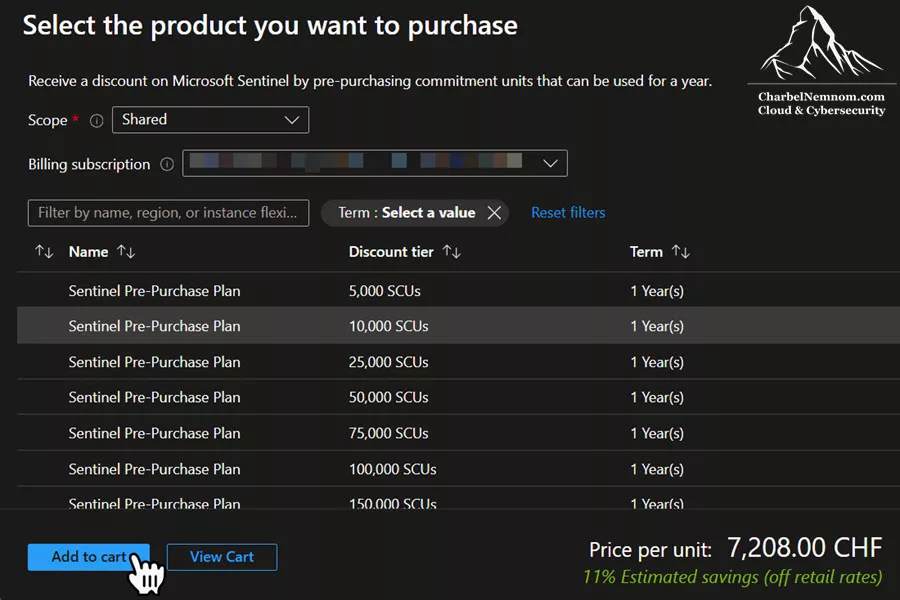
>Note: If your organization has an EA or CSP contractual discount that already exceeds 11%, the 10,000 SCU tier may not yield additional savings. As mentioned above, calculate your net benefit before purchasing.
Scenario 3: Large Enterprise (500+ GB/day Total Ingestion)
A large enterprise with 15,000 employees, 1,000+ servers, extensive network and cloud infrastructure, multiple subsidiaries, and strict regulatory retention requirements.
Data distribution (with XDR lake-only optimization):
- Analytics tier: 60 GB/day (identity sign-in and audit logs, critical server security events, application security logs, cloud workload alerts) + XDR alerts (free ingestion, negligible volume)
- Data lake tier: 540 GB/day (Defender for Endpoint Advanced Hunting tables ~70 GB/day, Defender for Office 365 Advanced Hunting tables ~15 GB/day, CloudAppEvents ~5 GB/day, full network telemetry, verbose firewall and proxy logs, DNS at scale, IoT device logs, compliance audit trails)
At enterprise scale, Defender Advanced Hunting telemetry is one of the largest cost drivers. With 15,000 employees and 1,000+ endpoints generating detailed process, network, file, and email events, the XDR Advanced Hunting volume easily reaches 90 GB/day or more. Streaming this directly to the data lake — bypassing Sentinel analytics ingestion entirely — avoids approximately $464/day or ~$13,920/month in analytics tier costs at Pay-As-You-Go rates, often the single largest line-item reduction available in the entire deployment. The data remains in the Defender Advanced Hunting experience for 30 days (included in the Defender license) for custom detections and queries.
Cost-reduction allowances:
- Microsoft 365 E5: 15,000 users × 5 MB/day = 75 GB/day free
- Defender for Servers P2: 1,000 servers × 500 MB/day = 500 GB/day free (pooled)
- Free sources: ~20 GB/day
For organizations at this scale, the P2 pooled allowance (500 GB/day) can absorb a significant portion of the analytics tier ingestion, especially the server-generated logs. With the reduced analytics tier volume of 60 GB/day, the effective billable analytics ingestion could fall to 0–15 GB/day, depending on the exact composition—a transformative reduction from the 55–70 GB/day estimate without the XDR lake-only optimization.
Commitment tier selection:
With 0–15 GB/day of effective billable analytics ingestion after the XDR lake-only optimization and allowances, the 100 GB/day commitment tier is no longer necessary. Pay-As-You-Go or the 50 GB tier (if billable volume stabilizes above 34 GB/day) would be the better choice. Without the XDR lake-only optimization, the Advanced Hunting data would flow through Sentinel analytics ingestion, pushing the analytics tier to 150 GB/day with 55–70 GB/day billable, making the 100 GB commitment tier the right choice. This is a perfect example of how streaming XDR Advanced Hunting data directly to the data lake doesn’t just avoid ingestion costs—it can downshift your entire commitment tier strategy.
Pre-purchase plan optimization:
Assuming billable analytics ingestion stabilizes around 10 GB/day (midpoint of the 0–15 GB/day range), the SCU-eligible annual Sentinel cost is approximately $1,548/month × 12 = ~$18,576. A 10,000 SCU pre-purchase plan at ~11% off retail costs approximately $8,900 and covers $10,000 of that annual bill—roughly 6.5 months of consumption. The remaining ~5.5 months (~$8,576) are billed at the standard rate. Total annual analytics cost with the plan: ~$17,476, saving ~$1,100 per year. If billable ingestion trends closer to 15 GB/day (~$27,864/year), a 25,000 SCU plan at a higher discount tier (~14% off, ~$21,500) would cover approximately 10.8 months and save ~$3,400/year—a more aggressive but higher-commitment option.
>Note: For organizations at this scale with EA or CSP agreements, verify that the chosen SCU discount tier exceeds your existing contractual discount before committing, as the SCU discount applies only to retail rates.
Retention configuration:
- Analytics retention: 90 days (minimize extended retention cost, rely on data lake for longer-term access)
- Data lake total retention: 2,555 days (7 years, financial regulatory compliance)
For large enterprises, I strongly recommend setting analytics retention to 90 days (the free window) and using the data lake for all long-term retention needs. The cost difference is dramatic at these volumes.
Key takeaway across all scenarios
The single most impactful optimization is correctly categorizing your data sources into the right tier—and this now explicitly includes Defender XDR Advanced Hunting tables. Every GB you keep out of the analytics tier when it doesn’t need Sentinel detection rules saves you the full difference between analytics and data lake ingestion costs—approximately $4–5 per GB at Pay-As-You-Go rates. For many organizations, redirecting XDR Advanced Hunting telemetry to the data lake is the largest single cost reduction available.
For organizations looking to further amplify these savings, a dedicated security data pipeline, such as VirtualMetric DataStream, can reduce the volume of data reaching Sentinel by 50–90% through intelligent filtering, normalization, and routing before ingestion. DataStream ensures that only high-value, security-relevant logs enter the analytics tier, while routing bulk telemetry directly to the Sentinel data lake, Azure Data Explorer (ADX), or blob storage—compounding the per-GB tier savings described above. It also eliminates much of the manual DCR and pipeline configuration effort required when scaling Sentinel across complex, multi-source environments.
Analytics Tier vs. data lake Tier
Choosing between the analytics tier and the data lake tier is not just a technical decision; it is a financial one. Let’s break down the finances in concrete terms to establish a cost-based decision framework.
Using representative North Europe pricing as an example, analytics tier ingestion costs approximately $5.16 per GB at Pay-As-You-Go rates. Ingesting the same data into the data lake costs approximately $0.06 per GB for ingestion plus $0.12 per GB for data processing, totaling $0.18 per GB. The savings on ingestion alone: $4.98 per GB, or roughly 96% cheaper.
However, there’s a trade-off: data lake queries cost approximately $0.006 per GB scanned, while analytics tier queries are free. This creates a breakeven calculation that every security architect should understand.
The Query Breakeven Formula
For every GB of data ingested, the savings from choosing the data lake over the analytics tier are $4.98. Each query that scans that GB costs $0.006. Therefore, you can run approximately 830 queries against the same data in the data lake before the total cost (ingestion + queries) exceeds what you would have paid for analytics-tier ingestion.
For most data sources, 830 lifetime queries per GB is extremely generous. Consider a practical example: if your SOC team runs one query per day that looks back 90 days, the same data will be scanned approximately 90 times during its queryable lifetime. Even at 9 queries per day across that data set, you would stay within the breakeven threshold.
Decision Matrix
So, when to choose between analytics and data lake tiers?
Choose the analytics tier when:
- The data source requires real-time Sentinel detection rules (analytics rules)
- SOC analysts query this data frequently during routine investigations
- The data is high-value, low-volume (e.g., identity alerts, critical server events)
- XDR alerts are always analytics tier and always free—no tier decision needed
- You have unused commitment tier capacity or allowance-provided free ingestion
Choose the data lake tier when:
- The data is high-volume, low-query-frequency (e.g., raw network flows, verbose firewall logs)
- You need long-term retention for compliance, but don’t need instant query access
- No real-time Sentinel detection rules need to run on this data
- You want to maintain an unfiltered, unmodified source-of-truth copy
- Application logs, DNS query logs, or device telemetry that is valuable for Digital Forensics and Incident Response (DFIR) but not for daily operations
- Microsoft Defender XDR Advanced Hunting tables (endpoint process/network/file events, email events, cloud app events), where you rely on Defender’s built-in custom detections rather than Sentinel analytics rules for real-time alerting
At the time of this writing, Microsoft is consolidating Sentinel analytics rules with Defender’s built-in custom detections into a new rules management experience.
The Hybrid Approach: Splitting Ingestion
One of the most effective strategies used by advanced Sentinel deployments is log splitting—sending the same data source to both tiers with different levels of detail. For example, consider firewall logs:
You can configure a DCR to send a filtered, summarized version of your firewall data to the analytics tier (e.g., only traffic flagged as suspicious or only connections involving known threat indicators), while sending the full, verbose log to the data lake. Your detection rules run against the lean dataset in the analytics tier, while the complete record remains available in the data lake for forensic investigations.
To take this further, you can run periodic KQL jobs against the data lake to extract and summarize key information (such as unique IP pairs, port usage statistics, and data transfer volumes over time) and promote those summaries back into the analytics tier for additional detection layers. This gives you real-time detection on the metrics that matter without paying analytics tier prices for every raw log entry.
Be aware that KQL jobs are not free: each job incurs data lake query charges on the uncompressed data scanned, plus analytics tier ingestion charges on the summarized results that land in the destination table. The economics still favor this approach when the summarized output is much smaller than the raw source data, but always account for both cost components.
Native Split Transformations
Historically, implementing log splitting required manually authoring Data Collection Rule (DCR) configurations—a powerful but complex approach that demands intimate knowledge of DCR schema and pipeline mechanics. Microsoft Sentinel now provides native Split Transformations, a built-in capability configurable directly from the Defender portal that delivers the same result without any manual DCR authoring.
With a split transformation, you define a single KQL expression that acts as the routing condition. Data matching the expression is ingested into the Analytics tier—and automatically mirrored to the Data lake, as with all Analytics tier data. Data that does not match the expression is routed exclusively to the Data lake tier, landing in a new table with the _SPLT_CL suffix. For example, applying a split rule to AWSCloudTrail creates an AWSCloudTrail_SPLT_CL table in the Data lake for all non-matching records. This ensures that all data remains available in the Data lake for long-term retention and compliance, while only high-priority records incur Analytics tier ingestion costs.
Practical example: AWS CloudTrail log routing. AWS CloudTrail generates two distinct categories of events: external API and user activity events (the traffic detection rules need to act on) and CloudTrail service self-monitoring events (high-volume, low-security-value internal records generated by the CloudTrail service itself). Routing the self-monitoring events to the Data lake while keeping all other activity in the Analytics tier is a straightforward split that materially reduces per-table Analytics ingestion costs without sacrificing detection coverage.
The split rule keeps all external AWS activity in the Analytics tier:
EventSource != 'cloudtrail.amazon.aws'Events matching this expression—all external AWS API calls, management events, and user activity—land in the Analytics tier where detection rules run at no query cost. Events from cloudtrail.amazon.aws (CloudTrail’s own service self-monitoring) are routed to AWSCloudTrail_SPLT_CL in the Data lake only, still fully queryable for forensic investigations and compliance audits at data lake pricing.
How to configure a split transformation:
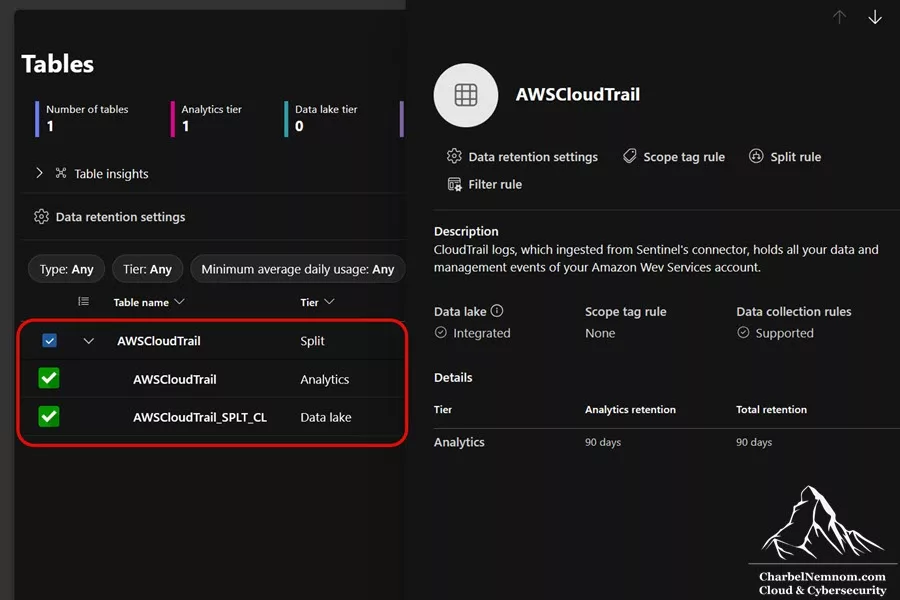
The Tables management page in the Defender portal is the single hub for both Split and Filter Transformations. Selecting any table from the list reveals the Split rule and Filter rule options in the right-side panel, alongside the table’s current tier, retention settings, and data lake integration status.
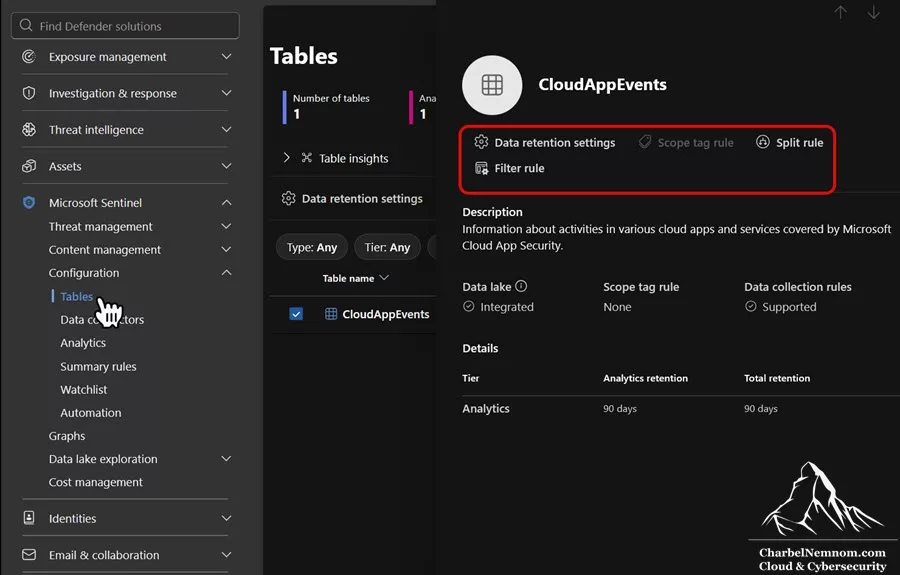
1) In the Microsoft Defender portal, navigate to Microsoft Sentinel > Configuration > Tables.
2) Select the target table (AWSCloudTrail in this example) and choose Split rule from the right-side panel.
3) Enter a Rule name — for example, “Don’t ingest AWSCloudTrail self-activity to Analytics“.
4) In the KQL expression field, enter the expression that defines which records should land in the Analytics tier. Records not matching the expression are routed to the Data lake.
5) Set Rule status to On and select Save.
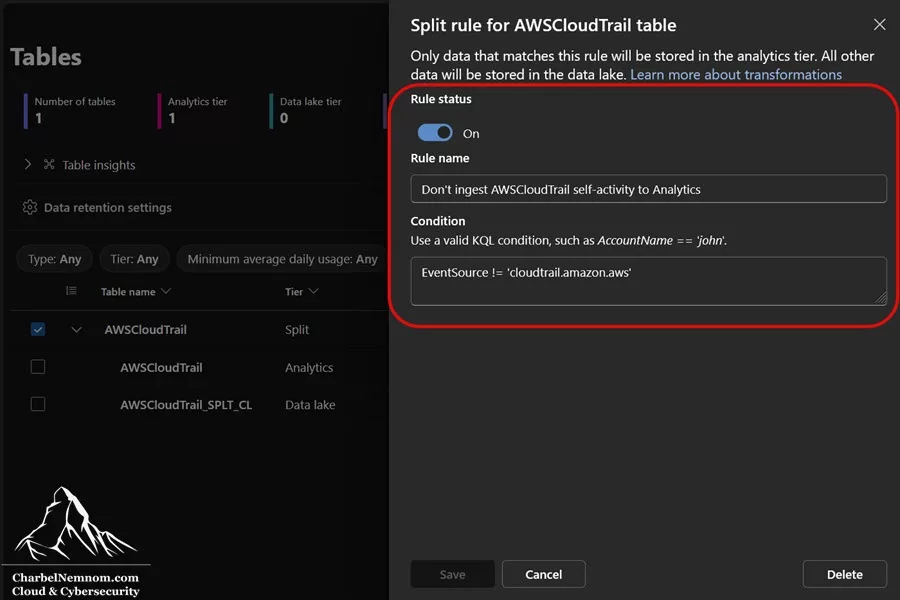
Once the rule is saved, the parent table row in the Tables list moves to the Split tier. As shown in the figure below, when expanding it reveals two sub-level tables: the original AWSCloudTrail table (scoped to the Analytics tier) and the new AWSCloudTrail_SPLT_CL table (Data lake tier only).
After applying the rule, verify correct routing by querying both tables independently:
// Analytics tier — should contain only non-self-activity events
AWSCloudTrail
| summarize Count = count() by EventSource
| sort by Count desc

// Data lake tier — should contain only CloudTrail self-monitoring events
AWSCloudTrail_SPLT_CL
| summarize Count = count() by EventSource
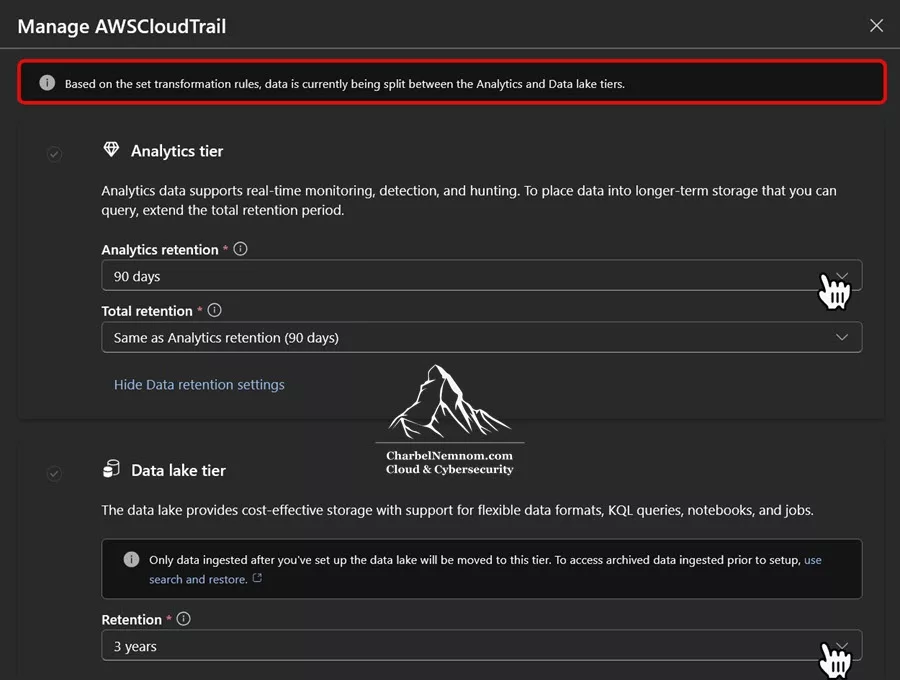
Configure retention for split tables independently. After creating a split rule, both the AWSCloudTrail Analytics table and the AWSCloudTrail_SPLT_CL Data lake table have separate, configurable retention settings. To configure them:
1) Under the original table in the Tables view, expand to see the two sub-level tables.
2) Select the Analytics sub-table (AWSCloudTrail) and choose Data retention settings to configure the Analytics retention period.
3) Select the Data lake sub-table (AWSCloudTrail_SPLT_CL) and choose Data retention settings to configure the Data lake retention period independently.
Alternatively, select the original parent table and configure both Analytics and Data lake retention from the combined Data retention settings panel.
This allows you to keep the Analytics tier data for 90 days (the free window) while retaining the full compliance record in the AWSCloudTrail_SPLT_CL data lake table for up to 12 years—without incurring extended Analytics retention charges on the full log volume.
Cost implications of split transformations. Split transformations do not eliminate the data lake processing fee—the full volume of uncompressed data entering the pipeline still incurs the processing charge before routing occurs. What split transformations eliminate is the Analytics tier ingestion cost for records routed to the Data lake. Instead of paying analytics rates (~$5.16/GB at Pay-As-You-Go) on the entire table volume, you pay data lake rates (~$0.18/GB) on the non-priority portion. For tables where self-monitoring or routine low-priority events represent a significant share of daily volume, a single split rule can materially reduce per-table Analytics ingestion costs.
As of this writing, the native Split Transformations have the following known limitations:
- Transformations take up to one hour to take effect after configuration. Data ingested during the propagation window is not retroactively re-routed.
- Only newly ingested data is subject to the split rule. Existing historical data already in the table is not re-routed.
- Split transformations applied to XDR tables do not appear in Advanced Hunting for the first 30 days of data. The split is applied correctly, but Advanced Hunting visibility reflects it only after data ages past the initial 30-day window. Data queried directly from the table in Log Analytics or Sentinel reflects the routing immediately.
- If an existing DCR transformation is already applied to a table, verify that the split rule’s KQL expression does not conflict with it. Combined effects can result in unexpected data exclusions. Always test the combined effect before applying to production traffic.
The Cost-Conscious Investigation Workflow
In practice, the most cost-efficient investigation pattern follows a natural escalation through the three data lake query modes.
1) An analyst begins with a short-range interactive query to confirm whether a hypothesis is worth pursuing—scanning minimal data at minimal cost.
2) If the initial findings warrant deeper investigation across a longer time window, the analyst switches to an Async query, which can run for up to one hour without timing out and caches results in the data lake hot cache for up to 24 hours. Other team members working the same incident can retrieve those cached results without triggering additional scan charges.
3) Finally, if the investigation reveals a recurring pattern that the SOC wants to monitor continuously, a scheduled KQL job promotes the summarized findings into the analytics tier, where they power detection rules and dashboards at no further query cost. Keep in mind that the KQL job itself generates two charges: the data lake scan cost for reading the uncompressed data, and the analytics ingestion cost for writing the results to the destination table. This dual cost is justified when the promoted summary is significantly smaller than the raw data and eliminates ongoing repeated scans by the entire team.
This workflow—interactive for triage, Async for deep investigation, KQL jobs for operationalization—ensures that every query dollar is spent intentionally, and that expensive full-dataset scans are never repeated unnecessarily across the team.
Long-Term Retention: The Paradigm Shift
The introduction of the data lake fundamentally changes how long-term retention works in Microsoft Sentinel. Understanding this transition is essential for planning your retention strategy.
Traditional Retention Model
Before the data lake, long-term retention worked through an archiving mechanism. Data that aged past your configured analytics retention period was moved to an archive tier on a rolling basis. The archive tier had significant limitations: reduced KQL functionality, slower performance, and the need for restoration to restore full query capabilities. The total retention was the sum of your analytics retention plus your archive period.
The data lake Retention Model
With the data lake enabled, the retention model shifts. Data is stored in the data lake at ingestion time—there is no separate archiving step. Your analytics retention controls how long data remains in the fast, interactive analytics tier. Your data lake retention defines the total duration data is preserved in the data lake. During the analytics retention window, the data lake copy is free. After analytics retention expires, data lake storage charges begin for that data.
The practical benefit is significant: data in the data lake is always queryable with full KQL syntax—no restoration required, no limited query operators. The shift from “archive and restore” to “always interactive data lake” dramatically improves the operational experience for Digital Forensics and Incident Response (DFIR) teams working with historical data.
Planning the Transition Carefully
If you are migrating from a long analytics retention period (say, 180 days) to a shorter one (90 days) plus extended data lake retention, you must plan the transition timeline carefully.
When you enable the data lake, only newly ingested data is mirrored. On day one, your data lake contains zero historical data. After 30 days, it contains 30 days of data. If you immediately reduce your analytics retention from 180 to 90 days, you would lose interactive access to the data between 90 and 180 days old, because the analytics tier would drop it, and the data lake hasn’t accumulated enough history to cover that gap.
The safe approach is to wait until the data lake has accumulated enough data to cover your desired total retention period before reducing analytics retention. In the example above, you would wait a full 180 days after enabling the data lake before shortening analytics retention. During the transition period, both the traditional archive mechanism and the data lake operate in parallel, ensuring no data coverage gaps.
Currently, for analytics tables that support the data lake, Microsoft runs both the traditional archive system and the data lake mirroring simultaneously. You are not double-charged during this coexistence period—you pay once, and both systems protect your data. This transitional safeguard is critical for preventing data loss during the migration window.
What Happens to Existing Archived Data?
Historical data that was archived before the data lake was enabled stays in its current location. It is not automatically migrated to the data lake. However, the billing meter does change: the archive storage cost switches to data lake storage pricing, which includes the 6:1 compression discount. This means your existing archived data becomes cheaper to store automatically—approximately one-sixth of the previous price—even though the data itself hasn’t moved.
>Note: When the billing meter transitions from legacy archive pricing to data lake storage pricing, the previous legacy meter rate does not carry over. The new data lake storage rate applies from the transition point forward. In most cases, this results in lower costs due to the 6:1 compression discount, but verify your specific pricing to ensure there are no unexpected changes.
Cost Optimization Strategies
Beyond selecting the right tier and commitment level, there are several tactical strategies that can meaningfully reduce your Sentinel spend.
The Cheapest Gigabyte Is the One You Never Send
The most effective cost optimization always happens before or during ingestion, not after. If a device or service produces large amounts of low-value data, the first question should not be “Which retention setting should we choose?” It should be “Do we need this field, this event type, or this entire stream at all?” Mature designs push noise reduction as close to the source as possible: firewall vendors export fewer categories, Windows event collection scopes are narrowed, syslog filters are tuned before forwarding, and custom applications emit only security-relevant events.
Filter Early, Filter Aggressively
Data Collection Rules (DCRs) allow you to filter and transform data before it reaches Sentinel. For analytics tables, this is an unqualified win: when Microsoft Sentinel is enabled for the Log Analytics workspace, there is no cost for DCR transformations applied to analytics tables, regardless of volume. Use transformKQL aggressively to drop unnecessary fields, remove noisy event types, and eliminate duplicate data—you only pay for the data that actually lands in the table.
For example, in a Syslog data collection rule, include where Facility == "auth" or Process == "sshd" to drop unrelated logs. In connectors like Windows Security Events, or Windows Event Forwarder (WEF), disable low-value sub-categories like machine account SIDs (“S-1-5-18“, “S-1-5-19“, “S-1-5-20“). Here is an example of a dataFlows section of the DCR. Notice the streams, destinations, transformKql and outputStream. You can apply additional clauses to filter out unnecessary events or parse.
"dataFlows": [
    {
       "streams": [ "Microsoft-SecurityEvent" ],
       "destinations": [ "LAW-DataCollectionEvent" ],
       "transformKql": "source | where SubjectUserSid !in ('S-1-5-18', 'S-1-5-19', 'S-1-5-20')",
       "outputStream": "Microsoft-SecurityEvent"
    }
]
For data lake tables, the situation is fundamentally different. The data lake processing fee is always charged based on the full volume of uncompressed data entering the DCR pipeline, even if the transformation filters out most of it. To avoid this charge, you should filter ingested data using alternative methods before it reaches the DCR—for example, at the source agent level by configuring which event IDs, log levels, or facility codes are collected. Pre-DCR filtering is the only way to reduce both data lake processing and ingestion costs simultaneously.
Watch out for CEF ingestion costs. When ingesting CEF-formatted logs, be aware that extra fields beyond the standard CEF schema are stored in the AdditionalExtensions column of the CommonSecurityLog table. Vendors that populate many custom key-value pairs in CEF extensions can significantly inflate per-event ingestion volume—sometimes doubling or tripling the size of each record. Review your CEF sources and remove unnecessary extensions before ingestion. A security data pipeline like VirtualMetric DataStream is particularly effective here: it can parse, normalize, and filter CEF data at the pipeline level—removing redundant extensions and mapping fields to ASIM-compliant schemas—before the data ever reaches Sentinel Analytics and data lake tiers, reducing both ingestion volume and per-event cost.
Native Filter Transformations
Alongside DCR-level filtering, Microsoft Sentinel now provides native Filter Transformations configurable directly from the Defender portal’s Tables management interface—no DCR authoring required. A filter transformation rule specifies a KQL condition that identifies records to discard: data matching the condition is dropped at ingestion time and is never stored in either the Analytics or Data lake tier.
Native Filter Transformations offer the same cost benefit as DCR transformKQL filtering for Analytics tier tables—both are free for Analytics targets, with charges applied only to the data that passes through. The portal-based approach simply removes the need to write or maintain DCR JSON directly, making targeted noise reduction accessible without deep DCR expertise.
For Data lake tables, the same caveat applies as with DCR transformations: the data lake processing fee is charged on the full volume entering the pipeline before the filter takes effect. Pre-source filtering—at the agent or connector level, before data reaches the ingestion pipeline—remains the only way to simultaneously eliminate both the processing fee and the ingestion cost for data lake targets.
How to configure a filter transformation:
1) In the Microsoft Defender portal, navigate to Microsoft Sentinel > Configuration > Tables. Select the target table (CloudAppEvents in this example) and choose Filter rule from the right-side panel.
2) Enter a Rule name — for example, “Filter out ‘Search’ events“.
3) In the Condition field, enter a KQL expression that identifies records to discard — for example, ActionType == "Search" to drop all search-type events that are unlikely to indicate threat activity. Records matching the condition are dropped entirely—they do not land in Analytics or the Data lake.
4) To add multiple conditions, select Add condition. Multiple conditions are combined with a logical OR, so data matching any condition is filtered out.
5) Set Rule status to On and select Save.
6) Once active, the Transformation Rules column for that table displays Filter.
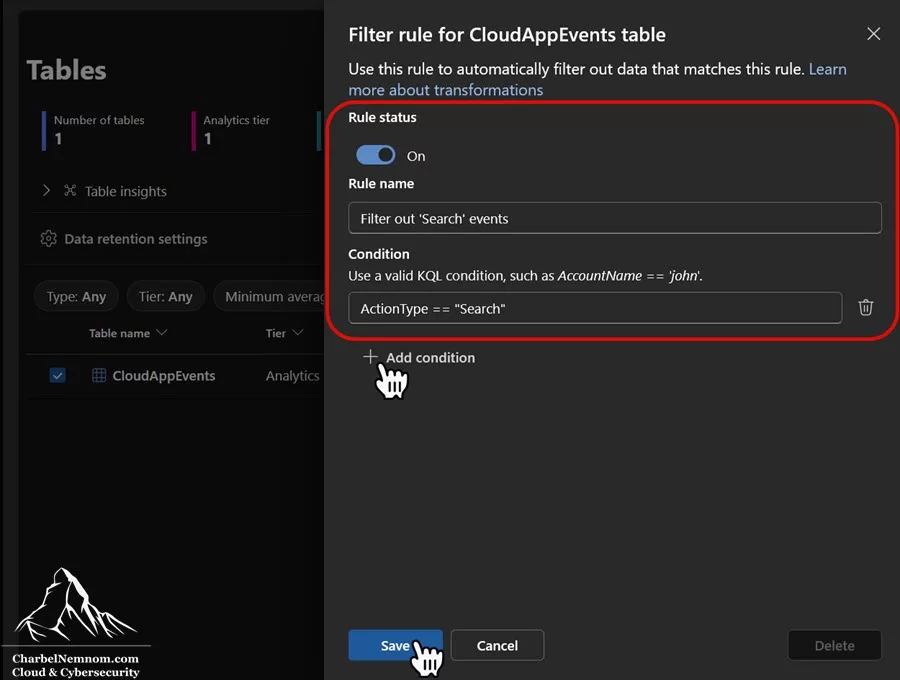
The critical distinction to keep in mind between the two native transformation types:
- Filter Transformation: Data matching the condition is discarded entirely—not ingested to either tier and not recoverable afterward.
-
Split Transformation: Data is routed between tiers—matching data goes to Analytics (and is mirrored to the Data lake); non-matching data goes to the Data lake only via the
_SPLT_CLtable.
Use Filter when you are certain that certain records have zero long-term value. Use Split when you want to preserve data at a lower-cost tier for compliance or forensic purposes. When in doubt, Split is the safer choice.
Optimize Table-Level Retention
Not every table needs the same retention period. Configure retention settings on a per-table basis to match your actual operational and compliance needs. Security alert tables might warrant 180 days of analytics retention, while verbose telemetry tables might need only the free 90 days in analytics with 2 years in the data lake.
Pay particular attention to _SRCH tables (created from search job results) and other transient tables. The default 90-day retention is usually sufficient for these. Leaving the defaults in place can inadvertently accumulate unnecessary storage costs.
Leverage Commitment Tiers Strategically
Analyze your historical ingestion patterns to find the optimal commitment tier. If your daily ingestion fluctuates between 80 and 100 GB, the 100 GB commitment tier locks you into a predictable daily cost regardless of daily variation. Any overage from occasional spikes above the commitment level is billed at the same effective per-GB rate of your selected tier, and the savings on your baseline volume more than compensate.
Review your commitment tier quarterly. As you onboard new data sources or optimize existing ones, your ingestion profile changes. An overcommitted tier wastes money. An undercommitted tier misses savings.
Stack Discounts
Combine commitment tiers with pre-purchase plans, E5 allowances, and Defender for Servers P2 allowances for maximum impact. In many real-world deployments, the effective per-GB cost after stacking all available discounts can be 40–60% lower than the published Pay-As-You-Go rate.
Monitor and Iterate
Cost optimization is not a one-time exercise. Use the built-in Sentinel cost management capabilities (discussed in the next section) to monitor ingestion volumes, identify unexpected spikes, and track cost trends over time. Set up alerts for sudden increases in ingestion volume that could indicate a misconfigured data source or a security incident generating unusual log volumes.
Enforce Cost Limits on Data Lake Queries and Notebooks
Beyond monitoring, you can now set hard spending guardrails on data lake workloads. The Configure Policies experience in the Defender portal (Microsoft Sentinel > Cost management > Configure Policies) lets you define threshold-based policies for two new categories:
- Data Lake Query (interactive KQL queries and KQL jobs)
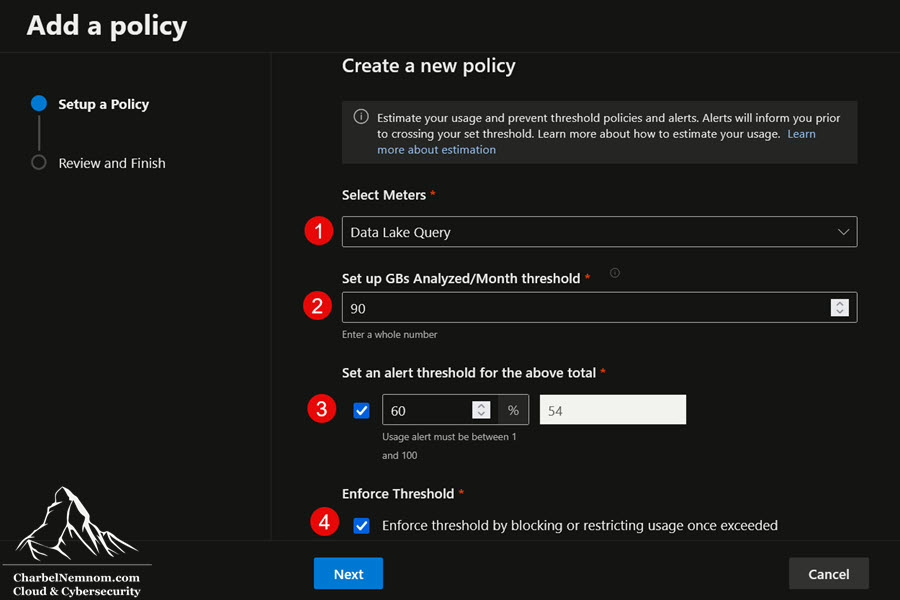
- Advanced Data Insights (notebook runs and notebook jobs)
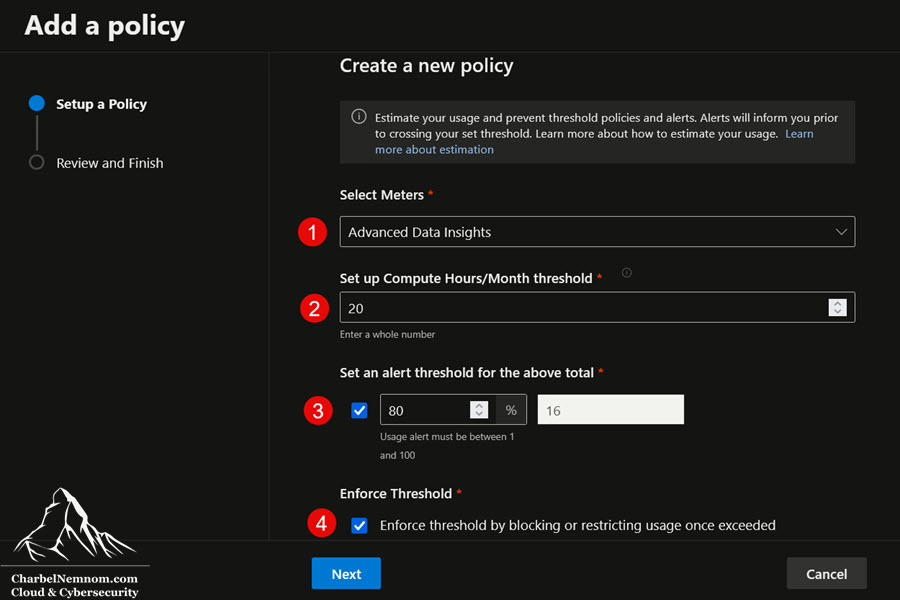
When the Enforcement toggle is enabled and usage exceeds the configured threshold, Microsoft Sentinel automatically blocks new queries, jobs, and notebook sessions with a clear “Limit exceeded” error—eliminating surprise cost spikes from runaway queries or analysts who mistakenly run heavy workloads against data lake data. Queries and jobs already in flight complete normally; only new executions are blocked. If circumstances change—for example, during an active breach investigation—administrators can quickly adjust the threshold, temporarily disable enforcement, or modify the policy to keep the SOC unblocked while maintaining overall budget governance.
Send XDR Advanced Hunting Data Directly to the data lake
This is one of the most impactful cost optimization opportunities available today, and many organizations are not yet taking advantage of it. Microsoft now supports data lake tier ingestion for Defender XDR Advanced Hunting tables — meaning you can stream high-volume endpoint, email, and cloud app telemetry directly to the Sentinel data lake, bypassing Log Analytics and Sentinel analytics tier ingestion entirely. Please note that data lake ingestion, data lake processing, and data lake storage costs still apply.
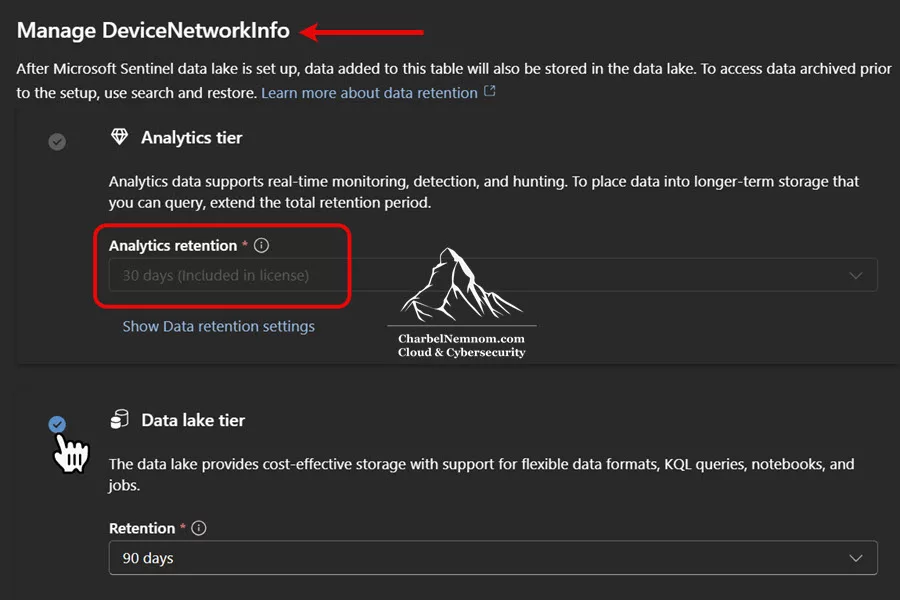
At the time of this writing, the supported tables span four Defender workloads:
-
Defender for Endpoint (MDE):
DeviceInfo,DeviceNetworkInfo,DeviceProcessEvents,DeviceNetworkEvents,DeviceFileEvents,DeviceRegistryEvents,DeviceLogonEvents,DeviceImageLoadEvents,DeviceEvents,DeviceFileCertificateInfo -
Defender for Office 365 (MDO):
EmailAttachmentInfo,EmailEvents,EmailPostDeliveryEvents,EmailUrlInfo,UrlClickEvents -
Defender for Cloud Apps (MDA):
CloudAppEvents -
Defender for Identity (MDI):
IdentityLogonEvents,IdentityQueryEvents,IdentityDirectoryEvents
The cost implication is dramatic. These Advanced Hunting tables are among the highest-volume data sources in any Sentinel deployment—a single endpoint can generate hundreds of megabytes per day of process, network, and file events. At analytics tier Pay-As-You-Go pricing (~$5.16/GB), this telemetry is expensive. At data lake pricing (~$0.18/GB total for ingestion plus processing), the same data costs approximately 96% less.
The key distinction to understand is the difference between XDR alerts and XDR Advanced Hunting telemetry. XDR alerts (from the SecurityAlert and SecurityIncident tables, as well as Microsoft Defender XDR incident and alert tables) are low-volume, high-value, and free to ingest—they should always remain in the analytics tier. Advanced Hunting tables, on the other hand, contain the raw, verbose telemetry behind those alerts: every process execution, every network connection, every file modification, every email event.
This raw telemetry is essential for investigation and threat hunting, but it cannot be used for Sentinel analytics rules, real-time hunting queries, workbooks, or playbooks when it is stored only in the data lake tier. This is not a practical limitation, however, because Defender XDR already provides a built-in custom detection engine that operates directly on this data within the Defender portal, where you can create custom detection rules using the new rules management experience—enabling real-time alerting without requiring Sentinel analytics rules.
When you configure an Advanced Hunting table for data lake tier ingestion, there is zero Sentinel analytics tier ingestion cost for these tables—you are not charged for analytics ingestion or analytics retention. The XDR platform continues to retain this data in the Defender Advanced Hunting experience for 30 days as part of your existing Defender license — fully accessible for custom detections and queries within the Defender portal at no additional Sentinel charge.
Simultaneously, the new XDR data is mirrored directly to the Sentinel data lake for long-term retention up to 12 years, where it is available for KQL queries, KQL jobs, notebooks, MCP server access, and custom Sentinel graphs. No changes are required to your existing Defender deployment—you simply adjust the table’s data retention settings in the Sentinel configuration under the Defender portal. Just be aware that data lake ingestion, data lake processing, and data lake storage costs still apply when you switch an Advanced Hunting table to a data lake tier ingestion only.
How to configure data lake-only ingestion for XDR tables. There are two paths, depending on whether the tables are already flowing through the analytics tier:
1. For tables not yet ingested into Sentinel (or tables still at the XDR default 30-day retention): In the Defender portal’s Tables management page, select the table and choose the Data lake tier option when configuring the retention settings. No connector configuration is needed—table-level settings control the routing.
2. For tables already streaming through the analytics tier (e.g., via the Sentinel XDR connector you enabled in the Azure portal): You must first stop analytics tier ingestion by resetting both the analytics retention and total retention to the default 30 days. This action automatically disables the connector in the Azure portal for those tables, as shown in the figure below; you do not need to manually delete or disable it. Once the analytics tier ingestion has stopped, configure the table for data lake tier ingestion in the Defender portal.
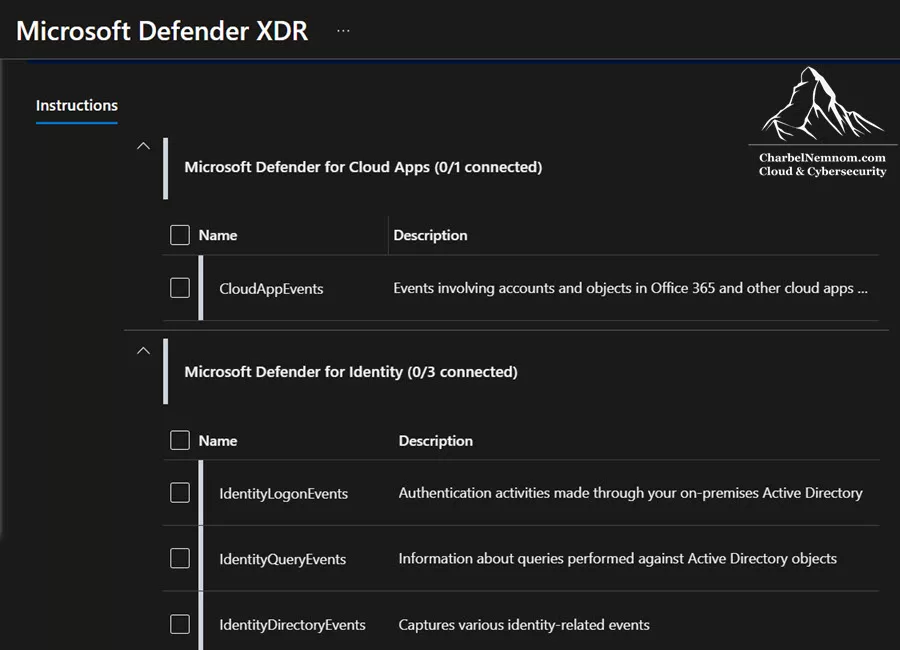
>Important — Prevent double-billing. If XDR tables are already being ingested into the analytics tier and you enable data lake tier ingestion without first resetting the analytics retention to 30 days, you will pay for both tiers simultaneously. Always stop analytics tier ingestion first, then configure the data lake tier. The order matters.
All XDR table management—including tier selection and retention settings—is now done from the Defender portal’s Tables management page, as shown in the figure below.
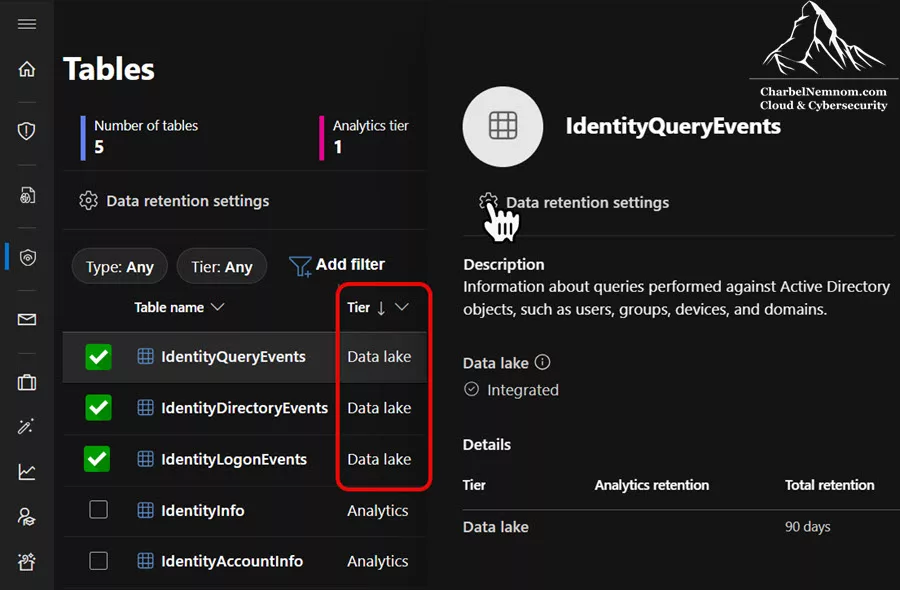
This architecture is powerful because it decouples your real-time XDR operations (which stay within the Defender portal using the license-included 30-day retention) from your long-term security data strategy (which lives in the Sentinel data lake at a fraction of the analytics tier cost). You get the best of both worlds: Defender’s built-in detection engine continues to operate on the data for 30 days, and the Sentinel data lake preserves the same data for months or years of retrospective analysis, compliance, and threat hunting.
For organizations with thousands of endpoints and active email protection, streaming Advanced Hunting telemetry directly to the data lake — bypassing Sentinel analytics ingestion — can eliminate 30–60% of what would otherwise be analytics tier volume, fundamentally changing the economics of the entire Sentinel deployment.
Understand What Auxiliary Tables Mean Now
If you were using auxiliary tables before the data lake was introduced, know that enabling the data lake automatically converts auxiliary tables to data lake tables. The billing meter switches from the auxiliary meter to the data lake meter. Similarly, the archive meter switches to data lake storage costs. These conversions happen automatically and typically result in lower costs due to the data lake storage compression discount.
Common Mistakes That Inflate Microsoft Sentinel Costs
Several mistakes recur across many Sentinel deployments I’ve seen. Consolidating them here as a quick-reference checklist:
1. Sending every log source into the analytics tier “just in case.” This creates a noisy, expensive workspace that the SOC often still does not use effectively. Challenge every source: does it need real-time detection, or is the data lake sufficient?
2. Applying a single retention value across all tables. A flat retention policy is simple to configure but almost always wasteful. Table-level retention aligned to operational and compliance needs is essential.
3. Assuming DCR filtering eliminates all costs for data lake ingestion. It does not. DCR transformations are free for analytics tables, but the data lake processing fee is always charged on the full uncompressed volume that enters the pipeline—regardless of how much the transformation drops.
4. Forgetting to model data lake query costs. Cheap storage does not mean free historical analysis. Poorly scoped queries against large data lake tables can erode the savings you expected.
5. Selecting commitment tiers based on raw ingestion instead of billable ingestion. After subtracting free sources, E5 allowances, and Defender for Servers P2 allowances, the actual billable volume is often significantly lower than the raw connector output.
6. Ignoring Microsoft-native benefits when presenting business cases. E5 allowances, P2 server allowances, and free data sources can dramatically reduce the effective cost—but only if they are factored in from the start.
7. Over-optimizing too early and weakening detections. Moving the wrong data out of the analytics tier to save money can blind your SOC to real threats. Remember that the goal is not the cheapest Sentinel deployment—it is the smartest one.
8. Assuming costs stop when you remove Microsoft Sentinel. Disabling or removing Microsoft Sentinel from a Log Analytics workspace does not delete the workspace or its data. The Log Analytics workspace remains active, and you continue to pay for data ingestion and retention at standard Azure Monitor rates. If you truly want to stop all charges, you must also delete or reconfigure the underlying Log Analytics workspace.
9. Assuming the Defender for Servers P2 allowance covers Linux Syslog data. The 500 MB/day P2 benefit only applies to a specific list of security data types—predominantly Windows tables, such as SecurityEvent and WindowsFirewall. The Syslog table (where Linux logs are ingested) is not eligible. Organizations with large Linux estates that budget based on P2 coverage for all server logs will face unexpected ingestion costs.
Sentinel Cost Management in the Microsoft Defender Portal
> Important: The Azure portal experience for Microsoft Sentinel will be retired on March 31, 2027. The initial retirement date was planned for July 1, 2026, but Microsoft pushed it to March 2027. After that date, Microsoft Sentinel will be managed exclusively through the Microsoft Defender portal. Plan your operational workflows accordingly and ensure your teams are familiar with the Defender portal experience.
Microsoft provides a dedicated cost management experience for Sentinel directly within the Microsoft Defender portal. This is your primary tool for monitoring ingestion volumes, analyzing cost trends, and identifying optimization opportunities without leaving your security operations workflow.
To access Sentinel cost management pages, you must hold both the Billing Administrator and Security Administrator roles. This dual-role requirement ensures that cost decisions are made with both financial accountability and security context.
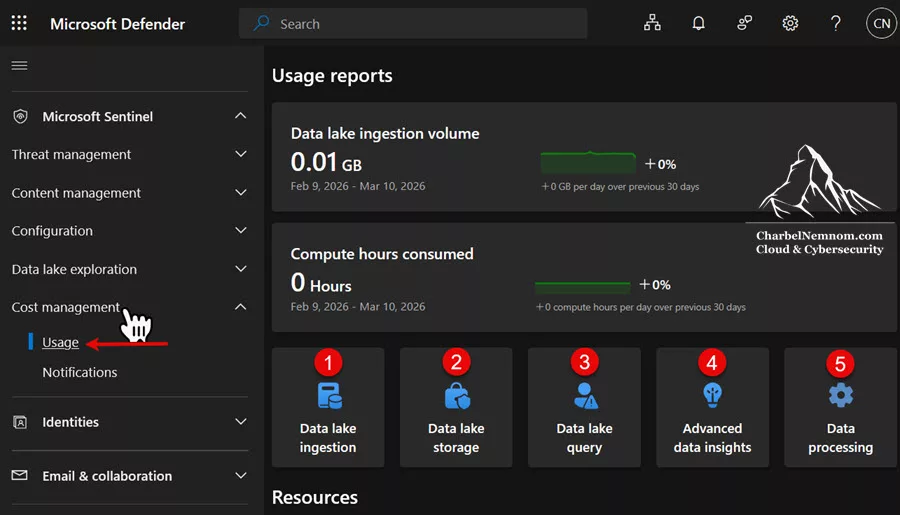
Through the cost management interface, you can review ingestion trends by table, identify which data sources are driving the most cost, track your commitment tier utilization, and forecast upcoming charges. This is the same data that informs the cost optimization strategies above, and reviewing it regularly is essential for maintaining a lean, efficient Sentinel deployment. You can also set up alerts and notifications for paid usage of data lake features.

Frequently Asked Questions
What happens to my existing archived data when I enable the data lake?
Your existing archived data has not been moved or migrated to the data lake. It remains in its original location within Sentinel. However, the billing meter changes to the new data lake-based pricing model, which includes the 6:1 storage compression discount. The practical result is that your archived data costs drop to approximately one-sixth of the previous price, automatically, without any data movement.
Does the data processing fee apply to data mirrored from the analytics tier?
No. The data processing fee only applies to data that enters the data lake ingestion pipeline directly—via DCRs targeting data lake tables. Data that is mirrored from the analytics tier to the data lake is not subject to processing charges.
Why can’t data lake retention be shorter than analytics retention?
This is a platform-enforced requirement to prevent data continuity gaps. Since the long-term retention of analytics data is transitioning to the data lake model, the data lake must retain data for at least as long as the analytics tier to ensure a complete, unbroken timeline for compliance and forensic investigations.
If I query data in the data lake that also exists in the analytics tier, do I pay query costs?
It depends on how you access the data. If you query through the standard Sentinel analytics interface (e.g., during incident investigation, using Advanced Hunting via the Triage collection), you are querying the analytics tier at no charge. If you specifically query the data lake interface—through the Data Exploration tab, KQL queries page, KQL jobs, or the API—you will incur data lake query costs, even if the same data exists in the analytics tier. Always be intentional about which interface you use, especially when using the MCP server, which defaults to the data lake.
How does the 6:1 compression factor work in practice?
Microsoft applies a fixed 6x discount to data lake storage fees, assuming an average compression ratio of 6:1. This discount applies only to storage fees—query charges are calculated against uncompressed data volumes. In reality, your data may compress better or worse than 6:1. The fixed factor simplifies billing: you always pay for one-sixth of the raw data size, regardless of actual compression. Note that Azure Cost Management reports display raw storage in GB without the 6:1 factor applied, so the numbers you see there will appear larger than your actual billed amount.
When should I choose the analytics tier over the data lake tier from a pure cost perspective?
If you need real-time detections, the analytics tier is required regardless of cost. But from a pure cost perspective, the data lake is dramatically cheaper for ingestion (approximately $0.18/GB total vs. $5.16/GB for analytics at Pay-As-You-Go North Europe pricing). The trade-off is query costs: at $0.006/GB per query scan, you can run approximately 830 queries per GB before analytics becomes cheaper. For data that is queried infrequently, the data lake is almost always the better financial choice.
Can I ingest data from one data lake table into another using KQL jobs?
Technically, it is currently possible to route data from one data lake table to another data lake-only table using KQL jobs. This enables advanced data lifecycle management use cases, such as summarizing raw data and storing the summaries in a separate table. However, be aware that Microsoft considers this an unintended behavior, and it may be removed at any time. If you build workflows that depend on this capability, monitor Microsoft announcements closely and have a fallback plan.
What’s the difference between data lake query charges and Advanced Data Insights charges?
Standard data lake queries (KQL queries, KQL jobs, API calls) are billed per GB of data scanned. Advanced Data Insights charges apply when you use managed Spark notebooks for analysis, and are billed per CPU hour consumed. When using notebooks, you do not incur the regular per-GB query charge—only the CPU-hour charge. This makes notebooks potentially more cost-effective for large-scale, complex analytical workloads.
What is the difference between a Filter Transformation and a Split Transformation?
Both are configurable from Microsoft Sentinel > Configuration > Tables in the Defender portal, but behave differently:
- Filter Transformation: Data matching the KQL condition is discarded entirely—not stored in Analytics or the Data lake, and not recoverable. Use this only when you are certain records have zero long-term value.
-
Split Transformation: Data is routed between tiers—matching records go to the Analytics tier (and are automatically mirrored to the Data lake); non-matching records go to the Data lake only, landing in a separate
TableName_SPLT_CLtable. Nothing is discarded.
When in doubt, prefer Split over Filter. A split preserves your data in the Data lake at low cost; a filter permanently eliminates it.
Conclusion
Microsoft Sentinel’s pricing model is multi-layered, but with a clear understanding of each cost element, as we described in this article, it becomes highly manageable and predictable. The introduction of the data lake tier is a game-changer for security teams that previously had to make difficult trade-offs between data retention and budget. The key takeaways from this guide:
1. Categorize your data. Separating high-value, frequently queried data (analytics tier) from high-volume, infrequently queried data (data lake tier) is the single highest-impact cost optimization available to you.
2. Stack your discounts. Commitment tiers, pre-purchase plans, Microsoft 365 E5 allowances, and Defender for Servers Plan 2 allowances can dramatically reduce your effective per-GB cost. Calculate the cumulative impact of all applicable discounts before finalizing your budget.
3. Plan long-term retention transitions carefully. If you are reducing analytics retention and extending data lake retention, wait until the data lake has accumulated sufficient historical data before making changes.
4. Monitor continuously. Use the Sentinel cost management pages in the Defender portal (requires both the Billing Administrator and Security Administrator roles) to track ingestion trends, commitment-tier utilization, and cost anomalies.
5. Be intentional about query targets. Querying the analytics tier is free; querying the data lake costs money. Know which interface and collection your team is using, and train your analysts accordingly.
6. Leverage native transformations to route data at the source. Split and Filter Transformations—configurable directly from the Defender portal’s Tables interface without manual DCR authoring—let you precisely control which records land in the Analytics tier and which go to the Data lake. For high-volume tables, a single split rule can reduce per-table Analytics ingestion costs by over 80% while preserving the full dataset for compliance and forensic investigations.
For more on how log tiering works within the Microsoft Sentinel ecosystem, check out my previous article: Master Log Tiering with Microsoft Sentinel data lake. And for additional Microsoft Sentinel content across the full spectrum of implementation, operations, and optimization, check the Microsoft Sentinel category on my blog.
I hope this helps to optimize your Microsoft Sentinel investment.
Remember, you can always support us in developing tools and creating content via Why Contribute? – Charbelnemnom.com Cloud & Cybersecurity
__
Thank you for reading our blog.
Please let us know in the comments section below if you have any questions or feedback.
-Charbel Nemnom-
