Updated – 02/09/2026 – I took the AB-650 beta exam on 18 August 2026 and documented my experience and takeaways in this section in case it helps others preparing for it. Good luck!
Are you preparing for the new Exam AB-650: Administering Microsoft 365 and AI Services? Microsoft has introduced this exam as part of the brand-new Microsoft 365 Certified: AI Services Administrator Associate certification, the first Microsoft 365 credential built around administering AI services — Microsoft Copilot, agents, and connected AI capabilities — alongside the tenant and workloads they run on.
The Microsoft 365 administrator role has changed. For years, the work was tenants, identities, mailboxes, sites, teams, threat policies, and compliance. That work is still there, but a new layer sits on top of it. Copilot has to be licensed, grounded, and governed. Agents have identities, owners, sponsors, and a lifecycle. Prompts and responses are data that Microsoft Purview has to see. AI consumption produces a bill that someone has to manage.
Exam AB-650 validates that new scope. It measures whether you can configure, secure, govern, and operate both Microsoft 365 and the AI services running on top of it.
In this AB-650 exam study guide, I cover everything you need to know to prepare for and pass the exam, including a full breakdown of the skills measured, the three official Microsoft Learn learning paths, curated Microsoft documentation organized by exam domain, practical exam scenarios, and my personal exam tips. I took the beta exam on 18 August 2026 and have documented my first-hand experience and takeaways in the AB-650 Exam Experience & Takeaways section below.
Table of Contents
Exam AB-650 Overview
The official exam title is: AB-650: Administering Microsoft 365 and AI Services.
As a candidate for this certification, you configure, manage, secure, and govern Microsoft 365 tenants, workloads, and AI services, including Microsoft Copilot, agents, and connected AI capabilities. You enable secure, compliant, and scalable productivity across the organization by governing data access, protecting information, and supporting collaboration between users and agents. You operate and continuously optimize Microsoft 365 and AI services at enterprise scale.
As a Microsoft 365 and AI services administrator, you work with architects and administrators across workloads, infrastructure, identity, security, compliance, endpoints, and applications.
For this exam, you should have experience with Microsoft 365 workloads and Microsoft Entra ID, an understanding of Microsoft Defender XDR capabilities, and familiarity with Microsoft Graph PowerShell.
The passing score is 700 out of 1000. At the time of writing, the exam is only available in English. If the exam is not available in your preferred language, you can request an additional 30 minutes to complete it.
Microsoft does not publish the exam duration on the exam details page while an exam is in beta. See the AB-650 Exam Experience & Takeaways section below for the breakdown I received when I took it.
At the time of writing, this exam is in beta, and there is currently no Practice Assessment available. Microsoft notes that Practice Assessments are usually available within eight weeks after an exam is out of beta and generally available.
Unlike the AI-500 and SC-500 beta exams, which launched with no training content, AB-650 launched with three dedicated Microsoft Learn learning paths and 17 modules. There is no instructor-led course for this exam yet. The learning paths are your primary study resource.
Please note that if you’re planning to take the beta exam, it is not scored immediately because Microsoft gathers data on the quality of the questions and the exam. Beta rescoring begins once the exam goes live, with final results released approximately 10 days later.
The AI Services Administrator Associate Certification Path
This is a single-exam associate certification with no formal prerequisite. To become a Microsoft 365 Certified: AI Services Administrator Associate, you must:
- Take one exam – pass Exam AB-650: Administering Microsoft 365 and AI Services.
- Earn the certification – Microsoft 365 Certified: AI Services Administrator Associate.
There is no prerequisite certification, no second exam, and no expert-level requirement. The job role Microsoft associates with this certification is Administrator.
Like all Microsoft associate, expert, and specialty certifications, this one expires annually and is renewed for free through an online assessment on Microsoft Learn.
MS-102 Retirement and AB-650 Replacement
If you work as a Microsoft 365 administrator, this section matters most.
Microsoft has confirmed that Exam MS-102: Microsoft 365 Administrator will retire on 30 November 2026, at 11:59 PM Central Standard Time. AB-650 is the exam that carries the Microsoft 365 administrator role forward.
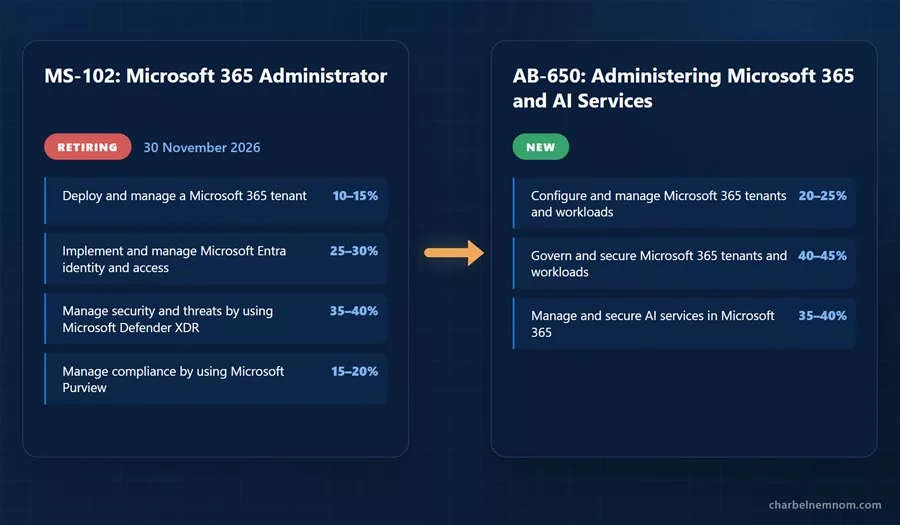
For reference, here is what MS-102 measures:
| MS-102 Skill Area | Weight |
|---|---|
| Deploy and manage a Microsoft 365 tenant | 10–15% |
| Implement and manage Microsoft Entra identity and access | 25–30% |
| Manage security and threats by using Microsoft Defender XDR | 35–40% |
| Manage compliance by using Microsoft Purview | 15–20% |
And here is what AB-650 measures:
| AB-650 Skill Area | Weight |
|---|---|
| Configure and manage Microsoft 365 tenants and workloads | 20–25% |
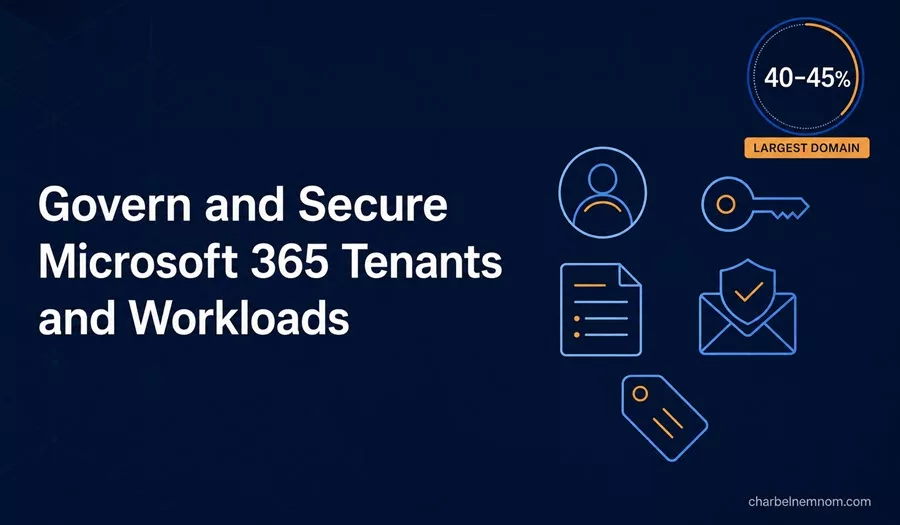
| Govern and secure Microsoft 365 tenants and workloads | 40–45% |
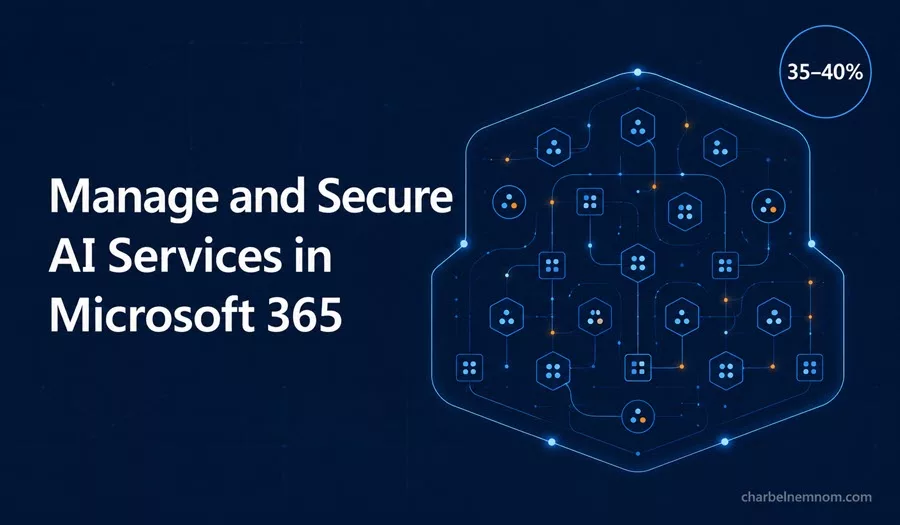
| Manage and secure AI services in Microsoft 365 | 35–40% |
The following table shows how the topics changed between the two exams:
| Topic | MS-102 (retiring) | AB-650 (new) |
|---|---|---|
| Tenant | Deploy and manage a tenant, identity synchronization, Microsoft 365 Apps deployment | Tenant configuration, licensing at scale including AI licenses, Microsoft 365 Backup, network insights, service health |
| Identity | Hybrid identity, Entra Connect, sync troubleshooting | Cloud identity governance: users, guests, groups, PIM, administrative units, Graph PowerShell bulk management |
| Security | Broad Defender XDR: Defender for Endpoint, Identity, Cloud Apps, Office 365 | Narrowed to Defender for Office 365: alerts, threat policies, investigation, attack simulation |
| Compliance | Purview implementation: labels, DLP, retention, insider risk | Purview requirements definition, plus DLP for Copilot and DSPM for AI |
| Workloads | Light coverage | Exchange, Teams, SharePoint, and OneDrive configured for Copilot grounding |
| Copilot | Not measured | A full domain: readiness, settings, Copilot Search, connectors, Cowork, web search, user experiences |
| Agents | Not measured | Entra Agent ID, Agent 365, agent registry, agent owners, agent Conditional Access, agent tools |
| Cost | Not measured | Copilot Credits, pay-as-you-go, usage-based billing, cost management |
Three changes are worth noting.
Hybrid identity is gone. There is no Entra Connect, no sync troubleshooting, and no directory synchronization domain. AB-650 is a cloud identity exam.
Defender XDR coverage is much smaller. Only Defender for Office 365 remains as an explicit objective. The exam expects you to understand XDR capabilities rather than configure every Defender workload.
Roughly 35–40% of the exam covers content that did not exist on MS-102 at all.
If you hold MS-102 and stop there, the areas most likely to catch you out on AB-650 are Copilot administration and settings, agent identity and governance, Copilot data readiness and oversharing controls, DSPM for AI, and AI cost management. Plan your study time accordingly.
Exam AB-650 Target Audience
The AB-650 exam is intended for Microsoft 365 administrators who now also manage the AI services layer. This includes professionals who work with:
• Microsoft 365 admin center and the Copilot Control System
• Microsoft Copilot, Copilot Chat, and Copilot Search
• Microsoft Copilot Studio and Agent Builder
• Microsoft Agent 365 and the agent registry
• Microsoft Entra ID, Entra Agent ID, PIM, and Conditional Access
• Microsoft Entra ID Governance, including access packages
• Exchange Online, Microsoft Teams, SharePoint Online, and OneDrive
• SharePoint Advanced Management (SAM)
• Microsoft Defender for Office 365 and Microsoft Defender XDR
• Microsoft Purview, including sensitivity labels, DLP, data lifecycle management, and DSPM for AI
• Microsoft 365 Backup
• Microsoft Graph PowerShell
• Copilot connectors and third-party AI providers
• Microsoft 365 licensing, including group-based licensing and pay-as-you-go
In this role, you collaborate with architects and administrators across workloads, infrastructure, identity, security, compliance, endpoints, and applications. You are a good candidate for this exam if you:
• Configure and operate a Microsoft 365 tenant end-to-end.
• Assign and monitor licenses at scale, including Copilot and agent licenses.
• Govern identities, guests, groups, and privileged roles in Microsoft Entra.
• Secure email and collaboration with Defender for Office 365.
• Define information protection, DLP, and retention requirements with Purview.
• Prepare tenant data for Copilot and remediate oversharing.
• Configure Copilot tenant settings, connectors, and user experiences.
• Govern the agent estate, including identities, owners, registry, access, and tools.
• Monitor Copilot and agent adoption, health, and cost.
Exam AB-650 Prerequisites
There are no formal prerequisites listed for Exam AB-650. You can register for it without holding any other certification.
Microsoft is clear about the experience it assumes. Before taking this exam, you should have practical experience with:
• Microsoft 365 workloads, including Exchange Online, SharePoint Online, OneDrive, and Microsoft Teams
• Microsoft Entra ID, including users, groups, guests, roles, and Conditional Access
• Microsoft Defender XDR capabilities
• Microsoft Graph PowerShell
• Basic DNS concepts for domain verification
• Beginner-level PowerShell
Microsoft’s learning paths add one practical prerequisite. The AI services path expects access to a Microsoft 365 E5 tenant, and notes that Microsoft 365 E7 (Frontier Suite) is preferred because it includes the Microsoft Agent 365 and Microsoft Entra Suite licensing used in the agent identity labs. Arrange your lab tenant before you start.
If you already hold MS-102, you have covered part of the identity, Defender for Office 365, and Purview content. If you hold SC-300 or SC-401, the identity and data protection domains will be familiar. Neither certification is required.
Exam AB-650 Preparation
How do you prepare for the AB-650 exam?
This exam covers tenant operations, security, governance, and AI services. Your preparation should cover all four areas.
You should be comfortable answering questions such as:
• Which admin portal do you use for a given Copilot or agent setting?
• What can Microsoft Copilot access that Copilot Chat cannot?
• How does Copilot ground a prompt, and what do Microsoft Graph and the semantic index do?
• How do you stop Copilot from surfacing content from a site that is still under permissions review?
• When do you use Restricted Content Discovery, Restricted SharePoint Search, or Restricted Access Control?
• Which licenses does a user need before Copilot works for them?
• How do you assign Copilot licenses to 5,000 users?
• How do you turn web grounding off for a subset of users?
• Who owns an agent, who sponsors it, and what happens when that person leaves?
• How do you give an agent time-bound and auditable access to a resource?
• How do you apply Conditional Access to an agent identity?
• How do you review, approve, block, or publish an agent in the agent registry?
• Where do prompts and responses go, and how does Purview see them?
• Which Purview control meets a stated data security requirement for Copilot?
• How do you report on Copilot adoption by workload?
• How do you attribute Copilot Credit consumption to a team and cap it?
The exam objectives are written around configure, manage, secure, govern, and monitor, so structure your preparation around the official skills measured. You need to know both which control to choose and which portal configures it.
Microsoft also notes that the bullets under each skill area illustrate how the skill is assessed, and related topics may also be covered on the exam. Most questions cover generally available (GA) features, but the exam may include questions on preview features if those features are commonly used. This is relevant on AB-650 because Agent 365, Entra Agent ID, Conditional Access for agents, and parts of the agent registry are moving quickly, and some of it is still in preview.
One naming note that will save you confusion. Microsoft is rebranding “Microsoft 365 Copilot” to “Microsoft Copilot” across the documentation, while the exam objectives still use “Microsoft 365 Copilot”. They refer to the same product.
Skills Measured on The AB-650 Exam
The AB-650 exam measures three main skill areas.
| Skill Area | Weight |
|---|---|
| Configure and manage Microsoft 365 tenants and workloads | 20–25% |
| Govern and secure Microsoft 365 tenants and workloads | 40–45% |
| Manage and secure AI services in Microsoft 365 | 35–40% |
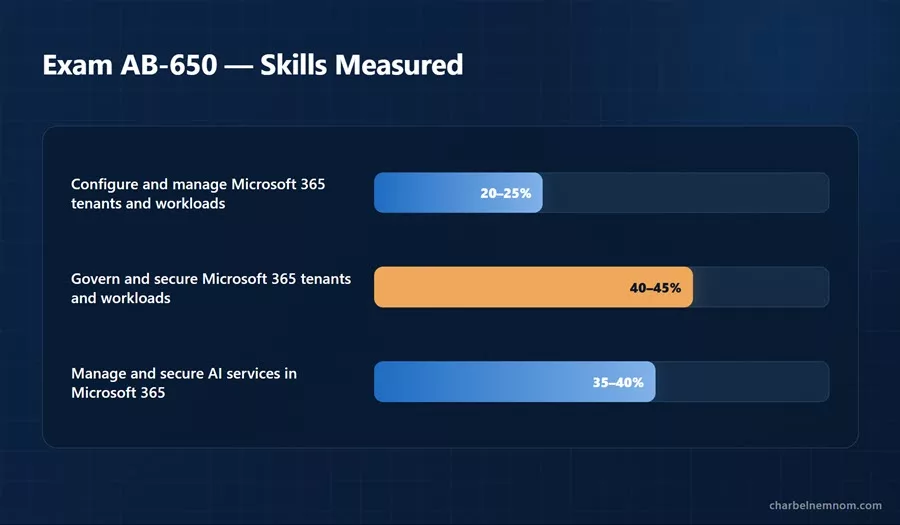
As you can see, the highest-weighted section is Govern and secure Microsoft 365 tenants and workloads at 40–45%, followed by Manage and secure AI services in Microsoft 365 at 35–40%. Together, these two sections represent 75–85% of the exam. Classic tenant and workload administration accounts for only 20–25%.
If you come from a Microsoft 365 administration background, note that the exam is not weighted the way daily administration work is weighted. Security, governance, and AI services make up most of it.
Configure and manage Microsoft 365 tenants and workloads — 20–25%
This is the smallest domain, and the most familiar one if you already administer Microsoft 365.
Configure and manage a Microsoft 365 tenant
You should know how to:
• Configure branding in a Microsoft 365 tenant, including logo, company URL, themes, and backgrounds
• Implement and manage domains
• Configure and manage organizational settings, including security and privacy settings and the organization profile
• Manage and monitor Microsoft 365 licenses, including group-based licensing and pay-as-you-go
• Manage and monitor licenses for AI services, including Microsoft Copilot, Microsoft Agent 365, and Microsoft Copilot Studio
• Configure and use Microsoft 365 Backup, including setup, restore, and monitor
• Configure and review network connectivity insights
• Monitor the health of Microsoft 365 services by using Service Health, including notification configuration
Manage Microsoft 365 workloads
You should know how to:
• Create and manage mailboxes, including shared mailboxes
• Create and manage teams in Microsoft Teams, including channels, owners, and members
• Configure settings for Copilot in Teams meetings, including transcription
• Create and manage SharePoint sites, including permissions
• Configure SharePoint and OneDrive for Copilot, including SharePoint Advanced Management, Microsoft Search in SharePoint, and site exclusions
Two objectives in this section are really Copilot objectives. Configuring Copilot in Teams meetings with transcription, and configuring SharePoint and OneDrive for Copilot, both test whether you understand that Copilot behavior depends on workload configuration. Learn the Teams meeting policy options for Copilot, and learn the SharePoint restriction controls.
Govern and secure Microsoft 365 tenants and workloads — 40–45%
This is the largest section of the exam. It covers identity, authentication, threat protection, and data protection.
Manage identities in Microsoft Entra
You should know how to:
• Create and manage Microsoft 365 users
• Manage guest users and external access settings
• Create and manage groups, including Microsoft 365 groups
• Manage roles for Microsoft 365, including Microsoft Entra Privileged Identity Management (PIM)
• Create and manage administrative units
• Create and manage contacts
• Perform bulk management, including Microsoft Graph PowerShell
Implement and manage authentication and access in Microsoft Entra
You should know how to:
• Configure and manage authentication methods
• Implement and manage Microsoft Entra Password Protection
• Configure self-service password reset (SSPR)
• Investigate and resolve authentication issues
• Implement and manage Microsoft Entra Conditional Access policies, including Microsoft Entra ID Protection and multifactor authentication
Secure Microsoft 365 workloads
You should know how to:
• Manage alerts in Microsoft Defender for Office 365
• Configure threat policies and rules in Defender for Office 365
• Investigate and respond to email and collaboration threats by using Defender for Office 365
• Configure and manage attack simulations, including training campaigns
Protect data in Microsoft 365 by using Microsoft Purview
You should know how to:
• Identify requirements for Microsoft Purview Data Loss Prevention (DLP) policies, including those for Exchange, SharePoint, OneDrive, Teams, endpoints, and Copilot
• Identify requirements for information protection, including sensitive information types, sensitivity labels, and sensitivity label policies
• Identify requirements for data lifecycle management, including retention labels, retention label policies, and retention policies
• Review and respond to DLP alerts for Microsoft 365 and AI services
• Monitor and secure AI activity by using Microsoft Purview Data Security Posture Management (DSPM)
Pay attention to the wording in the Purview objectives. Three of the five bullets say “identify requirements for” rather than configure or implement. The questions give you a business or regulatory requirement and ask which Purview control meets it. You need to know the difference between a sensitivity label, a DLP policy, and a retention label. The last two bullets are operational: responding to DLP alerts and monitoring AI activity in DSPM.
Manage and secure AI services in Microsoft 365 — 35–40%
This is the domain that makes AB-650 a new exam rather than a refreshed MS-102, and it is where most candidates will lose points.
Enable and manage Microsoft Copilot
You should know how to:
• Assess tenant readiness for Copilot, including in-app experiences
• Identify and resolve data readiness issues for Copilot, including data leaks, data oversharing, and data compliance
• Manage web search for Copilot and Microsoft Copilot Chat
• Configure Microsoft Copilot Search
• Configure Copilot settings for a tenant, including self-service purchases, Copilot in admin centers, release preferences, AI disclaimer, and video and image generation
• Manage Copilot user experiences
• Manage Microsoft Copilot Cowork
• Manage third-party AI providers
• Configure Copilot connectors
Implement and manage agents in Microsoft 365 and Agent 365
You should know how to:
• Manage the lifecycle workflows for agent identities by using Microsoft Entra Agent ID
• Secure agent access, including access packages and conditional access
• Manage agent owners
• Configure agent settings, including allowed agent types, sharing, templates, and user access
• Discover and manage Microsoft and third-party agents in the agent registry
• Review requests and publish or reject agents in the agent registry
• Install, block, or control access to agents in the agent registry, including uploading custom agents
• Manage tools in Agent 365
Secure and govern agents by using Agent 365
You should know how to:
• Monitor agent activity by using Agent 365
• Protect sensitive data by using Agent 365
• Evaluate compliance gaps by using Agent 365
Monitor AI services in Microsoft 365
You should know how to:
• Manage and monitor costs for AI services in Microsoft 365
• Monitor usage reports for Copilot in the Microsoft 365 admin center, including workload-level adoption details
• Monitor usage and adoption for AI services in Microsoft 365 by using the Copilot Control System
• Monitor service health by using the Copilot Control System
Notice how much of this section covers agents rather than Copilot. Three of the four sub-areas deal with agent identity, agent governance, or the agent registry. Enabling Copilot and assigning licenses is not enough preparation for this section. Microsoft tests whether you can manage an agent estate, including discovery, identity, ownership, approval, access, tooling, monitoring, and compliance.
Exam AB-650 Learning Path and Study Resources
Microsoft has published three dedicated learning paths for AB-650, with 17 modules in total. All three are rated Intermediate, and all three follow the same fictional company, Relecloud, an AI-native company deploying Copilot to its workforce while protecting Woodgrove Bank’s regulated financial data. The scenarios build on each other, so work through the paths in order.
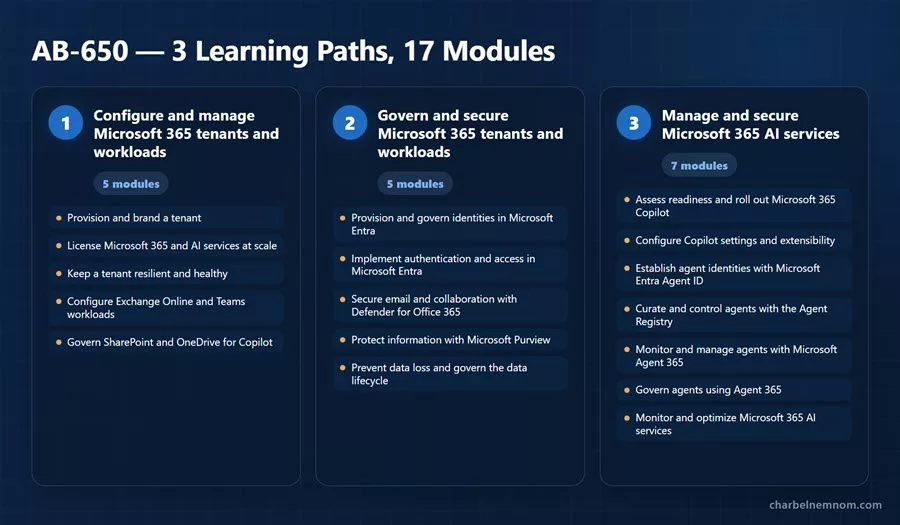
Learning Path 1: Configure and manage Microsoft 365 tenants and workloads (5 modules)
Configure and manage Microsoft 365 tenants and workloads
• Provision and brand a Microsoft 365 tenant — adding and verifying a custom domain, customizing organization branding, and configuring organizational settings using least-privilege administrator roles
• License Microsoft 365 and AI services at scale — direct, group-based, and pay-as-you-go assignment, troubleshooting common assignment issues, and choosing the right Microsoft Copilot, Copilot Studio, or Agent 365 access model for different user populations
• Keep a Microsoft 365 tenant resilient and healthy — Microsoft 365 Backup, service health and network connectivity monitoring including Copilot’s WebSocket requirements, usage reports, and Adoption Score
• Configure Exchange Online and Microsoft Teams workloads — user and shared mailboxes with the right permissions, sizing, and licensing, mail routing, teams and channels, and Copilot in Teams meetings with the correct transcription settings
• Govern SharePoint and OneDrive for Microsoft Copilot — SharePoint sites, permissions, and sharing settings, plus Restricted Content Discovery, Restricted Access Control, and Restricted SharePoint Search to control what Copilot can discover and use
Learning Path 2: Govern and secure Microsoft 365 tenants and workloads (5 modules)
Govern and secure Microsoft 365 tenants and workloads
• Provision and govern identities in Microsoft Entra — users, guests, groups, and privileged roles using least-privilege administrative units, Privileged Identity Management, and Microsoft Graph PowerShell
• Implement authentication and access in Microsoft Entra — authentication methods, Password Protection, self-service password reset, and Conditional Access policies that respond to sign-in risk, user risk, and device compliance, plus investigating authentication issues using Sign-in logs, the Sign-in diagnostic, and the What If tool
• Secure email and collaboration with Microsoft Defender for Office 365 — threat protection policies, alert management, threat investigation and response, attack simulation training, and how Defender for Office 365 fits into the wider Defender security estate
• Protect information with Microsoft Purview information protection — specifying information protection requirements, choosing the right classification technique for a given data shape, and verifying that classification supports safe Microsoft Copilot grounding
• Prevent data loss and govern the data lifecycle with Microsoft Purview — DLP requirements across Microsoft 365 workloads and Copilot, responding to DLP alerts, data lifecycle management requirements, and monitoring AI activity using DSPM for AI
Learning Path 3: Manage and secure Microsoft 365 AI services (7 modules)
Manage and secure Microsoft 365 AI services
• Assess readiness and roll out Microsoft Copilot — tenant and data readiness including the Copilot Readiness Report and update channels, resolving oversharing and compliance risks, and planning a phased rollout
• Configure Microsoft Copilot settings and extensibility — the Copilot tenant settings catalog, managing web search for Copilot and Copilot Chat, setting up Copilot Search, and extending Copilot with Copilot connectors and third-party AI providers
• Establish agent identities and secure access with Microsoft Entra Agent ID — governed agent identities, assigning sponsors and least-privilege owners, automating sponsor-transfer lifecycle transitions, and applying Conditional Access to secure agent access
• Curate and control agents with the Agent Registry and Agent 365 tools — governing what agents can invoke using Agent 365 tools, including MCP servers, and curating the agent estate using registry actions beyond initial onboarding
• Monitor and manage agents with Microsoft Agent 365 — real-time visibility into agents to detect agent sprawl, understand usage and behavior, and act on performance and risk signals
• Govern agents using Agent 365 — onboarding and validation, access governance controls for security and compliance, data compliance, and setting up policies, permissions, and rules
• Monitor and optimize Microsoft 365 AI services — Copilot and agent usage, adoption, and cost, plus Microsoft 365 Service Health and the Copilot Control System
One note on the prerequisites for this path. Microsoft states that you need access to a Microsoft 365 E5 tenant, and that Microsoft 365 E7 (Frontier Suite) is preferred because it includes the Microsoft Agent 365 and Microsoft Entra Suite licensing used in the agent identity labs.
AB-650 Microsoft Documentation by Exam Domain
Beyond the learning paths, I curated the following official Microsoft documentation, organized by exam domain, to help you study.
Configure and manage Microsoft 365 tenants and workloads
• Microsoft 365 admin center help
• Tenant management for Microsoft 365 for enterprise
• Add a domain to Microsoft 365
• Customize the Microsoft 365 theme for your organization
• Assign licenses to users in the Microsoft 365 admin center
• Group-based licensing in Microsoft Entra ID
• License options for Microsoft Copilot
• Minimum requirements to deploy Microsoft Copilot
• Set up Microsoft Copilot and assign licenses
• Manage self-service purchases and trials (for admins)
• Overview of Microsoft 365 Backup
• Set up Microsoft 365 Backup
• Restore data in Microsoft 365 Backup
• Microsoft 365 network connectivity overview
• Network connectivity in the Microsoft 365 admin center
• How to check Microsoft 365 service health
• Create a shared mailbox
• Manage Microsoft Copilot in Teams meetings and events
• Manage transcription and captions for Teams meetings
• Get ready for Microsoft Copilot with SharePoint Advanced Management
• Microsoft Copilot best practices with SharePoint
• Restrict discovery of SharePoint sites and content (Restricted Content Discovery)
• Restricted SharePoint Search
• Curate the allowed list for Restricted SharePoint Search
Govern and secure Microsoft 365 tenants and workloads
• Microsoft Entra ID documentation
• Add or update user profile information in Microsoft Entra ID
• Add Microsoft Entra B2B collaboration users
• Configure external collaboration settings
• Manage Microsoft 365 groups
• Microsoft Entra built-in roles
• What is Microsoft Entra Privileged Identity Management?
• Administrative units in Microsoft Entra ID
• Get started with Microsoft Graph PowerShell
• Authentication methods in Microsoft Entra ID
• Eliminate bad passwords using Microsoft Entra Password Protection
• Plan a self-service password reset deployment
• How to use Microsoft Entra sign-in diagnostics
• The Conditional Access What If tool
• What is Conditional Access?
• What is Microsoft Entra ID Protection?
• Microsoft Defender for Office 365 security operations guide
• Microsoft Defender for Office 365 in the Microsoft Defender portal
• Preset security policies in EOP and Defender for Office 365
• Get started using Attack simulation training
• Reports for Attack simulation training
• Learn about data loss prevention
• Microsoft Purview DLP for Microsoft Copilot and Copilot Chat
• Learn about sensitivity labels
• Learn about sensitive information types
• Learn about retention policies and retention labels
• Learn about Microsoft Purview Data Security Posture Management (DSPM)
• DSPM for AI data security and compliance protections for Copilot and generative AI apps
• Considerations for deploying DSPM for AI
• Use Microsoft Purview to manage data security and compliance for Microsoft Copilot and Copilot Chat
Manage and secure AI services in Microsoft 365
• What is Microsoft Copilot?
• Microsoft Copilot architecture and how it works
• Data, privacy, and security for Microsoft Copilot
• Semantic indexing for Microsoft Copilot
• Manage Microsoft Copilot Chat
• Minimum requirements for Microsoft Copilot Chat
• Data, privacy, and security for web search in Microsoft Copilot and Copilot Chat
• Manage Microsoft Copilot scenarios in the Microsoft 365 admin center
• Manage Microsoft Copilot Search
• Roll out Microsoft Copilot to your organization
• Microsoft Copilot adoption and onboarding guide for IT admins
• Configure a secure and governed data foundation for Microsoft Copilot
• Copilot Cowork overview
• Manage Copilot Cowork for your organization
• Copilot connectors overview
• Manage Copilot connectors
• Federated connectors overview
• OpenAI as a subprocessor in Microsoft Online Services
• Anthropic as a subprocessor for Microsoft Online Services
• Agents admin guide for Microsoft 365
• Manage agents in the Microsoft 365 admin center
• Governance and lifecycle actions for agents in the Microsoft 365 admin center
• Agent Builder in Microsoft Copilot
• Choose between Agent Builder and Copilot Studio
• Share and manage agents built with Microsoft Copilot
• Microsoft Agent 365 overview
• Agent overview in the Microsoft 365 admin center
• Protect agent identities with Microsoft Entra
• What is Microsoft Entra Agent ID?
• Overview of agent identities in Microsoft Entra
• Agent Registry in the Microsoft 365 admin center
• Agent Registry convergence with Microsoft Agent 365
• Governing agent identities in Microsoft Entra ID Governance
• Access packages for agent identities in Microsoft Entra
• Conditional Access for agents in Microsoft Entra
• Target agent identities in Conditional Access policies
• Copilot Control System overview
• Copilot Control System management controls
• Microsoft Copilot readiness report
• Microsoft Copilot usage report
• Microsoft Copilot agent usage report
• Microsoft Copilot Credits report
• Usage-based billing and cost management for Copilot Credits
• Microsoft Copilot pay-as-you-go service overview
• Prepaid capacity packs versus pay-as-you-go billing for Microsoft Copilot Chat
• Connect to the Microsoft Copilot Dashboard (Viva Insights)
Because AB-650 is a practical administration exam, reading alone is not enough. You should get hands-on experience in the Microsoft 365 admin center, the Microsoft Entra admin center, the Microsoft Defender portal, the Microsoft Purview portal, the SharePoint admin center, the Teams admin center, and Copilot Studio.
You can also explore the exam environment by visiting the exam sandbox page.
AB-650 Example Exam Scenarios
Scenario 1: Copilot Surfaces Content From a Site Under Review
Users report that Copilot is summarizing documents from a legacy HR site whose permissions are still being cleaned up. You must stop Copilot and organization-wide search from surfacing that content without changing who can access the site.
Best approach:
• Apply Restricted Content Discovery (RCD) to the site. It leaves site access unchanged but removes the content from Copilot responses and organization-wide search results.
• Be aware that RCD also removes AI entry points from the site, including the Copilot button, AI actions menus, agent creation, and Create pages with AI.
• Use RCD as a temporary control while permissions, ownership, and governance are reviewed.
• Do not use Restricted SharePoint Search here. That is a tenant-wide setting with an allowed list, not a per-site control.
• Do not remove user permissions to solve a discovery problem. That breaks legitimate access and does not scale.
Scenario 2: Copilot Chat Versus Microsoft Copilot
A department wants AI assistance but has no budget for add-on licenses. Leadership asks what those users can and cannot do.
Best approach:
• Microsoft Copilot, the licensed experience, reasons over organizational data through Microsoft Graph and the semantic index, and works inside Word, Excel, PowerPoint, Outlook, and Teams. It requires an add-on license.
• Microsoft Copilot Chat requires no add-on license. It is grounded in the web, and users can supply organizational data themselves, for example by referencing a file they already have access to.
• Copilot Chat agents can be metered through pay-as-you-go Copilot Credits, so no license does not mean no cost.
• Licensed users get priority access. Unlicensed users get standard access to in-app chat where it is available.
• In both cases, Copilot honors the existing user identity-based access boundary. It never surfaces content the signed-in user cannot already open.
Scenario 3: Choosing Where to Configure a Copilot Setting
You must disable self-service Copilot purchases, turn off image generation, and stop Copilot from grounding on the public web for one department.
Best approach:
• Configure self-service purchases, image and video generation, release preferences, and the AI disclaimer in the Microsoft 365 admin center under Copilot > Settings.
• Sign in with the AI Administrator role. It is the least-privileged role that can change Copilot settings. Global Reader can view them.
• Control web search with the Allow web search in Copilot policy in Cloud Policy service for Microsoft 365, which can be scoped to a group. The options are enabled in both, disabled in both, or disabled in Copilot Work mode while enabled in Web mode and Copilot Chat.
• Remember that not every Copilot control lives in the Microsoft 365 admin center. Agent controls also involve the Power Platform admin center and Copilot Studio, and agent identity is managed in the Microsoft Entra admin center.
Scenario 4: Agent Ownership and Lifecycle
An employee who built and owned a widely used agent is leaving the company. The agent must keep running, and the audit team wants a named accountable person at all times.
Best approach:
• Use Microsoft Entra Agent ID to manage the agent identity lifecycle, including sponsor-transfer transitions when the responsible person changes.
• Know the difference between the roles. An owner can edit, manage, and maintain the agent. A sponsor is the accountable person tied to the agent identity.
• Assign multiple owners so ownership is shared across a team. Ownership reassignment is supported for Agent Builder and Copilot Studio agents.
• Automate the lifecycle transition instead of relying on offboarding tickets.
• Verify that the agent’s access still resolves after the transfer. An orphaned agent with live permissions is the risk you are being asked to prevent.
Scenario 5: Time-Bound and Auditable Agent Access
A group of customer support agents needs the same set of permissions, granted deliberately and reviewable by audit.
Best approach:
• Use Microsoft Entra entitlement management access packages for agent identities. They make agent access assignments intentional, auditable, and time-bound, and they standardize access across many agents with the same requirements.
• Add the resources to the package, including Entra roles, group memberships, and OAuth permission grants to application APIs, then configure the policy settings.
• Add Conditional Access for agents to control the conditions under which the agent can use that access. Entitlement management controls what an agent can access. Conditional Access controls when and how.
• Note the licensing requirement. Conditional Access for agents requires Microsoft Entra ID P1 or P2, plus a Microsoft Agent 365 license for each user.
• In the Conditional Access policy, target agents under Assignments > Users, agents, or workload identities.
Scenario 6: Agent Sprawl and the Agent Registry
Business units have started building their own agents. Nobody knows how many exist, which ones are third-party, or which ones access sensitive data.
Best approach:
• Use the agent registry to discover and inventory both Microsoft and third-party agents in one place.
• Set up an approval workflow. Review requests, then publish or reject agents instead of allowing uncontrolled self-publishing.
• Use registry actions to install, block, or control access to agents, and to upload approved custom agents.
• Configure agent settings centrally, including allowed agent types, sharing, templates, and user access.
• Use Agent 365 to monitor activity, detect sprawl, protect sensitive data, and evaluate compliance gaps. Agent 365 is the unified registry and control plane. Entra Agent ID remains the identity foundation.
Scenario 7: Copilot Returns Data a User Should Not See
During a pilot, a user asks Copilot a question and receives a summary of a salary spreadsheet. Security escalates it as a Copilot data leak.
Best approach:
• Identify the actual cause. This is an oversharing problem, not a Copilot problem. Copilot respects existing permissions, so if it returned the file, the user already had access to it.
• Do the data readiness work. Use SharePoint Advanced Management reports and the content management assessment to find oversharing, then fix permissions and sharing links.
• Apply sensitivity labels so protected content keeps its protection in Copilot interactions, and use DLP for the Copilot location to stop labeled content from being processed.
• Use Restricted Content Discovery to contain the exposure while the permissions review runs.
• Monitor ongoing AI activity with DSPM for AI, including prompts and responses captured in the unified audit log and shown in Activity Explorer.
Scenario 8: Purview Requirement Mapping
Regulated financial records must be retained for seven years, must never be sent outside the organization, and must be visually marked as confidential.
Best approach:
• Map each requirement to the right control instead of using one tool for everything.
• Retention for seven years is a retention label and retention label policy, which is data lifecycle management.
• Blocking external sharing is a DLP policy scoped to the relevant locations, including Exchange, SharePoint, OneDrive, Teams, endpoints, and Copilot.
• Visual marking and encryption is a sensitivity label with the appropriate label policy.
• Identify the content first with the right sensitive information types or trainable classifiers.
• Include the Copilot DLP location whenever the requirement mentions AI. Workload DLP alone does not cover Copilot interactions.
Scenario 9: Copilot Cost Has Tripled
Finance reports a large increase in AI spend and cannot attribute it to a team. Agents and Cowork are both in use.
Best approach:
• Know the two billing models: prepaid capacity packs, and pay-as-you-go Copilot Credits billed through an Azure subscription meter.
• Use the Cost Management dashboard in the Microsoft 365 admin center to view and control spending on usage-based AI experiences.
• Use the Copilot Credits report to track pay-as-you-go usage, monitor metered agents, and set alerts.
• Set limits per user or group for usage-based experiences such as Cowork, which bills on activity, including model responses, tool and skill calls, image generation, and browser tasks. • Remember that Cowork requires usage-based billing to be enabled before users can access it.
Scenario 10: Reporting on Copilot Adoption
Leadership funded 2,000 Copilot licenses and wants evidence of adoption by workload before renewing.
Best approach:
• Use the Microsoft Copilot usage report in the Microsoft 365 admin center for enabled users, active users, retention, and workload-level adoption detail. Data is typically available within 48 hours.
• Use the Copilot readiness report to show how many users hold the prerequisite licenses and are ready to be enabled.
• Use the separate agent usage report and Copilot Chat usage report for agent and unlicensed chat activity.
• Use Copilot Analytics and the Copilot Dashboard in Viva Insights for productivity impact and return on investment, which is the measurement and reporting pillar of the Copilot Control System.
• Do not confuse readiness, which is license eligibility, with adoption, which is actual usage. The exam offers you both.
Schedule Exam AB-650
Once you are ready, you can schedule Exam AB-650 from the official Microsoft Learn exam page.
At the time of writing, Microsoft lists Exam AB-650 as a beta exam. According to the official Microsoft Tech Community announcement, the first 300 people who took Exam AB-650 beta on or before 18 August 2026 could get 80% off by using the discount code AB-650SkyClub when prompted for payment.
Please note that this beta discount code has now expired. The offer ended on 18 August 2026, which is the day I took the exam, so AB-650SkyClub is no longer accepted at checkout. I am documenting it here for reference only.
For context on how the offer worked, it was not a private access code; the seats were offered on a first-come, first-served basis subject to availability and country restrictions, and it was not available in Turkey, Pakistan, India, or China. If Microsoft publishes a new discount or voucher offer for this exam, I will update this section.
The exam is still available at standard pricing while it remains in beta. Microsoft has stated that general availability of this certification is planned for October 2026. Since Exam MS-102 retires on 30 November 2026, there is a short period where both exams are available. If you are currently preparing for MS-102, decide which exam you want to take.
Beta exam rescoring begins when the exam goes live, with final results released approximately 10 days later.
Please note that exam details, availability, discounts, and timelines can change. Always confirm the latest information on the official Microsoft Learn exam page before registering. Before scheduling, make sure you:
• Read the official Microsoft study guide carefully; we already discussed it here.
• Review all three skills measured areas.
• Complete all three Microsoft Learn learning paths (17 modules).
• Get hands-on practice in the Microsoft 365, Entra, Defender, Purview, SharePoint, and Teams admin centers.
• Spend time in the Copilot and Agents pages of the Microsoft 365 admin center.
• Use the exam sandbox to understand the Microsoft exam experience.
• Confirm the latest exam availability, language, and pricing in your region.
I strongly recommend using a personal Microsoft account when registering for Microsoft certification exams. If you register with an organizational account, your exam records could be impacted if you leave the organization.
Please note that if you’re planning to take the beta exam, it is not scored immediately because Microsoft gathers data on the quality of the questions and the exam.
AB-650 Exam Tips
Here are my recommendations to prepare for and pass the AB-650 exam:
• Do not prepare using only the MS-102 blueprint.
• Complete all three learning paths and the 17 modules.
• Learn which admin portal configures which setting. This is the most common question type on the exam.
• Know the difference between Microsoft Copilot and Copilot Chat, including licensing, grounding sources, and access.
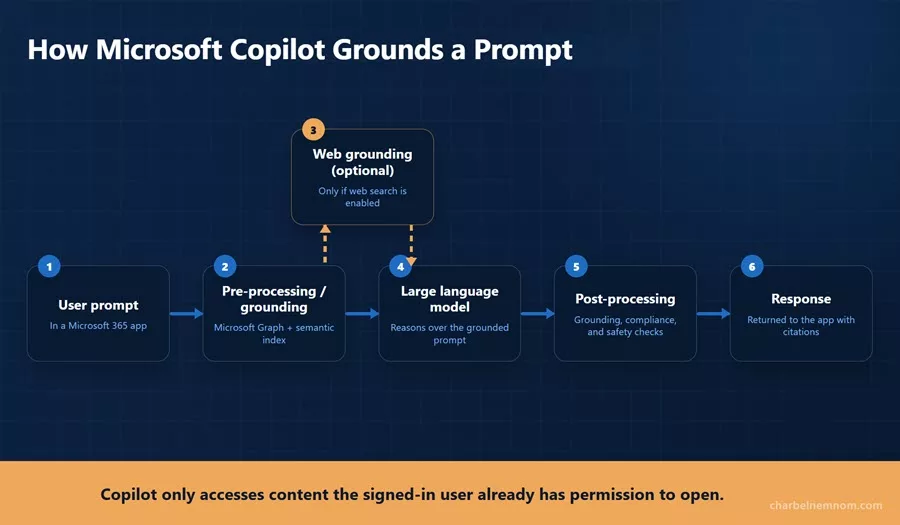
• Understand how Copilot grounds a prompt using Microsoft Graph, the semantic index, and optional web grounding.
• Know that Copilot never crosses the user’s existing permission boundary.
• Learn the three SharePoint restriction controls: Restricted Content Discovery, Restricted SharePoint Search, and Restricted Access Control.
• Treat Copilot data exposure questions as oversharing questions. The fix is permissions, labels, and DLP.
• Learn the agent terminology: owner, sponsor, agent identity, agent registry, Agent 365, Entra Agent ID, access package, Conditional Access for agents, and agent tools.
• Know the least-privileged role for each task. The AI Administrator role is often the correct answer instead of Global Administrator.
• Study Microsoft Purview by requirement, not by feature. Be able to choose between a sensitivity label, a DLP policy, and a retention label.
• Review DSPM for AI. It is where AI activity monitoring takes place.
• Know the reports by name: readiness, usage, agent usage, Copilot Chat usage, Copilot Credits, and the Copilot Dashboard.
• Understand Copilot Credits, pay-as-you-go billing, and prepaid capacity packs.
• Know the three pillars of the Copilot Control System: security and governance, management controls, and measurement and reporting.
• Review the Teams meeting policy options for Copilot, and remember that only “On with saved transcript required” is enforced by the administrator.
• Expect preview features. Agent identity and Conditional Access for agents are changing quickly, so check the current documentation.
• Practice scenario-based questions.
The best exam mindset is: think like the administrator who has to enable Copilot for the whole organization. For every question, ask what needs to be true about permissions, licensing, policy, and cost before it is safe to do so.
AB-650 Exam Experience & Takeaways
I took the AB-650 beta exam on 18 August 2026, and here is my honest experience to help you prepare and pass.
Exam Format and Structure
I received 63 questions with 120 minutes of actual exam time. The total appointment length is longer than the exam time because it includes the NDA agreement, the pre-exam survey, and the post-exam feedback survey.
The question breakdown: 49 standalone questions, including drag-and-drop and multiple-response items, plus 2 case studies. At the time of this writing, there were no performance-based tasks (labs), but this might change in future versions of this exam.
The exam was almost entirely scenario-based. Very few questions were direct recall. Most of them describe an organization with a requirement and a constraint, and then ask you to select the control, portal, or role that meets it. Read the questions carefully because they are tricky. The wrong answers are usually options that would technically work but grant too much access or solve only part of the problem.
The AB-650 exam is open book. You have access to Microsoft Learn documentation during the exam, which you can use to double-check answers. Use it as a safety net for exact setting names and role names, not as a replacement for preparation. The scenario questions take time to read, so you will not have time to look up many answers.
I will share my score results as soon as I receive the final report, once the exam is out of beta.
What I Actually Saw in the Exam
Here is what I encountered in the exam, along with official Microsoft documentation links for each topic so you can study further:
Microsoft Copilot Architecture and Capabilities (Heavy Focus)
This was the heaviest area on the exam. Questions covered what Copilot can and cannot do, how grounding works, the role of Microsoft Graph and the semantic index, how prompts are processed, and web grounding. You should be able to describe the full path a prompt takes: user prompt, grounding against Microsoft Graph and the semantic index, optional web query, the large language model, post-processing, and the response.
• What is Microsoft Copilot?
• Microsoft Copilot architecture and how it works
• Semantic indexing for Microsoft Copilot
• Overview of Microsoft Graph
• Data, privacy, and security for web search in Microsoft Copilot and Copilot Chat
Copilot Chat Versus Microsoft Copilot
Several questions depend on this distinction. You need to know which experience requires an add-on license, what each one can access, and what an unlicensed user gets. Microsoft Copilot uses organizational data and the web and requires a license. Copilot Chat is grounded in the web with organizational data that users provide, and it does not require an add-on license.
• Manage Microsoft Copilot Chat
• Minimum requirements for Microsoft Copilot Chat
• License options for Microsoft Copilot
Agents, Agent Builder, and Copilot Studio (Heavy Focus)
A large number of questions covered agents. Expect questions on when to use Agent Builder versus Copilot Studio, agent permissions, owners, managers, sponsors, assigning access to groups and users, and the agent lifecycle. Agent Builder is the simple natural language experience for declarative agents. Copilot Studio is for actions, external service integration, and more complex requirements.
• Agent Builder in Microsoft Copilot
• Choose between Agent Builder and Copilot Studio
• Share and manage agents built with Microsoft Copilot
• Agents admin guide for Microsoft 365
• Governance and lifecycle actions for agents
• What is Microsoft Entra Agent ID?
• Microsoft Agent 365 overview
• Access packages for agent identities in Microsoft Entra
• Conditional Access for agents in Microsoft Entra
Microsoft Copilot Licensing
Questions on who needs a license, what licensed and unlicensed users can do, and the licensing prerequisites. You need to know the base Microsoft 365 subscription required before the Copilot add-on can be assigned, that the user needs a Microsoft Entra account, and that the user’s primary mailbox must be in Exchange Online. Group-based licensing was the answer for assigning licenses at scale.
• License options for Microsoft Copilot
• Minimum requirements to deploy Microsoft Copilot
• Set up Microsoft Copilot and assign licenses
• Group-based licensing in Microsoft Entra ID
Microsoft 365 Copilot Administration and Admin Portals
This was one of the most common question types on the exam. You are given a configuration requirement and asked which admin portal you use. Copilot tenant settings, self-service purchases, release preferences, the AI disclaimer, and image and video generation are in the Microsoft 365 admin center. Agent controls also involve the Power Platform admin center and Copilot Studio. Microsoft Entra manages agent identity. Know the AI Administrator role as the least-privileged option for Copilot configuration.
• Manage Microsoft Copilot scenarios in the Microsoft 365 admin center
• Copilot Control System management controls
• Microsoft Entra built-in roles
• Manage self-service purchases and trials (for admins)
Data Security and Permissions (Heavy Focus)
A large block of questions covered SharePoint permissions, sensitivity labels, restricted content, external users, and how Copilot respects existing permissions. If a user can already open a file, Copilot can use it. If the user cannot, Copilot cannot. Most questions about Copilot exposing content are answered with permissions cleanup, restriction controls, or labeling.
• Microsoft Copilot best practices with SharePoint
• Restrict discovery of SharePoint sites and content (Restricted Content Discovery)
• Restricted SharePoint Search
• Get ready for Microsoft Copilot with SharePoint Advanced Management
• Configure a secure and governed data foundation for Microsoft Copilot
• Configure external collaboration settings
Microsoft Purview
Questions on sensitivity labels, DLP, and data security, privacy, and compliance controls, including DLP for the Copilot location and how Purview protections apply to generative AI. Expect requirement-to-control mapping rather than step-by-step configuration.
• Learn about sensitivity labels
• Learn about data loss prevention
• Microsoft Purview DLP for Microsoft Copilot and Copilot Chat
• Use Microsoft Purview to manage data security and compliance for Microsoft Copilot
• DSPM for AI
• Learn about retention policies and retention labels
Copilot Data and Privacy
Questions on how prompts and responses are handled and what happens to organizational data. Prompts, responses, and data accessed through the semantic index are not used to train the foundation models. Data stays within the Microsoft 365 service boundary. Interactions are captured in the unified audit log where Purview can act on them. Microsoft has also onboarded OpenAI and Anthropic as subprocessors, and administrators can disable specific models in Copilot settings, which is relevant to the third-party AI provider objective.
• Data, privacy, and security for Microsoft Copilot
• OpenAI as a subprocessor in Microsoft Online Services
• Anthropic as a subprocessor for Microsoft Online Services
Copilot Analytics and Reporting
Questions on usage reports, adoption, readiness, and which reports are available. Know the difference between the readiness report, which shows license eligibility and prerequisites, and the usage report, which shows enabled users, active users, retention, and workload-level adoption. The agent and Copilot Chat usage reports are separate reports.
• Microsoft Copilot readiness report
• Microsoft Copilot usage report
• Microsoft Copilot agent usage report
• Copilot Control System measurement and reporting
• Connect to the Microsoft Copilot Dashboard
Copilot Extensibility, Plugins, and Connectors
Questions on extending Copilot, including when to use a Copilot connector, when to build an agent, and when Copilot Studio is the right tool. Know the difference between synced connectors, which crawl and index external content into Microsoft Graph, and federated connectors, which fetch content live without indexing. The Copilot Visibility toggle controls whether a connection’s content appears in Copilot Search and Copilot Chat results.
• Copilot connectors overview
• Manage Copilot connectors
• Federated connectors overview
• Choose between Agent Builder and Copilot Studio
Prompting and Responsible AI
Questions on what makes a good prompt, including context, goal, source, and expectations, along with specificity, iterating on a response instead of starting over, and responsible AI considerations.
• Craft effective prompts for Microsoft Copilot (learning path)
• Microsoft Copilot adoption and onboarding guide for IT admins
• Write effective instructions for declarative agents
Cost Management, Copilot Billing, and Copilot Credits
Questions on managing and monitoring the cost of AI services, including Copilot Credits, pay-as-you-go billing through an Azure meter, prepaid capacity packs, and cost management in the Microsoft 365 admin center. Usage-based experiences such as Cowork bill on activity, and administrators can set consumption limits per user or group.
• Usage-based billing and cost management for Copilot Credits
• Microsoft Copilot pay-as-you-go service overview
• Prepaid capacity packs versus pay-as-you-go billing
• Microsoft Copilot Credits report
• Manage Copilot Cowork for your organization
Key Takeaways for Exam Preparation
This is a broad exam that rewards administrators who have worked with Copilot in a real tenant. Here are my key observations:
The exam is scenario-based, not recall-based. Almost every question describes an organization with a requirement and a constraint. Memorizing feature lists is not enough, because you have to choose between several controls that all sound correct.
Copilot architecture is the foundation. Grounding, Microsoft Graph, the semantic index, and web grounding appeared repeatedly and were also part of other questions. Study this area first.
Knowing the right admin portal is a question type on its own. More than any exam I have taken recently, AB-650 tests whether you know where a setting is configured. Spend time in the Microsoft 365 admin center Copilot and Agents pages, the Entra admin center, and Copilot Studio before you take the exam.
Agents make up a large part of the AI section. Agent Builder versus Copilot Studio, owners and sponsors, agent identity, the registry approval workflow, access packages, and Conditional Access for agents all appeared.
Copilot respects permissions. Many of the data security questions test whether you understand this. The correct answers are usually about fixing oversharing, applying labels, or restricting discovery.
Licensing details are tested precisely. Who needs a license, what the prerequisites are, what unlicensed users can still do, and how to assign licenses at scale.
Purview is tested as requirement mapping. Sensitivity label, DLP policy, or retention label. You need to choose correctly from a one-sentence business requirement.
Cost management is on the exam. Copilot Credits, pay-as-you-go, capacity packs, and consumption limits are in the objectives, and many candidates skip this area.
Reporting questions use specific report names. Readiness, usage, agent usage, Copilot Chat usage, Copilot Credits, and the Copilot Dashboard each answer a different question.
My Verdict
AB-650 is a fair exam, but it covers more ground than the title suggests. It measures both Microsoft 365 administration and AI services administration. If you are a strong Microsoft 365 administrator who has not yet worked with Copilot at scale, the AI services section will be difficult. If you know Copilot well but have not administered identity, Defender for Office 365, and Purview, the govern and secure section will be difficult, and it is the largest section on the exam.
Because the questions are scenario-based, time management matters. Read every question twice. The answer choices are close, and several of them will be options that work but grant too much access or configure the right setting in the wrong portal.
My advice is to study Copilot architecture and the Copilot admin surface first, then agent identity and governance, then the SharePoint restriction controls, and then Purview requirement mapping. Those four areas covered most of what I saw.
If you have been running a Microsoft 365 tenant with Copilot deployed to real users, this exam is very passable with focused preparation. If your Copilot experience is limited to a demo tenant and a few prompts, expect a difficult exam.
If you have taken the exam, please share your experience in the comments section below so we can help others prepare.
Other Microsoft Certification Exams
Are you interested in another Microsoft certification exam? We highly recommend checking out the following certification paths:
• Exam AI-500: Designing and Implementing Multi-Agent AI Solutions
• Exam SC-500: Implementing End-to-End Security Controls for Cloud and AI Workloads
• Exam AZ-802: Administering Windows Server
• Exam AI-901: Microsoft Azure AI Fundamentals
• Exam SC-900: Microsoft Security, Compliance, and Identity Fundamentals
• Exam SC-200: Microsoft Security Operations Analyst
• Exam SC-300: Microsoft Identity and Access Administrator
• Exam SC-401: Administering Information Security in Microsoft 365
• Exam AZ-104: Microsoft Azure Administrator
• Exam AZ-305: Microsoft Azure Solutions Architect Expert
Conclusion
The new Exam AB-650: Administering Microsoft 365 and AI Services is an important update for the Microsoft 365 administrator role. With MS-102 retiring on 30 November 2026, this is the exam that carries that role forward.
The Microsoft 365 Certified: AI Services Administrator Associate certification validates your ability to configure and manage tenants and workloads, govern and secure identities and data across Microsoft Entra, Defender for Office 365, and Microsoft Purview, and enable, secure, govern, and manage the cost of the AI services running on top, including Microsoft 365 Copilot, Copilot Chat, connectors, and agents.
If you already administer Microsoft 365, much of the govern and secure section will be familiar, and your study time is best spent on the AI services section: Copilot readiness and settings, agent identity and governance with Entra Agent ID and Agent 365, DSPM for AI, and AI cost management. If your background is on the Copilot side, do the opposite, because the largest section on this exam covers identity, threat protection, and data protection.
In both cases, get hands-on practice in a tenant. AB-650 rewards administrators who have configured the Copilot and Agents pages, fixed a real oversharing problem, and worked with the usage reports.
Good luck with your AB-650: Administering Microsoft 365 and AI Services exam preparation! Once you pass, let us know in the comments section below!
Remember, you can always support us in developing tools and creating content via Why Contribute? – Charbelnemnom.com Cloud & Cybersecurity
__
Thank you for reading our blog.
Please let us know in the comments section below if you have any questions or feedback.
-Charbel Nemnom-
