
Phishing remains one of the most effective and persistent cyber threats to organizations of all sizes. With the shift to cloud productivity platforms, especially Microsoft 365, attackers are evolving their methods to exploit cloud-native workflows, email services, and identity infrastructure. Microsoft 365, used by over a million organizations globally, has become a prime target for phishing attacks due to its widespread adoption and centrality to business operations.
A single successful phishing email can lead to credential theft, ransomware deployment, business email compromise (BEC), or widespread data exfiltration. As threat actors refine their tactics, it is critical that defenders not only deploy the right tools but also cultivate a layered, resilient approach to defense.
This article dives deep into the evolving phishing threat landscape, explores real-world attack scenarios, and provides actionable strategies for securing Microsoft 365 environments against phishing-based threats. This guide aims to help you with the knowledge and tools necessary to safeguard your cloud environment effectively.
Table of Contents
The Evolving Phishing Threat Landscape
Phishing attacks have transitioned from crude, easily detectable scams to highly sophisticated social engineering campaigns. The phishing operations we see today often use automation, AI-generated content, and advanced reconnaissance to craft convincing messages that evade basic defenses. The key trends shaping the phishing landscape:
* Credential Phishing-as-a-Service (PhaaS): Underground marketplaces offer phishing kits tailored to Microsoft 365, complete with proxy-based login pages that capture multi-factor authentication (MFA) tokens.
* Business Email Compromise (BEC): Threat actors impersonate executives or vendors to manipulate employees into wiring funds or sharing sensitive data.
* Token Theft and MFA Fatigue: Phishing campaigns now increasingly aim to harvest session tokens or trigger repeated MFA prompts to trick users into approving logins.
* Third-Party App Abuse: Attackers use OAuth phishing to trick users into granting permissions to malicious apps, bypassing traditional email security altogether.
Microsoft’s telemetry shows a significant year-over-year increase in these types of attacks, often linked to initial access brokers that sell entry points to ransomware affiliates.
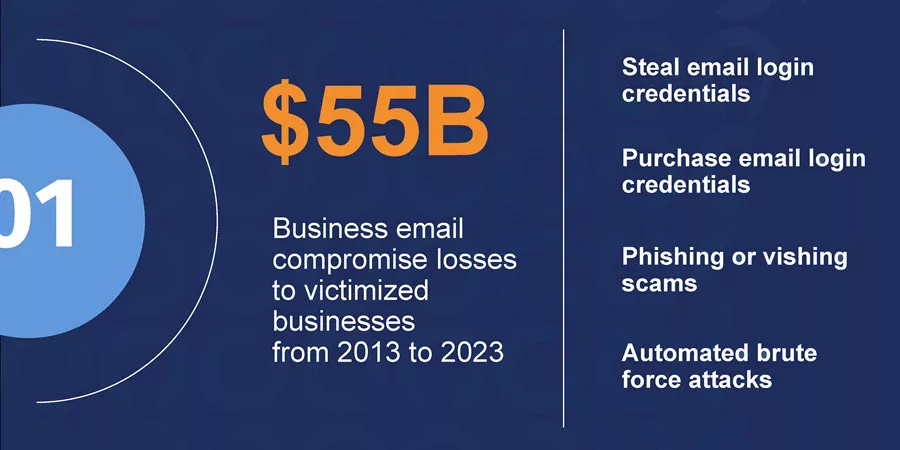
Phishing is no longer just about stealing passwords—it’s about gaining persistence and lateral access in your cloud environment.
Common Phishing Attack Techniques
Phishing campaigns targeting Microsoft 365 often leverage tactics specifically crafted to bypass its default protections.
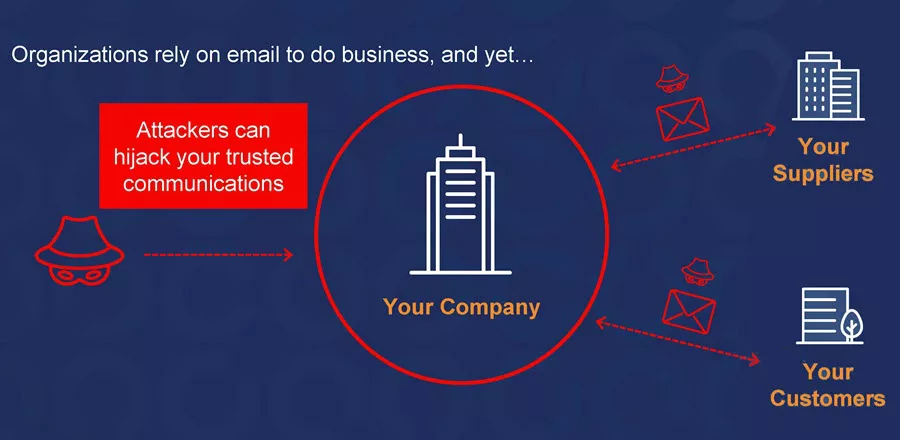
Some of the most notable techniques include:
1. Lookalike Domains and Brand Impersonation: Attackers register domains that closely resemble legitimate ones (e.g., micr0soft365[.]com) to trick users into clicking phishing links. They often replicate Microsoft branding and login portals to appear credible.
2. Adversary-in-the-Middle (AiTM) Phishing: AiTM phishing kits act as proxies, capturing credentials and session cookies in real time. Even if MFA is enabled, session hijacking allows attackers to bypass it.
3. Phishing via Compromised Accounts: Once an attacker compromises a user’s mailbox, they send internal phishing emails from that account, which are far more likely to be trusted by other users or business partners.
4. Malicious OAuth Apps: Instead of stealing passwords, attackers trick users into granting access to malicious apps via Microsoft’s OAuth consent framework. These apps gain persistent access to mailboxes, files, and user data without requiring further logins.
5. Fake Meeting Invites or Shared Documents: Attackers mimic SharePoint, Teams, or OneDrive notifications to lure users into clicking malicious links. These messages exploit trust in Microsoft-native services.
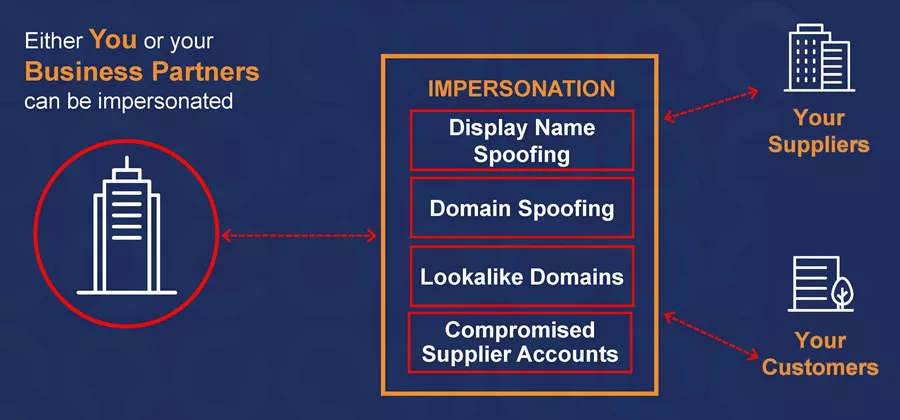
Understanding these techniques is vital to designing defenses that detect and block not only the payloads but also the delivery and command-and-control channels of phishing operations.
Real-World Phishing Scenarios in Microsoft 365
To understand how phishing attacks unfold in real environments, let’s explore several real-world scenarios that illustrate the attacker’s playbook and where Microsoft 365 organizations are most vulnerable.
Scenario 1: Business Email Compromise (BEC) via OAuth Consent Phishing
In this scenario, an attacker sends an email that appears to come from a trusted Microsoft 365 admin or help desk, requesting the user to authorize a new “productivity-enhancing” app. The app uses Microsoft’s legitimate OAuth consent flow. The unsuspecting user grants access, thinking it’s a corporate-approved tool.
Outcome: The app now has persistent access to the user’s mailbox and files. It can read, send, and forward emails without triggering login alerts, bypassing MFA completely.
Scenario 2: Credential Harvesting with AiTM Kit
An employee receives a fake SharePoint document sharing notification. Clicking the link takes them to a proxy site that mirrors Microsoft’s login page. The attacker captures both in real time as they enter credentials and complete MFA.
Outcome: Session tokens are used immediately to access the user’s mailbox. The attacker creates inbox rules to forward emails and conceal their activity while initiating password reset requests for other connected services.
Scenario 3: Internal Phishing from a Compromised Executive Account
An attacker compromises a CFO’s account and sends urgent invoice requests to the finance team using previous email threads. Because the messages come from a legitimate internal address and include relevant context, they bypass email security and raise no suspicion.
Outcome: Funds are transferred to an attacker-controlled bank account before the breach is detected. The investigation reveals that the initial compromise was due to a missed phishing email and weak mailbox auditing.
These real-world cases show that phishing attacks are not just entry points—they are launchpads for broader compromises. Protecting Microsoft 365 requires detection and containment mechanisms at multiple layers. Let’s look at how to combat phishing!
Microsoft 365 Built-in Tools to Combat Phishing
Microsoft 365, in combination with Microsoft Defender XDR and SIEM, offers a robust ecosystem of security tools to mitigate phishing threats. These tools can significantly reduce risk when appropriately configured and combined with proactive monitoring.
1. Microsoft Defender for Office 365 (MDO): This is Microsoft’s advanced email protection suite. It offers:
- Safe Links: Scans and rewrites URLs in real-time to detect malicious destinations at click-time.
- Safe Attachments: Sandboxes and detonate attachments in a secure environment.
- Anti-Phishing Policies: Uses machine learning to detect impersonation and spoofing attempts.
- Campaign Views: Provides a holistic view of phishing campaigns and impacted users across the tenant.
2. Microsoft Defender for Identity (MDI): This tool helps detect lateral movement and credential abuse after initial compromise. It monitors on-premises Active Directory Domain Services (AD DS) signals, including Active Directory Certificate Services (AD CS), and Active Directory Federation Services (AD FS). It integrates with Microsoft 365 alerts for complete visibility.
See Also: How to deploy Microsoft Defender for Identity and manage MDI.
3. Microsoft Purview (Compliance and Insider Risk): Purview provides tools for Data Loss Prevention (DLP), Insider Risk Management, and Communication Compliance. While not a phishing tool per se, it’s critical for responding to phishing incidents involving data theft or insider misuse.
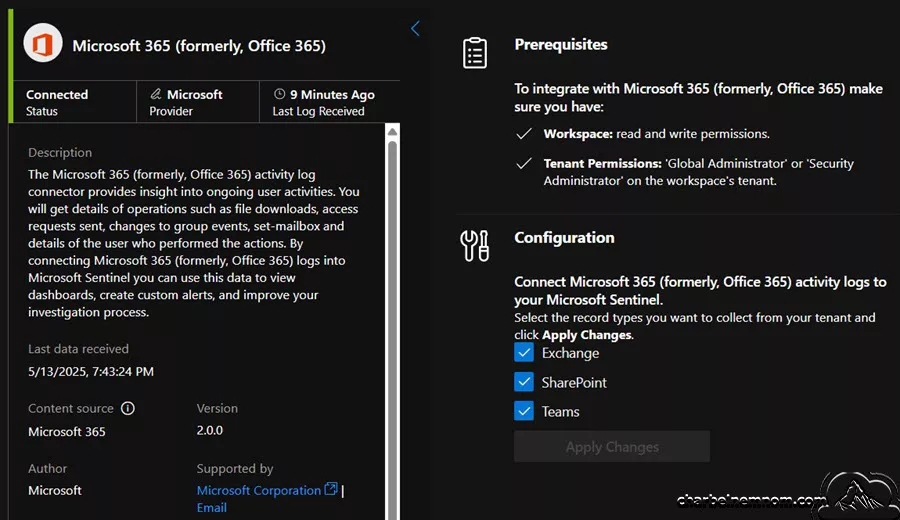
4. Microsoft Sentinel (SIEM + SOAR): For organizations that need advanced correlation, custom threat detection, and automated response, Microsoft Sentinel, a cloud native SIEM, allows ingestion of Microsoft 365 logs and Defender alerts for Free. Custom KQL queries and automation rules can detect unusual access patterns or mass forwarding rules indicative of phishing compromise.
5. Conditional Access and Risk-Based Policies: Having the Microsoft Entra ID P2 license, organizations can implement conditional access rules that block or restrict access based on real-time risk. Conditional Access Policies can be evaluated for:
- Impossible travel
- Anonymous IP addresses
- Sign-ins from unfamiliar locations
- Sign-ins from infected devices
Blocking access or triggering reauthentication under these conditions can stop a phishing attempt from progressing to full-blown account compromise.
Proactive Defense Strategies
Phishing defense in Microsoft 365 should not rely solely on reactive detection—it must include proactive strategies combining technical and administrative controls.
1. Enforce Strong Authentication
Mandatory MFA for All Users: Use Microsoft Entra ID to enforce Multi-Factor Authentication (MFA) via Conditional Access policies. The default MFA is no longer enough—use phishing-resistant methods like:
- FIDO2 security keys
- Windows Hello for Business
- Certificate-based authentication
Block Legacy Authentication: Disable basic authentication protocols like IMAP, POP, SMTP, and MAPI. These bypass MFA and are often exploited by attackers using stolen credentials.
2. Apply the Principle of Least Privilege
Role-Based Access Control (RBAC): Ensure users only have the permissions they need. Limit Global Administrator accounts and use Privileged Identity Management (PIM) to provide “just-in-time” elevation.
Segregate Admin Accounts: Separate workstations and credentials are required for administrative functions.
3. Harden Mail Flow and Domains
Implement SPF, DKIM, and DMARC:
- SPF ensures only authorized mail servers can send on your behalf.
- DKIM uses cryptographic signatures to verify message integrity.
- DMARC allows you to define how receiving mail servers should handle spoofed messages.
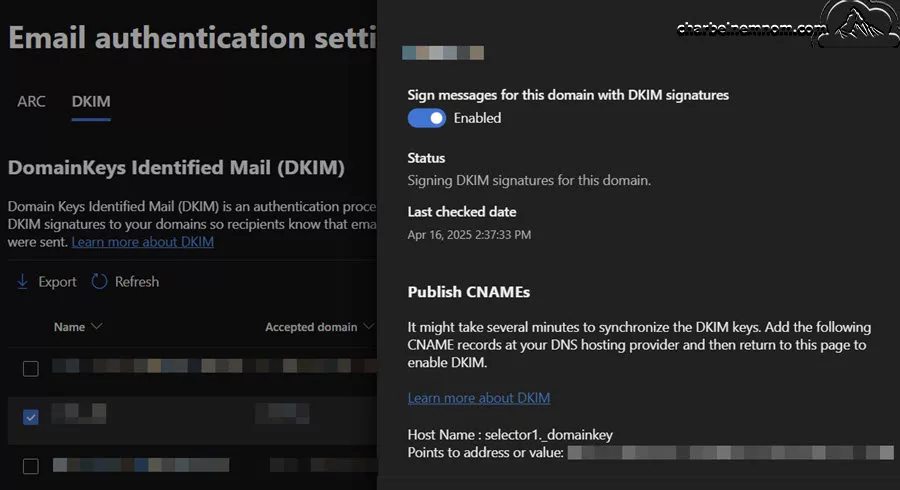
Turn on Anti-Spoofing in Defender Policies: Use advanced impersonation protection to prevent internal domain spoofing and lookalike domain attacks.
4. Monitor for Suspicious Inbox Rules and External Forwarding
Phishers often create inbox rules to:
- Delete or move messages from the security teams
- Auto-forward emails to external accounts
Use audit logs and Defender alerts to detect and investigate such activity.
5. Implement Security Awareness Training
Technical defenses are only part of the equation. Human error remains a top cause of successful phishing. Your organization should:
- Conduct regular simulated phishing campaigns
- Offer interactive and contextual training
- Reinforce positive behaviors when users report phishing attempts
Microsoft offers tools like Attack Simulation Training within Defender for Office 365 for this purpose.
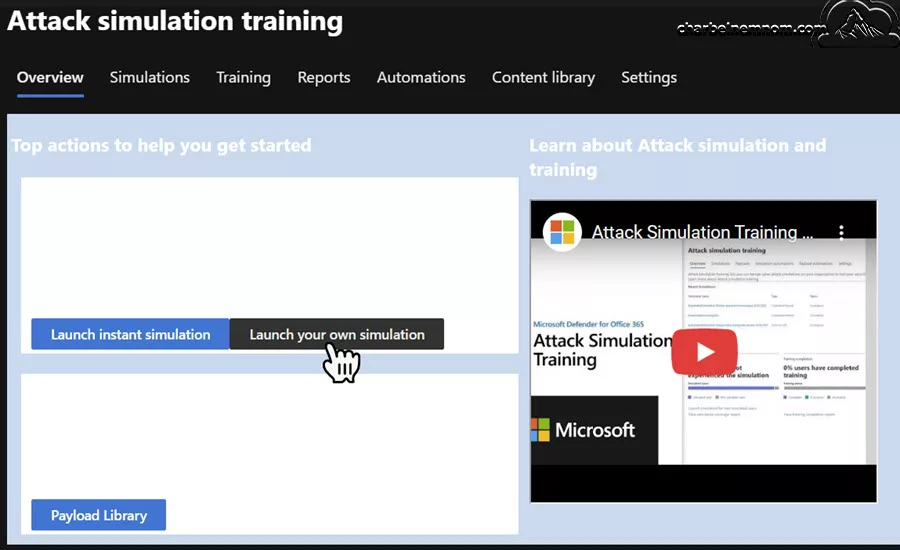
Email Security Hardening with Defender for Office 365
Many Microsoft 365 tenants do not fully utilize the capabilities of Microsoft Defender for Office 365 (MDO). Let’s explore key configurations that can drastically improve protection.
1. Secure Preset Security Policies
Microsoft provides preset security profiles that automatically configure Defender settings based on best practices:
- Standard Protection: Recommended for most users
- Strict Protection: Ideal for high-risk users (e.g., executives, finance, IT admins)
These policies configure Safe Links, Safe Attachments, anti-phishing thresholds, and impersonation protections with minimal manual setup.
2. Advanced Phishing Thresholds
Set Anti-Phishing policy thresholds to 2 or higher for enhanced detection of spoofing, lookalikes, and anomalous sending behaviors. Combine this with user impersonation protection for VIPs and domain impersonation blocking.
3. Use ZAP (Zero-hour Auto Purge)
ZAP retrospectively scans messages delivered before signatures are available and moves them to quarantine if they are found malicious. Ensure this feature is enabled to remove threats missed at delivery time.
4. Customize Quarantine Policies
Empower end users to review and release quarantined messages safely. You can set up:
- End-user spam notifications
- Phishing alert customization
- Role-based quarantine access for security analysts
5. Use Microsoft Secure Score
Lastly, regularly check your Microsoft Secure Score to identify and prioritize security improvements across the Microsoft 365 environment. It includes insights across identity, devices, email, data, and more.
Automating Detection and Response with Microsoft Sentinel
While prevention is vital, rapid detection and automated response are equally crucial when a phishing attack breaks through. Microsoft Sentinel, Microsoft’s cloud-native SIEM and SOAR platform, offers powerful tools to detect, investigate, and respond to phishing incidents at scale.
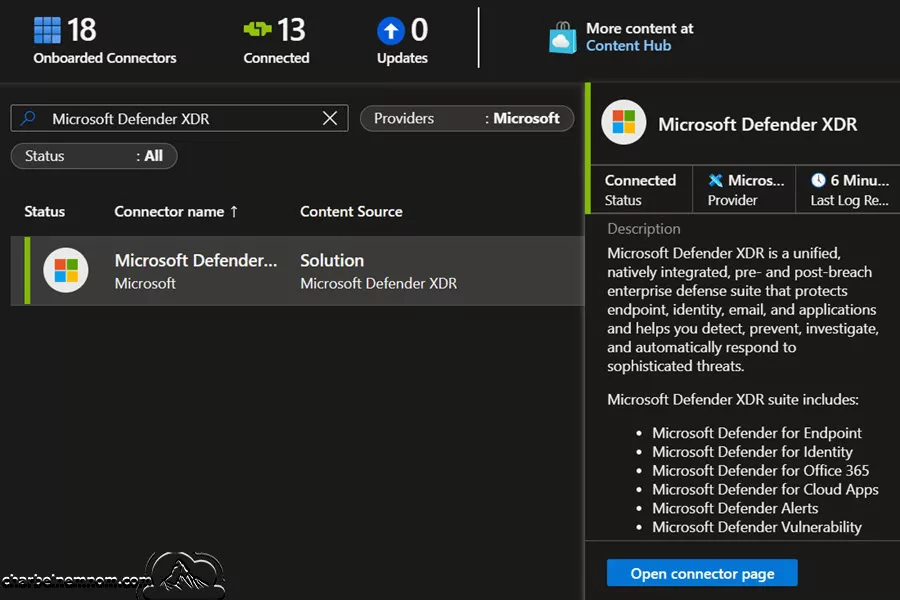
1. Ingest Microsoft 365 and Microsoft Defender XDR Data Connectors: Microsoft Sentinel integrates natively with:
- Microsoft Defender for Office 365
- Microsoft Entra ID Sign-In and Audit Logs
- Microsoft Purview Audit Logs
- Microsoft Defender for Identity
- Microsoft Defender for Cloud Apps
These connectors stream alerts and logs into Sentinel for centralized correlation and investigation.
2. Build Analytic Rules for Phishing Indicators: Use Kusto Query Language (KQL) to create analytics rules that detect:
- Inbox rule creation with suspicious patterns
- Mass email forwarding to external domains
- MFA bypass or risky sign-ins from unfamiliar IPs
- Users clicking on Safe Links to known phishing domains
The following KQL measures the email security detection rate in Microsoft Defender for Office 365 (MDO) for phishing and malware catches. This rule evaluates the effectiveness of MDO in detecting and remediating phishing and malware emails both before and after delivery. It calculates detection statistics over the past day, including emails identified as malicious or phishing, false positives (FPs), successful and unsuccessful ZAP (Zero-hour Auto Purge) actions, and admin-submitted false negatives (FNs). The analytic rule generates an alert when:
- Post-delivery or pre-delivery effectiveness drops below 90%,
- More than 5 phishing or malware emails are unsuccessfully ZAPped, or
- More than 2 undetected threats are manually submitted by admins.
This helps security teams promptly identify gaps in email threat protection and improve response actions.
// === Define Thresholds ===
let threshold_PostDeliveryEffectiveness = 90.0;
let threshold_PreDeliveryEffectiveness = 90.0;
let threshold_UnsuccessfulZAPs = 5;
let threshold_AdminFNSubmissions = 2;

// === Time Range ===
let StartTime = startofday(ago(1d));
let EndTime = now();

// === Mail/Phish Total Detection ===
let Mal_Phish_Mailflow = toscalar(
    EmailEvents
    | where TimeGenerated between (StartTime .. EndTime)
    | where EmailDirection == "Inbound"
    | extend MDO_detection = parse_json(DetectionMethods)
    | extend FirstDetection = iif(isempty(MDO_detection), "Clean", tostring(bag_keys(MDO_detection)[0]))
    | extend FirstSubcategory = iif(FirstDetection != "Clean" and array_length(MDO_detection[FirstDetection]) > 0, strcat(FirstDetection, ": ", tostring(MDO_detection[FirstDetection][0])), "No Detection (clean)")
    | where FirstSubcategory contains "Malware" or FirstSubcategory contains "Phish"
    | summarize count()
);

// === Reverse ZAPs (False Positives) ===
let FP_ZAP = toscalar(
    EmailPostDeliveryEvents
    | where TimeGenerated between (StartTime .. EndTime)
    | where ActionType == "Redelivery" and ThreatTypes !contains "Phish" and ThreatTypes !contains "Malware"
    | join kind=leftsemi (
        EmailEvents
        | where TimeGenerated between (StartTime .. EndTime + 7d)
        | where ThreatTypes contains "Phish" or ThreatTypes contains "Malware"
        | project NetworkMessageId
    ) on NetworkMessageId
    | summarize count()
);

// === Successful False Negative ZAPs ===
let FN_ZAP_Successful = toscalar(
    EmailPostDeliveryEvents
    | where TimeGenerated between (StartTime .. EndTime + 7d)
    | where ActionType in ("Malware ZAP","Phish ZAP") and ActionResult in ("Success","AdminPolicy")
    | join kind=leftsemi (
        EmailEvents
        | where TimeGenerated between (StartTime .. EndTime)
        | where ThreatTypes !contains "Phish" and ThreatTypes !contains "Malware"
    ) on NetworkMessageId
    | summarize count()
);

// === Unsuccessful ZAPs ===
let FN_ZAP_Unsuccessful = toscalar(
    EmailPostDeliveryEvents
    | where TimeGenerated between (StartTime .. EndTime + 7d)
    | where ActionType in ("Malware ZAP","Phish ZAP") and ActionResult !in ("Success","AdminPolicy")
    | join kind=leftsemi (
        EmailEvents
        | where TimeGenerated between (StartTime .. EndTime)
        | where ThreatTypes !contains "Phish" and ThreatTypes !contains "Malware"
    ) on NetworkMessageId
    | summarize count()
);

// === Admin FN Submissions ===
let FN_Admin_Submissions = toscalar(
    CloudAppEvents
    | where TimeGenerated between (StartTime .. EndTime + 7d)
    | where ActionType == "AdminSubmissionSubmitted"
    | extend SubmissionType = tostring(parse_json(RawEventData).SubmissionType)
    | extend NetworkMessageId = tostring(parse_json(RawEventData).ObjectId)
    | where SubmissionType in ("1","2")
    | join kind=rightsemi (
        EmailEvents
        | where TimeGenerated between (StartTime .. EndTime)
        | where ThreatTypes !contains "Phish" and ThreatTypes !contains "Malware"
    ) on NetworkMessageId
    | summarize count()
);

// === Metrics Calculation ===
let Effectiveness_Post = abs(round(((FN_Admin_Submissions + FN_ZAP_Unsuccessful) / (Mal_Phish_Mailflow + FN_ZAP_Successful + FN_ZAP_Unsuccessful + FN_Admin_Submissions - FP_ZAP)) * 100 - 100, 2));
let Effectiveness_Pre = abs(round(((FN_Admin_Submissions + FN_ZAP_Unsuccessful + FN_ZAP_Successful) / (Mal_Phish_Mailflow + FN_ZAP_Successful + FN_ZAP_Unsuccessful + FN_Admin_Submissions - FP_ZAP)) * 100 - 100, 2));
let Unsuccessful_ZAPs = toreal(FN_ZAP_Unsuccessful);
let Admin_Submissions = toreal(FN_Admin_Submissions);
// === Alert Trigger ===
union
    (print StatisticName = "Effectiveness Post Delivery", Value = Effectiveness_Post),
    (print StatisticName = "Effectiveness Pre-Delivery", Value = Effectiveness_Pre),
    (print StatisticName = "Mal / Phish UN-Successfully Zapped", Value = Unsuccessful_ZAPs),
    (print StatisticName = "Admin Mal/Phish FNs Submitted", Value = Admin_Submissions)
| where
    (StatisticName == "Effectiveness Post Delivery" and Value < threshold_PostDeliveryEffectiveness)
    or (StatisticName == "Effectiveness Pre-Delivery" and Value < threshold_PreDeliveryEffectiveness)
    or (StatisticName == "Mal / Phish UN-Successfully Zapped" and Value > threshold_UnsuccessfulZAPs)
    or (StatisticName == "Admin Mal/Phish FNs Submitted" and Value > threshold_AdminFNSubmissions)
| extend TimeGenerated = now()
| project TimeGenerated, StatisticName, Value
This query will only return results when at least one of the following thresholds is breached:
- Effectiveness Post Delivery
- Effectiveness Pre-Delivery
- Mal / Phish UN-Successfully Zapped
- Admin Mal/Phish FNs Submitted
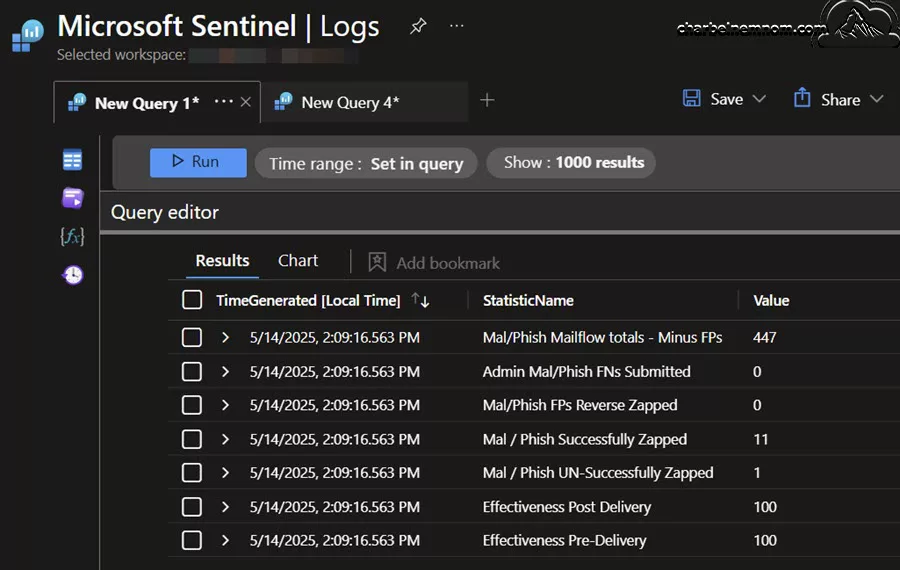
Another important KQL query to understand email authentication patterns, which can be valuable to understand suspicious email flows into your environment. Phishing attacks are less likely to have properly configured email security and are more likely to fail authentication requirements such as SPF or DMARC:
EmailEvents
| where TimeGenerated > ago(14d)
| extend AuthenticationDetails = todynamic(AuthenticationDetails)
| project SenderFromAddress,
          SenderDisplayName,
          RecipientEmailAddress,
          AuthDetailsSPF=parse_json(AuthenticationDetails.SPF),
          AuthDetailsDKIM=parse_json(AuthenticationDetails.DKIM),
          AuthDetailsDMARC=parse_json(AuthenticationDetails.DMARC),
          AuthDetailsCompAuth=parse_json(AuthenticationDetails.CompAuth)
| summarize by SenderFromAddress, SenderDisplayName, RecipientEmailAddress, tostring(AuthDetailsSPF), tostring(AuthDetailsDKIM), tostring(AuthDetailsDMARC), tostring(AuthDetailsCompAuth)
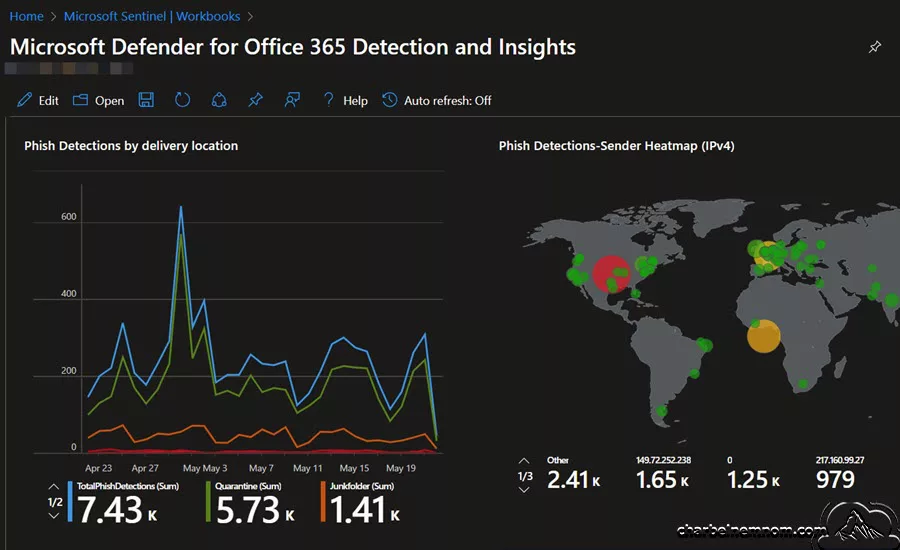
3. Leverage the Microsoft Defender for Office 365 Detections and Insights workbook: The Microsoft Defender for Office 365 Detections and Insights workbook helps you to gain extensive insight into your organization by analyzing and correlating events. You can track various detections and insights over time, including: metrics for phishing, spam, malware, URL, and URL click detection details, post-delivery detections, user and admin submissions, system overrides, and actions taken by security administrators. This workbook requires that you have the Microsoft Defender XDR solution installed from the Content Hub and that you are ingesting the following data type:
- EmailEvents
- EmailPostDeliveryEvents
- EmailUrlInfo
- UrlClickEvents
- CloudAppEvents
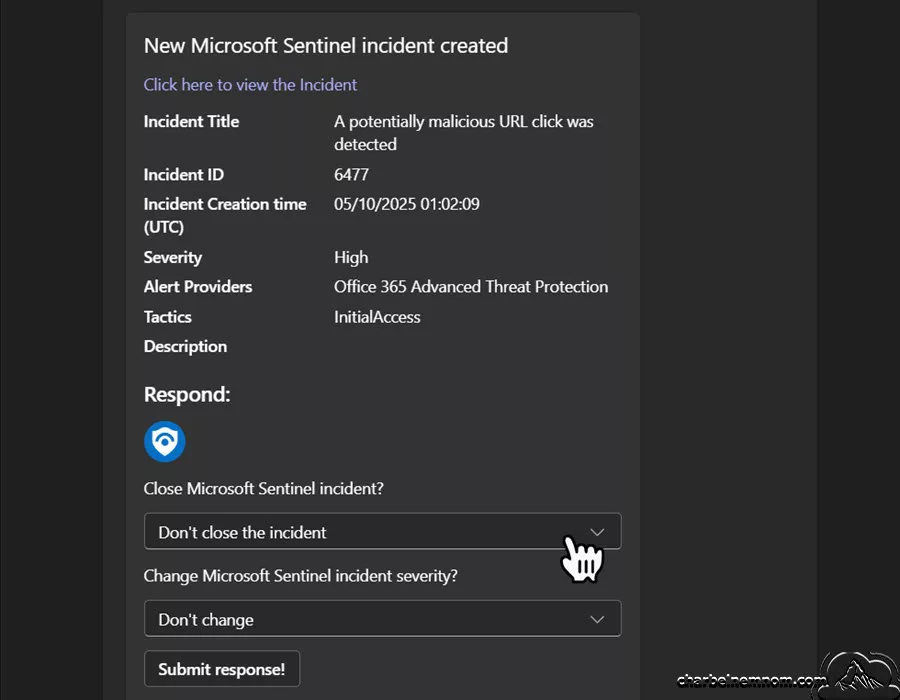
4. Enable Automation with Playbooks: Playbooks (powered by Azure Logic Apps) can trigger automatically when an alert is raised. Example playbook actions:
- Suspend a compromised user account in Microsoft Entra
- Notify the security team via Teams or email
- Pull related emails from mailboxes
- Update a ticket in ServiceNow
This minimizes mean time to containment (MTTC) and reduces reliance on manual intervention.
5. Leverage UEBA and Threat Intelligence: Microsoft Sentinel’s User and Entity Behavior Analytics (UEBA) provides anomaly detection based on historical user activity. Combining UEBA with threat intelligence feeds can uncover stealthy phishing compromises that evade traditional detection.
See Also: Deep Dive into Microsoft Sentinel UEBA (User and Entity Behavior Analytics).
Post-Phishing Incident Response Plan
Even with the best defenses in place, phishing incidents can and do happen. A swift, structured response is critical to limiting damage and restoring trust. The first step after identifying a phishing compromise is containment—this includes revoking active sessions, resetting affected user credentials, disabling external email forwarding rules, and scanning any potentially infected endpoints. Attackers often leave behind hidden backdoors such as inbox rules, malicious OAuth applications, or compromised tokens, so it’s essential to investigate thoroughly and eradicate all traces of unauthorized access.
Once containment is underway, organizations should assess the full impact of the breach. This means identifying all affected accounts, reviewing audit logs to track attacker movements, and determining whether sensitive data was accessed or exfiltrated. Communication plays a key role during this phase. Impacted users should be notified with clear, supportive instructions, and leadership teams should be briefed on both the technical and business implications.
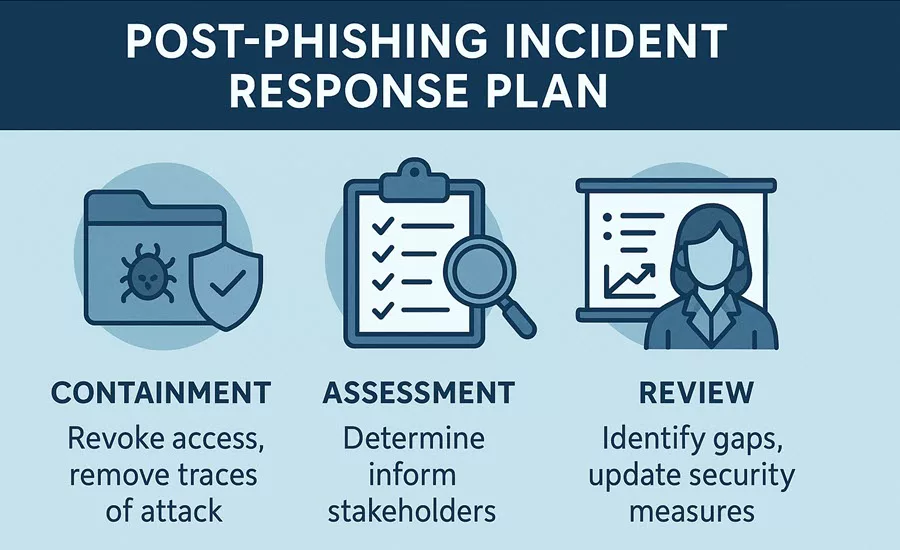
Finally, no response is complete without reflection. Conduct a post-incident review to identify gaps, update detection rules, improve user training, and strengthen your security posture. A resilient organization is not one that never experiences phishing—it’s one that learns, adapts, and evolves in the face of it.
Key Takeaways
Phishing remains the #1 attack vector for compromising Microsoft 365 environments, often leading to broader business email compromise (BEC) and data breaches. Microsoft provides a robust ecosystem of native tools—including Defender for Office 365, Microsoft Sentinel, and Entra ID Conditional Access—to combat phishing. A comprehensive Microsoft 365 protection strategy must include:
- Strong identity protection with MFA and Conditional Access
- Proactive mail flow hardening with SPF/DKIM/DMARC
- Real-time threat detection and automated response with Microsoft Sentinel
- Ongoing user education and phishing simulations
The phishing threat landscape is evolving rapidly:
- AI-generated phishing messages are getting more personalized and evasive.
- Multi-channel phishing is increasing—using SMS (smishing), voice (vishing), and even Teams or collaboration platforms.
- Adversary-in-the-Middle (AiTM) Phishing kits and token theft techniques are increasingly bypassing traditional multi-factor authentication (MFA) at an alarming rate.
Wrapping Up
Phishing is not a solved problem—it’s a dynamic, evolving threat that requires layered defenses and continuous vigilance. Organizations can significantly reduce their risk profile by aligning technical controls with user training and leveraging the full potential of Microsoft 365 security features.
Organizations must move toward zero trust principles, leveraging real-time context (device health, location, behavior) to make access decisions, not just credentials.
In summary, Microsoft 365 customers must shift from reactive to proactive, from siloed security tools to integrated defense, and from user blame to empowered awareness. Start with the basics, build on automation, and evolve with the threat landscape.
If you want to learn more about strengthening your Microsoft 365 environment, I highly recommend checking out Microsoft Press’s official SC-200 full exam course.
Remember, you can always support us in developing tools and creating content via Why Donate? – Charbelnemnom.com Cloud & Cybersecurity
__
Thank you for reading our blog.
Please let us know in the comments section below if you have any questions or feedback.
-Charbel Nemnom-
