
In today’s rapidly evolving threat landscape, protecting enterprise environments from sophisticated cyberattacks demands a comprehensive and proactive approach. Microsoft Sentinel, a scalable, cloud-native SIEM (Security Information and Event Management) and SOAR (Security Orchestration, Automation, and Response) solution, offers unparalleled threat detection, investigation, and response capabilities.
Leveraging the MITRE ATT&CK® framework, this article explores how Sentinel empowers organizations to detect and mitigate threats effectively through detailed use cases, technical insights, SOC optimization, and real-world scenarios for enhancing cybersecurity.
Table of Contents
Understanding Microsoft Sentinel
Microsoft Sentinel is a powerful security analytics and threat intelligence tool that provides organizations with a comprehensive view of their security posture. Its key capabilities include:
- Data Collection: Gathers data from users, devices, applications, and infrastructures, both on-premises and in the cloud.
- Advanced Threat Detection: Utilizes machine learning and threat intelligence to identify potential threats and reduce false positives.
- Streamlined Investigation: Employs AI to expedite threat examination and supports proactive threat-hunting efforts.
- Automated Response: Uses customizable playbooks to streamline incident response processes, from isolating risky accounts to alerting security teams.
- SOC Optimization: Provides recommendations to enhance coverage and minimize unnecessary data usage, aligning with industry best practices.
Sentinel integrates with frameworks like MITRE ATT&CK to support organizations in identifying tactics, techniques, and sub-techniques used by threat actors. Its versatility allows for various use cases, from monitoring email threats to detecting insider risks.

MITRE ATT&CK Framework Integration
The integration of the MITRE ATT&CK framework into Microsoft Sentinel enhances cybersecurity management by:
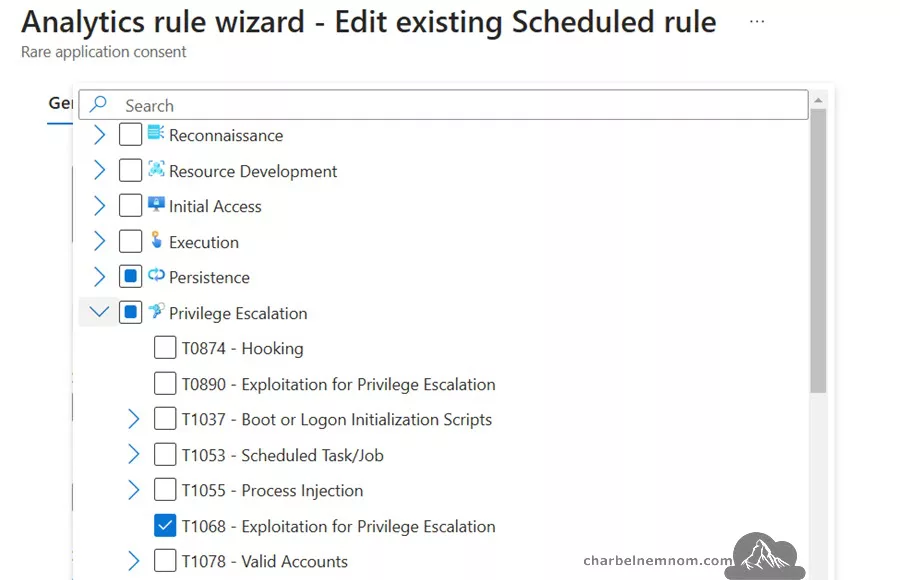
1. Improving threat visibility through mapping analytics rules and hunting queries to MITRE ATT&CK Tactics, Techniques, and Sub techniques.
2. Enabling efficient incident response with automated processes facilitated by Azure Logic Apps.
3. Centralizing security operations for streamlined management and decision-making.
4. Providing actionable intelligence that allows teams to prioritize critical threats effectively.
This integration equips organizations with enhanced capabilities in detecting, analyzing, and responding to threats, making security operations more predictive, precise, and resilient against evolving cybersecurity challenges.

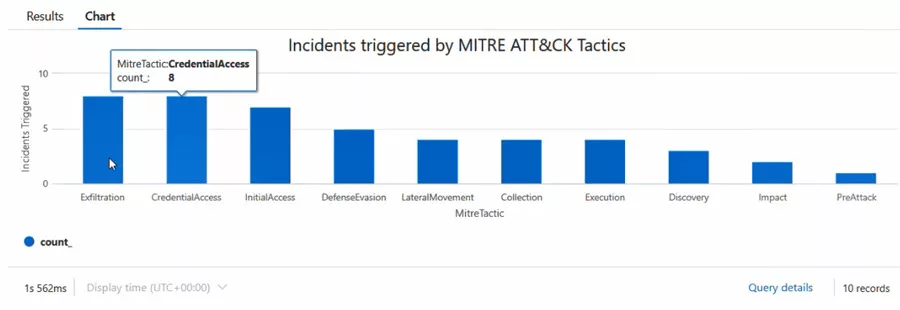
Incidents Triggered by MITRE ATT&CK Tactics
Understanding the relationship between incidents and the MITRE ATT&CK framework is essential for improving threat detection and response. Organizations can better prioritize mitigation strategies and identify recurring vulnerabilities by analyzing incidents that align with specific ATT&CK tactics in Microsoft Sentinel.
The following KQL query identifies and visualizes incidents triggered by MITRE ATT&CK tactics:
SecurityIncident
// Collect the last argument of incident
| summarize arg_max(TimeGenerated, *) by IncidentNumber
| extend MitreTactic = todynamic(parse_json(AdditionalData).tactics)
// Filter only on Incidents that contain MITRE Tactic
| where MitreTactic != "[]"
| mv-expand MitreTactic
| extend MitreTactic = tostring(MitreTactic)
| summarize count() by MitreTactic
| sort by count_
| render columnchart with (title="Incidents triggered by MITRE ATT&CK Tactics", ytitle="Incidents Triggered")
The above KQL query will:
1. Collect the Most Recent Incidents:
The arg_max(TimeGenerated, *) operator retrieves the most recent instance of each incident based on the IncidentNumber field, ensuring the data reflects the latest status.
2. Extract MITRE Tactics:
The extend MitreTactic line parses the AdditionalData field to extract the list of tactics associated with each incident. The todynamic function converts the JSON-formatted data into a usable format.
3. Filter Relevant Data:
The where MitreTactic != "[]" line filters out incidents that do not contain any MITRE tactics, focusing the analysis on actionable data.
4. Expand and Normalize Tactics:
The mv-expand MitreTactic operator breaks apart the list of tactics into individual entries for easier processing.
The extend MitreTactic = tostring(MitreTactic) line converts each tactic into a string for consistency.
5. Summarize and Visualize:
The summarize count() function aggregates the number of incidents per tactic.
The render columnchart command generates a visual representation of the results, making it easy to identify which tactics are most frequently triggered.
Practical Use Cases of Microsoft Sentinel
Let’s delve into six practical use cases highlighting Sentinel’s potential to mitigate cybersecurity threats. Microsoft Sentinel demonstrates its versatility through various practical use cases:
Use Case 1: Integration with Microsoft Defender for Office 365
Microsoft Defender for Office 365, part of Microsoft Defender XDR, integrates seamlessly with Sentinel to enhance threat detection and response capabilities. This integration focuses on detecting phishing attacks, email compromise, and suspicious activities across Microsoft/Office 365 environments.
Implementation
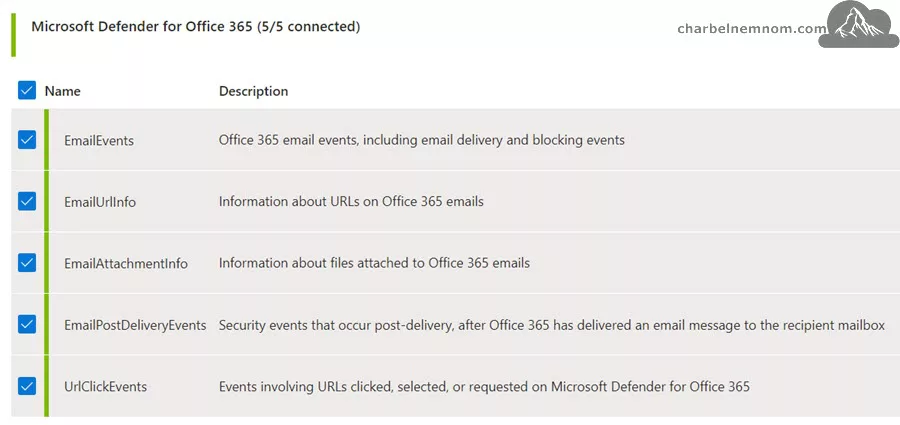
1. Connect Data Sources: Ensure Microsoft Defender for Office 365 logs are ingested into Sentinel via Microsoft Defender XDR data connector.
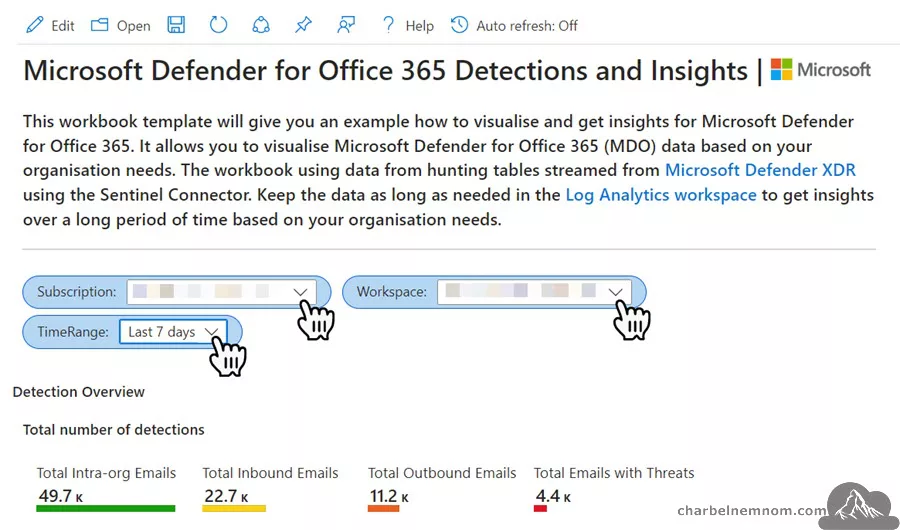
2. Enable Built-in Workbooks: Use workbook templates such as “Microsoft Defender for Office 365 Detection and Insights“, “Exchange Online,” or “Security Alerts” dashboards for immediate insights into suspicious activities.
3. Create Custom Analytics Rules: Develop rules tailored to organizational needs. For instance, detect anomalies in email forwarding rules or high volumes of email deletions.
4. Automate Responses: Deploy playbooks to isolate compromised accounts or notify security teams via Teams channels.

Detection Example
A KQL rule to detect suspicious email forwarding can look like this:
OfficeActivity
| where OfficeWorkload == "Exchange"
| where Operation == "Set-Mailbox" and Parameters has "ForwardingSmtpAddress"
| extend Actor = tostring(split(UserId, "@")[0]), AccountUPNSuffix = tostring(split(UserId, "@")[1])
| summarize count() by Actor, bin(TimeGenerated, 1h)
Real-World Scenarios
- Phishing Detection: Alerts triggered by Safe Links or Safe Attachments are investigated for potential phishing attempts.
- Account Compromise: Automation rules disable accounts with unusual login patterns.
Technical Insights
Microsoft Defender’s Safe Links and Safe Attachments provide dynamic content scanning. Microsoft Sentinel correlates these events with other activity logs, offering holistic visibility into potential phishing attempts and account compromises.
Impact
- Improved detection of sophisticated email threats.
- Faster incident resolution via automated workflows.
Use Case 2: Sysmon and PowerShell Monitoring
Sysmon, included in the Sysinternals software suite, enhances the standard Windows logs by providing advanced monitoring of events and process creations. It offers in-depth details on process creations, network connections, and file modifications.
Sysmon and PowerShell are vital components for system and script management. However, their misuse can lead to significant security breaches. This use case demonstrates how Sentinel can monitor and detect malicious activities involving Sysmon and PowerShell.
Implementation
1. Install and Configure Sysmon: Deploy and install Sysmon with a tailored configuration to capture essential events. Once Sysmon is installed and starts logging actions, you can find the event log by opening the local Event Viewer and going to the event path: Windows Logs – Applications and Services Logs – Microsoft – Windows – Sysmon – Operational. You can use the following PowerShell command to view the first 10 Sysmon events:
Get-WinEvent -LogName "Microsoft-Windows-Sysmon/Operational" | Select-Object -First 102. Ingest Data into Sentinel: Use data connectors like Windows Security Events via AMA or Windows Forwarded Events to ingest Sysmon and PowerShell logs into Sentinel.

Note: To get the best value from the Advanced Security Information Model (ASIM) and ensure that Sysmon telemetry is included in Microsoft Sentinel Analytics, deploy the full ASIM parser suite.
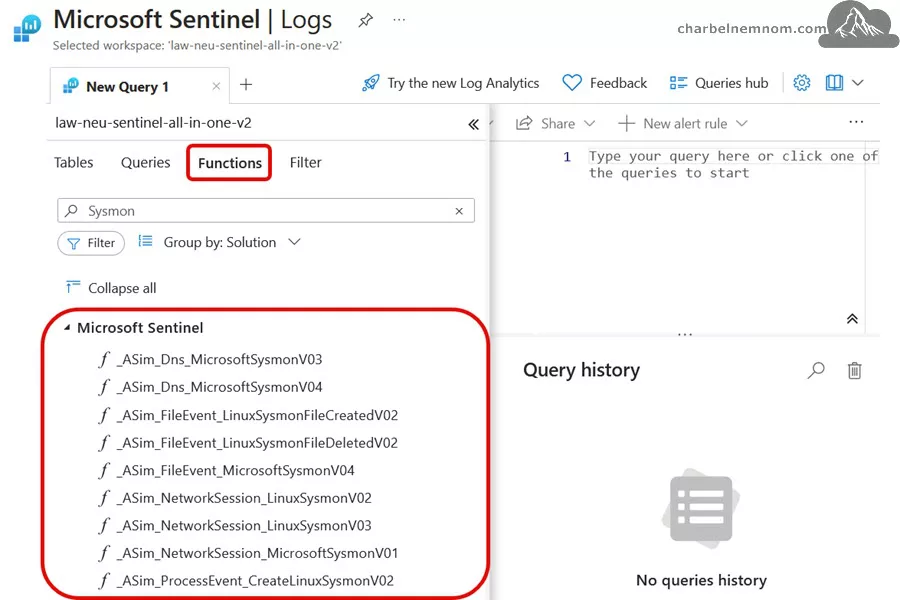
3. Develop Analytics Rules: Create rules to identify known attack patterns, such as Mimikatz execution or unauthorized PowerShell scripts.
4. Enable Built-in Workbooks: Utilize workbooks such as “Sysmon Threat Hunting” to simplify your threat hunts using Sysmon data mapped to MITRE ATT&CK data. This workbook allows you to drill down into system activity based on known ATT&CK techniques and other threat-hunting entry points, such as user activity, network connections, or virtual machine Sysmon events.
5. Deploy Playbooks: Automate responses like disabling compromised endpoints or notifying security analysts.
Detection Example
Identify unauthorized PowerShell activity:
WindowsEvent
| where EventID == 4104
| extend ScriptBlockText = tostring(EventData.ScriptBlockText)
| extend ScriptBlockPath = tostring(EventData.Path)
| where ScriptBlockText like "*Invoke-Mimikatz*" or ScriptBlockText has "DownloadString"
| project TimeGenerated, Computer, ScriptBlockText, ScriptBlockPath
Technical Insights
Utilize machine learning models in Sentinel to flag anomalous PowerShell commands. Enrich Sysmon data with threat intelligence feeds to identify known malicious behaviors.
Impact
- Enhanced endpoint visibility.
- Faster detection and mitigation of threats.
See Also: Effective Approach To Collect Windows Firewall Events to Microsoft Sentinel.
Use Case 3: Remote Desktop Activity Monitoring
Remote Desktop Protocol (RDP) is a frequent target for attackers due to its potential for lateral movement. Monitoring RDP activities in Sentinel helps organizations detect and respond to unauthorized access attempts.
Implementation
1. Enable Security Logs: Collect RDP-related events from Windows servers. Use data connectors like Windows Security Events via AMA or Windows Forwarded Events to ingest security event logs into Sentinel.

2. Develop Analytics Rules: Create rules to identify suspicious patterns, such as logins from untrusted IPs, repeated failed attempts, or successful RDP connections for audit purposes.
3. Leverage Watchlists: Use Watchlists to flag deviations from approved jump hosts or trusted IPs.
4. Deploy Playbooks: Automate responses to automate the triage process for incidents related to RDP connections, specifically focusing on identifying “rare” activity or notifying security analysts.
Detection Example
Flag repeated failed login attempts. The following KQL query will help you identify and analyze RDP failed login attempts in your logs. You can adjust the time window, filters, and thresholds to suit your needs and security policies.
SecurityEvent
| where TimeGenerated > ago(1d)
| where EventID == 4625 // Event ID for failed logon
| where not(Account contains "SYSTEM" or Account contains "$")
| summarize FailedLoginCount=count() by IpAddress, TargetUserName
| where FailedLoginCount > 10
| project IpAddress, TargetUserName, FailedLoginCount
The next KQL query detects successful RDP connection attempts:
SecurityEvent
| where TimeGenerated > ago(1d)
| where EventID == 4624 and LogonType == 10 // Event ID for successful logon with Logon Type 10 (RDP)
| summarize StartTime = min(TimeGenerated), EndTime = max(TimeGenerated), ConnectionCount = count() by Account = tolower(Account), Computer = toupper(Computer), IpAddress, AccountType, Activity, LogonTypeName, ProcessName
Real-World Scenarios
- Unauthorized Access: Detect and respond to logins from unexpected geolocations.
- Policy Violations: Identify users bypassing jump hosts to access critical assets.
Technical Insights
Integrate Sentinel with geolocation REST APIs to enrich login data with location context. Use anomaly detection models to highlight deviations from normal login patterns.
Impact
- Prevent lateral movement.
- Strengthen compliance with access policies.
Use Case 4: Cloud Security Posture Management (CSPM)
Cloud environments present unique security challenges. CSPM solutions like Microsoft Defender for Cloud (MDC) integrated with Sentinel allow organizations to identify misconfigurations, ensure compliance, and detect anomalies in cloud workloads.
Implementation
1. Enable Cloud Connectors: Integrate cloud platform connectors like Azure Activity, Azure Storage, Microsoft Defender for Cloud, Amazon Web Services (AWS), or Google Cloud Platform (GCP) with Sentinel.
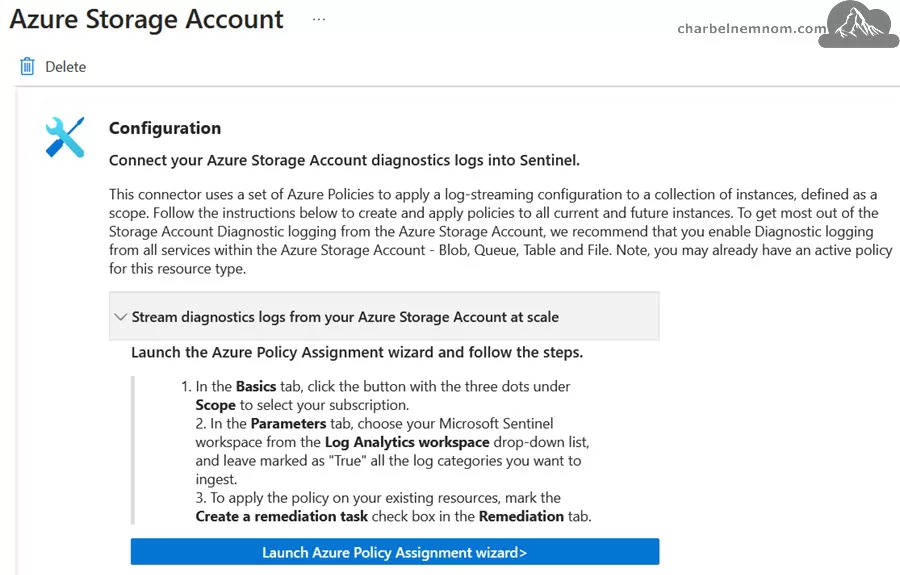
2. Monitor Configurations: Use analytics rules to detect misconfigurations, such as overly permissive storage S3 buckets, exposed endpoints, or list storage account access keys.
3. Automate Remediation: Deploy playbooks to remediate issues automatically, such as applying secure configurations or revoking access.
4. Leverage Dashboards: Utilize built-in workbooks or custom dashboards to visualize the security posture.

Detection Example
Analyze and monitor who accessed or listed Azure storage account access keys:
AzureActivity
| where Properties has "Microsoft.Storage/storageAccounts/listKeys/action"
| extend WhoDidIt = Caller, StorageAccountName = tostring(parse_json(Properties).resource)
| project WhoDidIt, StorageAccountName, ResourceGroup, _ResourceId, CallerIpAddress, EventSubmissionTimestamp
Real-World Scenarios
- Misconfiguration Alerts: Detect and respond to cloud resources exposed to the public internet.
- Compliance Monitoring: Ensure adherence to industry standards like CIS benchmarks or GDPR.
Technical Insights
Combine Sentinel’s CSPM capabilities with Azure Policy to enforce real-time compliance. Use automated alerts for non-compliant resources.
Impact
- Reduce the cloud environment attack surface.
- Enhance security monitoring and compliance.
Use Case 5: Insider Threat Detection
Insider threats, whether malicious or unintentional, pose significant risks to organizations. Sentinel’s user and entity behavioral analytics (UEBA) can detect anomalous user behavior indicative of insider threats.

See Also: Deep Dive into Microsoft Sentinel User and Entity Behavior Analytics.
Implementation
1. Ingest Identity & User Activity Logs: Collect logs from identity and access management solutions like Microsoft Entra ID, Audit Logs, Azure Activity, Sign-in Logs, Microsoft 365, and Security Events.
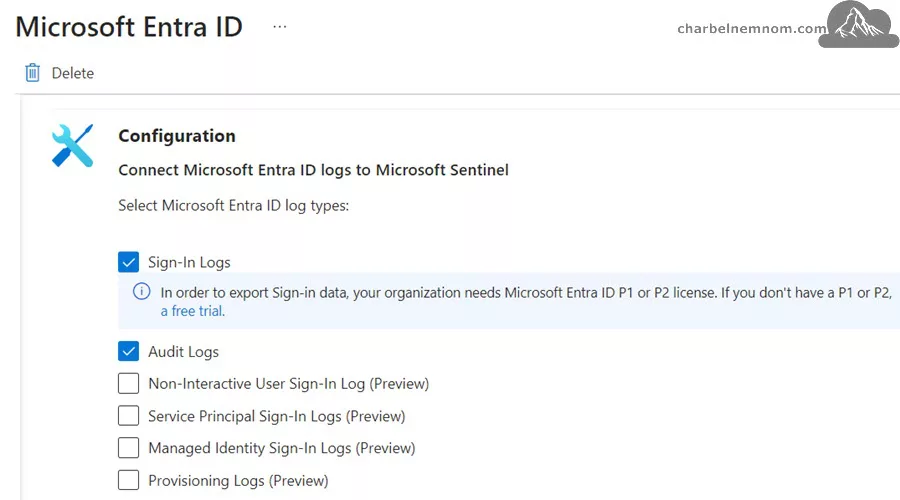
2. Enable Behavioral Analytics: Use ML-based models to identify deviations from typical user behavior by enabling UEBA.

3. Create Watchlists: Flag high-risk users, terminated employees, VIP users, or roles for prioritized monitoring.
4. Automate Actions: Alert SOC managers, restrict access, or start investigations.
Detection Example
The following KQL query will detect large file transfers using the Microsoft 365 data connector (Office Activity):
OfficeActivity
| where OfficeWorkload in ("OneDrive", "SharePoint") and Operation == "FileDownloaded"
| summarize TotalDownloaded = dcount(OfficeObjectId) by UserId, _ResourceId
| where TotalDownloaded > 100000
| sort by TotalDownloaded desc nulls last
Real-World Scenarios
- Data Exfiltration: Detect large data transfers to unauthorized locations.
- Privilege Abuse: Identify users accessing sensitive data outside their role.
Technical Insights
Sentinel’s integration with Microsoft Purview and Microsoft Defender for Cloud Apps (CloudAppEvents) enables detailed audit logs and fine-grained activity tracking, improving insider threat detection accuracy.
Impact
- Reduce risks posed by insider threats.
- Maintain a secure and compliant environment.
Use Case 6: Integration with Third-Party Tools
Sentinel integrates with third-party tools like Splunk, ServiceNow, Palo Alto, and Fortinet firewalls, enabling cross-platform threat detection and response.
Implementation
1. Enable Data Connectors: Use connectors to integrate third-party logs like Common Event Format (CEF) and ServiceNow.
2. Develop Custom Rules: Create rules tailored to third-party data.
3. Deploy Playbooks: Automate actions, such as creating tickets in ServiceNow.

Detection Example
Monitor firewall traffic for unusual activity. The following KQL query is designed to analyze logs from Fortinet devices and identify potential anomalous activity involving specific ports (RDP and SSH) often used for remote access. These ports are commonly targeted in attacks.
CommonSecurityLog
| where DeviceVendor == "Fortinet"
| where DestinationPort in (3389, 22)
| summarize count() by SourceIP, DestinationIP, DeviceAction, bin(TimeGenerated, 1h)
| where count_ > 50
| order by count_ desc
See Also: Optimize Costs Using Ingestion-Time Transformation for Fortinet Logs in Microsoft Sentinel.
Technical Insights
Utilize Sentinel’s REST API to push incident data to third-party platforms. Use webhook integrations for real-time alerting and response.
Impact
- Unified visibility across platforms.
- Streamlined incident response workflows.
SOC Optimization in Microsoft Sentinel
The new SOC optimization capability provides actionable recommendations to enhance your Microsoft Sentinel environment. These recommendations focus on three key areas:
1. Threat-Based Recommendations: Add security controls to close coverage gaps against specific attack scenarios. For example, enabling new analytics rules to detect emerging threats.
2. Data Value Recommendations: Optimize your data usage by identifying underutilized data sources or suggesting better data plans.
3. Similar Organizations Recommendations: Compare your environment to similar organizations and recommend log sources or detections they commonly use.

Additional Features of SOC Optimization
With SOC Optimization, you can:
> Understand Metrics at a Glance: View data ingestion statistics, optimization status, and active recommendations from the SOC optimization dashboard.
> Tailored Recommendations: Receive specific guidance for reducing unused data ingestion costs and improving threat detection coverage.
> Actionable Insights: Filter recommendations by type, such as threat coverage or data value, and view detailed guidance on each.
> Automated Updates: Optimizations are recalculated every 24 hours, ensuring recommendations remain relevant as your environment evolves.

Key Benefits of SOC Optimization
The Key Benefits of SOC Optimization include:
> Close Coverage Gaps: Ensure your defenses align with current and emerging threats.
> Maximize Data Efficiency: Optimizing data ingestion and retention strategies avoids unnecessary costs.
> Benchmark Against Industry Standards: Gain insights into how peer organizations address similar challenges.
> Streamline Implementation: Easily act on recommendations via links to relevant solutions, content hubs, or data plan adjustments.
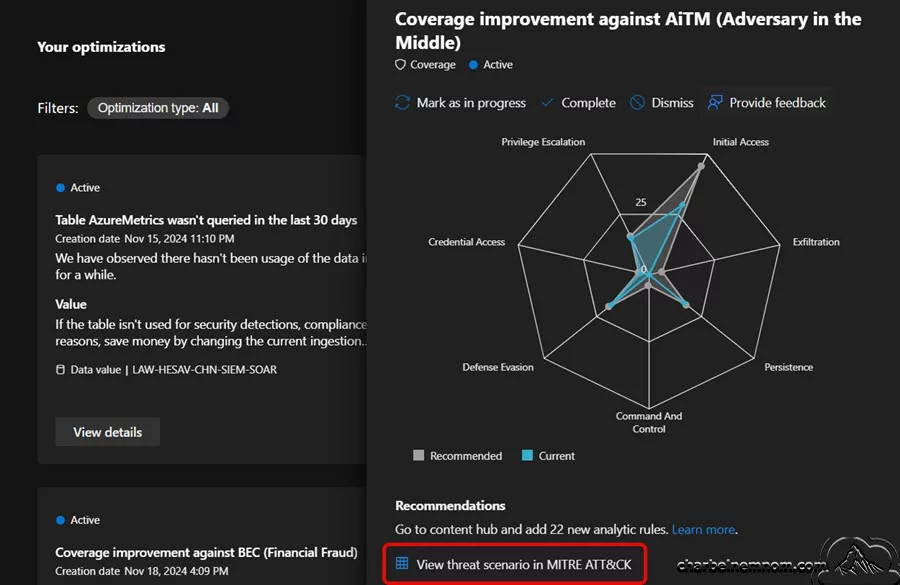
> Risk-based recommendations: Includes three foundational use cases that align threat types with specific business risks:
- Credential Exploitation
- Network Infiltration
- Data Exfiltration
These risk-based scenarios surface directly within the SOC Optimization experience in the unified portal, alongside existing recommendations. Users receive coverage scores and improvement suggestions spanning both SIEM and XDR content — all mapped to relevant MITRE tactics, techniques, and sub-techniques for complete visibility and traceability.

> AI MITRE ATT&CK tagging recommendations: This powerful capability uses artificial intelligence to suggest tagging security detections with MITRE ATT&CK tactics and techniques. You can select “Tag all rules” to update all detections at once, or “Choose rules” to view and manage tagging for specific detection rules.
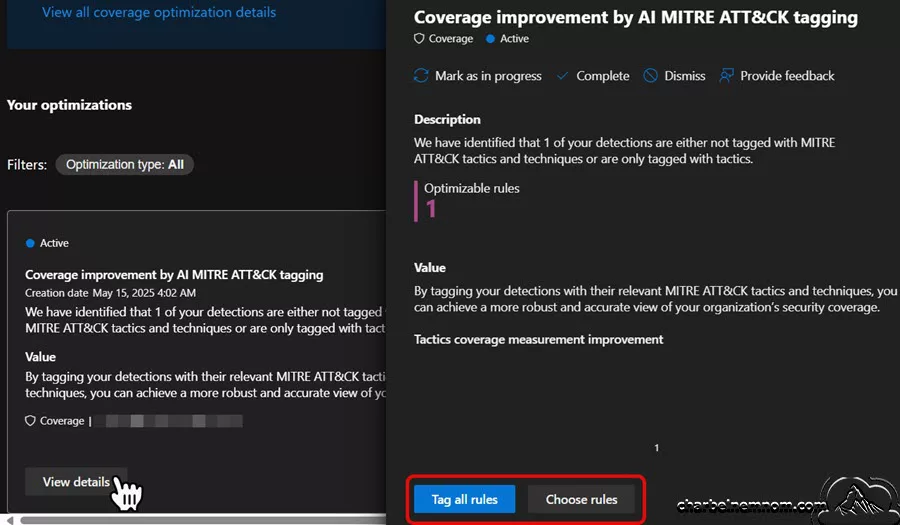
> MITRE ATT&CK integration with the SOC assessment to gain visibility into threat-based scenarios, offering a detailed coverage management experience aligned with the MITRE ATT&CK® framework.
The MITRE ATT&CK Defender “SOC assessment” mainly addresses the important product aspect. As we know, SOCs rely on tools; while SIEM has traditionally been the primary tool for creating analytics and mapping tactics, techniques, and sub-techniques, other products do the same thing and are typically out of the box. When assessing detection coverage, it’s essential to identify which products the SOC is running and what detections they deliver (and their tactic/technique), which are now mapped in the matrix, as shown in the figure below.
This new capability in SOC optimization provides visibility to product-level detections (and mappings) like Microsoft Defender XDR, Microsoft Defender for Cloud Apps (MDA), Microsoft Defender for Endpoint (MDE), and Microsoft Defender for Office 365 (MDO).

SOC optimization and assessment also provide granular details on each recommendation, including the specific tables and log sources impacted, ensuring transparency in suggested actions.
In Conclusion
When combined with the MITRE ATT&CK framework, Microsoft Sentinel offers unmatched capabilities for modern SOCs. By leveraging real-world use cases such as Defender for Office 365 integration, Sysmon, and PowerShell monitoring, RDP activity analysis, CSPM, insider threat detection, and integration with third-party tools, along with the new SOC optimization capabilities, organizations can:
- Detect sophisticated threats proactively.
- Automate incident response with playbooks to reduce repetitive tasks and enrich your investigation.
- Enhance visibility across on-premises and cloud environments.
- Optimize security operations with tailored recommendations.
Playbooks are a cornerstone of Sentinel’s SOAR capabilities. Examples include:
- Blocking Compromised Users: Automatically disable accounts flagged by analytics rules.
- Team Notifications: Send alerts to designated Teams channels for incident awareness.
- Incident Escalation: Integrate with ITSM tools for streamlined ticket creation.
By implementing these use cases and technical insights, Microsoft Sentinel helps organizations unlock the full potential of proactive cybersecurity.
__
Thank you for reading our blog.
Please let us know in the comments section below if you have any questions or feedback.
-Charbel Nemnom-
