On September 23, 2026, Microsoft announced the public preview of the Integrated Security Operations Center (ISOC) in Microsoft Defender. The headline is straightforward: XDR and SIEM now run in one platform, and security operations capabilities that previously required a separate Microsoft Sentinel purchase are now part of the Microsoft 365 E5 and E7 value.
The launch, however, leans heavily on vision. The keynote video, The Physics of Cyber Have Changed: Microsoft Defender ISOC, spends most of its time on the agentic SOC narrative, and the accompanying whitepaper, Agentic SOC: The new operating model for continuous defense, is an operating-model document rather than a technical one. It is easy to finish the keynote without a clear picture of what actually changes in your tenant, and with the sense that Microsoft security is becoming more confusing as it catches up to its new features. That is a fair observation.
We spent a couple of days viewing the keynote, reading the whitepaper, the Microsoft Security blog announcement, the Tech Community FAQ, the ISOC product page, and the new Microsoft Learn documentation, and we cross-checked them against each other. Some of what we see is shared with us under NDA; everything in this article is based on public, non-NDA information only.
In this article, we will break down what ISOC is and what it isn’t, who qualifies, which capabilities work with and without an ISOC workspace, how data and retention work, what the new ingestion meter costs compared to Microsoft Sentinel, and how to create and verify an ISOC workspace with least privilege. We will also address the concerns many security practitioners raised, and we will highlight the preview details that are still changing, because during a preview, those gaps matter.
Note: At the time of this writing, ISOC is in public preview. Capabilities, dates, and prices in this article reflect the public information available as of October 1, 2026, and may change during the preview.
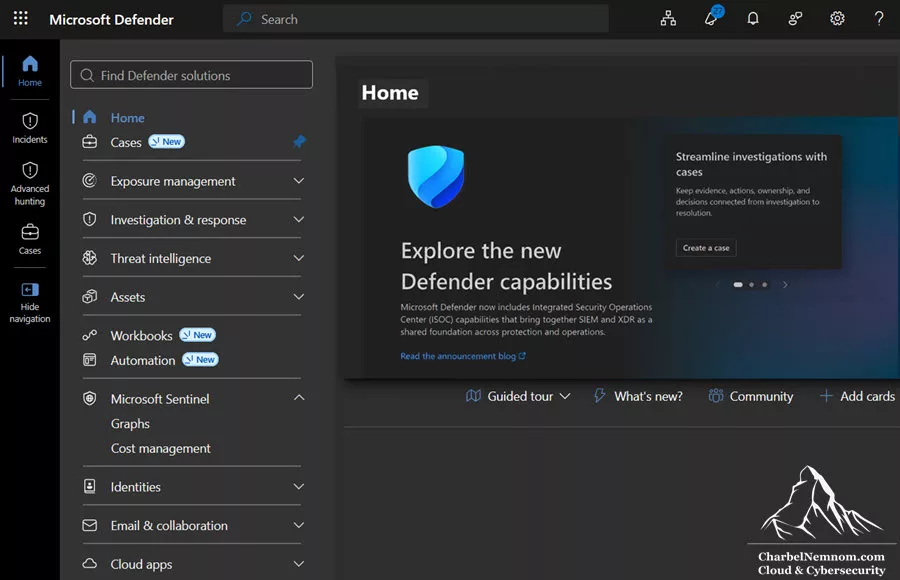
Table of Contents
ISOC At A Glance
Before we go deeper, here is the short version for security practitioners who need the facts first.
| Item | What we know today |
|---|---|
| What it is | A benefit for eligible Microsoft 365 E5, Microsoft 365 E7, and Microsoft Defender Suite customers. It is not a new standalone product. |
| Preview start | September 23, 2026 |
| Who can join the preview | Eligible tenants without an active Microsoft Sentinel workspace |
| Existing Microsoft Sentinel customers | No change. They can choose to move to ISOC starting November 15, 2026, if they meet the licensing criteria. |
| Included Defender data retention | 30 days during the preview, extending to 90 days starting November 15, 2026 |
| Non-Microsoft data ingestion | $2.40 per GB pay-as-you-go meter starting October 1, 2026 (requires an ISOC workspace) |
| Works without a workspace | Case management, workbooks, natural-language playbook generation, enhanced automation rules |
| Requires an ISOC workspace | UEBA, Content hub connectors, repositories (CI/CD), threat intelligence, Azure and third-party security data, automation on third-party data |
| What an ISOC workspace is | Technically, an Azure Log Analytics workspace that you create and connect from the Defender portal |
| Microsoft Sentinel | Remains available as a standalone SIEM. The Azure portal retirement date of March 31, 2027, still applies. |
What ISOC Is, And What It Isn’t
The most important point of the entire launch is simple: ISOC expands the value of Microsoft 365 E5 and E7 with security operations capabilities, such as workbooks and natural-language SOAR, that previously required a separate Microsoft Sentinel purchase. ISOC is NOT a new standalone product.
So, if we remove the agentic framing, ISOC comes down to two concrete changes:
- SIEM features inside the Defender portal for E5 and E7 customers who chose Microsoft as their XDR but never deployed Microsoft Sentinel. Several of these work without creating any Azure resources.
- A new commercial model for non-Microsoft data: native Defender data is used where it already lives (no re-ingestion), and third-party data goes into an ISOC workspace at a dedicated per-GB meter.
Where ISOC Sits In Microsoft’s “Cyber Stack”
In July 2026, Microsoft introduced Project Perception, a multi-agent system with specialized AI agents that reason across security data, tools, and workflows. Microsoft describes security in the agentic era as a six-layer stack: Sensors and Signals, Context, Models, Harness, Agents, and Actuators.
Project Perception delivers the models, the harness, and the agents. ISOC is the foundation underneath: the signals and sensors that give the system visibility, the context that turns signals into understanding, and the actuators (disruption, containment, automation) that turn decisions into protective action.
The stack is only as effective as the visibility it has, the data it can reason over, and the actions it can take. That is the technical argument for ISOC, and it is a reasonable one. Agents that can only see Defender telemetry, but not your AWS CloudTrail, firewall, or SaaS logs, will reason over an incomplete picture, right?
Microsoft shows how these layers work together. Because the keynote is long on vision, here is the technical sequence from the demo, in order. It is a good map of the intended analyst workflow:
-
Set up the foundation: create an ISOC workspace and install the AWS solution from Content Hub, for example, to bring
CloudTraildata into the same experience. We walk through both in the hands-on section below. - Threat intelligence: open the summary page and an article on new techniques for abusing VM extensions, which already maps to an active case in the tenant.
- Case management: open the related case, which Defender had already tagged as attack disrupted, and assign it.
- Investigate: review the timeline and the asset graph, where a compromised credential led to lateral movement that reached an account present in AWS.
- Blast radius: use the attack graph to see where the attacker could have gone next, with predictive shielding hardening those paths in advance.
- Hunt: run Advanced hunting queries for the command-and-control address across the fleet, using a 90-day window.
- Close the loop: review the case activity log, contact the affected users through Microsoft Teams, and close the case.
- Project Perception: run an agentic playbook where teams of agents investigate, emulate the attack, perform reconnaissance, and produce a vulnerability report, followed by a posture assessment and remediation agent that recommends configuration changes and new detections.
The last step is not part of the ISOC benefit. At the time of this writing, Project Perception is in limited public preview, available only to a small, invitation-only set of customers, and it uses consumption-based, pay-as-you-go pricing. Treat the ISOC foundation and the agents as two separate decisions: ISOC gives you the data, context, and actions today, and the agents are a later evaluation with their own cost. If you plan to evaluate Perception, you can prepare now. It requires Unified RBAC enabled across all Defender workloads, and setting up an agent creates a Microsoft Entra Agent ID, which you should govern like any other privileged identity.
Keep in mind that the 90-day hunting window in step 6 does not apply during the first phase of the preview. We cover this in the ISOC Preview Details To Watch section below.
The Operating Model Behind ISOC
ISOC makes more sense once you look at the operating model Microsoft is building it for: an agentic SOC, where agents take on the execution work, and people direct the outcomes. Here is how we understand that model, and what it means for security practitioners.
The problem. The traditional SOC sequence (alert, investigate, escalate, respond) was built for attackers who move at human speed. Attackers now use AI to map exposure, tailor payloads to the environment, and retry automatically when they are blocked. At the same time, many SOC teams already can’t keep up: according to the Microsoft and Omdia State of the SOC Report 2025, 41% of alerts go uninvestigated due to capacity.
The shift. The measure of a SOC moves from how many alerts were processed to how much risk was removed. Agents gather evidence, correlate signals, validate attack paths, and coordinate actions, while people decide whether the threat is contained, the attack path is eliminated, and the business is protected.
The role changes. In this model, the roles in the SOC change as well:
| Today | Future role | Focus |
|---|---|---|
| SOC Analyst | Agent Orchestrator | Validates findings, approves system actions, handles low-confidence or high-impact decisions |
| Detection Engineer | Frontier Security Engineer | Defines guardrails, codifies expertise, pressure-tests defenses |
| Threat Hunter | Adversary Exposure Lead | Directs attacker-informed exploration and validates attack paths |
| SOC Leadership | Risk System Orchestrator | Owns protection outcomes, measures resilience and risk reduction |
The adoption path. Getting there takes three steps: (1) build a shared foundation for data, context, and action; (2) introduce agents into well-defined workflows to create capacity, not immediate autonomy; (3) scale from individual agents to coordinated systems.
Our take. Step 1 is where ISOC lives, and it is the only step most organizations can act on today. The role names are aspirational, and the model doesn’t yet address a real problem that industry analysts have raised: when agents take over the work an L1 analyst would normally do, organizations need a new way to train junior staff so they still build the knowledge required to make good decisions and to judge whether the AI is making good decisions. If you are a SOC manager, that training gap deserves a plan before you hand triage to agents.
Who Is Eligible For ISOC
Here is who qualifies for ISOC today:
| Eligible | Not eligible |
|---|---|
| Microsoft 365 E5 | Security mini suites |
| Microsoft 365 E7 | Standalone security suites |
| Microsoft Defender Suite | Education (EDU) SKUs |
| Eligible customers in government and sovereign cloud environments | Frontline (F) SKUs |
A few details are worth calling out:
- No minimum seat count. There is no minimum seat threshold for eligible E5 and E7 customers.
- Preview condition. During this phase, ISOC is available only to eligible tenants that don’t have an active Microsoft Sentinel workspace. Don’t disconnect a production Microsoft Sentinel workspace only to qualify for the preview.
- Azure subscription. The license alone is enough for the workspace-free capabilities. To create an ISOC workspace, you also need an Azure subscription with the right permissions (covered in the hands-on section below).
- Defender Suite nuance. Microsoft Defender Suite is listed as eligible, but the benefit terms are described mainly for E5 and E7. If you are on Defender Suite, confirm with your Microsoft account team that the $2.40/GB meter and the 90-day retention apply to you before you build a cost model on them.
Two Layers Of Capability: With And Without An ISOC Workspace
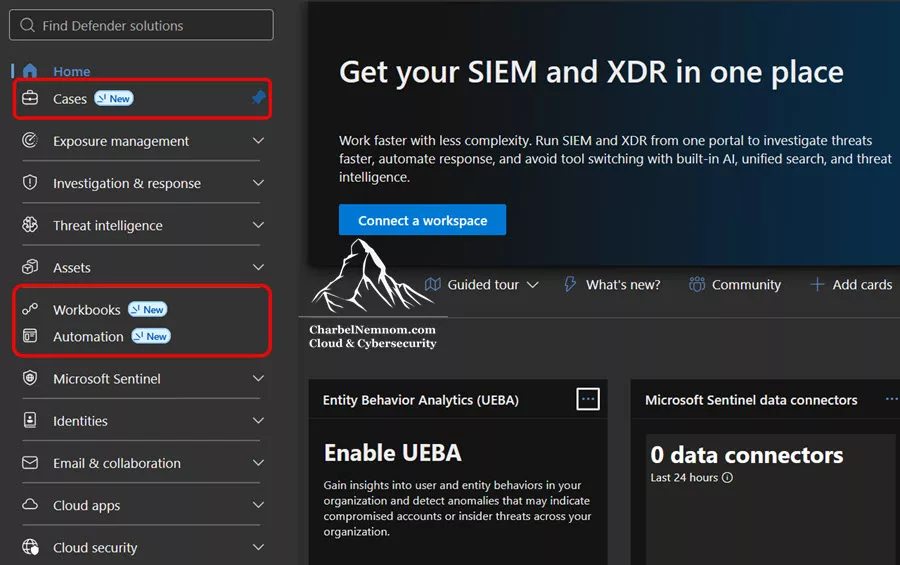
This is the part that matters most for planning. ISOC has two layers: capabilities that light up in the Defender portal with the license alone, and capabilities that require an ISOC workspace in your Azure subscription.
What Is An ISOC Workspace?
Before we go through the capabilities, let’s clarify the name. Technically, an ISOC workspace is an Azure Log Analytics workspace. Microsoft calls it an ISOC workspace because you create and connect it from the ISOC experience in the Defender portal, where it is listed under Microsoft Sentinel > SIEM workspaces. For automation on third-party data, Microsoft also refers to it as a Microsoft Sentinel workspace.
This matters because everything you already know about Log Analytics workspaces applies:
- The region is fixed at creation and can’t be changed afterward.
- Tables, table plans, and retention are managed at the workspace level.
- The
Usagetable reports billable ingestion by table, which we use later in this article. - Azure RBAC, resource locks, Azure Policy, and Azure Cost Management apply to the workspace like any other Azure resource.
What is different is the commercial model around it: the $2.40/GB meter for non-Microsoft data, and the fact that native Defender data doesn’t need to be ingested into it.
Capabilities With And Without A Workspace
Let’s look at the capabilities with and without an ISOC workspace:
| Capability | ISOC workspace required | What you should know |
|---|---|---|
| Case management | No | Incident cases and generic cases work without any workspace. Long-term case audit requires a connected primary workspace (see below). |
| Natural-language playbook generation | No | Python-based, code-generated playbooks with specific limits (see below). |
| Enhanced automation rules | No | Run a generated playbook when an alert is created, or when an incident case is created or updated. Case triggers also offer case actions such as emails, case updates, and case tasks. One action per rule, no priority ordering. |
| Automation on Microsoft data | No | Automation rules and playbooks on Microsoft data work without a workspace. |
| Workbooks | No | Custom reporting and dashboards in the Defender portal. |
| User and Entity Behavior Analytics (UEBA) | Yes | Behavioral baselines and anomalies over your data. |
| Content hub | Yes | The same solutions and connectors familiar from Microsoft Sentinel. |
| Repositories (CI/CD) | Yes | Content as code from GitHub or Azure DevOps. |
| Threat intelligence | Yes | Threat intelligence experiences that depend on workspace data. |
| Azure and third-party security data | Yes | Ingested through connectors at the ISOC meter. |
| Automation on third-party data | Yes | Automation on third-party data ingested through Log Analytics requires the workspace. |
This table reflects the workspace requirement during the preview only. It doesn’t indicate licensing or availability of the same capabilities in other Microsoft security experiences, and more security operations capabilities are planned for the ISOC benefit over time.
Case Management
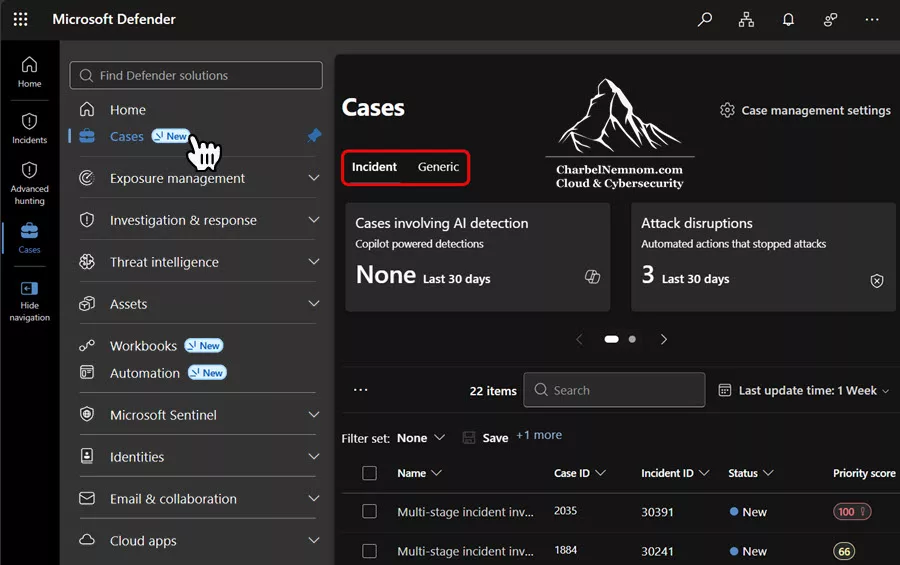
Case management supports two case types:
- Incident cases: created from correlated incident activity. Microsoft positions them as the recommended experience for managing incidents in the Defender portal, while the legacy incident experience remains available during the preview.
- Generic cases: created manually to track SecOps work that sits outside incident response, such as a vulnerability follow-up or an audit request.
Cases support tasks with owners and due dates, comments, attachments, activity history, custom fields, and SLA policies through case templates. Incident cases can also include agentic sessions, where analysts run supported agentic playbooks from the case and review the session output.
On permissions, incident cases follow the same model as incidents: Security Data Read to view and Security Data Manage to manage. Generic cases map to Unified RBAC permissions or the familiar Microsoft Sentinel Reader, Responder, and Contributor roles, depending on the action.
One important detail that is easy to miss: case activity is synced to the SecurityCaseEvent table in Log Analytics only when your tenant has a connected primary Microsoft Sentinel workspace. Without it, case history stays in Defender with a default retention of 180 days. If your auditors, or a framework such as the EU Digital Operational Resilience Act (DORA), expect you to retain evidence of incident handling decisions longer than that, plan for a workspace even if you don’t need third-party data yet. See Audit and retain case data in Log Analytics for details. See Audit and retain case data in Log Analytics for details.
Automation: Generated Playbooks, Integration Profiles, And Enhanced Automation Rules
Automation with ISOC includes automation rules, Logic Apps-based playbooks, Playbook Generator, integration profiles, and enhanced alert trigger support. The new pieces are the last three.
Playbook Generator creates code-based playbooks from natural language inside an embedded Visual Studio Code experience. You describe the workflow in Plan mode, review the plan and flow diagram, switch to Act mode to generate the code and documentation, test it against a real alert, and save it. Saved playbooks start in a disabled state and must be activated before an automation rule can call them.
If you already use Microsoft Sentinel, you may also find the Microsoft Sentinel version of this documentation, which lists a Microsoft Sentinel workspace onboarded to the Defender portal as a prerequisite. That applies to Microsoft Sentinel customers. For ISOC-eligible tenants, Playbook Generator works without a workspace; you need an ISOC workspace only to run automation on third-party data ingested through Log Analytics.
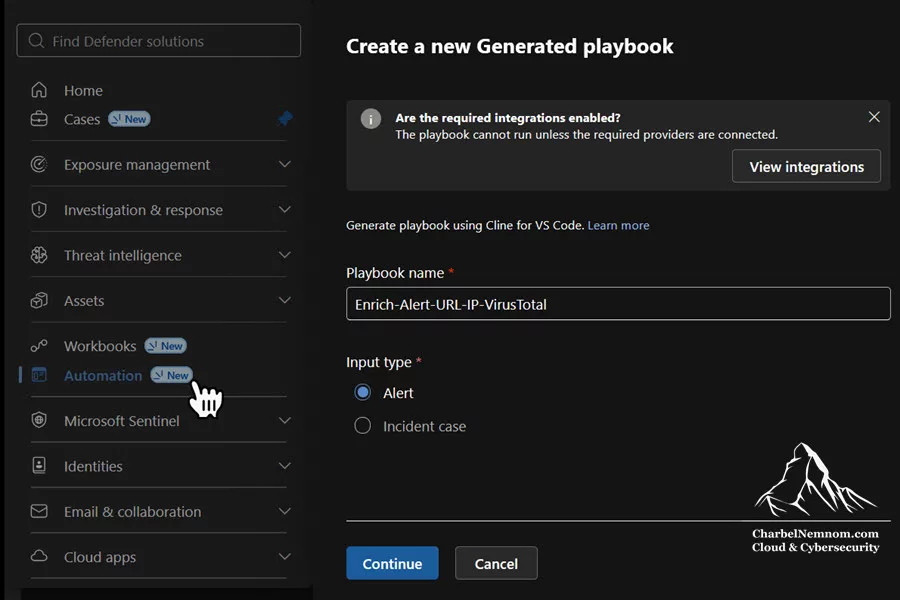
These limits are important for playbook design decisions:
| Limit | Current value |
|---|---|
| Authoring language | Python only |
| External libraries | Not supported |
| Playbooks per tenant | 100 |
| Lines per playbook | 5,000 |
| Maximum run time | 10 minutes |
| Integration profiles per tenant | 500 |
| AI interaction tokens | 8 million per tenant per day |
| Nesting (a playbook calling another playbook) | Not supported |
| Code validation | Manual review required |
| Concurrent editing | A single user can edit one playbook at a time |
Integration profiles are how generated playbooks connect to Microsoft and third-party APIs. Microsoft Graph and Azure Resource Manager profiles must be configured before generated playbooks can use them. Custom profiles support OAuth2 Client Credentials, API Key, AWS Auth, User and Password, Bearer/JWT Authentication, and Hawk. One detail to plan for: the API URL and authentication method of a custom profile can’t be changed after creation. Treat each profile as a governed integration, name it clearly, and store its credentials following your secret rotation process.
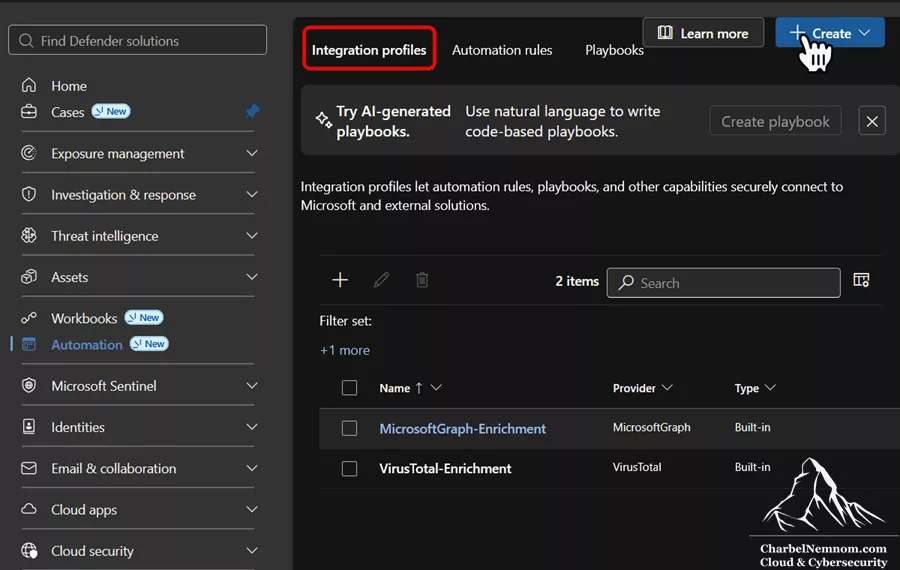
Enhanced automation rules are new in ISOC, and each trigger offers its own actions:
| Trigger | Available actions |
|---|---|
| When alert is created | Run a generated playbook, scoped to the workspaces and Microsoft Sentinel scopes you select |
| When case is created | Run an incident case-input generated playbook, or case actions such as sending a case created email, updating the case, or creating case tasks |
| When case is updated | Run an incident case-input generated playbook, or case update actions such as sending a case updated email |
The playbook’s input type must match the trigger: alert-input playbooks run from the alert trigger, and incident case-input playbooks run from the case triggers. Enhanced rules also have their own limits: no priority ordering, one action per rule, and up to 500 active rules per tenant. For automation on third-party data, you can only select workspaces where you have the required permissions.
Standard automation rules keep the model you know from Microsoft Sentinel. They trigger when an incident is created or updated, support multiple actions (running a Logic Apps playbook, changing status or severity, assigning an owner, adding tags, and adding tasks), and let you set the rule order. Use standard rules when you need ordered, multi-action automation, and enhanced rules for generated playbooks and case workflows.
Unified RBAC Permissions For Automation
Automation in the Defender portal uses Unified RBAC, with dedicated permissions:
| Permission | Access levels |
|---|---|
| Automation Admin | Execution Low / Medium / High |
| Automation Rules | Read / Write |
| Automation Integration | Read / Write |
| Automation Playbooks | Read / Write |
This is a good fit for least privilege. Give security analysts Read on rules and playbooks, give automation engineers Write only on what they build, and keep Automation Integration Write with the few people who manage API connections. Microsoft doesn’t yet describe in detail what each execution level covers, so grant the lowest level that fits the role, and reserve High for a small group protected by Privileged Identity Management (PIM).
A Safe First Generated Playbook
As a best practice, start with enrichment, not containment. For example, generate a playbook that takes an alert as input, enriches its URL or IP entities with threat intelligence, and adds the results as a comment to the related incident, rather than one that disables accounts or isolates devices. Run it from an enhanced rule with the When alert is created trigger. If you also want a review task for the analyst, create a separate enhanced rule with the When case is created trigger and the Create case tasks action, because each enhanced rule runs only one action. Before you activate the playbook, write down:
- The trigger and input type (an alert-input playbook runs from the When alert is created trigger).
- The fields the playbook reads and the enrichment it should add.
- What happens when an API call fails or times out.
- Who approves moving from enrichment to a high-impact action.
In Plan mode, the generator also proposes test scenarios for each logic path, including the paths where the playbook should exit without calling any API. Review them as part of the plan, because they show how the playbook behaves when data is missing.
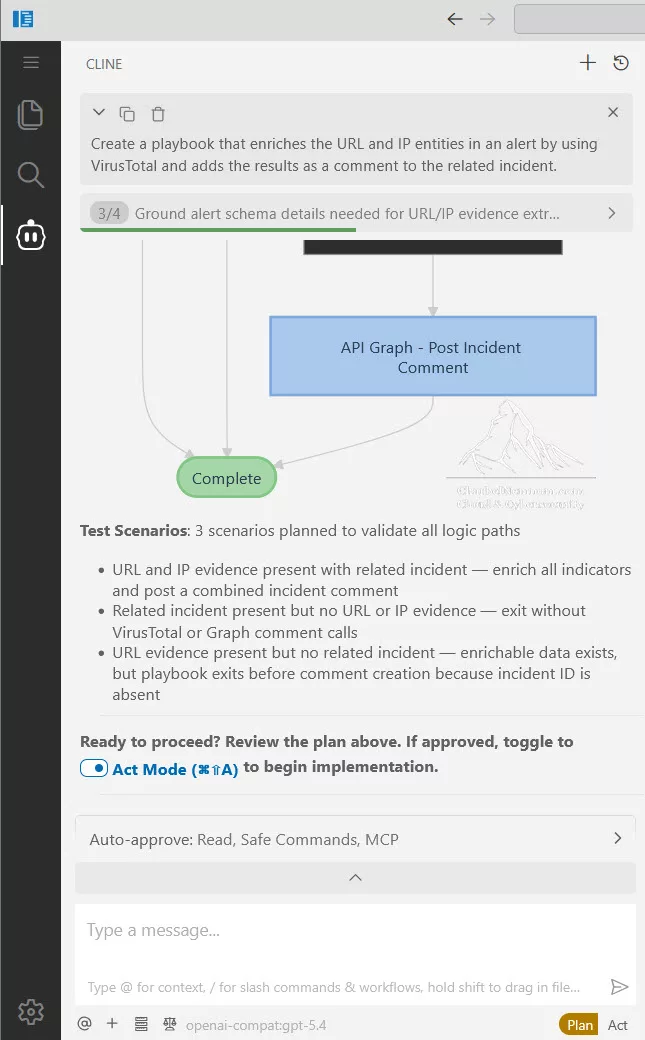
Then inspect the generated code, test it against a controlled alert, activate it, and review both the action and the resulting case activity. Only move to containment once the enrichment playbook has run reliably.
Two practitioner notes to take into account:
-
Monitoring. Automation rule run results for generated playbooks go to the activity log and are not written to the Microsoft Sentinel health table. So, if you monitor automation health with
SentinelHealthlike we do, as we describe in our Ultimate Health Check For Microsoft Sentinel, those runs won’t show up there. -
Least privilege. For playbooks that take incident cases as input, the Microsoft Graph integration identity needs
SecurityAlert.ReadWrite.All,SecurityIncident.ReadWrite.All,CaseManagement.Read.All, andCaseManagement.ReadWrite.Allapplication permissions with admin consent. These are tenant-wide write permissions. We recommend using a dedicated identity for this integration, documenting the consent, and including it in your privileged access reviews.
Your existing Logic Apps playbooks are not replaced. Generated playbooks are an additional, code-based option. For the Logic Apps model, see our guide on Mastering Microsoft Sentinel Playbooks.
Workspace-Dependent Capabilities
Once you create an ISOC workspace, you unlock the capabilities that depend on workspace data:
- UEBA: behavioral baselines and anomaly scoring over your identity, cloud, and network data. For how UEBA builds its profiles and which tables it populates, see our Deep Dive Into Microsoft Sentinel UEBA. To enable it, see Add UEBA to Microsoft 365 E5 data.
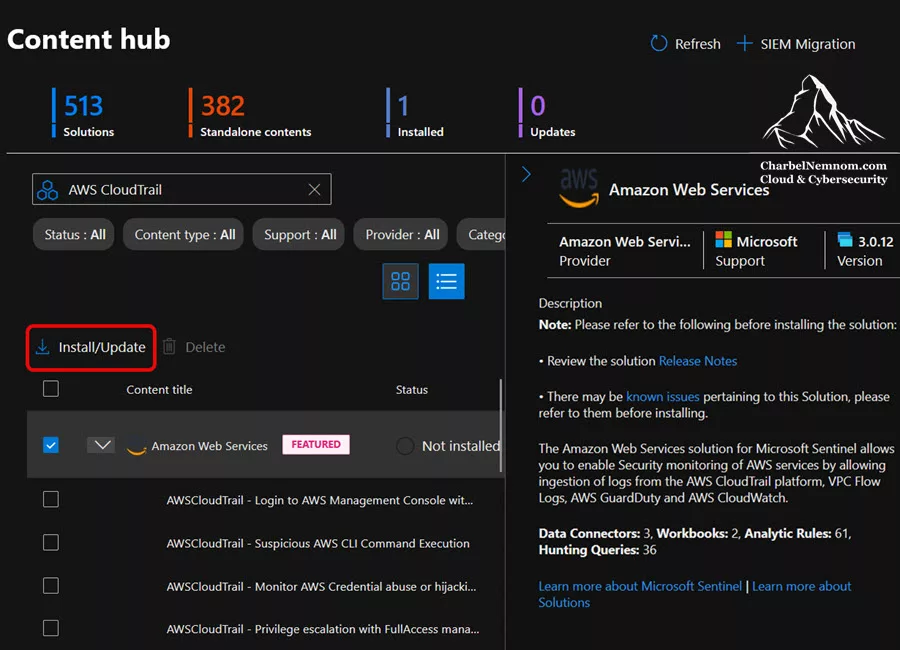
- Content hub: the same solutions and connectors you know from Microsoft Sentinel, such as the AWS and GCP solutions, etc.
- Repositories (CI/CD): content as code for the ISOC workspace, with the same repository experience as Microsoft Sentinel. See our articles on managing security content as code and rotating repository connections.
- Threat intelligence: the threat intelligence experiences that correlate intel with your environment.
How Data Flows In ISOC
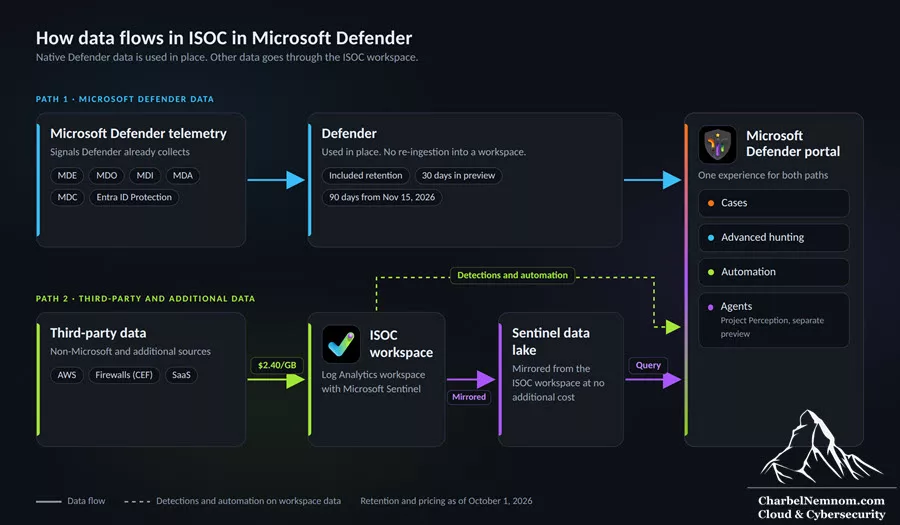
The data model is where ISOC differs most from a classic Microsoft Sentinel deployment. Data reaches ISOC in two ways:
- Native Microsoft Defender data is available directly in the Defender experience and doesn’t need to be ingested into an ISOC workspace.
- Other supported Microsoft and non-Microsoft data is connected to an ISOC workspace through data connectors.
The supported Microsoft security data sources are Microsoft Defender for Endpoint, Defender for Office 365, Defender for Identity, Defender for Cloud Apps, Defender for Cloud, Microsoft Entra ID Protection logs, and Azure Activity and Office 365 Activity logs through a connector.
Why This Matters If You Know Microsoft Sentinel
In the current Microsoft Sentinel model, Defender XDR raw data stays in the Advanced Hunting store for 30 days. If you want it longer, you either ingest it into the Microsoft Sentinel analytics tier (and pay ingestion) or stream supported tables directly to the data lake. We covered both options in Effective Tips To Manage Microsoft Defender XDR Tables and Log Tiering With Microsoft Sentinel data lake.
With ISOC, included retention for Microsoft Defender data, Azure Activity, and Office 365 Activity extends from 30 to 90 days starting November 15, 2026. For many E5 customers, that removes one of the most common reasons to pay for ingesting raw XDR tables such as DeviceProcessEvents or DeviceNetworkEvents into the analytics tier.
What About the Sentinel data lake?
ISOC workspace data is mirrored to the Microsoft Sentinel data lake at no additional cost. Most of the data lake feature set is expected to be available through interactive KQL in Advanced Hunting, while jobs, notebooks, and graphs require Microsoft Fabric. These feature details aren’t fully documented yet for ISOC, so validate them in your tenant.
Retention And Pricing: The Numbers That Matter
Retention and pricing change in phases during the preview, so we start with the key dates before comparing the new meter with Microsoft Sentinel pricing.
| Date | What happens |
|---|---|
| September 23, 2026 | ISOC public preview starts. 30 days of included Defender data retention. |
| October 1, 2026 | $2.40/GB pay-as-you-go meter available for non-Microsoft data through 500+ connectors. |
| November 15, 2026 | Included retention extends from 30 to 90 days. Existing Microsoft Sentinel customers can opt in to ISOC if eligible. |
| November 17–20, 2026 | Microsoft Ignite, where more details on migration paths are expected. |
| March 31, 2027 | Microsoft Sentinel is no longer supported in the Azure portal. Defender portal only. |
The $2.40/GB Meter Compared to Microsoft Sentinel
The Microsoft Sentinel analytics tier pay-as-you-go list price is $4.30 per GB in East US. The ISOC meter is $2.40 per GB. That is a 44% reduction against the pay-as-you-go list price. This applies to non-Microsoft sources, such as AWS CloudTrail or firewall and network appliance logs sent in Common Event Format (CEF) to the CommonSecurityLog table.
Treat $2.40 as the U.S. rate, not a universal price. Pricing varies by region and currency, so if you operate in Switzerland, the EU, or another region, confirm the rate that applies to your tenant and agreement with your Microsoft account team before you build a business case on it.
| Option (East US list prices; regional pricing varies) | Approximate price per GB | Notes |
|---|---|---|
| Microsoft Sentinel analytics tier, pay-as-you-go | $4.30 | Full analytics, detections, hunting |
| Microsoft Sentinel analytics tier, 100 GB/day commitment | ~$2.96 | See our Sentinel sizing and pricing guide |
| Microsoft Sentinel analytics tier, highest commitment tiers | ~$2.06 | Microsoft advertises up to 52% savings over pay-as-you-go |
| ISOC third-party ingestion meter | $2.40 | U.S. rate, pay-as-you-go, eligible tenants, from October 1, 2026 |
| Microsoft Sentinel data lake tier (ingestion + processing) | $0.15 | $0.05 ingestion + $0.10 processing; storage and query billed separately |
Three observations from this table:
- ISOC beats pay-as-you-go and the lower commitment tiers, but not necessarily the highest ones. Large existing Microsoft Sentinel customers on a high commitment tier may already pay less than $2.40 per GB. Compare your effective per-GB rate, not the list price.
- The data lake is still the cheapest place for high-volume, low-detection-value data. $2.40 is a good price for data you run detections on. It is an expensive price for verbose firewall allow-logs you keep only for investigations.
- Decide what to do with the savings. Some organizations should simply keep them. Others get more value by closing a coverage gap within the same budget, for example by bringing back a network or cloud source they left out because of cost. Either way, start from the investigation or detection the source supports, not from the price per GB.
A Worked Example
Consider an E5 tenant without Microsoft Sentinel that wants to bring in 50 GB/day of AWS CloudTrail and firewall logs. We use an average month of 30.4 days (365 days ÷ 12 months), which is the same average the Azure pricing calculator uses (730 hours per month):
| Scenario | Calculation | Monthly cost |
|---|---|---|
| Microsoft Sentinel pay-as-you-go | 1,520 GB × $4.30 | $6,536 |
| ISOC meter | 1,520 GB × $2.40 | $3,648 |
| Difference | $2,888 per month (~$34,656 per year) | |
| Same volume to the data lake tier only | 1,520 GB × $0.15 | $228 (plus storage) |
This is a list-price estimate for planning only. It excludes retention beyond the included period, data lake storage and query, and regional price differences. For a full cost methodology, see our Microsoft Sentinel Cost Estimation and Optimization — The Definitive Guide.
The Trade-Off For Existing Microsoft Sentinel Customers
Existing Microsoft Sentinel customers with E5 today receive a data grant of up to 5 MB per user per day of free ingestion for eligible Microsoft data. Opting in to ISOC is expected to mean giving up that grant in exchange for the ISOC benefits. For a 5,000-seat tenant, the grant is worth roughly 25 GB per day. Microsoft has not yet published the full mechanics of the opt-in, so build both scenarios into your cost model before November 15, 2026, just ahead of Microsoft Ignite 2026 in San Francisco (November 17–20).
Announced But Not Yet Documented
Further pricing options are being discussed in the community, such as an optional 180-day extension for certain Defender data at $1.20/GB, applied only to data collected after enablement. We could not confirm these figures in Microsoft’s documentation at the time of writing, so we don’t recommend building a budget on them yet.
Hands-On: Create An ISOC Workspace
If you only need case management, workbooks, generated playbooks, and automation on Microsoft data, you can stop here. Create an ISOC workspace when you need third-party data, automation on that data, UEBA, Content Hub, CI/CD, or threat intelligence.
Prerequisites
To create an ISOC workspace, you need:
- An eligible tenant.
- An active Azure subscription.
- The Security Administrator role in Microsoft Entra ID.
- One of the following on the Azure subscription:
- Unconditional Owner, or
- User Access Administrator and Microsoft Sentinel Contributor.
We recommend the second option, User Access Administrator + Microsoft Sentinel Contributor, activated just-in-time through Microsoft Entra Privileged Identity Management, and removed once the workspace is provisioned. The role-assignment right is required because connecting a workspace to the Defender portal grants access to Microsoft first-party applications in your subscription, the same pattern used when onboarding Microsoft Sentinel to the Defender portal. There is no reason for a standing Owner assignment. For a complete view of the roles involved, see Demystifying Microsoft Sentinel Roles and Permissions.
Decide on these before you start, because they are hard to change later:
- Subscription: use a dedicated security subscription, separate from workload subscriptions, so cost and access boundaries stay clean.
- Region: choose the region that meets your data residency requirements. Like any Log Analytics workspace, the ISOC workspace can’t be moved to another region after creation. For customers in Switzerland or the EU under FINMA or DORA oversight, confirm the region with your compliance team first.
- Naming and tags: apply your standard resource group naming and cost-center tags so the new meter shows up correctly in Azure Cost Management.
Step-By-Step
1) Sign in to the Microsoft Defender portal.
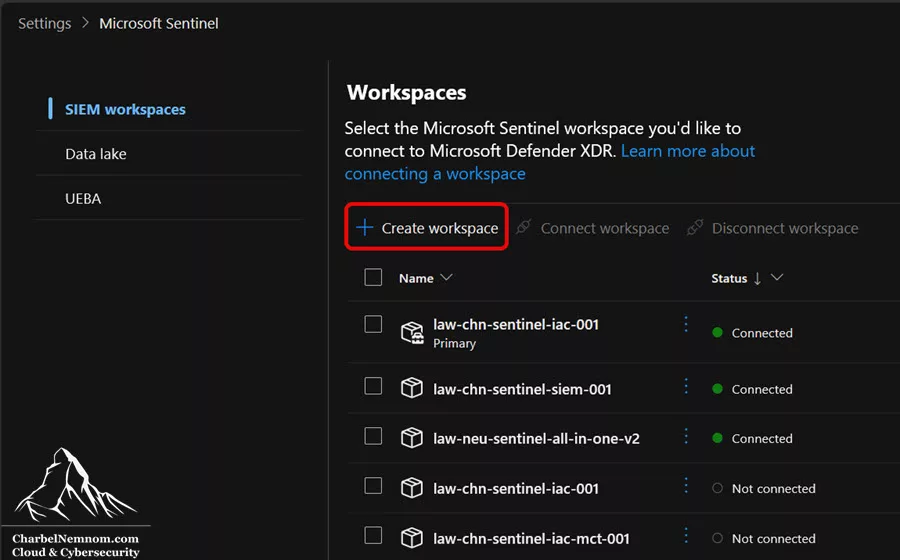
2) Go to Setup & configuration > Settings > Microsoft Sentinel > SIEM workspaces.
3) Select + Create workspace.
4) In Subscription, select the Azure subscription for the workspace. The portal checks whether you have the required permissions on that subscription.
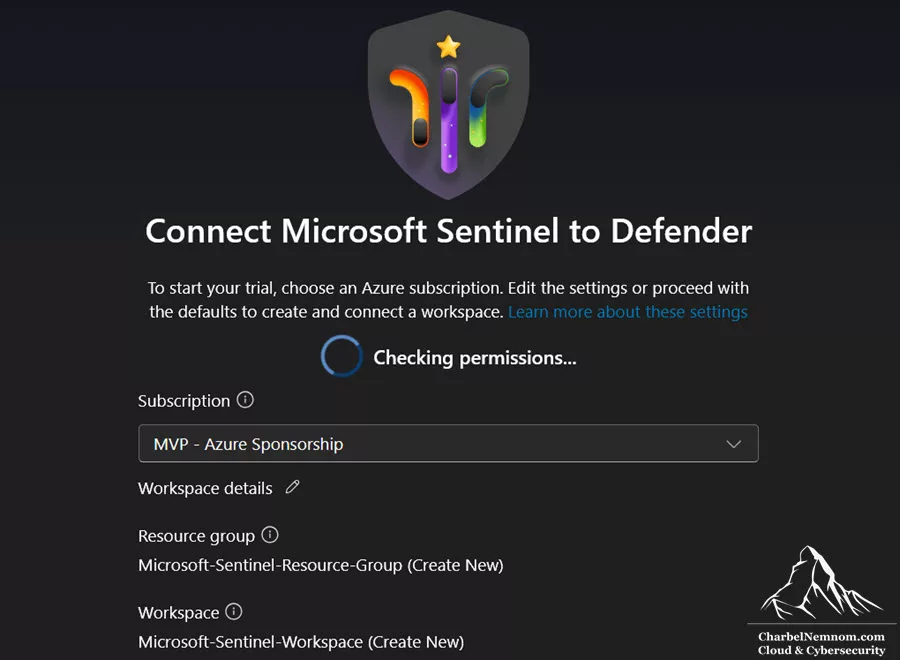
5) After the permissions check succeeds, review the proposed resource group, workspace name, and region.
6) Select the edit icon next to Workspace details and update the resource group, workspace name, region, and tags to match your standards.
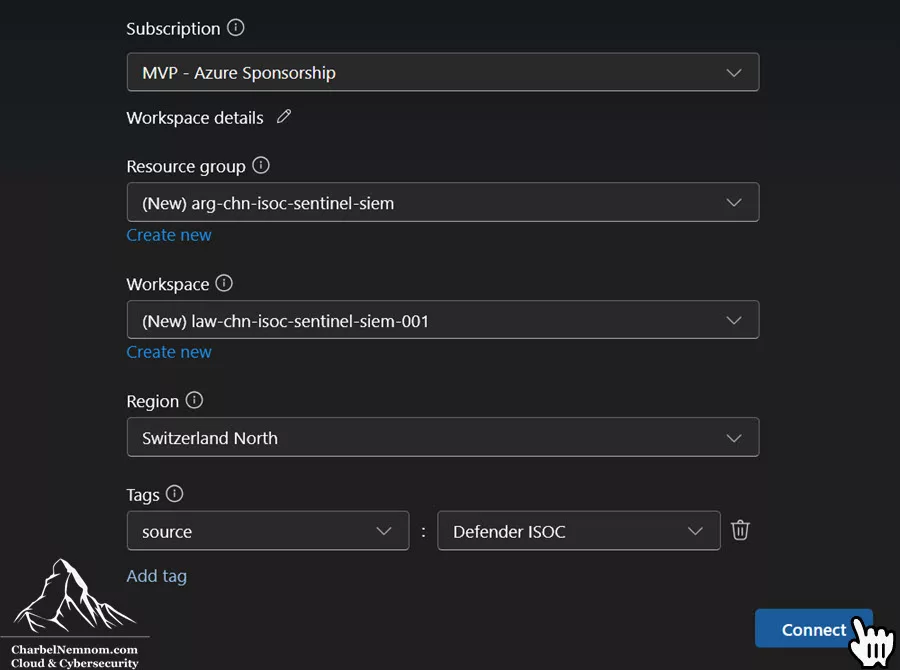
7) Then select Connect. Provisioning takes several minutes and moves through 3 steps: Creating resources, Deploying Microsoft Sentinel, and Connecting the workspace.
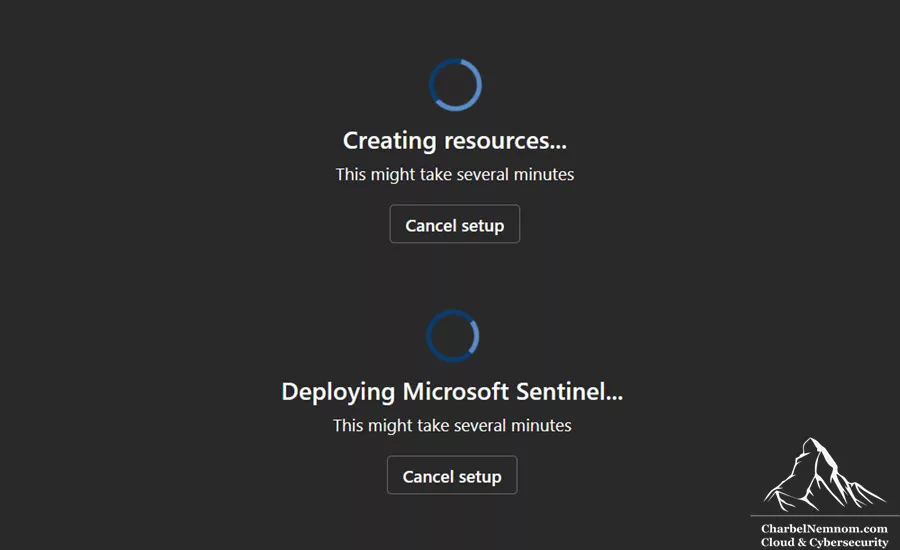
8) When provisioning completes, the portal confirms that a Microsoft Sentinel workspace was created with a 31-day trial and connected to Defender. The workspace is also listed on the SIEM workspaces page.
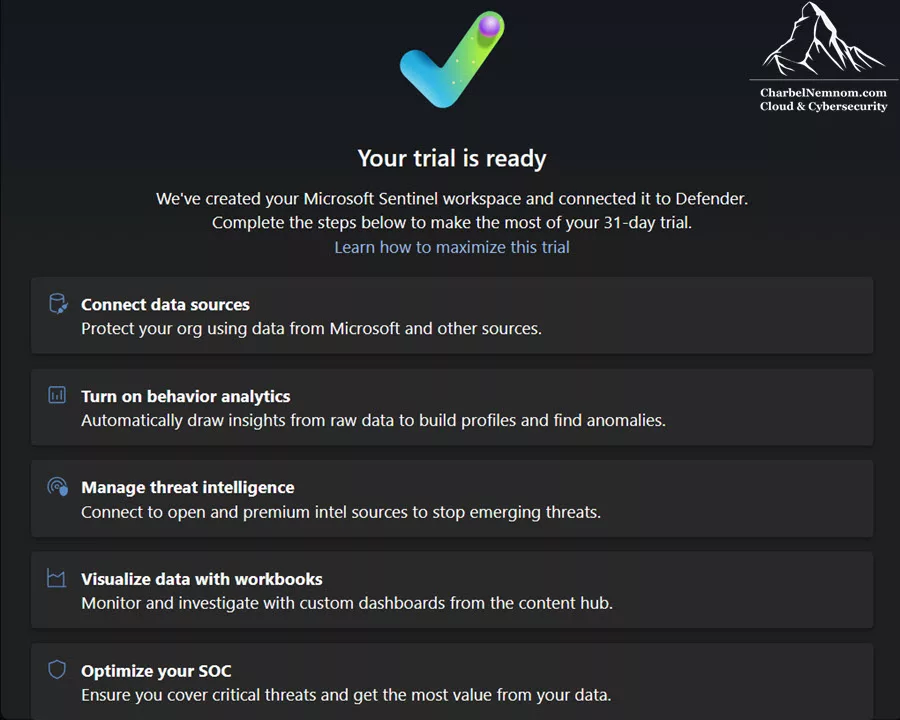
Next, you can start connecting data sources, turning on behavior analytics, managing threat intelligence, visualizing data with workbooks, and optimizing your SOC. Before you do, complete the hardening checklist below.
Post-Creation Hardening Checklist
Once the workspace exists, we recommend the following before you connect any data source:
1) Confirm the Log Analytics workspace in Azure. Open the resource group in the Azure portal. The ISOC workspace is deployed as an Azure Log Analytics workspace (resource type Microsoft.OperationalInsights/workspaces). Record the resource ID, region, and pricing settings for your change record.
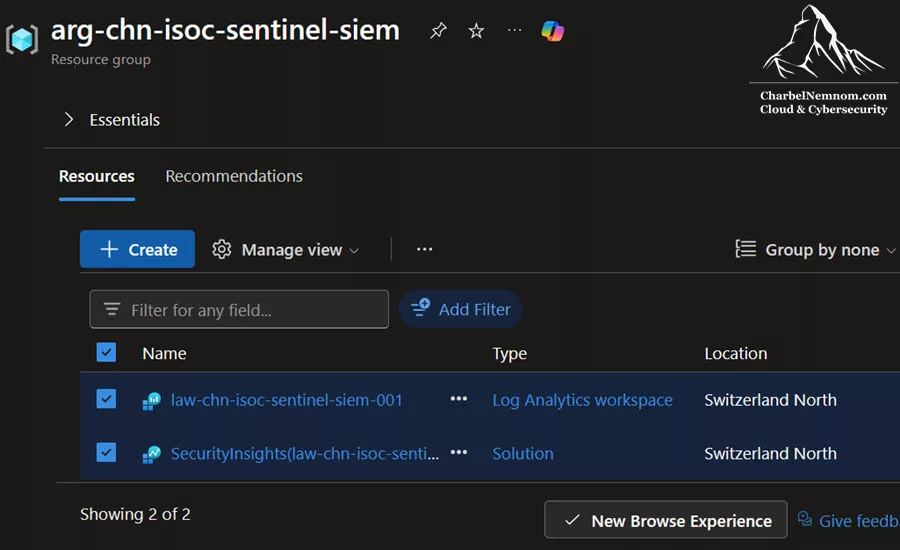
2) Apply a CanNotDelete resource lock on the resource group. Deleting a security workspace by mistake means losing its data and configuration.
3) Create a budget with alerts in Azure Cost Management on the resource group (for example, at 50%, 80%, and 100% of the expected monthly spend). The ISOC meter is pay-as-you-go, and a misconfigured connector can ingest far more than planned. As a best practice, create budget alerts rather than setting a daily ingestion cap on the workspace, because a cap stops ingestion and creates a detection blind spot.
4) Check Unified RBAC. If your tenant uses Defender Unified RBAC, confirm the new workspace appears under Settings > Microsoft Defender XDR > Permissions and roles, and that the roles your team needs exist in Unified RBAC. Activating a workspace in Unified RBAC does not migrate existing Azure RBAC assignments, which can lead to the “We couldn’t find the requested workspace” error we documented in Fix Microsoft Sentinel UEBA Access In The Defender Portal.
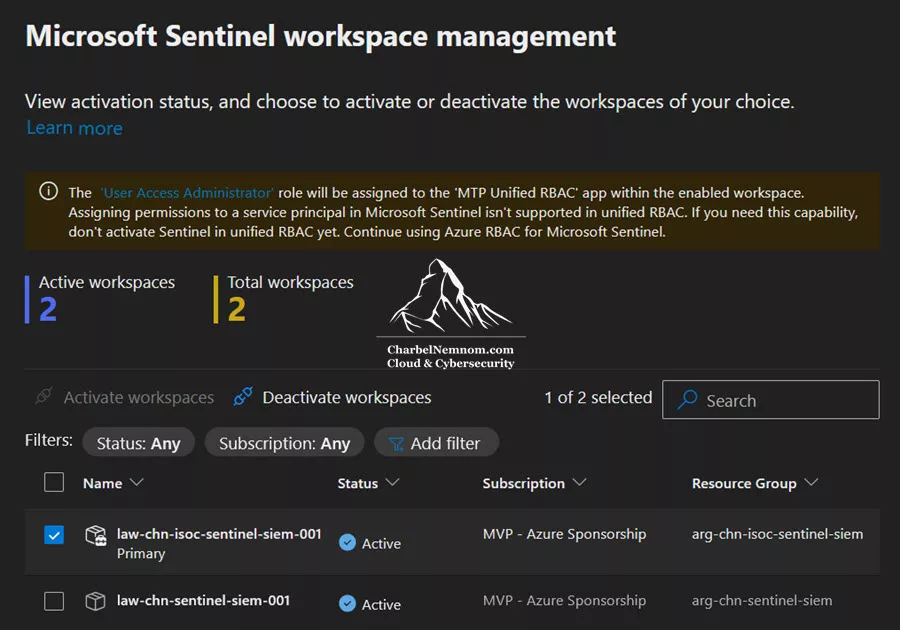
5) Test access separation. Assign a test analyst read-only access, and confirm they can view cases and query data but can’t edit automation rules, connectors, playbooks, or integration profiles. Then confirm that only the intended engineers can make those changes.
6) Define the pilot before you connect a source. Pick one investigation question that a single source can answer. For example, your security analysts can see an identity-related incident in Defender, but they need AWS CloudTrail to confirm whether the same identity performed an unauthorized cloud action. Before you select Connect, write down:
- The investigation question the source must answer.
- The expected events and daily volume.
- The fields needed to join the data with Defender incidents (for example, the identity ARN or source IP address).
- The team that owns the connector.
- A monthly cost ceiling for the source.
If the question can already be answered with native Defender data, don’t connect the source. Otherwise, install the solution from Content Hub, follow that connector’s current prerequisites, measure its daily volume for a week, and then decide whether to expand.
Verify Your Setup
After you connect your first data source, use the following KQL queries in Advanced hunting (or in the workspace Logs) to confirm that ingestion and costs look the way you expect.
Billable Ingestion By Table With A Cost Projection
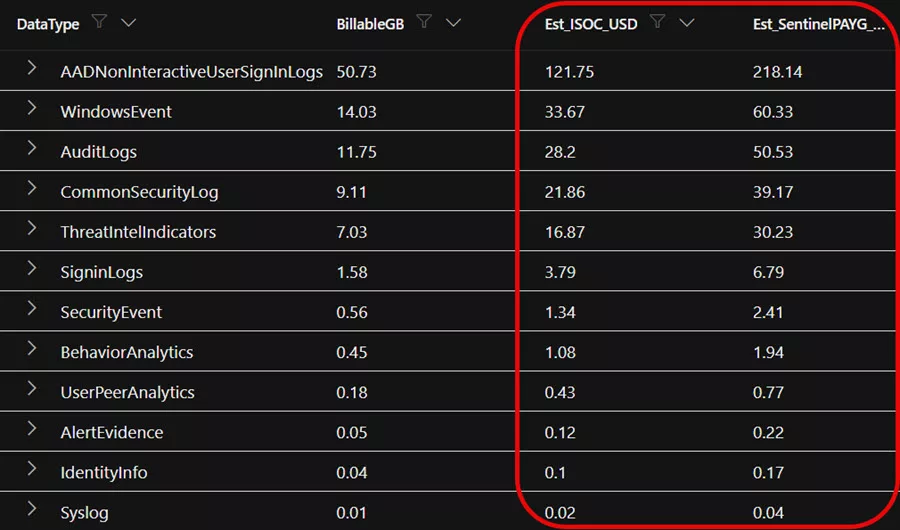
This query summarizes billable ingestion by table over the last 30 days and projects the cost at the ISOC meter and at Microsoft Sentinel pay-as-you-go list price. The Quantity column in the Usage table is reported in MB.
// Billable ingestion by table over the last 30 days
// Prices are East US list prices; adjust for your region and agreement
Usage
| where TimeGenerated > ago(30d)
| where IsBillable == true
| summarize BillableGB = round(sum(Quantity) / 1024, 2) by DataType
| extend Est_ISOC_USD = round(BillableGB * 2.40, 2),
         Est_SentinelPAYG_USD = round(BillableGB * 4.30, 2)
| sort by BillableGB desc
Existing Microsoft Sentinel customers can run the same query against their current workspace today to size the ISOC opt-in decision before November 15, 2026. Keep in mind that some Microsoft tables are covered by existing grants, so review the result table by table.
Confirm The Connector Delivers Usable Data
A connector showing Connected is not evidence of usable data. Confirm that events arrive continuously, with sensible timestamps, and with the fields your investigation needs. For the AWS CloudTrail pilot, start with the hourly volume:
// Hourly event volume for the pilot source over the last 24 hours
AWSCloudTrail
| where TimeGenerated > ago(24h)
| summarize Events = count() by bin(TimeGenerated, 1h)
| render timechart
Then check ingestion delay and field coverage for the identity and network fields you plan to join with Defender incidents:
// Ingestion delay and coverage of the fields used for correlation
AWSCloudTrail
| where TimeGenerated > ago(24h)
| extend IngestionDelay = ingestion_time() - TimeGenerated
| summarize Events = count(),
            LatestEvent = max(TimeGenerated),
            MaxIngestionDelay = max(IngestionDelay),
            MissingIdentityArn = countif(isempty(UserIdentityArn)),
            MissingSourceIp = countif(isempty(SourceIpAddress))
Replace AWSCloudTrail and the field names with the table and columns of your pilot source. Once the data looks right, run the hunting query your security analysts need and confirm it connects the new data to the Defender incident.
Confirm Defender Data Is Not Being Ingested Twice
Native Defender data should not appear as billable ingestion in the ISOC workspace. This query checks a sample of common Defender XDR tables:
// Native Defender XDR tables should not show billable ingestion in the ISOC workspace
Usage
| where TimeGenerated > ago(7d)
| where DataType in ("DeviceEvents", "DeviceProcessEvents", "DeviceNetworkEvents",
                     "DeviceFileEvents", "DeviceLogonEvents", "EmailEvents",
                     "IdentityLogonEvents", "CloudAppEvents")
| summarize GB = round(sum(Quantity) / 1024, 2) by DataType, IsBillable
| sort by GB desc
An empty result is what we want to see. If rows appear with IsBillable == true, review the table retention settings under Microsoft Sentinel > Configuration > Tables.
Confirm Case Audit Is Flowing
If the ISOC workspace is set as your primary workspace, case activity should start appearing in the SecurityCaseEvent table:
SecurityCaseEvent
| where TimeGenerated > ago(1d)
| take 20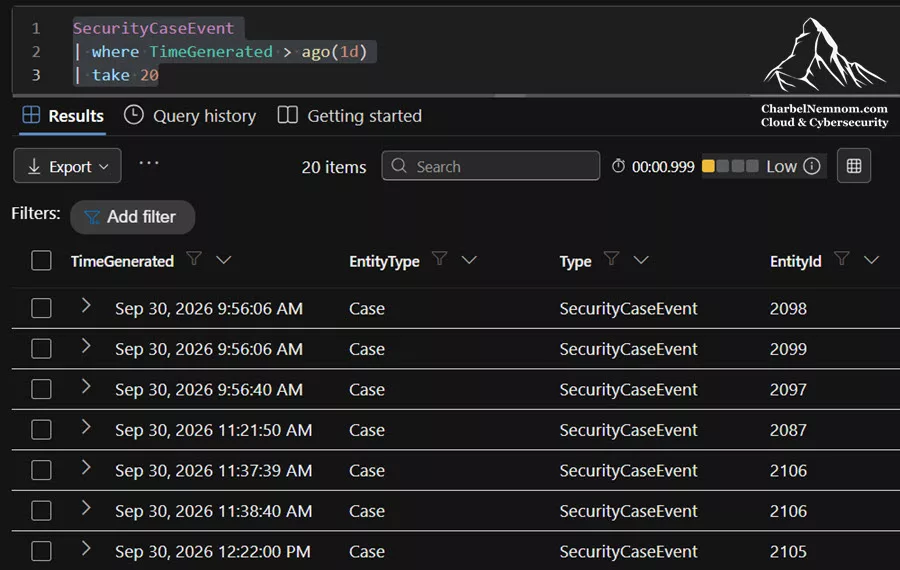
Practical Questions Before You Adopt ISOC
Beyond the features, there are five questions we think every SOC should answer before adopting ISOC. Here is our view on each:
Does AI Really Change The Speed Of Attacks?
Automation in attacks is not new. What changes is the decision loop: AI can now run most of a campaign and adjust it in near real time, with humans making only a few decisions. Microsoft’s analysis of agentic-driven cloud attacks by Storm-3168 shows what that looks like in practice.
That said, 41% of alerts going uninvestigated is a capacity problem that predates AI. ISOC does not patch servers, enforce phishing-resistant MFA, or remove standing privileged access. Treat it as a consolidation of data and workflows, not as a substitute for security hygiene.
How Predictable Is Automation In The Unified Experience?
Less predictable than many teams are used to. The Defender XDR correlation engine owns incident creation and names incidents automatically; there can be a delay of up to about 5 to 10 minutes between incident creation and automation rule execution, and enhanced rules run one action each with no priority ordering. If your SOC depends on deterministic automation, we recommend the following:
- Don’t use incident titles as automation conditions. Use analytics rule name, severity, product, or custom fields instead.
- Separate enrichment from containment. Let attack disruption handle containment where it is supported, and keep high-impact actions in reviewed, tested playbooks with explicit conditions.
- Measure latency in your tenant. For enrichment that must not wait for correlation, use alert-input playbooks and measure the time from alert to action before you rely on it.
-
Update your monitoring. Add the activity log to your automation health checks, because generated playbook runs aren’t recorded in the
SentinelHealthtable.
What Happens To Your Existing Sentinel Content?
Nothing is forced. Existing Microsoft Sentinel customers see no change, and moving to ISOC is optional from November 15, 2026. Analytics rules keep running, standard automation rules and Logic Apps playbooks remain, and content as code works the same way for ISOC workspaces. Generated playbooks and enhanced rules are additional options, not replacements.
The change you can’t avoid is the Azure portal retirement on March 31, 2027. If you haven’t yet, inventory your content now, starting with our guides on exporting Microsoft Sentinel automation rules and managing security content as code.
Where Do Non-Security Logs Belong?
In the Microsoft Sentinel data lake tier. Route high-volume, low-detection-value data, such as verbose network or application logs, to the lake at roughly $0.15 per GB for ingestion and processing, query it with KQL from Advanced Hunting when an investigation needs it, and promote only the subset you need with KQL jobs or summary rules. A telemetry pipeline can filter and route each source before ingestion, as we showed in Maximizing Microsoft Sentinel ROI with VirtualMetric DataStream – Part 2.
Because the ISOC workspace is a Microsoft Sentinel workspace connected to Defender, you manage tiering and retention per table from the table management experience in the Defender portal. Keep one limit in mind: when you move a table from the analytics tier to the data lake tier, real-time analytics rules and hunting queries on that table stop working. For step-by-step guidance, see Log Tiering With Microsoft Sentinel data lake and Ingest Custom Logs To Microsoft Sentinel.
How Do You Govern AI Agents In The SOC?
The same way you govern any privileged automation. An agent works toward the goal it is given, so its boundaries must come from you. Ask three questions about every agent: what does it see, what can it actually do, and can you audit all of it? At the time of writing, Microsoft has not yet published how agent actions within ISOC are logged, audited, or reversed.
Today, you can rely on case activity logs, the SecurityCaseEvent audit table, human-in-the-loop steering in agentic playbooks, mandatory review of generated code, and Unified RBAC. On top of that, we recommend the following:
- Treat every agent and integration identity as a privileged service principal.
- Define in your runbooks what an “approved” high-impact action means, and don’t allow any autonomous response you cannot audit and reverse.
- Expand an agent’s authority only when its results, reviewed against representative scenarios, justify it. Measure decision quality alongside speed, because a faster wrong decision is not an improvement.
ISOC Preview Details To Watch
During the ISOC preview, the launch messaging and what applies to your tenant today don’t always match. Here is what we recommend planning for:
| Topic | What has been announced | What applies today | Our recommendation |
|---|---|---|---|
| Included Defender retention | 90 days of included data retention | 30 days until November 15, 2026 | Plan investigations around 30 days until then |
| Connector count | 450+ or 500+ connectors, depending on where you look | A large Content hub catalog | Check Content hub for the specific connectors you need, not the total |
| Eligibility | Microsoft 365 E5, E7, and Microsoft Defender Suite | The benefit terms are described mainly for E5 and E7 | Defender Suite customers should confirm the meter and retention with Microsoft |
| Office 365 Activity in the retention benefit | Included in the extended retention | Not listed consistently in every Microsoft resource | Treat it as included, and verify after November 15, 2026 |
| Government and sovereign clouds | Eligible customers are included | Not yet covered in the technical documentation | Confirm for your cloud environment |
| Scope of Sentinel capabilities | E5 and E7 customers get Microsoft Sentinel capabilities in Defender | A defined capability set for the preview, with more added over time | Plan against the current capability table |
ISOC Decision Guide: What Should You Do Now?
Your next steps depend on where your SOC starts today. Find the scenario that matches your environment:
If you are a Defender-only E5 or E7 customer (no Microsoft Sentinel): Start using case management, workbooks, and generated playbooks now; they require no Azure resources. Then list the non-Microsoft data sources you need for detection, and decide whether an ISOC workspace is justified. If it is, pilot one source after October 1, 2026, with a budget alert in place. Before you switch on more capabilities, decide who owns detection selection, case handling, approval of sensitive actions, and maintenance of automation. For a small team, that ownership is often the real constraint, not the license.
If you run Microsoft Sentinel with Defender XDR today: There is no required action. Don’t disconnect your workspace to join the preview. Connecting an existing workspace to the Defender portal is its own documented process, separate from creating a new ISOC workspace. Before November 15, 2026, build a cost model that compares your effective per-GB rate (including commitment tiers), the value of your E5 data grant, and the ISOC benefits. Wait for the opt-in mechanics that Microsoft is expected to share around Ignite, and continue your Defender portal transition regardless, because the March 31, 2027, retirement date for Microsoft Sentinel in the Azure portal still applies.
If you run a non-Microsoft SIEM today: ISOC makes consolidation tempting, but don’t retire a mature SIEM based on a connector count. First, reproduce your highest-value cross-vendor detections in ISOC, run both platforms in parallel on the same data, and compare detection results and investigation quality. Only then decide what to migrate, and plan the migration as its own project.
If an MSSP or MDR provider runs your SOC: ISOC doesn’t change your existing MDR or MSSP agreement. Wait for guidance from your provider before changing configuration, and agree on the scope of any adoption work in writing. Third-party log onboarding, data lake configuration, and SIEM migration are usually scoped separately from a base deployment, so make these responsibilities explicit, including who has the authority to approve response actions. Multitenant access in the Defender portal also works differently from Azure Lighthouse, and that access model needs to be planned deliberately.
If you operate in a regulated industry: 90 days of included retention is operational retention, not compliance retention. Plan long-term retention in the data lake, retain case audit data through a primary workspace, and confirm the workspace region with your compliance team before you create it. Also consider concentration risk: consolidating identity, endpoint, productivity, and security operations with one vendor increases your dependency on that vendor’s roadmap, pricing, availability, and resilience. Under DORA, for example, that belongs in your ICT third-party risk assessment and your exit strategy.
Things To Keep In Mind
At the time of this writing, keep the following points in mind when planning your ISOC adoption:
- ISOC is in preview. Capabilities, dates, and pricing can change, and preview terms apply.
- The $2.40/GB meter is pay-as-you-go. Microsoft has not announced commitment tiers for it.
- Project Perception is not part of the ISOC benefit. It is in invitation-only preview with its own consumption-based pricing.
- The ISOC workspace is a Log Analytics workspace, so its region can’t be changed after creation. Choose it carefully.
- Integration profiles can’t change their API URL or authentication method after creation.
-
Generated playbook runs don’t appear in
SentinelHealthtable. Adjust your health monitoring. - Case audit beyond 180 days requires a connected primary workspace.
- Existing Microsoft Sentinel customers who opt in give up the 5 MB/user/day E5 data grant. Include it in your cost comparison before November 15, 2026.
Conclusion
ISOC in Microsoft Defender is less about a new product and more about packaging: it removes the separate Microsoft Sentinel purchase for E5 and E7 customers who want SIEM workflows, keeps native Defender data where it already lives, and introduces a lower meter for the non-Microsoft data that agents and analysts need to see the full attack path.
For Defender-only customers, it is an easy win to start with case management and automation today, and a reasonable decision point for third-party data after October 1. For existing Microsoft Sentinel customers, the right move is to measure your actual costs, wait for the opt-in details, and keep working toward the Defender portal before March 31, 2027.
The agentic vision may or may not play out the way Microsoft describes. The foundation underneath it, which is consolidated data, shared context, and auditable automation, is worth building either way.
Remember, you can always support us in developing tools and creating content via Why Contribute? – Charbelnemnom.com Cloud & Cybersecurity
__
Thank you for reading our blog.
Please let us know in the comments section below if you have any questions or feedback.
-Charbel Nemnom-
